
The short answer
There is no single IRS fax number. The right number depends on why you are faxing. If you are answering a notice or letter, use the fax number printed on that notice, or the one the IRS employee handling your case gave you. If you are sending a form that may be faxed, use the number in that form's current instructions. Put a cover sheet on top that names the IRS unit or employee, your notice number and the tax year, and only the last four digits of your SSN or EIN.
You can use our free IRS fax cover sheet, or fill it in online and download a PDF.
This guide covers how to send a fax. It is not tax or legal advice.
Why there is no one IRS fax number
The IRS is not one office. Notices come from different units, campuses and examiners, and each one works its own cases. A fax sent to the wrong unit may never reach the people working your case. It can sit in the wrong queue while your response deadline passes.
That is why the number you find in a forum post or a list online is risky. It may belong to a different unit, a different form or a different year. Use the number from an IRS source that is about your case.
Where to find the right fax number
If you are replying to a notice or letter
Start with the notice itself. The IRS page on understanding your notice or letter tells you to find the notice number (CP or LTR) in the upper right corner and look it up on IRS.gov. Read the response section of the letter. If it gives a fax number, that is the one to use. If it gives only a mailing address, the notice is asking you to mail your reply. For Letter 12C, see how to fax your Letter 12C response.
If an IRS employee asked you to fax something, use the number they gave you and write their name and unit on the cover sheet.
If a letter looks wrong or you cannot find it on IRS.gov, the same IRS page says to call the number it lists and check before you act. Do not fax anything to a number from a letter you are unsure about.
If you are sending a form
Some forms can be faxed and list fax numbers in their instructions. Form 2848 and Form 8821 are the common example: the "Where To File" chart gives a fax number by where the taxpayer lives. The chart carries a note worth reading every time: "These numbers may change without notice." Check the current instructions on the day you send.
For other forms, open the form's page from IRS forms and instructions and read where to file. If the instructions give only an address, mail it.
Where to fax IRS forms puts every form we cover in one table, with the IRS page each number comes from. We also have step-by-step guides for forms that are often faxed:
- How to fax Form 2848 or 8821, and why the CAF unit rejects Form 2848
- How to fax Form 4506-T
- How to fax Form 2553
- How to fax Form SS-4
- How to fax Form 3911 for a missing refund
- How to fax Form 911 to the Taxpayer Advocate Service
- How to fax Form 8802 for a U.S. residency certificate
- How to fax Form 8655
When fax is not the best route
The IRS also takes some documents online:
- Notice replies. The IRS Document Upload Tool accepts documents in response to an IRS notice or letter. It does not accept tax returns.
- Authorization forms. Forms 2848 and 8821 can be submitted online.
Use one route per document. Sending the same papers by fax and by upload can create duplicate work on your case.
What to put on the IRS cover sheet
The cover sheet is how the person at the other end matches your pages to your case. Fill in:
- IRS unit or employee. The name, unit or department from your notice.
- Fax. The number you are sending to, copied from the notice or instructions.
- From and phone. Your name and a number where you can be reached in business hours.
- Date and pages. Count every page, including the cover.
- Taxpayer. The name exactly as it appears on the notice.
- SSN or EIN (last 4). Only the last four digits. The notice already identifies the full number.
- Tax form and tax year. For example, Form 1040, 2025.
- Notice or letter number. The CP or LTR number from the top right of the notice.
- Message. One or two lines on what is enclosed, such as "Signed response and three pages of receipts for CP2000."
Put the full SSN or EIN only where an IRS form asks for it, never on the cover sheet. A cover sheet may be read by anyone near the receiving machine.
See the cover before you fill it in
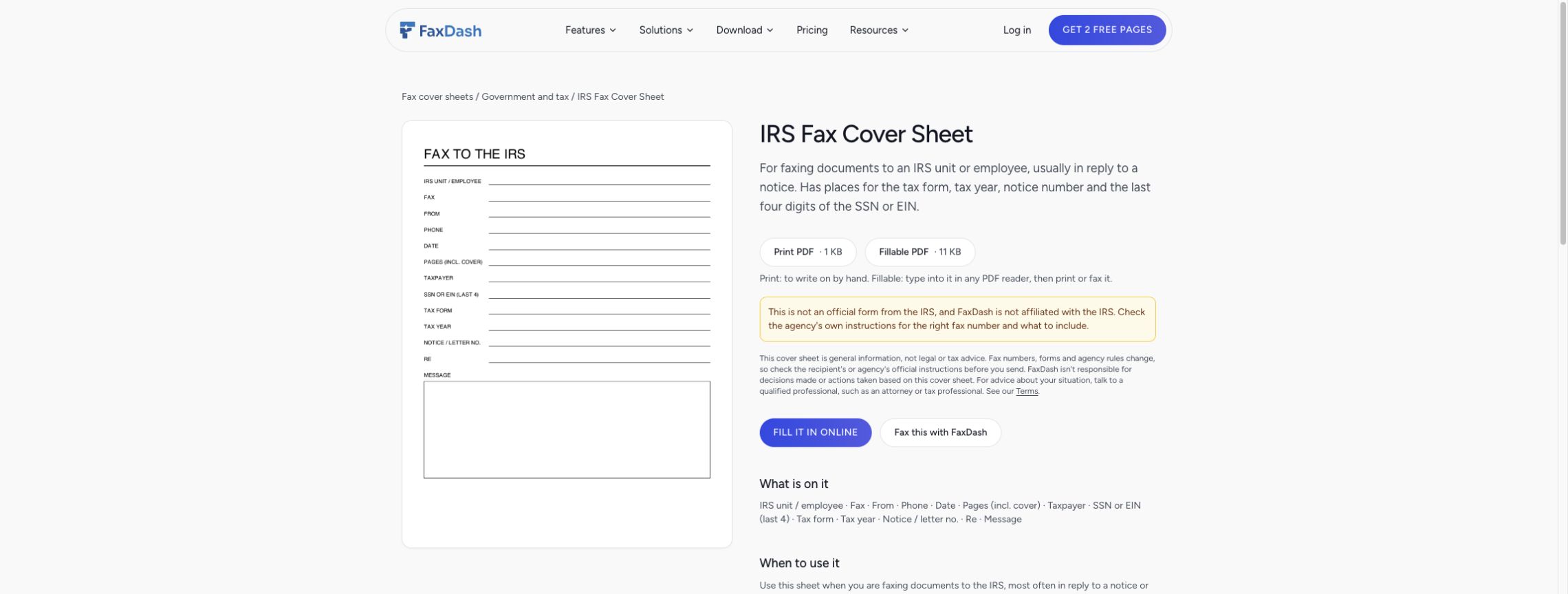
Use the IRS unit / employee, Tax form, Tax year and Notice / letter no. fields to make the packet easy to route. A field appearing on a template does not mean every submission needs it: include only the identifiers requested for your submission. The template does not supply a destination number; use the current notice or official form instructions.
Choose Print PDF to write by hand, Fillable PDF to type into the downloaded file, or Fill it in online to use the browser maker. Count the cover in the total pages, then check the completed packet before sending.
How to send it
No fax machine is needed: how to fax from a computer, phone or email walks through each route.
- Put the pages in order. Cover sheet first, then a copy of the notice's response page if the notice asks for it, then your documents.
- Scan cleanly. Flat pages, dark text, no shadows. Our guide to preparing a document to fax cleanly covers settings that read well at fax resolution.
- Check the number again. Compare it digit by digit with the notice or instructions.
- Send once. Any fax service works. In FaxDash you can attach the cover sheet and the documents and send from your phone or browser.
- Wait for the result. If the fax fails to connect, see what to do when a fax fails to connect before you try again.
After you send
A fax status of Delivered means the fax transmission completed. It does not mean the IRS has read, accepted or processed the pages. Processing happens later, on the IRS's schedule.
Keep:
- The confirmation or sent record with the date, time and page count
- A copy of exactly what you sent, cover sheet included
- The notice itself
Do not fax the same documents again just because you have not heard back. If the notice gave a response deadline and you are past it with no word, call the number on the notice and ask whether your fax was received.
Compare the workflow for an IRS fax
We make FaxDash. This comparison focuses on the workflow, not a claim that one service is cheapest or guarantees a better transmission result. FaxDash brings the cover, document upload and transmission receipt into one workflow.
| What to compare | FaxDash workflow | Why it matters |
|---|---|---|
| Prepare one complete packet | The web sender combines PDF and image uploads into one fax | Keep the cover, signed pages and attachments together |
| Keep a transmission record | Download a receipt with destination, page count and transmission times | File it with the exact version you sent |
| Continue from a phone or computer | Scan or select a PDF in the app, or upload from the dashboard | Use the document you already have without finding a fax machine |
Fax.Plus also documents a downloadable confirmation report. FaxZero provides email confirmation and a status link. Whichever service you choose, make sure you can save its result with your notice and response.
FaxDash offers 2 free pages when you sign up. Later sends are pay-as-you-go; receiving replies by fax needs a paid receive plan.
IRS.gov controls the destination and submission requirements. A transmission receipt does not establish IRS acceptance, processing or a faster response.
Checklist
- Fax number taken from your notice, the IRS employee, or the form's current instructions
- Cover sheet names the unit or employee and the notice number
- Only the last 4 digits of the SSN or EIN on the cover sheet
- Tax form and tax year filled in
- Page count includes the cover
- Sent once; confirmation saved
Get the cover sheet
Download the IRS fax cover sheet as a print or fillable PDF, or fill it in online. It is not an IRS form and FaxDash is not affiliated with the IRS. If you are not sure what your notice is asking for, a qualified tax professional can help.
This guide is general information, not legal or tax advice. Fax numbers, forms and agency rules change, so check the agency's official page before you send. FaxDash isn't responsible for decisions made or actions taken based on this guide. For advice about your situation, talk to a qualified tax professional or attorney.