
To ask the Taxpayer Advocate Service (TAS) for help by fax, complete and sign Form 911 and fax it to (855) 828-2723. From overseas, the form lists 1 (304) 707-9793, which is not toll-free. Avoid duplicate requests: the form says not to submit multiple Forms 911 for the same issue. If TAS specifically asks you to resubmit or supply more information, follow that request. If you hear nothing within 30 days, the form tells you how to follow up.
Numbers checked November 9, 2026 on the current Form 911 (Rev. 6-2026) and the TAS contact page. Check both on the day you send. This page explains how to send the form. It is not tax or legal advice; follow the form's instructions.
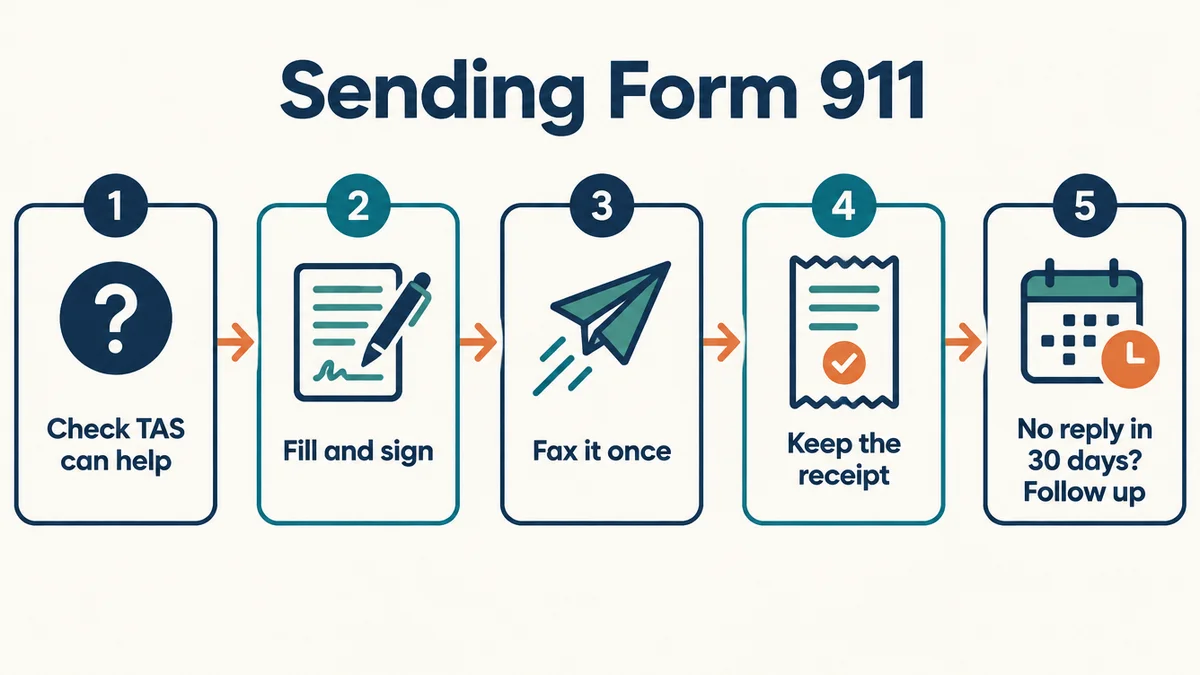
Avoid duplicate requests, but follow any specific TAS request to resubmit or provide information. The 30-day step is a follow-up trigger, not a response guarantee or an extension of a legal deadline.
What Form 911 is for
Form 911 is the Request for Taxpayer Advocate Service Assistance. TAS describes itself on the form as an independent organization within the IRS. The form says TAS may be able to help if your federal tax problem is causing a financial difficulty, you have tried and been unable to resolve it with the IRS, or an IRS system or process is not working as it should. The form says its help is free.
Do not miss another deadline while waiting for TAS. Page 4 of Form 911 says signing this request is not a substitute for legal or administrative action and does not suspend applicable periods for you to perform acts related to assessment or collection, such as petitioning the Tax Court or requesting a Collection Due Process hearing. Follow your actual notice and seek qualified advice about any deadline.
Step 1: Check whether TAS can help
Before you fill anything in, the TAS contact page points you to its TAS Qualifier Tool, which helps you decide whether TAS can assist. Use it to check the current next steps; requesting help does not guarantee that TAS will accept your case.
Step 2: Choose how to send it
The current form and the TAS contact page list these routes:
| Route | Where | Notes from the form and TAS |
|---|---|---|
| Fax | (855) 828-2723 | Listed on the form and the TAS contact page |
| Fax from overseas | 1 (304) 707-9793 | Listed on the form. "Not a toll-free number for U.S. taxpayers" |
| The Form 911 address on the form and the TAS contact page | The contact page warns that initial email submissions and attachments are not encrypted; it says a TAS employee contacts you by phone or letter rather than replying to that submission | |
| Confirm the destination with TAS before mailing | The current PDF and contact page show different street numbers. Confirm the mailing destination with TAS before mailing; do not guess between them | |
| Phone | 1-877-777-4778 | The TAS toll-free assistance number; calling does not establish case acceptance |
Avoid submitting duplicate requests through multiple routes unless TAS instructs you to do so.
Step 3: Fill it in and sign it
Follow the form's own instructions. A few points from the current revision:
- Lines 10 to 12. Give the tax form, the tax years, the problem and the help you are asking for. Attach extra sheets if you need space.
- Line 7a. Choose how you want updates: email, letter or phone call.
- Signatures. Follow page 4: both spouses sign and date a joint assistance request; if only one spouse requests assistance, only that spouse signs. Lines 13a and 14a are on page 2. A business request must be signed by a properly authorized officer with their title.
- Representatives. If an authorized representative is sending the form for you, they complete Section II, attach a copy of Form 2848, Form 8821 or other power of attorney, give their CAF number, and sign. Page 4 says the taxpayer does not need to sign when an authorized representative submits it. Form 8821 alone permits disclosure of information, not representation; do not treat its appointee as authorized to advocate your position. Follow the separate authorization instructions for the role involved. For sending Form 2848 itself, see how to fax IRS Form 2848 or 8821.
- Supporting documents. Include the documents that explain the issue and requested relief, and any additional sheets needed for lines 12a and 12b. Check that required signatures, dates and authorization pages are present.
Follow the actual form's signature and authorization instructions. One conservative workflow is to sign on paper and scan the complete signed form; do not assume an app signature feature establishes TAS acceptance.
Check the scan before you send: every page upright, readable and in order, including signatures and dates. See how to prepare a document so it faxes cleanly.
Step 4: Send the complete request
With FaxDash, you can send from your phone or computer:
- Scan the signed form and any supporting pages with the FaxDash app, or open the web dashboard and add the PDF.
- After checking the current official instructions, enter +1 855 828 2723, or +1 304 707 9793 from overseas. Start with + and the country code rather than relying on your device's local prefix.
- Check the complete packet, recipient, page count and credit cost. Add a cover only if appropriate under the instructions you received; if a cover should not be included, disable any saved default cover, including for email-to-fax. Then send.
If the fax fails, check the number and the status before you send it again. See why a fax fails to connect.
Step 5: Keep your record
- The delivery receipt. When the fax shows Delivered, open it on the Sent Faxes page of the web dashboard and choose Download Receipt. It lists the destination number, the page count, and when the fax was sent and completed.
- A copy of exactly what you sent, including any supporting pages.
- The date you sent it. You need it for the 30-day follow-up below.
Delivered means the transmission to the TAS fax number completed. It does not show that TAS has accepted your request.
Compare tools for the signed packet and its records
We make FaxDash. Provider documentation checked November 9, 2026. These differences concern sending and record-keeping, not TAS eligibility, legal deadlines or case acceptance.
- FaxDash: the dashboard workflow merges PDFs or images into one fax, shows the recipient and credit cost before sending, and provides a downloadable receipt. That can fit one prepared request and supporting pages without a monthly sending subscription.
- Fax.Plus: its document workflow accepts up to 10 supported files, including Word and spreadsheet formats, and lets you arrange their order. That may help with mixed-format supporting documents; inspect the final pages and applicable per-fax limits.
- eFax: its plan features include searchable stored faxes and email-to-fax. That can suit repeated correspondence where locating earlier records matters; compare current subscription terms against a one-off request.
With any service, retain the exact signed packet and transmission result outside the service too. A confirmation proves neither TAS acceptance nor suspension of an appeal or other deadline.
Step 6: What happens next, and when to follow up
- TAS decides acceptance. The form says TAS will let you know whether your request has been accepted and may contact you using the method you chose on line 7a, or other methods if needed. The contact page warns of high request volumes; do not treat its response estimates as guarantees.
- No response after 30 days. The form says to email the Form 911 address with "No Response" in the subject line.
- Avoid duplicate requests. The form says multiple Forms 911 for the same issue may delay processing. This does not override a specific TAS request to resubmit or provide additional information.
Taxpayer Advocate Service fax and your local TAS office
Form 911 itself goes to the national numbers above. For an existing case, the TAS contact page says that if you have an open case, it has been more than 30 days since you submitted Form 911, and you need to speak with your advocate, you should contact your local TAS office. Find yours with the office locator on the TAS contact page and use the contact details it lists for that office.
For other IRS forms and their fax numbers, see IRS fax numbers by form.
FAQ
What is the Form 911 fax number? (855) 828-2723. From overseas, 1 (304) 707-9793, which is not toll-free. Both were checked on November 9, 2026; check the form or the TAS contact page on the day you send.
Should I fax Form 911 to my local TAS office? Send Form 911 to the numbers on the form. The TAS contact page points you to your local office once you have an open case and more than 30 days have passed.
Can I send Form 911 more than once to speed things up? Do not submit duplicates to accelerate a request. Follow any specific TAS instruction to resubmit or provide more information.
Can my tax professional send it for me? Yes, if they are your authorized representative. They complete Section II, attach the authorization and sign.
Does Delivered mean TAS accepted my case? No. It means the fax transmission completed. TAS tells you whether your request has been accepted.
Sources checked November 9, 2026: Form 911 (Rev. 6-2026) on IRS.gov; TAS contact page; FaxDash Help: sending faxes, pricing and billing.
This guide is general information, not legal or tax advice. Fax numbers, forms and agency rules change, so check the agency's official page before you send. FaxDash isn't responsible for decisions made or actions taken based on this guide. For advice about your situation, talk to a qualified tax professional or attorney.