
Say a Florida Department of Revenue letter asks for a document, or you're sending a refund application with receipts, and the easiest thing in reach is a fax. Florida does publish a few tax fax numbers, but each one belongs to a specific office. The right number depends on what you're sending, and for most tasks the department offers an online route first.
This article is general information, not legal, tax or compliance advice. Agency rules and fax numbers change, so confirm with the agency or a qualified professional before you send.
Follow the instructions on your notice or form, and ask a tax professional about the substance of your case. This page covers Florida taxes only, not child support.
The short answer
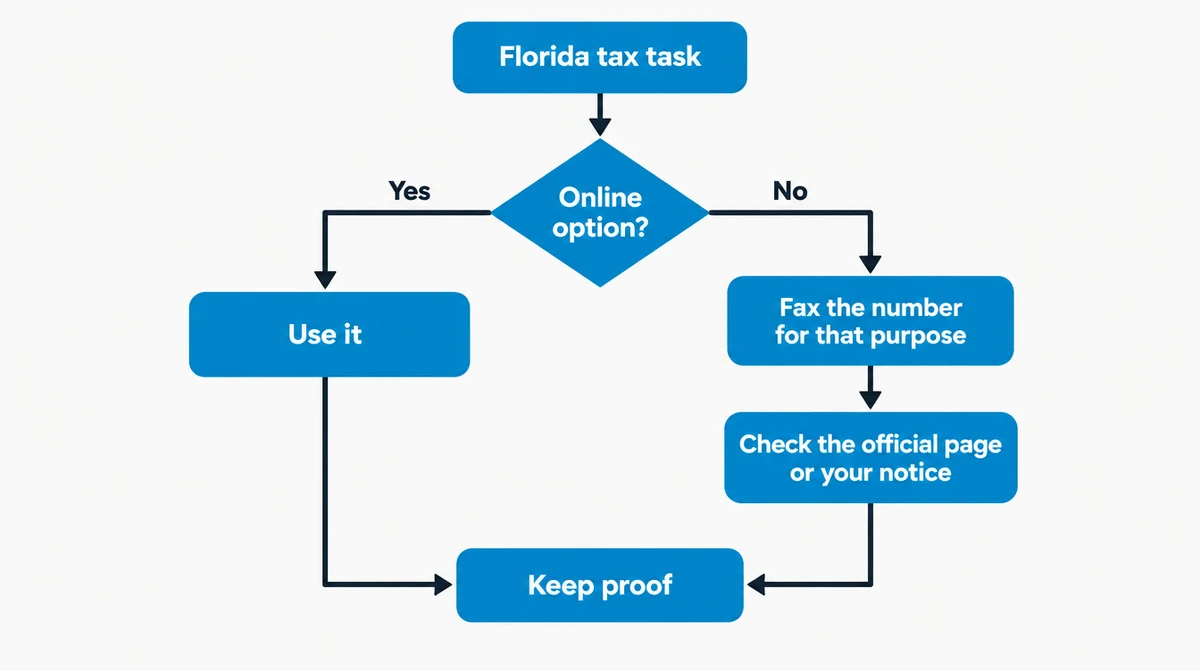
Check for an online option before you fax. The department runs online applications for refunds and lets you send refund documents electronically. If you do fax, use the number published for that exact purpose, or the number printed on your notice or form. A number from a search result or an old letter may belong to a different office.
Official Florida DOR fax numbers for tax matters
These are the tax fax numbers the department publishes on its own pages. Each row links the page that lists it.
| What you're sending | Fax number | Official source (checked Oct 31, 2026) |
|---|---|---|
| General correspondence to Taxpayer Services | 850-245-5990 | General Tax Administration contacts |
| A refund application (Form DR-26 or DR-26S) and its supporting documents | 850-410-2526 | Tax refunds; also printed on Form DR-26S and Form DR-26 |
| A protest to Informal Dispute Resolution (proposed audit assessments, billings, refund denials) | 850-921-2983 | General Tax Administration contacts |
| Form DR-835 (Power of Attorney) appointing a reemployment tax agent in Section 4 | 850-488-5997 | Form DR-835 instructions |
| Form DR-835 for a specific matter | The office or employee handling that matter | Form DR-835 instructions |
| A reply to a notice or bill | The number printed on that notice, if it gives one | Your notice |
One number to confirm before you use it. The department's two contact pages list different fax numbers for the Office of Technical Assistance, which handles written requests for technical advice. The main Contact page shows (850) 921-2983, and the General Tax Administration contacts page shows 850-617-8346, which is also that office's phone number. Until the pages match, call 850-617-8346 or email DOROTA@floridarevenue.com to confirm where to send it.
What you can fax here, and what you can't
Refunds have an online route first. The department's refund page says to apply online with the DR-26S web application for sales and use tax, surtax or solid waste fees, and the DR-26 web application for other taxes except reemployment tax. You can send supporting documents electronically. If you can't, you can mail or fax them to 850-410-2526 (Tax refunds, checked October 31, 2026).
Reemployment tax overpayments are refunded automatically, according to the same page, so there's no application to fax for those.
A small sales tax mistake may not need a refund at all. If the refund relates to an error on your Sales and Use Tax Return (Form DR-15), the department says you may take a credit on your next return instead.
A power of attorney can be faxed. The DR-835 instructions say photocopies and fax copies of the form are usually acceptable, but email transmissions are not.
Taxpayer Services wants identifying details. Its contacts page asks you to include your contact name, phone number, tax type, a full description of why you're writing, your business name and address, and your tax identification numbers. Have your account details, such as your Business Partner number, FEIN or certificate number, ready as well.
Before you send
- Match the number to the purpose. Use the table above or the number printed on your notice or form, not a number from another office.
- Add a cover sheet. Put your business name, the tax type, your Business Partner number or FEIN, the notice or form number, a daytime phone number and the total page count including the cover. Use the last four digits of any Social Security number on the cover, not the full number. See what to put on a fax cover sheet, or fill one in with the free fax cover sheet maker.
- Send the signed form first, then the supporting documents, in the order the form or notice asks for them. Make sure every page is readable. See how to prepare a document so it faxes cleanly.
- Keep proof. Save a copy of exactly what you sent and the delivery confirmation with its date and time. If you applied for a refund online, the department says to print the confirmation page or write down the confirmation number.
Sending without a fax machine
You don't need a fax machine or a phone line to send to these numbers. With FaxDash you can scan pages with your phone's camera in the app, or upload a PDF in the web dashboard, then enter the number and send. There's no subscription to send. A fax to a US number uses 1 credit per page, and a cover page has no feature fee but uses 1 send credit. FaxDash offers 2 free pages when you sign up.
Check your history for Delivered or Failed. On the web dashboard you can open a delivered fax on the Sent Faxes page and choose Download Receipt, which lists the destination number, the page count and when the fax was sent and completed.
How this compares, checked November 12, 2026
Most online fax services sell sending as part of a monthly plan. For one form or a few pages of receipts to the department, the useful comparison is how you pay to send, whether you can send from your phone, and what you need for a reply by fax. This is what each company's own pages said on November 12, 2026.
| FaxDash | Fax.Plus | eFax | |
|---|---|---|---|
| Paying to send | Credit packs that never expire, with no subscription needed to send | Monthly or annual plans with a set number of pages a month | Monthly plans with a page allowance that counts both sent and received pages; unused pages don't roll over |
| Sending from your phone | Mobile app with camera scan, or a PDF | Mobile app | iOS and Android apps |
| A number for a faxed reply | A receive number on a Starter, Standard or Business plan | Receiving needs an active paid plan, which includes a fax number | Personal and Business each include 1 fax number |
Current prices are on each company's pricing page: Fax.Plus and eFax. FaxDash's are on Pricing, credits and billing.
If the department faxes something back
The forms ask for your fax number, but they also ask for a phone number and email address, so you don't need a fax number of your own to deal with the department. If you want one anyway, a FaxDash receive number starts at $3.99 a month (Starter), with 50 received pages and 10 send credits.
If your letter is from the IRS rather than Florida, the numbers are different. See where to fax IRS forms.
The honest catch
Florida's fax numbers are tied to specific offices, and the department's own pages don't always agree. The department also says its Taxpayer Assistance Contact Center is seeing higher than normal call and correspondence volumes, so expect a wait for a written reply. When an online route exists, it's usually the simpler one.
FAQ
What is the Florida Department of Revenue fax number? There isn't one general tax fax number. Taxpayer Services lists 850-245-5990, refunds use 850-410-2526, and Informal Dispute Resolution uses 850-921-2983. Use the number published for your purpose or printed on your notice.
Can I fax a Florida tax refund application? Yes. The department accepts Form DR-26 or DR-26S by mail or fax at 850-410-2526, though it offers online applications for both.
Can I fax Form DR-835 to the Florida Department of Revenue? Yes. Fax it to the office or employee handling your matter. If it appoints a reemployment tax agent in Section 4, the instructions give 850-488-5997.
Does this page cover child support faxes? No. The department also runs the child support program, which has its own contacts. This page covers taxes only.
What should I keep after I fax? A copy of exactly what you sent, the cover sheet and the delivery confirmation.