

Suppose you're faxing a signed four-page vendor form to a supplier's accounts payable team. Their number goes to a shared machine, or a shared inbox, that several departments use. Without a note on top, your pages could sit in a stack until someone works out who they're for.
That note is the cover sheet: one first page that says who the fax is for, who sent it, how many pages to expect and how to reach you. It doesn't need a logo or a design. It needs to be readable at fax quality, complete enough that the right person can act on it, and free of anything you wouldn't want a stranger at the machine to see.
This article is general information, not legal, tax or compliance advice. Agency rules and fax numbers change, so confirm with the agency or a qualified professional before you send.
The short answer
Put these on the cover sheet: the date, the recipient's name and fax number, your name and a phone number, the total page count including the cover, and a short subject with any reference number the recipient uses. Leave off full Social Security or tax ID numbers, account numbers and anything private. Those belong inside the document, if anywhere.
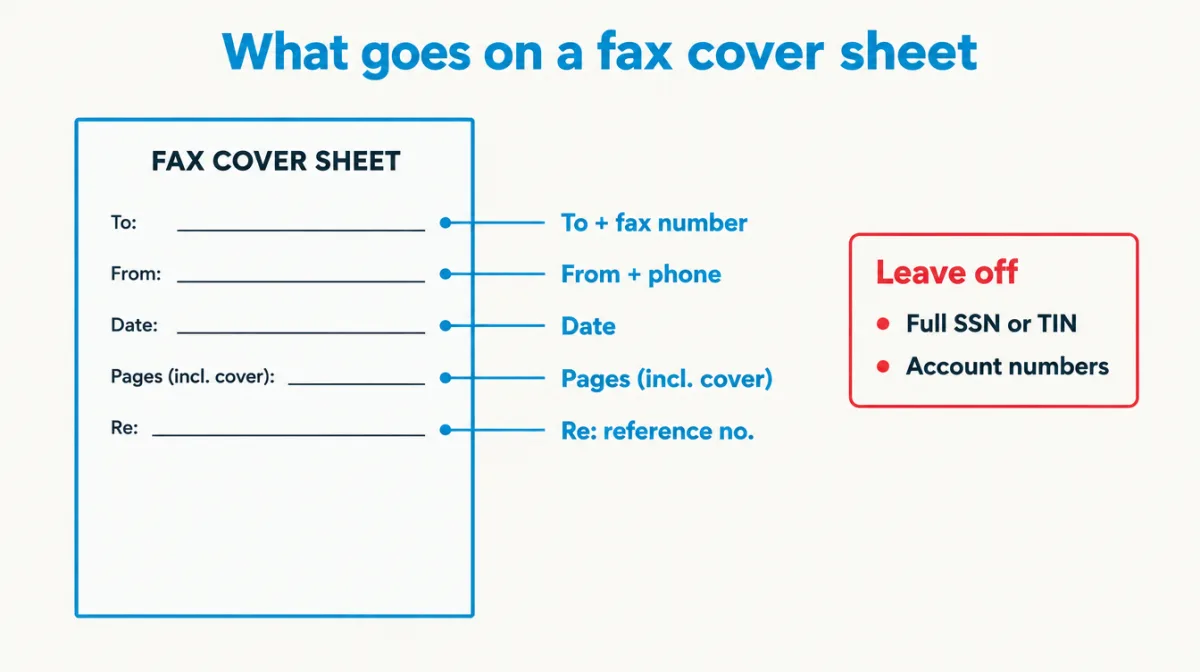
What to put on a fax cover sheet
Each field answers a question the person at the other end will have.
- Date. When you sent it. Useful when a page turns up days later in a pile.
- To. The recipient's name, department and company, plus their fax number. The number helps someone spot a fax that landed at the wrong machine.
- From. Your name and business, your fax number if you have one, and a phone number for questions.
- Pages. The total, including the cover sheet. Write it as "Pages: 4 (including this cover sheet)" so nobody has to guess.
- Re. A short subject plus the reference the recipient uses, such as a purchase order, claim or notice number. Copy it exactly as they wrote it.
- Message (optional). One or two lines, such as "Please call if any page is missing or hard to read."
- Confidentiality notice (optional). A line asking anyone who gets the fax by mistake to tell you and destroy it. More on what it can and can't do below.
What to leave off
The cover sheet is the page most likely to be seen by whoever is standing near the machine or opening the shared inbox. Keep it general.
- Full Social Security numbers or tax ID numbers. If the recipient needs to match the fax to a record, use a non-sensitive reference if the recipient accepts it. Include even a partial identifier only when their instructions require it, and keep full identifiers off the cover.
- Account, card or bank numbers. Use a non-sensitive reference where possible. Follow the recipient's instructions for any identifier they require inside the packet.
- Private details in the message line. Balances, medical details and case facts belong in the document, not on page one.
If you work in a medical or dental office, see fax rules for small medical and dental practices for how those offices handle faxes.
A completed example: four form pages plus one cover
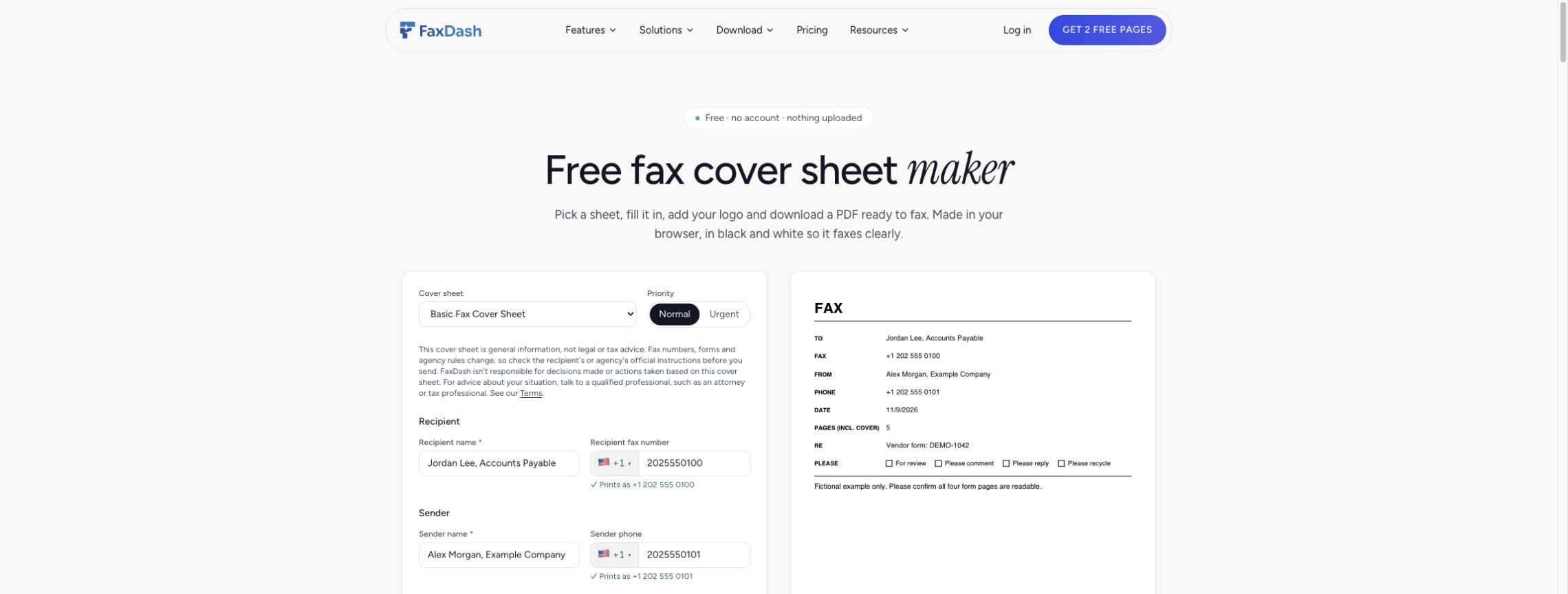
Here is how the opening example fits together. These are fictional details, not a fax destination to use:
| Field | Example |
|---|---|
| To | Jordan Lee, Accounts Payable |
| Recipient fax | +1 202 555 0100 |
| From | Alex Morgan, Example Company |
| Sender phone | +1 202 555 0101 |
| Pages | 5, including this cover |
| Re | Vendor form: DEMO-1042 |
| Message | Please confirm all four form pages are readable. |
The key distinction is four document pages + one cover = five transmitted pages. The reference helps route the packet without exposing an account number. If you remove or add a page after preparing the cover, update its count before sending.
To reproduce this in the free maker, select Basic Fax Cover Sheet, fill in Recipient, Sender and Message, then set Number of pages (including this one) to 5. Check the preview before downloading. Use your actual verified recipient details for a real fax.
A plain cover sheet template you can copy
Copy this into a document, fill in the brackets and save it as the first page of your PDF, or fill one in with our free fax cover sheet maker. If you want a ready-made layout for a specific job, our free fax cover sheet templates are sorted by who you're faxing.
FAX

Date:       [Month Day, Year]

To:         [Recipient name], [Department]
Company:    [Company name]
Fax:        [Recipient fax number]
Phone:      [Recipient phone number, if known]

From:       [Your name]
Company:    [Your business name]
Fax:        [Your fax number, if you have one]
Phone:      [Your phone number]

Pages:      [Total] (including this cover sheet)
Re:         [Subject and reference number]

Message:
[One or two short lines. Keep private details off this page.]

[Optional confidentiality notice]
This fax is intended only for the person or organization named
above. If you received it by mistake, please call the sender at
[phone number] and destroy the pages.
Keep it to one page in a plain font at a normal size. Faxes print in black and white, so skip shaded boxes and light gray text. For more on what survives the trip, see how to prepare a document so it faxes cleanly.
Is a cover sheet required?
Usually not. A cover sheet is required only when the recipient's own instructions say so. Read the form instructions, the letter or the request email first, because their rules beat any template.
The IRS gives a clear example. For Form 8802, its instructions say you can fax up to 10 forms, 100 pages at most, and "You must use a fax cover sheet stating the number of pages included in the transmission" (Instructions for Form 8802, Rev. October 2026, checked October 30, 2026). If you send that packet without a cover sheet, or with the wrong count, you haven't followed the instructions. If you're also sorting out which IRS fax number goes with which form, our IRS fax numbers by form guide lists them in one place.
There's also a federal rule that applies to every fax sent from a computer or other electronic device in the US. The fax has to show the date and time it was sent, who sent it, and a phone number for the sender, either in the top or bottom margin of each page or on the first page (47 CFR 68.318(d), checked October 30, 2026). A cover sheet with those details is a simple way to put them on the first page.
You can often skip a cover sheet when the recipient has told you not to include one, or when the first page of your document already shows who it's for, who sent it and how many pages there are.
How to put one together in four steps
- Check the recipient's instructions. Look for a required cover sheet, an attention line, a reference number or their own cover form.
- Fill in the template last. Assemble the whole packet first, then fill in the cover. Delete any line you don't need rather than leaving it blank.
- Count every page, including the cover. If you write "Pages: 5" and the recipient gets four, they know to call you.
- Make it page one of the same PDF. That keeps the cover with the pages it describes. If you already added a cover to your file, do not also enable an automatic cover in your sending app unless you intend to send two covers. With FaxDash email-to-fax, only the first attached PDF is sent and the email body isn't, so if you want a cover page, make it the first page of that PDF.
After you send, check the result in your fax history for Delivered or Failed. Save the cover sheet and document together with the delivery confirmation, so you can show what you sent and when.
About confidentiality notices
A confidentiality notice asks anyone who receives the fax by mistake to tell you and destroy the pages. It's a reasonable courtesy line. It can't undo a fax that went to the wrong number, and it doesn't make a fax compliant with any law by itself. Checking the number before you send does more than any notice.
The honest catch
A cover sheet is a page, and most fax services charge by the page. That includes FaxDash: a cover sheet uses a send credit like any other page, 1 credit to a US or Canada number. For a short fax to someone who's expecting it, a clear first page on the document itself may be enough.
The bigger risk is a cover sheet that's wrong. A page count that doesn't match or an old reference number causes more confusion than no cover at all, so fill it in after the packet is final.
How FaxDash compares with Fax.Plus and iFax on cover pages
If you're choosing a service for the cover page itself, here is how three online fax services describe built-in and custom covers on their own pages, checked November 6, 2026.
- Fax.Plus documents a built-in cover sheet on outgoing faxes, a custom Cover Sheet Gallery on Premium and above (up to 50 gallery pages), and Enterprise Shared Cover Sheets with Cover Sheet Enforcement so a default cover can be required across a team. Its FAQ says the cover sheet transmits as the first page, so it uses page allowance like any other page. See how to add a cover sheet, Cover Sheet Enforcement and the cover sheet templates page.
- iFax documents built-in cover templates and custom cover sheets, with defaults you can set for the whole account, a fax number or a team/permission group. See custom fax cover sheets and how to add a custom cover sheet. Its public pages don't clearly say whether a cover sheet counts against monthly page quota, so check their site for current rules.
- FaxDash has a built-in cover page builder that adds your name and number, the recipient, a subject and a short message, plus free web cover-sheet templates and a maker, and a default cover under Settings → Cover sheet. The cover page has no feature fee and uses 1 send credit (1 credit per page to US and Canada (+1) numbers). See sending faxes and integrations.
Our advice: if you need enforced org-wide cover templates, Fax.Plus Enterprise documents that, and if you need defaults by number or group, iFax documents that. If you mainly want a built-in cover or a free printable or fillable sheet on pay-as-you-go sending without a subscription, FaxDash charges no feature fee and 1 send credit for the cover page. Features and prices change, so check each service's own page before you decide.
FAQ
Does the cover sheet count in the page total? Yes. Count it and say so: "Pages: 4 (including this cover sheet)."
Should I put my full Social Security number on a fax cover sheet? No. Prefer a non-sensitive reference, and include a partial identifier only if the recipient requires it. Keep the full number on the form where it is required, not on the cover.
Can I write the reference number in the email subject for email-to-fax? No. With FaxDash email-to-fax, the subject holds only the destination fax number, and every digit there is read as part of it. Put the reference on the cover sheet inside the PDF.
Do I need a confidentiality notice? It's optional. It's a courtesy line, not a legal safeguard.