
Most fax cover sheet templates are sorted by look: "modern," "classic," "creative." That doesn't help when you're about to fax a reply to an IRS notice and want to know which fields the person on the other end needs to see.
So we built a free set sorted by who you're faxing. There are 25 sheets at faxdash.io/fax-cover-sheets, each with the fields that recipient usually looks for: tax year and notice number for the IRS, loan and property details for a payoff request, claim number for an adjuster.
Every sheet is:
- Free, with no account. Download it and use it however you like.
- Available two ways: a print PDF to fill in by hand, or a fillable PDF you can type into in any PDF reader.
- Fillable online too. Open any sheet in the cover sheet maker, type in your details, add your logo if you want, and download a ready-to-fax PDF. It runs in your browser, and nothing you type or upload is sent to FaxDash.
- Black and white. A fax prints in black and white at about 200 dots per inch, so gray fills and pale logos turn to speckles. Every sheet is black on white, and the maker shows you how your logo will come out on the other end.
This article is general information, not legal, tax or compliance advice. Agency rules and fax numbers change, so confirm with the agency or a qualified professional before you send.
See a completed sheet before you download
The screenshot below shows the real Basic Fax Cover Sheet maker using fictional business details. The preview updates as you enter the recipient, sender, subject and message. In this example, four document pages plus one cover make five pages, so the count on the cover is 5.
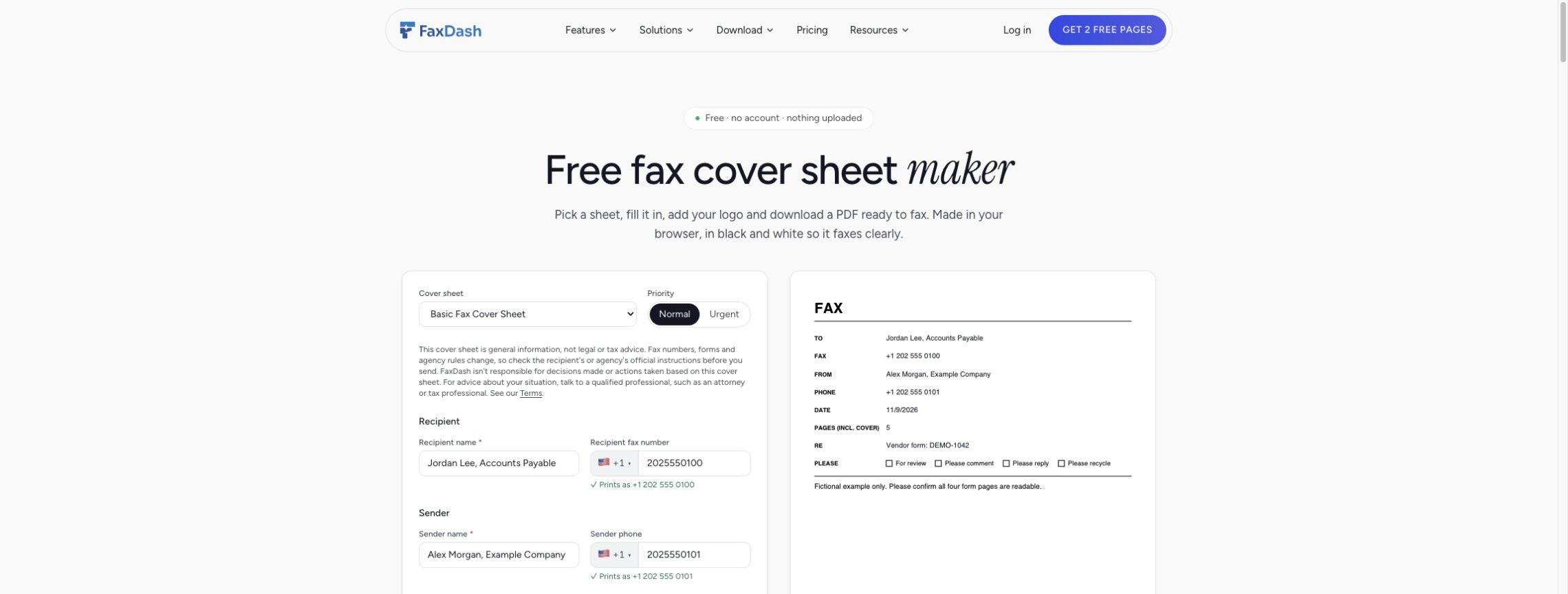
- Open the basic sheet in the maker.
- Enter the recipient and sender details, then a short subject and message. Keep private details out of the cover note.
- Count the complete packet, including the cover, and enter that total under Number of pages (including this one).
- Review the PDF and Fax previews, download the cover, and put it first in your final packet. Check the final PDF again after combining files.
For email-to-fax, combine the cover and documents into one PDF. FaxDash sends the first PDF attachment, not the email body. Keep only the destination fax number in the email subject. If your sending app also offers an automatic cover, check that you are not adding a second cover accidentally.
What's available
Government and tax
- IRS fax cover sheet: has places for the tax form, tax year, notice or letter number, and the last four digits of the SSN or EIN. Pair it with our guide on how to fax the IRS.
- Social Security fax cover sheet. Guide: how to fax Social Security.
- VA fax cover sheet. Guide: how to fax the VA.
- State tax agency fax cover sheet
- Taxpayer Advocate fax cover sheet
These aren't official agency forms, and FaxDash isn't affiliated with any agency. Always use the fax number and instructions on your notice or the agency's own site.
Business
Confidential and legal
Real estate and finance
- Title / escrow payoff request cover sheet. Guide: how to fax a payoff request to title or escrow.
- Mortgage fax cover sheet
- Property management fax cover sheet
- Insurance claim fax cover sheet. Guide: how to fax an insurance claim.
Tax and accounting offices
- Tax client documents fax cover sheet
- IRS power of attorney (Form 2848 / 8821) fax cover sheet. Guide: how to fax Form 2848 and 8821.
Healthcare
- Healthcare fax cover sheet
- Medical records request fax cover sheet. Guide: how to request medical records by fax.
- Medical referral fax cover sheet
- Dental office fax cover sheet
- Chiropractic fax cover sheet
- Physical therapy fax cover sheet
The healthcare sheets include a confidentiality notice. It's a general notice, not legal advice, and your office may need its own wording. For example, programs covered by 42 CFR Part 2 must add their own redisclosure statement. For more, see faxing patient information in a small practice.
Personal
How to pick the right one
Start with who's receiving the fax, not with how the sheet looks:
- Replying to a government notice? Use the agency's sheet (IRS, Social Security, VA, state tax, or Taxpayer Advocate). Those sheets put the reference numbers the office uses to match your fax to your file right at the top.
- Sending a payoff request, claim, or loan documents? Use the real estate and finance sheets. They have fields for the property, loan, or claim number.
- Sending client documents or a power of attorney from a tax office? Use the tax and accounting sheets.
- Sending patient information? Use a healthcare sheet, and follow your practice's own privacy procedures.
- Anything else? The basic or business sheet works for most faxes. Use the confidential sheet when the pages shouldn't sit in an open tray.
Not sure? The most popular sheets are at the top of the page: basic, business with logo, IRS, confidential, personal and healthcare.
What to put on a fax cover sheet
At minimum:
- Who it's to, and their fax number
- Who it's from, with a phone number and a fax number they can reply to
- The date
- The number of pages, counting the cover sheet
- A short "Re:" line saying what the fax is about
- Any reference number the recipient uses, like a notice, claim, loan, or case number
Keep the message short. Don't put sensitive details like a full SSN on the cover sheet itself, since it's the first page anyone at the receiving machine sees. For the full rundown, read what to put on a fax cover sheet.
Compare cover-sheet tools by the file you need
FaxDash's free maker is useful when you want a recipient-specific PDF without creating an account. Choose a template, fill the fields, add a logo if needed and inspect the black-and-white preview before downloading.
| Feature | FaxDash maker | Other options to consider |
|---|---|---|
| Start without an account | Public browser maker and downloadable templates | Fax.Plus also offers a public cover-sheet maker |
| Match the recipient | Government, business, healthcare and personal templates | eFax offers downloadable templates you can edit |
| Check branding before sending | Logo upload and a black-and-white fax preview | Fax.Plus supports logo upload and Word export if an editable office document is your priority |
| Keep the finished file | Download a PDF to place first in your packet | iFax documents saved defaults inside its dashboard |
We make FaxDash; this is a comparison of documented tools, not transmitted-image quality. Making a cover is free; transmitting it is a separate step, and the cover counts toward your total fax pages. Save the final PDF, check page order and avoid adding a second automatic cover.
Sending it with FaxDash
Once your cover sheet is ready, you can send it along with your documents from the FaxDash app on your phone, the web app, or by email-to-fax (email-to-fax needs a receive number).
- No subscription to send from the app or web. You buy page credits, starting at $0.99 for 5 pages, and credits never expire. The cover sheet itself is free, but it's a page of your fax, so it uses 1 send credit like any other page.
- Want your own number to receive faxes? Plans start at $3.99 a month. Business is $12.99 a month and covers you + 2 team seats.
Every sheet page also has a "Fax this with FaxDash" button, so you can go straight from the sheet to sending.