
The short answer
The VA uses different fax numbers for different kinds of mail. For a disability compensation application, the VA's own How to file a VA disability claim page lists the fax numbers to use: one for applicants in the U.S. and one for applicants outside the U.S. (they are copied below, with the date we checked). For anything else, such as pension, education, health care or a decision review, use the fax number on the form's instructions or on the letter the VA sent you.
Put a cover sheet on top with the veteran's name, the last four digits of the VA file number, and the claim number if you have one. Our free VA fax cover sheet has those fields, and you can fill it in online.
This guide covers sending a fax. It is not legal advice about VA benefits.
The fax numbers for a disability compensation claim
On How to file a VA disability claim, under "Option 4: By fax", the VA lists:
| Where you are | Fax your application to |
|---|---|
| In the U.S. | 844-531-7818 |
| Outside the U.S. | 248-524-4260 |
We read these on that page on October 30, 2026. Agencies change fax numbers, so open the page and check before you send. These numbers are for the disability compensation application on that page. Do not assume they are right for other VA forms or programs.
Other VA mail: where to find the number
The VA has separate intake points for different benefits. If you are sending something other than a disability compensation application:
- Answering a VA letter. Use the address or fax number in the letter. It tells you where that office wants the reply.
- Sending a VA form. Open the form's page on VA.gov and read its instructions on where to send it.
- Not sure. Ask your accredited representative, or call the VA, before you fax. Fax numbers on third-party lists are often old or for a different program.
Consider uploading instead
If you have already filed a disability claim and want to add evidence, the VA's page on uploading evidence to support your claim says you can upload it through the claim status tool. The same page points to the QuickSubmit tool for other documents you want to send online. Uploading is tied to your claim, and you can see it on your claim afterwards.
The same page notes that you can keep adding evidence for up to one year from the date the VA receives your claim, and that the VA may decide earlier if it does not get evidence or information it needs within 30 days.
Fax still works when you are filing on paper, when someone is helping you who does not have access to your account, or when a letter asks you to fax. Just pick one route per document. Sending the same pages by fax and by upload can create duplicate records.
What to put on the VA cover sheet
- VA office or employee. The office or person named on your letter, or "Claims intake" for a new disability claim.
- Fax. The number you are sending to.
- From and phone. Your name, or the name of the person helping the veteran, and a phone number.
- Date and pages. Count every page, including the cover.
- Veteran. The veteran's full name as it appears on VA letters.
- VA file number (last 4). Only the last four digits.
- Claim number. If you have one, from a VA letter or the claim status tool.
- Message. What is enclosed, such as "VA Form 21-526EZ with private treatment records."
Keep the full file number and the full Social Security number off the cover sheet. If a VA form asks for them, put them on the form, where the VA expects them.
See the cover before you fill it in
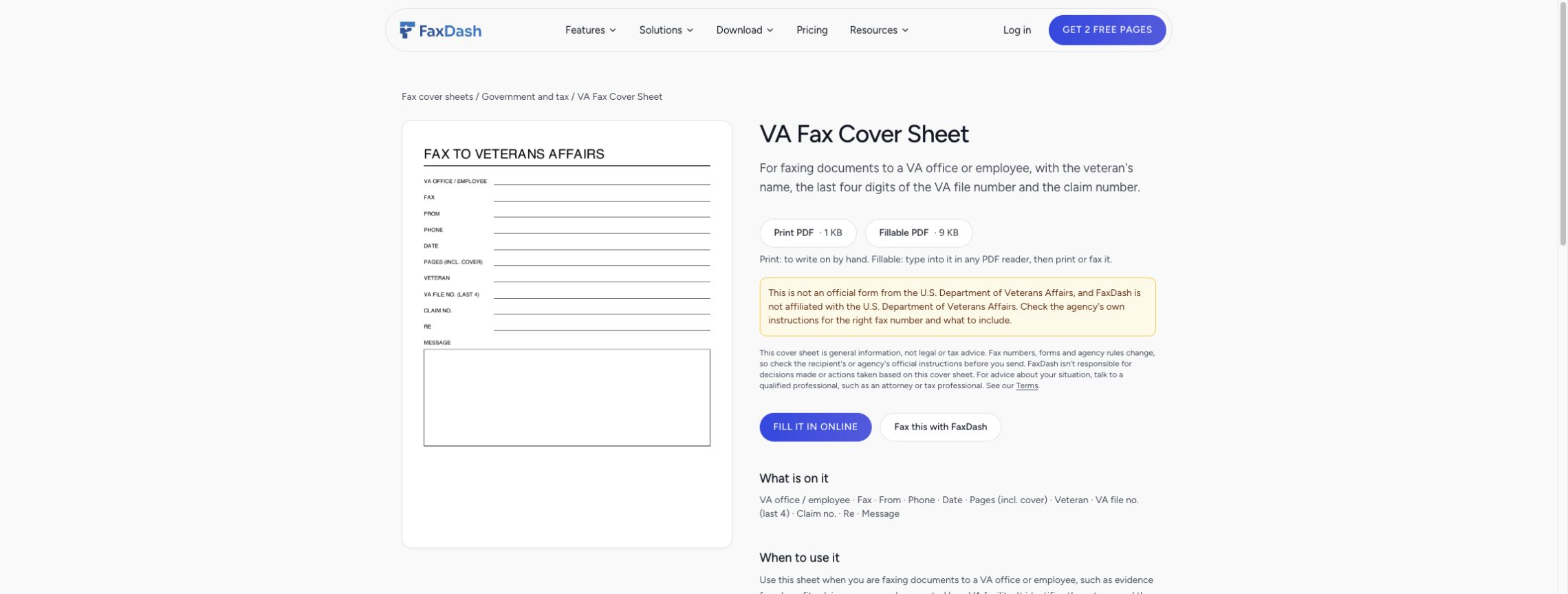
The VA office / employee, Veteran and Claim no. fields help label the packet for the office expecting it. Follow that office's instructions for identifying information and supporting pages. This template does not choose the correct VA destination or replace a required VA form.
Choose Print PDF to write by hand, Fillable PDF to type into the downloaded file, or Fill it in online to use the browser maker. Count the cover in the total pages, then check the completed packet before sending.
How to send it
No fax machine? Send from your phone or computer: how to fax from a computer, phone or email shows each route. To compare an office store or library, see where can I send a fax.
- Fill in and sign the form the way its instructions say. A signature you are not sure about is worth checking before you fax, not after.
- Put the cover sheet first, then the form, then supporting documents in a sensible order.
- Scan clearly. Medical records with small print and stamps fax better when they are flat and dark. See how to prepare a document to fax cleanly.
- Check the number against the VA page or letter, digit by digit.
- Send once. Any fax service works. FaxDash lets you send from your phone or browser and keeps the sent record.
Large packets can take a while to transmit. If a long fax fails partway through, see why a fax fails to connect before you resend the whole packet.
After you send
A Delivered status means the fax transmission completed. It does not mean the VA has reviewed the pages, added them to a claim or made a decision.
Keep:
- The sent record with the date, time and page count
- A copy of everything you faxed, cover sheet included
Then watch the claim status tool for the claim to appear or the evidence to be noted. Give it time before you resend. If you need help, the VA lists ways to get help from an accredited representative or a Veterans Service Organization.
Compare preparation and proof for a VA evidence packet
Start with the VA's upload options and the instructions for your submission. If fax is appropriate, FaxDash's useful features are preparing one readable packet and keeping the transmission result.
| What to compare | FaxDash workflow | Why it matters |
|---|---|---|
| Prepare one complete packet | The web sender combines PDF and image uploads into one fax | Keep the cover, signed pages and attachments together |
| Keep a transmission record | Download a receipt with destination, page count and transmission times | File it with the exact version you sent |
| Continue from a phone or computer | Scan or select a PDF in the app, or upload from the dashboard | Use the document you already have without finding a fax machine |
For a comparison, Fax.Plus documents a downloadable confirmation report, while FaxZero sends the final result by email. Check packet limits for the specific route before uploading a long evidence bundle. These are documented workflows, not a side-by-side transmission test.
Before uploading medical evidence, review the provider's privacy terms and the configuration appropriate to you or the organization handling it. Keep the exact packet and transmission result outside the service too. Delivered does not mean the VA indexed the evidence, accepted it or decided the claim.
Checklist
- Fax number taken from the VA page, form instructions or your letter
- Cover sheet names the VA office or employee
- Veteran's name and VA file number (last 4) only
- Claim number included if you have one
- Form signed as its instructions require
- Sent once; sent record saved
Get the cover sheet
Download the VA fax cover sheet as a print or fillable PDF, or fill it in online. It is not an official VA form, and FaxDash is not affiliated with the U.S. Department of Veterans Affairs.
This guide is general information, not legal or tax advice. Fax numbers, forms and agency rules change, so check the agency's official page before you send. FaxDash isn't responsible for decisions made or actions taken based on this guide. For advice about your situation, talk to a qualified tax professional or attorney.