
Suppose a county office asks you to fax back a signed permit form by Friday. You have the signed PDF on your laptop. You don't have a fax machine, and buying one for a single page feels like a lot of plastic for one form.
You have three realistic places to send it: an online fax service on your phone or computer, an office store or print shop, or a public library that offers faxing. All three can send a fax. They differ most on receiving, so decide first whether anyone will fax you back.
If you only need to send now and then, any of them can work. Pick the one closest to where your document already is. If people will fax you replies, or this will happen every month, a fax number you can check from your phone is usually less work than a trip to the counter.
Your options at a glance
| Option | Send | Receive | How you pay | Best for |
|---|---|---|---|---|
| Office store or print shop | Yes, at the store | At some locations, for pickup | Per page, set by the store | A one-off paper document |
| Public library | Where offered | Where offered, for pickup | Per page, set by the library | A one-off, near a branch that offers it |
| Online fax service (app, web dashboard, email) | Yes, from your phone or computer | Yes, with a fax number plan | Per page or by plan, depending on the service | Digital files, replies and regular faxing |
Store and library prices vary by location, so call ahead before you rely on one for a deadline.
Faxing at an office store, print shop or library
Office stores are the classic answer to "where can I send a fax near me." FedEx Office offers self-service faxing on the copiers at locations that have them. You can send or receive local, long-distance and international faxes where the service is available. Prices and availability vary by store, so call ahead. Some locations can receive faxes for pickup. The UPS Store lists sending and receiving faxes as a store service. Locations are independently owned, so call your store for hours and pricing. Staples lists local, long-distance and international faxing at its self-service machines, with a printed confirmation.
Some public libraries also keep a fax machine for the public. Fees and availability vary by branch. As one illustration, Marshall Public Library in Missouri lists $1 per page to send and $0.25 per page to receive (checked Oct 26, 2026). Other libraries set their own rates. Check your library's website or call before you go.
Receiving is the awkward part. A store or library that accepts incoming faxes gives the sender its own fax number. Your pages print there and wait until you collect and pay for them. That's fine for a single document you can pick up. It's less comfortable for anything sensitive, and it won't help with a reply that arrives after closing time.
Faxing online from your phone, computer or email
An online fax service sends your file over the phone network to an ordinary fax machine. The recipient doesn't need to use the same service. Most services offer some mix of three sending routes:
- A mobile app, for scanning a paper page with your camera or picking a PDF on your phone.
- A web dashboard, for uploading a file from your computer.
- Email-to-fax, for sending an attachment from your email account.
To receive, you need a fax number of your own. Faxes sent to that number arrive in the service instead of on a printer.
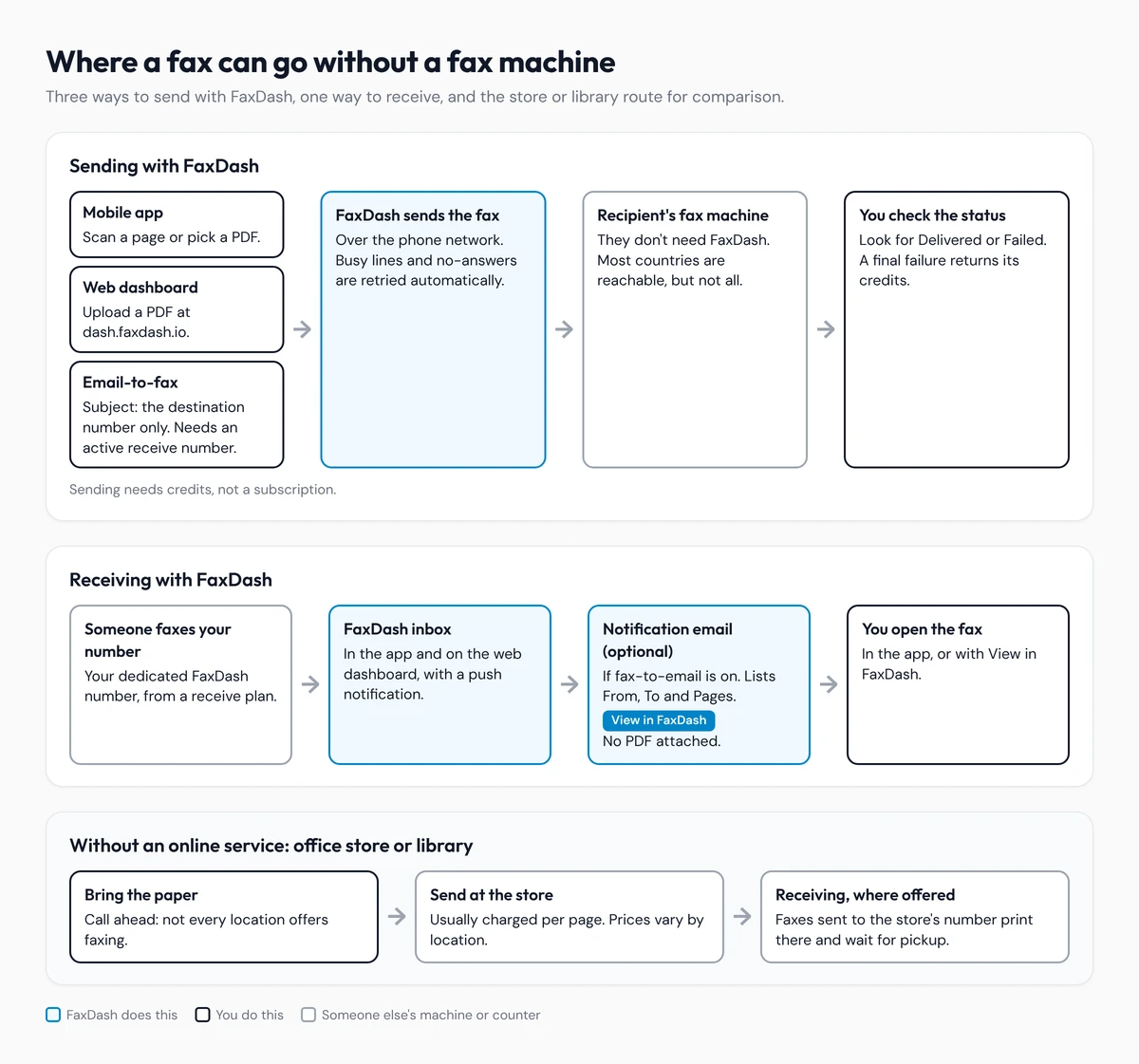
FaxDash covers all three sending routes. The mobile app scans and sends, the web dashboard at dash.faxdash.io uploads and sends, and email-to-fax sends a PDF from the email address on your account. Sending doesn't need a subscription. Receiving needs a paid plan with a dedicated number.
The steps below use FaxDash as the example, but the same checks apply to most online services.
Step 1: Decide whether you need to send, receive or both
Start with the reply question. If you're sending a form and the other side will answer by email or phone, you only need to send. If they'll fax something back, you need a number they can reach.
With FaxDash, sending runs on credits. A page to a +1 number (the US, Canada and the Caribbean) uses one credit, and a page to anywhere else uses two. FaxDash offers 2 free pages when you sign up. After that, credit packs start at 5 pages for $0.99, and the per-page rate falls on larger packs, up to 150 pages for $9.99. Purchased credits don't expire.
Receiving needs a receive plan with a dedicated fax number. Plans start at $3.99 a month. Every receive plan also includes monthly send credits, so a plan covers some sending as well as receiving.
Step 2: Check the destination number
Get the fax number from a trusted source, such as the recipient's letterhead, website or a phone call. A number copied from an old email thread may be out of date.
For an international fax, enter the full number with + and the country code, and leave off the national trunk prefix. For example, use +44 20 3988 3922 rather than +44 020 3988 3922. Our guide to sending an international fax covers the format and the credit cost.
FaxDash sends to fax numbers in most countries, but not every one. Sixteen destinations aren't supported, including Ecuador and Kosovo. Another 55, such as Jamaica, the Bahamas and Qatar, can be faxed only after you've made a purchase, such as a credit pack or a plan, because the free pages from sign-up don't cover them. If you try one of those on the free pages, FaxDash stops the fax before it's sent and nothing is charged.
Step 3: Send from the app, the web dashboard or email
Pick the route that matches where your document is:
- Paper in hand: in the mobile app, scan the page with your camera, enter the destination number and send.
- PDF on your computer: sign in at dash.faxdash.io, upload the PDF, enter the number and send.
- Already in your email: if you have an active FaxDash receive number, email the PDF from your account's email address to your-fax-number@fax.faxdash.io. Here, "your-fax-number" means your FaxDash number, not the recipient's.
For the full steps on each route, see how to fax from a computer, phone or email, or how to fax from your phone for the app.
For email-to-fax, the subject line holds only the destination fax number. An international number has to start the subject, so a reply-style subject such as "Re: +44 20 7946 0123" won't go through. Every digit in the subject is read as part of the number, so leave out dates and invoice numbers.
Before you send, open the file once more. Check that every page is there, the signature is visible and the scan is readable.
Step 4: Set up a number if you need to receive
When you choose a receive plan, you pick a dedicated local or toll-free number. Faxes sent to it land in your FaxDash inbox, in the app and on the web dashboard, and your phone gets a push notification.
You also get an email for each new fax by default. The email lists who sent it, when it arrived and a link to open it in FaxDash; the fax itself isn't attached. Turn that email off in Settings if you don't want it. The View in FaxDash button opens the document. Replying to that email won't send a fax. If you need help, contact support@faxdash.io.
FaxDash numbers are available in the United States, Canada, the United Kingdom, Germany, France, the Netherlands, Sweden, Australia and Israel. Australia and Israel need the Premium Fax Number add-on, and toll-free numbers are US and Canada only. You can still send to most other countries from any FaxDash number.
If more than one person needs to fax, teams come only with the Business plan, at $12.99 a month. It covers the owner plus 2 people, and extra seats are $2.99 a month each. The owner or an admin invites members from the web dashboard at dash.faxdash.io, and members can then send and receive faxes from the app or the web. Someone with the finance role can see the team's faxes and billing but can't send.
Step 5: Check for Delivered or Failed
A sent fax isn't finished until you see its final status. In FaxDash, check for Delivered or Failed.
If the line is busy or doesn't answer, FaxDash retries automatically, so give it a few minutes before you resend anything. A wrong or invalid number won't be retried. If a fax ends as Failed, its credits go back to your balance automatically. Confirm the number with the recipient, then send it once more.
Delivered is a status in FaxDash, not a promise that someone opened the pages. For a real deadline, a quick call or email to confirm receipt is worth the minute. See how to confirm a fax was received.
The honest catch
An online service isn't automatically the better choice. For one page, once a year, a nearby store or library may be the simplest route, with no account to set up. The trade is a trip, a per-page fee set by the location and, for receiving, pages that sit at the counter until you collect them.
Online sending is pay-as-you-go, but receiving is a monthly cost. If nobody faxes you, you don't need a number. If replies come in every week, a plan usually costs less effort than repeated trips. And because FaxDash can't reach every destination, check the country first if you're faxing abroad. To compare receiving numbers by monthly price, see online fax with a real receiving number.
How online fax services compare
If you need to send without a machine and keep a number for replies, the shape of the bill matters as much as the features. Here's a short look at two well-known online fax services next to FaxDash's pay-as-you-go send plus receive plan. Plan pages change; figures below were checked Oct 26, 2026.
| Service | How you send and receive | Cost shape (as of Oct 26, 2026) |
|---|---|---|
| FaxDash | App, web dashboard, email-to-fax; dedicated number on a receive plan | Send with credit packs (no subscription required). Receive plans from $3.99/mo, with monthly send credits included. |
| MetroFax | Fax from email, desktop or mobile; dedicated local or toll-free number on plans | Monthly plans with included pages; homepage lists additional pages at $0.03. Exact plan dollar amounts weren't clearly listed on the public pricing page when checked. |
| RingCentral Fax (Fax 3000) | Web, desktop, mobile and email; local number included | Fax-only package: $22.99/user/mo billed annually ($27.99 month-to-month), 3,000 pages/user/mo, overages 4.9¢/page. Larger RingCentral Advanced phone suites also include internet fax; Fax 3000 is the fax-only compare. |
Sources checked Oct 26, 2026 (America/Los_Angeles): MetroFax pricing, MetroFax homepage, RingCentral Fax how it works, plus FaxDash Help and homepage for FaxDash figures.
Your next step
Decide whether you need replies by fax. If you only need to send, compare the cost of one trip with a small credit pack. If you need a number, or a few people share the work, the FaxDash business page lays out the plans, team seats and email-to-fax in one place.