

Suppose a patient was rear-ended last month and is now coming in for adjustments. This week a fax arrives from their attorney's office asking for records and an itemized bill. Two days later the auto insurer's adjuster faxes a request of their own, and the attorney sends a letter of protection. Each of these needs to be matched to the right patient and the right case, answered once, and easy to find again when the case settles months from now.
The routine that holds up is a short loop: check the request and the paperwork behind it, log it against the case, build the package once, send it and keep the record, then confirm by phone when timing matters. This guide walks through that loop for a small chiropractic front desk.
This article is general information, not legal, tax or compliance advice. Agency rules and fax numbers change, so confirm with the agency or a qualified professional before you send.
Rules on records disclosure, letters of protection, liens and auto coverage vary by state and by case.
What personal-injury cases add to the fax queue
Depending on your state and the case, a personal-injury (PI) patient can bring a steady stream of paperwork:
- Records requests from the patient's attorney, the other side's attorney or an insurer.
- Signed authorizations that come with those requests.
- Letters of protection (LOPs) from the patient's attorney.
- Bill and balance requests, and later, reduction requests when a case is settling.
- Narrative report requests, when the attorney asks the doctor for a written summary.
Outbound, the office usually sends treatment notes for a date range, an itemized bill, imaging reports if any, and a narrative if the doctor has written one.
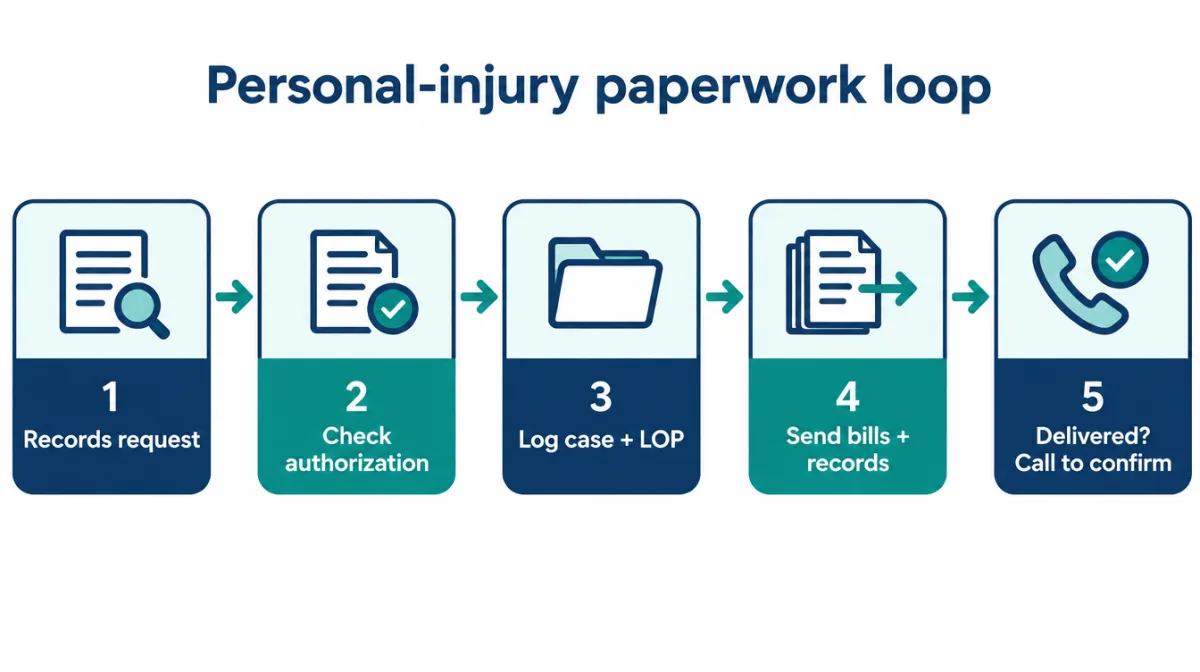
Step 1: Check the request before you send anything
Start with the paperwork behind the request, not the request itself. A records request from an attorney or insurer usually comes with an authorization the patient signed, a subpoena or a court order.
The HIPAA Privacy Rule at 45 CFR 164.508 lists core elements for a valid authorization, including a description of the information, who may receive it, the purpose, an expiration date or event, and the patient's signature and date. The same section lists defects, such as an expiration date that has passed or a missing core element, that make an authorization not valid. Read the section itself for the full list.
For a subpoena that comes without a court order, an HHS FAQ describes conditions under 45 CFR 164.512(e), such as written assurances from the requester, for a provider that isn't a party to the case. Ask your counsel how your office handles these.
For the front desk, the practical routine is:
- Find the authorization, subpoena or order that came with the request.
- Check it against your office's checklist: patient name, date of birth, what's requested, who it goes to, signature and date, expiration.
- Decide with your doctor or counsel what the front desk does when something looks missing, unclear or expired, and write that rule down.
Sources checked November 17, 2026: 45 CFR 164.508 on eCFR (up to date as of November 16, 2026) and HHS FAQ 711 (content last reviewed August 12, 2026).
Step 2: Log the request against a case
Every PI request should land in a log tied to a case, not just a patient. The same patient might have an attorney, an auto insurer and later a second attorney. Record:
- Patient ID (use your internal ID, not the full name, on shared sheets)
- Attorney or adjuster, with phone and fax numbers you've confirmed
- Claim or case number, and date of injury
- Date the request arrived, and what it asks for
- Authorization status (checked, missing, expired)
- Due date, if the requester gave one
If you work from a shared fax inbox, the inbox shows when each request arrived. The log adds what the inbox can't: which case it belongs to and what happens next.
Step 3: Build the package once
Pull the items the request asks for into one file, in the order the requester will read it.
- A cover sheet with the patient's case reference, the page count and your office's fax number for replies
- Treatment notes for the requested date range
- The itemized bill
- Imaging reports, if requested
- The narrative report, if the doctor has written one and it was requested
Check the final file page by page before you send: readable, upright, in order, and the page count you expect. A file can be up to 50 MB, measured after it is converted to fax quality, and up to 350 pages; a file over the limit is rejected automatically. The guide on preparing a document so it faxes cleanly has a short checklist.
Step 4: Send, confirm and keep the record
Send the package from the app, the web dashboard or by email. For email-to-fax, which needs a FaxDash receive number, send the PDF to your FaxDash number at fax.faxdash.io with only the destination fax number in the subject. The fax-to-email and email-to-fax workflow guide walks through it.
Then check the sent history for Delivered or Failed. Delivered means the transmission completed. It doesn't mean the attorney's office has the file in front of the right person. For anything time-sensitive, call the requester on a number you already have on file and confirm they received it. If a send fails, the guide on why a fax fails to connect covers what to check before you resend.
Write the date sent, the page count and the result in your log. Months later, when someone asks what was sent and when, that line and the sent history answer it.
Letters of protection and balances: keep them with the case
In plain terms, an LOP is usually a letter from the patient's attorney saying the provider's bill will be addressed from any settlement or judgment. What an LOP means, whether it's enforceable and how balances and reductions are handled vary by state. Don't interpret an LOP at the front desk.
What the front desk can do:
- File each LOP with the case, alongside the log.
- Note the attorney, the date received and any terms the doctor or office manager has flagged.
- Route balance and reduction requests to whoever in the office makes those decisions, and log the reply you send.
If you're unsure what an LOP commits your office to, ask your own attorney.
Auto insurers, PIP and MedPay
Some states use personal injury protection (PIP), and some auto policies include medical payments (MedPay) coverage. Whether either applies, what forms the insurer needs and what deadlines apply depend on the state and the policy. Follow the instructions on the insurer's own request, and confirm anything unclear with the adjuster by phone.
A copyable PI request log
| Received | Patient ID | Case / claim # | From (attorney or adjuster) | Request | Auth checked? | Due | Sent (date, pages) | Result | Follow-up |
|---|---|---|---|---|---|---|---|---|---|
| 11/03 | P-1042 | CL-55871 | Example Law (synthetic) | Notes 9/1 to 10/31, itemized bill | Yes | 11/14 | 11/05, 18 pp | Delivered | Called 11/06, confirmed |
The row above is a made-up example. Copy the headers into your spreadsheet or practice-management notes.
Where FaxDash fits, and where it doesn't
A dedicated fax number for attorney and insurer traffic keeps PI paperwork in one place. On a FaxDash team (team seats are on Standard and above), everyone shares one inbox and one sent history that shows who sent each fax. Business includes you + 2 team seats, so the front desk and billing can work the same inbox while each person signs in as themselves. Teams are managed in the web dashboard, and members can send and view faxes in the mobile app. For the full front-desk setup, see front-desk fax for small healthcare offices, without a landline.
Fax-to-email is on by default. Each new fax sends an email with who it's from and a link to open it in FaxDash. The fax itself isn't attached. You can turn the email off in Settings.
If your front desk works from paper, the FaxDash Connect app, which has no feature fee, can print each newly received fax at the desk. Run it on one computer, and put the printer where patients in the waiting area can't see the tray.
FaxDash creates AI summaries of received faxes, and AI analysis is on unless you turn it off. FaxDash's receiving help says accounts with a signed BAA start with it off and can turn it on, and that "Analysis runs on Amazon Bedrock, inside our AWS BAA." Without a BAA, you can turn it off in Settings yourself. Turning it off does not by itself make your fax workflow HIPAA compliant. A BAA is available on the Business plan only, requested through FaxDash support at support@faxdash.io or hipaa@faxdash.io. For the wider rules on faxing patient information, see faxing patient information in a small practice.
FaxDash doesn't check authorizations, track case deadlines or interpret LOPs. The log and your office's review do that.
How WestFax compares
Pricing models differ more than features for a small office. Checked November 22, 2026, on WestFax's pricing page:
| FaxDash | WestFax | |
|---|---|---|
| Sending | Pay-as-you-go credits that never expire | Included pages on a monthly plan |
| Entry plan with a number | Starter $3.99/mo (50 received pages, 10 send credits) | Solo $14.99/mo for 500 pages, 1 user license |
| Team option | Business $12.99/mo, you + 2 team seats | Team from $39.95/mo, 1,500 pages, 5 user licenses |
| Paper at the desk | Connect app auto-prints, no feature fee | AutoPrint on Enterprise only (not Solo or Team) |
Whichever service you use, check the agreement and settings it requires before faxing patient records. Prices can change, so check before you buy.
The honest catch
The hard part of PI paperwork isn't the fax. It's knowing whether a request is valid, which case it belongs to and what the office agreed to. A good log and a clear written office rule do more than any fax setup. If most of your attorneys already use a records portal, use it, and keep fax for the ones who don't.
FAQ
Can we fax records to an attorney as soon as the request arrives? Follow the office rule you set with your doctor or counsel. The routine above starts by finding and checking the authorization, subpoena or order that came with the request.
Is an LOP the same in every state? No. LOP rules vary by state. Ask your own attorney what one means for your office.
What does Delivered prove? That the transmission completed. It doesn't prove the right person has reviewed it, so call for anything time-sensitive.
Your next step
Copy the PI request log into your spreadsheet today and fill in the open cases first. To try sending a records package first, FaxDash offers 2 free pages when you sign up.