

Many payers still take prior authorization requests by fax, and many referrals still arrive that way. The fax itself is rarely what goes wrong. What goes wrong is the request nobody owns: sent on a Tuesday, never logged, and found again when the patient calls to ask why nothing has happened.
The short answer on deadlines: starting January 1, 2026, impacted payers such as Medicare Advantage and Medicaid plans must generally decide expedited prior authorization requests within 72 hours and standard ones within 7 calendar days, with drugs excluded.
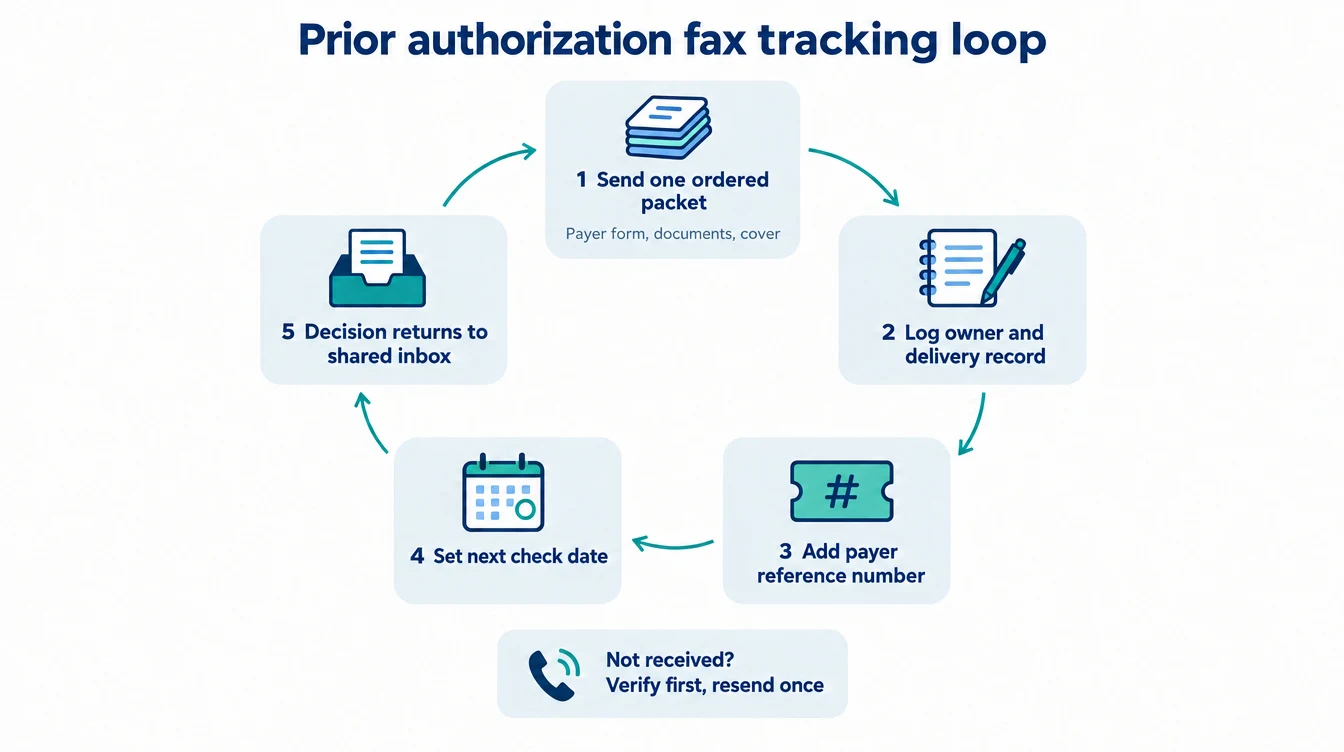
This guide treats fax as the channel and the tracking as the job. Every request gets an owner, a delivery record, the payer's reference number and a next check date. You can run it with any fax tool; FaxDash is the worked example where a product step matters.
Who this is for: the practice manager or front-desk lead at a practice with roughly 1 to 10 providers, handling inbound referrals and outbound prior authorization (PA) requests.
This is a workflow guide, not legal or compliance advice. Payer rules and forms change, so confirm each payer's current process on its own site. This guide builds on our front-desk fax setup hub for small healthcare offices, which covers the number, shared inbox and auto-print.
Fax is the channel; the workflow is the job
A prior authorization by fax has a simple mechanism. You send a packet to the payer's fax number. The payer makes a decision and sends it back by portal, fax, email, mail or phone. Between those two events, the request exists only in your records.
That is why the log matters more than the fax. A fax confirmation proves a transmission completed. It doesn't tell you who is waiting on the answer, when to chase it or what the payer called it.
One more point before the steps. CMS is moving prior authorization toward electronic exchange: its CMS-0057-F final rule requires impacted payers to build a Prior Authorization API, with that requirement beginning January 1, 2027. Where a payer already offers a portal or electronic submission, that route may be the better one for that payer. Use fax where fax is what the payer accepts, and run the same tracking either way.
Inbound referrals: intake, match, route
Referrals arrive in the shared inbox like any other fax. The intake routine has three steps.
- Intake. Note who sent it, when it arrived and the page count. In FaxDash, the email notice and the inbox show the sender's number, arrival time and pages, and FaxDash Connect can print it with a sender and time stamp on each page.
- Match. Match the referral to the right patient using more than one detail, such as name and date of birth, before it goes anywhere near a chart.
- Route. Send it to whoever schedules or reviews referrals, and log it.
When records are missing. If the referral is incomplete, request the missing records from the referring office using a fax number you have already confirmed, and log the request with a next check date. An incomplete referral with no follow-up date is how a patient waits weeks for a call.
Outbound prior auth: one ordered packet
A clean packet is one fax, in the order the payer expects, going to the number the payer lists today.
- The payer's own form and fax number. Take both from the payer's current form or website, not from an old cover sheet or a sticky note. Numbers and forms change.
- Supporting documents in order. Put them in the order the payer's form asks for, and count the pages before you send. A file can be up to 50 MB, measured after it is converted to fax quality, and up to 350 pages; a file over the limit is rejected automatically.
- The payer's cover sheet, if it has one. If it doesn't, FaxDash's built-in cover page adds your name and number, the recipient, a subject and a short message. A cover page has no feature fee but uses 1 send credit, because it counts as a page.
- Your return fax number on the request. Put the practice's receiving number on the request so the decision comes back to the shared inbox someone watches, not to a provider's personal line.
- One send, not three. Splitting a packet across several faxes makes it easier for pages to be filed separately.
If a page is on paper, the FaxDash phone app's camera scan finds the page edges, straightens the page and cleans up shadows and contrast before you send. That enhancement is part of the phone camera scan. For other files, see how to prepare a document so it faxes cleanly.
Log it: owner, delivery record, reference number, next check date
Here is a log you can copy into a spreadsheet or a front-desk binder. Keep it wherever your practice keeps other records that identify patients, with the same access rules.
| Field | What to write |
|---|---|
| Request ID | Your own running number, e.g. PA-0142 |
| Patient | As your practice identifies patients in its records |
| Payer and plan type | Including whether it is Medicare Advantage, Medicaid or CHIP, or another plan |
| Item or service | What is being requested |
| Urgency | Standard or expedited, as submitted |
| Owner | One named person |
| Sent | Date and time, number of pages, fax number used |
| Delivery record | Final status (Delivered or Failed) and where the confirmation is saved |
| Payer reference number | From the payer's portal, phone call or response |
| Next check date | Set it when you send, not later |
| Decision | Approved (with end date), denied (with reason) or more information requested |
| Decision received | Date, and how it arrived |
Synthetic example row: PA-0142 · patient as recorded in the chart · Medicare Advantage plan · knee MRI · standard · owner: front desk lead · sent Mon 9:40 AM, 6 pages · Delivered, confirmation saved to the request folder · reference number pending · next check Thu · decision blank.
In FaxDash, the delivery record comes from the sent history: when a fax shows Delivered, you can download a confirmation listing the destination number, page count, and when the fax was sent and completed. On a team, the sent history also shows who sent each fax, which fills the Owner column when someone forgets.
Setting the next check date. Use the decision clock below. For a standard request to an impacted payer, a check partway through the seven calendar days catches a missing fax while there is still time to resend. For an expedited request, check the same day.
The decision clock
The deadlines below come from CMS's CMS-0057-F final rule and the Medicare Advantage regulations on eCFR. They apply to these impacted payers: Medicare Advantage organizations, Medicaid and CHIP fee-for-service programs, Medicaid managed care plans and CHIP managed care entities. Qualified Health Plan issuers on the Federally-Facilitated Exchanges are excluded from these timeframes.
| Request type | Decision deadline for impacted payers | Starting (generally) |
|---|---|---|
| Expedited (urgent) | 72 hours | January 1, 2026 |
| Standard (non-urgent) | 7 calendar days | January 1, 2026 |
What else the CMS fact sheet says:
- Drugs are excluded. These policies don't apply to prior authorization decisions for drugs.
- Denial reasons apply whatever the channel. Impacted payers must give a specific reason for a denial regardless of the method used to send the request, and decisions may come back by portal, fax, email, mail or phone.
For Medicare Advantage specifically, eCFR shows the mechanics. The 7-calendar-day standard timeframe runs from receiving the request, for items and services subject to the prior authorization rules, beginning January 1, 2026 (42 CFR 422.568). The expedited timeframe is 72 hours after receiving the request (42 CFR 422.572). In both cases, an MA organization may extend the timeframe by up to 14 calendar days in listed circumstances, such as when the enrollee asks or more medical evidence is needed from a noncontract provider, and must notify the enrollee in writing.
Two practical consequences for the log:
- "After receiving the request" is why the delivery record matters. Your Delivered confirmation is your record of when the transmission completed. Whether that is when the payer considers the request received is the payer's call, so log the payer's reference number as soon as you have it.
- For plans outside this list, CMS-0057-F doesn't set the clock. Check that payer's own published timeframe and write it in the log.
When the payer says "not received"
Delivered and processed are different events. Delivered means the call finished and the pages went through. Processed means someone at the payer matched them to a request. A "not received" answer usually sits between the two.
- Check the final status first. FaxDash retries automatically when a failure looks temporary, such as a busy line, and tells you when retrying rarely helps. A fax marked Failed gets its credits back automatically. If it failed, check that the number is a fax line and resend.
- If it shows Delivered, have the confirmation ready: destination number, page count, and when it was sent and completed.
- Call the payer on a number you already trust. Give the date and time, confirm the fax number you used, and ask for a reference number.
- Resend once, if they ask. Mark the cover page as a resend with the original send date, and log the second send as its own line.
- Don't resend on a guess. Two copies of the same packet may be logged as two separate requests.
For failed sends, see why a fax fails to connect.
Safeguards for faxing patient information
HHS says covered providers may share protected health information for treatment by fax without patient authorization, as long as they use reasonable safeguards. HHS's examples are confirming a fax number you don't use regularly with the intended recipient, and pre-programming frequently used numbers to avoid misdirecting the information.
For this workflow, that means:
- Confirm each payer's and referring office's fax number once, then save it as a contact so staff pick it instead of retyping it.
- Read the destination on screen before every send.
- Put the receiving printer, if you use one, where the waiting room can't see it.
Our guide to faxing patient information in a small practice covers the HHS rules in depth, including what to do when a fax goes to the wrong place.
Why to turn AI analysis off for patient data
Keep AI analysis off for patient data. AI analysis is on by default for accounts without a signed BAA, and it would summarize and extract details from exactly the faxes this workflow handles: referrals and payer decisions.
Turn it off in Settings before patient faxes arrive: in the web dashboard, open Settings → General and switch off the AI analysis setting, or turn off Summarize received faxes with AI in the app. New faxes then arrive without a summary, category or extracted details, which means the log above is filled in by a person reading the original page.
If your practice needs a BAA, FaxDash signs one on the Business plan only. To request one, email FaxDash support at support@faxdash.io. Accounts with a signed BAA start with AI analysis off and can turn it on; analysis runs on Amazon Bedrock, inside FaxDash's AWS BAA. Turning AI analysis off is not by itself a HIPAA compliance guarantee.
For how AI summaries work on non-patient paperwork, see AI fax summaries: triage without blind trust.
How this compares with Doximity DocFax and Sfax
Both come up when clinicians and practices look for ways to send prior authorizations by fax. Facts below are from each company's own page, checked October 29, 2026.
| FaxDash Business | Doximity DocFax | Sfax Standard | |
|---|---|---|---|
| Who can sign up | Open signup; teams on Standard and above | U.S. licensed physicians, nurse practitioners, physician assistants and pharmacists | No eligibility limit listed |
| People | You + 2 team seats, $2.99/extra seat | For eligible individual clinicians | Unlimited users |
| Shared office inbox | Yes, with sent history showing who sent each fax | Not described on the page | Not described on the plan list |
| Cover pages | Built-in, no feature fee (uses 1 send credit) | Built-in, customizable | Custom cover pages listed |
Where they win: DocFax is built for eligible clinicians and lists prior auths among its use cases. Sfax includes unlimited users on its entry plan. Sfax lists "BAA Available" on its Plus plan and above but not on Standard; Doximity's DocFax page doesn't describe a BAA, so ask Doximity before patient documents go through it.
Where FaxDash fits: a front desk that needs one shared inbox, a named sender on every fax and a downloadable delivery confirmation for the log, at a low monthly price.
FAQ
What are the prior authorization decision deadlines? For impacted payers under CMS-0057-F, starting January 1, 2026: 72 hours for expedited requests and 7 calendar days for standard requests. Drugs and QHP issuers on the Federally-Facilitated Exchanges are excluded. Medicare Advantage organizations may extend by up to 14 calendar days in listed circumstances.
Do the deadlines apply if we fax the request? The CMS fact sheet says the denial-reason requirement applies regardless of the method used to send the request, and the Medicare Advantage timeframes on eCFR are counted from receiving the request and don't name a channel.
Is a Delivered status proof the payer has the request? It is proof the transmission completed. Log the payer's reference number to confirm they have matched it to a request.
Should AI summaries read our PA decisions? No. Turn AI analysis off before patient faxes arrive; it is on by default for accounts without a signed BAA.
Where should payer decisions come back to? To the practice's shared receiving number, so the inbox someone watches gets them.
The decision rule
Copy the PA log into your front-desk binder or spreadsheet today, and fill in the Owner and Next check date columns for every open request. If any open request has no owner, assign one before you send anything new. If any has no reference number past its next check date, call the payer.
If several people share this work, the FaxDash Business plan (you + 2 team seats) gives everyone one shared inbox and a sent history that shows who sent each fax.
Sources
Checked October 29, 2026:
- CMS, CMS Interoperability and Prior Authorization Final Rule (CMS-0057-F) fact sheet
- CMS, press release on the CMS-0057-F final rule
- eCFR, 42 CFR 422.568 and 42 CFR 422.572
- HHS, FAQ on sharing patient information for treatment by fax
- FaxDash Help: sending faxes, receiving faxes, teams and seats, scanning, signing and enhancing, and the HIPAA page
- Doximity DocFax and Sfax plans
This guide is general information, not legal or tax advice. Fax numbers, forms and agency rules change, so check the agency's official page before you send. FaxDash isn't responsible for decisions made or actions taken based on this guide. For advice about your situation, talk to a qualified tax professional or attorney.