
If a fax arrives with a short summary, a category and a few extracted amounts and dates, you can decide what to open first without reading every page. The useful question is how much reading that actually saves once you count the time needed to check the important details against the original.
Here is what FaxDash produces for a received fax, what each output is good for, where a person still needs to look at the page, and how to test it on your own samples.
This article is general information, not legal, tax or compliance advice. Agency rules and fax numbers change, so confirm with the agency or a qualified professional before you send.
What a summary can and cannot change in your fax intake
Every incoming fax creates two jobs. The first is triage: working out what the document is, how urgent it is and who should handle it. The second is the work itself: paying the invoice, signing the form, meeting the deadline.
An AI summary mostly helps with the first job. It can change the order in which you open documents. It does not, by itself, confirm what a document says or complete the task it asks for.
What the workflow produces for each received fax
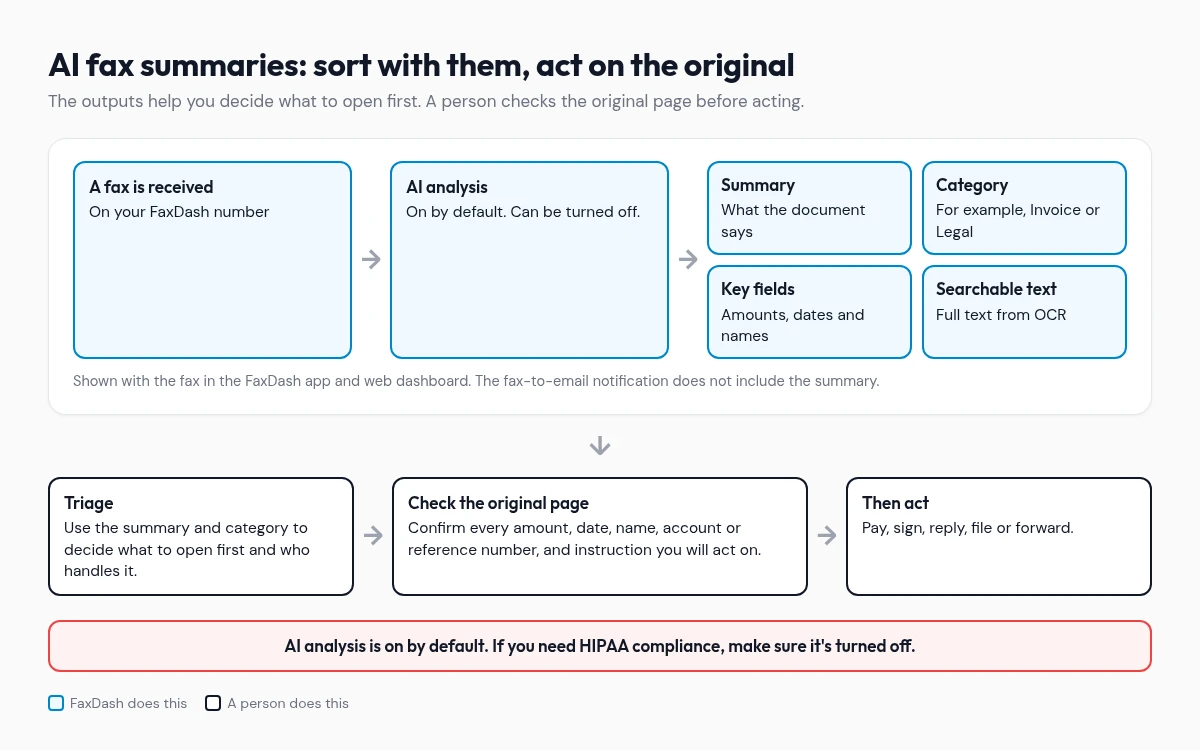
According to FaxDash's receiving guide, AI analysis of received faxes is on by default for accounts without a FaxDash BAA, and accounts with a signed BAA start with it off and can turn it on. Summaries are made for received faxes up to 10 pages; longer faxes arrive without one. When analysis runs on an eligible fax, you get four outputs:
- A plain-language summary of what the document says.
- A document category. FaxDash's pages name Medical, Legal, Invoice, Government and Financial, "and more". The full list is not published.
- Key data extracted from the page, such as amounts, dates and names.
- Full searchable text. This comes from OCR (optical character recognition), the step that turns the image of a faxed page into text you can search and copy.
The input is the received fax, which is an image of pages. The outputs sit alongside it in your in-app inbox. If you have connected Slack or Microsoft Teams through an incoming webhook, FaxDash's integrations help says the inbound-fax notice shows the sender, receiving number and page count, with an Open in FaxDash button. By default, it includes neither the fax itself nor its AI summary.
Fax-to-email works differently. You get an email notification when a fax arrives, then open FaxDash to review the document and any available AI summary. The notification lists who it is from, the number it was sent to, the page count and a sign-in link. It does not attach the fax PDF and does not include the AI summary. To see an available summary, open the fax in the FaxDash app or web dashboard. A Slack or Teams webhook notice provides a link to open FaxDash; it does not include the summary by default. See also receiving faxes.
The feature applies to faxes received on a dedicated number, so it needs an active receive plan. Sending faxes does not.
How FaxDash compares on summaries, extraction and review
If you're choosing an intake tool, compare the output you need. Here is what four services document, checked November 7, 2026. We make FaxDash; these are vendor descriptions, not an accuracy test.
| FaxDash | iFax | Documo IDP | eFax Clarity | |
|---|---|---|---|---|
| Plain-language summary | Automatic when analysis is enabled, for received faxes up to 10 pages | On-demand “Summarize with AI” action | Narrative summary not established in the reviewed pages | Narrative summary not established in the reviewed page |
| Searchable text | OCR text alongside the fax | OCR documented | OCR and searchable PDFs | Extraction documented; a standalone searchable-text view was not established |
| Structured fields | Amounts, dates and names | Data extraction documented | Configurable field extraction | Structured extraction and patient matching |
| Classification and routing | Document category in the inbox | Confirm the exact automation needed | Splitting, classification and routing | Classification and EHR delivery |
| Human review | Check the original before acting; no enforced review gate established | Enforced review gate not established | Confidence thresholds and human-in-the-loop review | Exception portal with confidence-based rules and optional sampled review |
| Plan or processing cost | Active receive plan required | Credits apply to AI chat, OCR and extraction; confirm summary eligibility and cost | IDP is a per-document add-on or bundle | Confirm Clarity pricing and scope separately from a fax plan |
Sources: FaxDash's receiving guide; iFax's dashboard help, AI features and credit update; Documo's IDP and pricing; eFax Clarity.
For patient records, review the signed BAA, AI processing, retention and connected systems for the exact service. FaxDash offers a BAA on the Business plan only, requested by emailing support@faxdash.io or hipaa@faxdash.io, and its receiving guide says accounts with a signed BAA start with analysis off. Documo says it signs BAAs for healthcare customers. A fax-plan BAA alone does not establish that every AI add-on or external integration is covered.
Our advice: Documo IDP or eFax Clarity may fit a practice that needs structured data routed into an EHR. iFax documents a summary you request on demand. FaxDash fits inbox triage of shorter received faxes. In every case, check consequential details against the original.
What each output is useful for
It helps to give each output a narrow job rather than treating the bundle as "the AI read it for me."
| Output | Useful for | Check before acting |
|---|---|---|
| Summary | Deciding which fax to open first | Whether it matches the document's actual request |
| Category | Sorting and routing to the right person | Documents that fit two categories, or none |
| Extracted fields | Finding the right spot on the page quickly | Every amount, date and name you will act on |
| Full text | Searching and copying later | Characters in a poor scan, and handwriting |
Each output points you toward the original document. None of them replaces it.
A hypothetical fax, traced from arrival to action
Hypothetical example. The document below is synthetic, and this article does not show real FaxDash output.
A two-page supplier invoice arrives on your fax number. Page one has an invoice date of the 3rd and a payment due date of the 30th. Someone at the supplier has crossed out the printed total and handwritten a lower figure beside it, with initials. Page two has the remittance details.
The category and summary suggest this is an invoice from a known supplier, so it goes into the "pay this week" pile instead of waiting behind unread pages. That is the triage gain.
Then the review step has a specific job. Open the original fax and confirm three things on the page:
- Which date is the due date. The invoice has two dates that look similar, and you need the right one.
- Which total applies. Here the page itself carries both a printed figure and a handwritten correction.
- Whether the remittance details match the supplier you already pay.
Whatever the extracted fields say, those three checks decide whether you pay the right amount on time. The summary got the document in front of you sooner. The original page tells you what to do with it.
What still needs review on the original page
A human checkpoint is only useful if it has a clear job. For received faxes, a reasonable rule is: before you pay, sign, reply, file or forward, confirm on the original page every amount, date, name, account or reference number, and instruction you are about to act on.
Some documents deserve a closer look. This list is an editorial inference about where any automated extraction needs extra checking, not a documented FaxDash limit or a test result:
- Poor scans, faint text or pages sent at an angle.
- Handwriting, including corrections and margin notes.
- Several unrelated documents sent as one fax.
- Fields that look alike, such as an invoice date and a due date.
- Documents that do not fit a familiar category.
Where received-fax content goes
FaxDash's Privacy Policy and receiving guide state the following:
- The receiving guide says, "Analysis runs on Amazon Bedrock, inside our AWS BAA." That analysis produces the summary and category and reads the content of each received fax when it runs.
- For accounts without a FaxDash BAA, the analysis is on by default and can be turned off in Settings. With it off, no fax content is sent for analysis.
- Accounts with a signed FaxDash BAA start with AI analysis off and can turn it on.
- Apart from this analysis, FaxDash does not send your data to an AI provider itself, "and we do not use your documents to train any model." That statement covers FaxDash itself. This article makes no claim about how the provider retains or uses content.
Turning AI analysis off is one control; it is not by itself a guarantee of HIPAA compliance. Confirm your obligations with whoever owns compliance for your practice. A BAA is available on the Business plan only. To request one, email support@faxdash.io or hipaa@faxdash.io. For a fuller treatment of fax safeguards in a small practice, see Faxing patient information in a small practice. This article is not compliance advice.
When the summary is worth relying on, and when manual reading wins
The summary is most useful as a sort key when:
- Several faxes arrive in a day and the order you handle them in matters.
- Most documents are routine and familiar, such as invoices, notices or forms you have seen before.
- A wrong first impression is cheap to correct, because someone reviews the original before acting anyway.
Reading every page yourself may be the better choice when:
- Volume is low, so there is little to sort.
- Most documents are high-stakes, where reading the original is unavoidable either way.
- You need HIPAA compliance. For accounts without a FaxDash BAA, AI analysis is on by default, so make sure it's turned off. Accounts with a signed FaxDash BAA start with it off. Turning it off is not by itself a compliance guarantee.
- Your documents should not go through AI analysis at all. In that case, turning the feature off is a reasonable decision, not a lost feature.
The conclusion changes with your evidence. If summaries match your originals on the documents you actually receive, lean on them more for sorting. If they often need correcting, review cost eats the triage gain.
A small test to run before you build a routine around it
Try the workflow on a small set of non-sensitive sample documents, such as a blank form, a test invoice with made-up figures and a public notice. Include at least one awkward example: a faint scan, a handwritten correction or two documents sent together.
For each fax, record:
- Whether the category and summary pointed you to the right next step.
- Which extracted fields you had to correct after checking the page.
- How long the review took, including the check against the original.
Then decide. If the outputs help you order the work and the corrections are rare and easy to spot, keep the summary as your first sort. If they mislead you on the cases that matter, keep reading originals first, or turn the feature off.
Next step
If your office receives faxes regularly and several people need to see and sort them, the FaxDash business page explains how a receive plan with a dedicated number and team seats fits that workflow. Check the details against your own volume before you choose a plan.
FaxDash offers 2 free pages when you sign up.