Fax from your phone.Pay 50% less.
Scan, enhance, sign, and send a fax in seconds — or receive on your own number. From $0.07 a page, no subscription required to send.
New — connect Claude or ChatGPT and send a fax by askingEncrypted in transit & at rest. HIPAA-ready, BAA available.



- HIPAA-ready, BAA available
- Encrypted in transit & at rest
- Works with Claude, ChatGPT & Grok
- Carrier-grade delivery
Send and receive faxes with FaxDash
FaxDash lets you send documents from your computer or phone without a fax machine. New accounts receive two free sending pages. After that, sending uses prepaid credits; a monthly subscription is not required to send.
Receiving faxes requires a paid plan with a dedicated fax number.
Want to use an AI assistant? FaxDash also offers an MCP connection that uses your FaxDash account and credits. See the connection guide for supported tools, permissions, and setup.
Point your camera. We do the rest.
FaxDash turns a phone photo into a crisp, fax-ready document — deskewed, denoised, and sharpened automatically before it's sent.
- 1
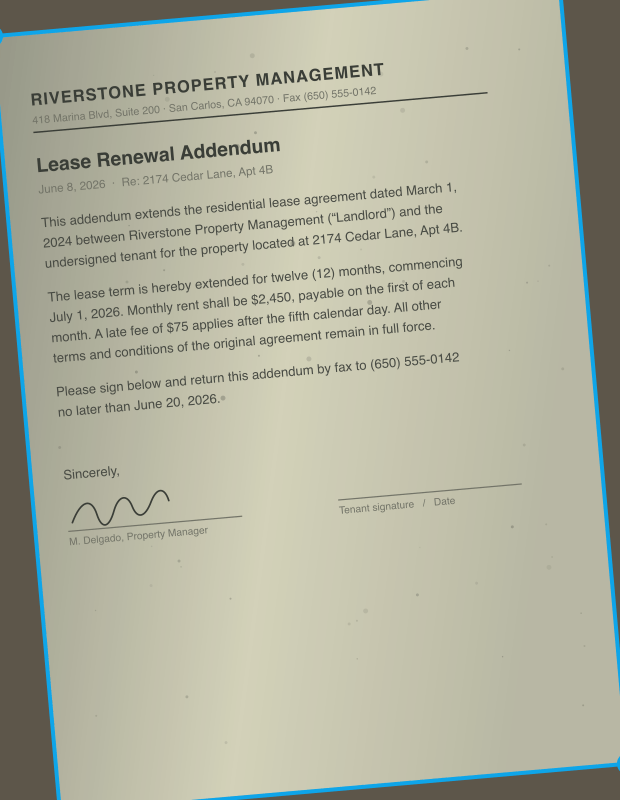
Edges, found.
Point your camera — the page is detected automatically.
- 2
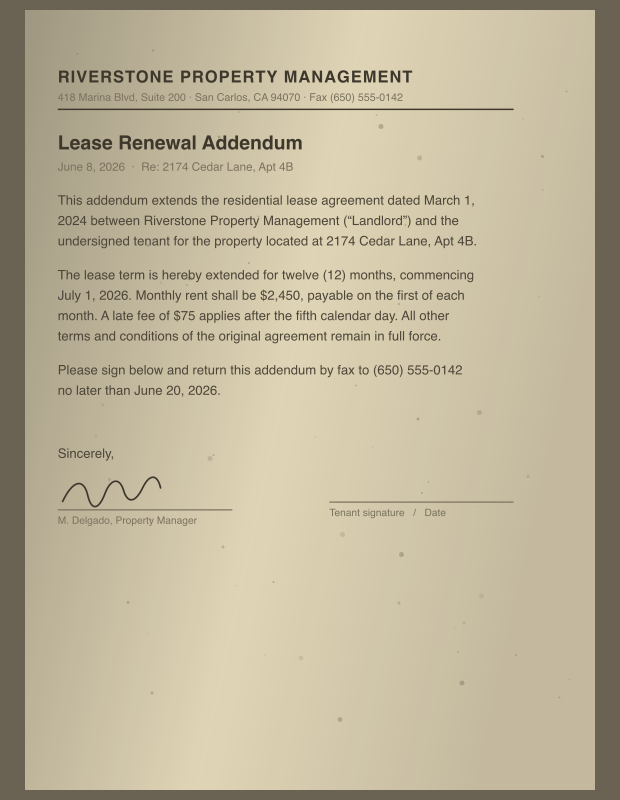
Skew, corrected.
Perspective and rotation are straightened out.
- 3
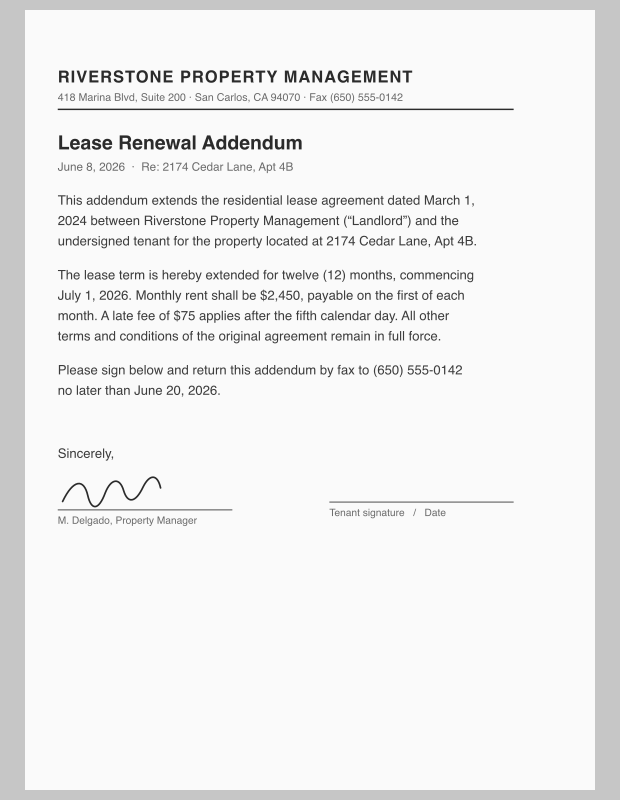
Noise, gone.
Shadows and color cast removed, contrast balanced.
- 4
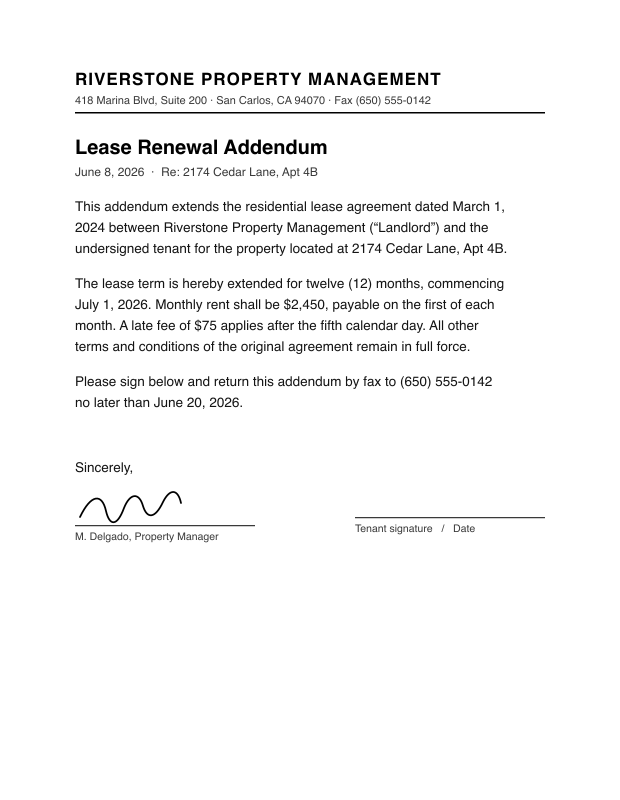
Signed.
Draw your signature once — placed right on the page.
- 5
Fax-ready.
Crisp output at 204×196 dpi — ready to send.


 1
1Edges, found.
Point your camera — the page is detected automatically.
 2
2Skew, corrected.
Perspective and rotation are straightened out.
 3
3Noise, gone.
Shadows and color cast removed, contrast balanced.
 4
4Signed.
Draw your signature once — placed right on the page.
- 5
Fax-ready.
Crisp output at 204×196 dpi — ready to send.
See it for yourself.
A skewed, shadowed phone photo on one side — the clean, fax-ready output on the other. Drag the handle to compare.


One document — from phone photo to fax-ready.
Sign it. Right on your phone.
Half of faxing is signing something and sending it back. Draw your signature, place it on the page, and send — no printer, no scanning it back in.
- Draw with your finger, place it anywhere on the page
- Works on scans, PDFs, and received faxes
- Included free — no per-signature fees
Your own fax number. In your pocket.
Receive faxes on a dedicated local or toll-free number. Every page lands in the app and in your email — with an AI summary, so you know what it says before you open it.
- Push notification the moment a fax arrives
- Forwarded to your email as a PDF
- AI summary, category, and searchable text
- Keep your existing number — port in free
Or skip the app entirely.
Compose an email, attach your PDF, and send it to the destination number at fax.faxdash.io. It arrives as a fax, with delivery confirmation back in your inbox. Works from Gmail, Outlook, Apple Mail — anywhere.
Know what your fax says. Before you open it.
Every received fax is analyzed automatically — summary, category, key fields, and full searchable text — so you can prioritize what matters without reading every page.
Instant summary
AI reads the document and gives you a plain-language overview in seconds.
Auto-classification
Tagged by category — Medical, Legal, Government, Financial, and more.
Key data extraction
Amounts, dates, and names pulled out automatically.
Full text OCR
Every fax becomes searchable, copyable text.
Send a fax by asking.
Connect FaxDash to Claude, ChatGPT, Grok or any assistant that speaks the Model Context Protocol, and faxing becomes something you ask for instead of something you do.
Your account, your credits
It signs in as you and spends from your balance — nothing separate to set up or pay for.
You approve each permission
Sending, history, and balance are granted one by one on a screen you see before anything connects.
It can't spend money
Buying credits hands you a checkout link to open yourself. No purchase happens without you.
Disconnect anytime
Remove the connector in your assistant and its access stops immediately.
Small app. Full fax machine.
Sign, watermark, batch-send, and archive — everything you need to send a fax from your phone, nothing you don't.
Crumpled paper in. Fax-ready out.
Deskewed, denoised, sharpened — automatically.
Keep your number. Bring it over free.
A guided port-in wizard moves your existing fax number in — no downtime, no porting fees, and your contacts never notice.
Any fax number, worldwide.
One credit a page to +1 numbers, two anywhere else.
CONFIDENTIAL, in one tap.
Watermarks are free here.
per page to send. No subscription. Pricing
One tap. Every recipient.
Batch the same document to a whole list.
Your team. One plan.
2 seats included on Business.
Shared credits, with a monthly page limit per member.
A vault. With receipts.
Immutable audit trail — who accessed what, and when.
A proper first page.
Built-in cover pages with your name and message.
Numbers, remembered.
Contacts for the places you fax every week.
Send a fax anywhere in the world.
Any fax number, in any country, straight from your phone. Pages outside the +1 region (US, Canada and the Caribbean) cost two credits each.
Pay for pages. Not for promises.
Pay per page to send. Subscribe only if you want a number to receive faxes. Credits never expire.
Sending abroad, and where you can get a number›
Sending works to any fax number in the world. Pages to a +1 number — the US, Canada and the Caribbean — cost one credit; everywhere else costs two credits per page. If a fax cannot be delivered, the credits go back to your account. Receiving needs a dedicated number, and those are available in the United States, Canada, the United Kingdom, Germany, France, the Netherlands, Sweden, Australia and Israel. Numbers in Australia and Israel need the Premium Fax Number add-on. Toll-free numbers are US and Canada only.
Receive plans — dedicated fax number included, to receive faxes in the app and by email
- 1 dedicated number
- Fax to email
- Push notifications
- 1 dedicated number
- Fax to email
- Push notifications
- Priority support
- 2 team seats included · +$2.99/seat/mo
- 1 dedicated number
- Fax to email
- Push notifications
- Priority support
- Document vault
Add extra dedicated numbers to any receive plan.
The math, since you asked.
| FaxDash | eFax | SnapFax | Fax.Plus | |
|---|---|---|---|---|
| Send price (per page) | From $0.07 | $0.10 | $0.20 | $0.10 |
| Receive plan (monthly) | From $3.99 | $16.99 | N/A | $8.99 |
| Team plan (monthly) | $12.99 · 2 seats | $39.99 · 5 users | N/A | $27.99 · 5 users |
| No subscription to send | Yes | No | Yes | No |
| Free credits on signup | Yes | No | No | No |
| Custom watermarks | Yes | No | No | No |
Built for the documents that matter.
Medical records, legal filings, insurance claims — FaxDash is HIPAA-ready for faxing protected health information, with the paperwork to prove it.
BAA, signed
We'll execute a Business Associate Agreement for covered entities and their vendors.
Encrypted, always
AES-256 at rest, TLS in transit — every page, every time.
Compliant rails
Built on AWS, under a BAA covering every account in our organization.
Audit trail
The Document Vault keeps an immutable record of who accessed what, and when.
Common questions
Can I send and receive faxes online for free?+
You can try sending with FaxDash’s free signup credits. Eligible new accounts receive two sending credits, with no card required. That covers two pages sent to a +1 fax number; destinations outside the +1 region use two credits per page. The signup offer does not include a free number for receiving faxes.
After using your free credits, buy a credit pack when you need to send again. Sending does not require a monthly subscription, and purchased credits do not expire. You can upload a PDF from your computer or scan a document with your phone.
To receive faxes, choose a paid plan with a dedicated fax number. Monthly receive plans start at $3.99. Incoming faxes appear in your inbox; you can also enable forwarding to your email.
How does pay-as-you-go work?+
Buy a credit pack once — credits never expire. Pages sent to a +1 number use one credit each; every other destination uses two credits per page. No subscription required to send faxes. You only subscribe if you need to receive.
Do I need a subscription to send faxes?+
No. You can send faxes with just a credit pack. Subscriptions are only needed if you want a dedicated fax number to receive incoming faxes.
How do I receive faxes?+
Subscribe to a receive plan to get a dedicated local or toll-free fax number. Incoming faxes are delivered to your app with push notifications and, when email forwarding is enabled, forwarded to your email as PDFs.
Can my team share one FaxDash account?+
Yes, without sharing a login. The Business plan ($12.99/month) includes 2 team seats, so you can invite 2 people, and each extra seat is $2.99 a month.
Everyone signs in with their own account; admins and members send from the team’s credits, and finance sees the team’s faxes, inbox, credits and billing, but doesn’t send faxes or manage members. The team shares one inbox and one sent history that shows who sent each fax, and admins can set a monthly page limit per member. You invite people and manage the team from the web dashboard.
What file formats can I fax?+
You can scan paper documents with your camera, or attach PDFs, JPEGs, and PNGs. Multi-page documents are merged automatically.
Is my data secure?+
Yes. Documents are encrypted in transit and at rest. The Document Vault provides an immutable audit trail so you always know who accessed what.
Can I send faxes internationally?+
Yes. You can send to a fax number in any country. Pages to a +1 number — the US, Canada and the Caribbean — cost one credit each; every other destination costs two credits per page. Enter the number in international format with the country code, and leave off the national trunk prefix: +44 20 3988 3922 rather than +44 020 3988 3922. If a fax cannot be delivered, the credits are returned to your account.
Which countries can I get a fax number in?+
Numbers for receiving faxes are available in the United States, Canada, the United Kingdom, Germany, France, the Netherlands, Sweden, Australia and Israel. Numbers in Australia and Israel need the Premium Fax Number add-on. Toll-free numbers are available in the United States and Canada. Sending is not limited this way — you can send to any country from a number in any of these.
What does the AI Summary do?+
Every received fax is automatically analyzed by AI. You get an instant plain-language summary, document category (Medical, Legal, Government, etc.), key data extraction (amounts, dates, names), and full searchable OCR text.
Do credits expire?+
No. Once you buy credits, they stay in your account until you use them.
Your next fax takes a minute.
2 free pages on signup. No card, and no subscription to send.