

Can a small medical or dental office still fax patient information? Under the HIPAA Privacy Rule, generally yes. The U.S. Department of Health and Human Services (HHS) says covered providers may share protected health information for treatment by fax without patient authorization, as long as they use reasonable safeguards. The practical questions are which safeguards, who on your team owns them, and what changes when the "fax machine" is really a cloud service.
Who this is for: an office manager, front-desk lead or owner at a practice with roughly 1 to 10 providers who sends referrals, records and payer paperwork by fax and wants to understand the rules before writing an office routine.
This is a plain-language teaching guide, not legal advice. HIPAA obligations depend on how your practice operates, and state law can add requirements. Confirm your policies with your compliance officer or legal advisor.
Turning AI analysis off is one control; it is not by itself a guarantee of HIPAA compliance. Confirm your obligations with whoever owns compliance for your practice. See FaxDash's HIPAA page and receiving guide.
What HHS actually says about faxing patient information
The starting point is an HHS FAQ that answers the question directly. It says the Privacy Rule "allows covered health care providers to share protected health information for treatment purposes without patient authorization, as long as they use reasonable safeguards when doing so," and that these communications may happen "by phone, fax, e-mail, or otherwise" (HHS FAQ). Its examples include a physician faxing a copy of a medical record to a specialist who intends to treat the patient.
A second HHS FAQ covers one office faxing another. It says covered entities "must have in place reasonable and appropriate administrative, technical, and physical safeguards" for information sent by fax, and gives two examples: the sender confirming that the number is correct for the other office, and placing the fax machine in a secure location (HHS FAQ). That FAQ points to the regulation behind it, 45 CFR 164.530(c), which requires a covered entity to "reasonably safeguard" protected health information from uses or disclosures that break the rule, and to limit incidental disclosures.
Stated plainly, HIPAA neither bans fax nor certifies it. It asks whether your practice applied reasonable safeguards to the way it actually sends and receives. The treatment FAQ names two that map onto a routine: for a number not regularly used, "first confirming the fax number with the intended recipient," and pre-programming "frequently used numbers" to avoid misdirecting information. The weight falls on your routine: who dials, who checks, where incoming pages land and who sees them.
One scope note. Under 45 CFR 164.502(b), most disclosures must be limited to "the minimum necessary to accomplish the intended purpose," but disclosures to a provider for treatment are an exception. A referral and a records packet for a payer may call for different checks on what goes into the fax.
When fax makes a practice a HIPAA covered entity
Most medical practices that bill insurance electronically are already HIPAA covered entities. CMS explains that providers "who submit HIPAA transactions, like claims, electronically are covered," and lists doctors, clinics, psychologists, dentists and chiropractors among them (CMS: Are You a Covered Entity?). CMS links a covered entity decision tool on the same page.
Dental offices sometimes ask whether fax changes their status. The American Dental Association says that "using a regular paper-to-paper fax to send or receive reimbursement information will not, by itself, make a dental practice a HIPAA covered entity," but that a practice "can become a HIPAA covered entity if it conducts a HIPAA standard transaction using a computerized or digital fax" (ADA). The ADA adds that safeguards are worth having even outside HIPAA, since state data security law can apply.
Decision rule: if your office conducts standard transactions such as claims or eligibility inquiries electronically, or switches those transactions to a computer or online fax, assume HIPAA applies and confirm with your advisor.
Paper fax and online fax are treated differently
HIPAA's definition of "electronic media" in 45 CFR 160.103 contains a sentence that explains why the format matters. Transmissions of paper "via facsimile" are not considered transmissions via electronic media "if the information being exchanged did not exist in electronic form immediately before the transmission."
In workflow terms, a paper page fed into a standalone fax machine sits outside that definition. A PDF on a computer or in a cloud account already exists in electronic form. Labeled inference: for most online fax workflows, where documents are stored, uploaded and received as files, the information is electronic protected health information (ePHI), and the HIPAA Security Rule's safeguards for ePHI come into play alongside the Privacy Rule. Confirm how this applies to your setup with your compliance advisor.
The ADA makes a related practical point: when "electronically storing or transmitting sensitive information (e.g., via computer fax)," choose an encryption method that renders the information "secure" under the HIPAA Breach Notification Rule.
The business associate question for online fax
When a cloud service stores or processes ePHI for your practice, HHS generally treats it as a business associate. HHS's cloud guidance says that when a covered entity engages a cloud service provider "to create, receive, maintain, or transmit ePHI (such as to process and/or store ePHI), on its behalf, the CSP is a business associate under HIPAA," and that the parties "must enter into a HIPAA-compliant business associate agreement (BAA)" (HHS cloud computing guidance).
The guidance also addresses the "conduit" idea, that a service only passes information along like a postal carrier. HHS says the conduit exception "is limited to transmission-only services" with only temporary storage. A provider that also stores documents "is still a business associate with respect to such transmission." Labeled inference: an online fax service that keeps your faxes in an account is storing them, so the conduit argument is a weak basis for skipping a BAA.
HHS states the consequence: maintaining ePHI with a cloud provider without first executing a BAA puts the covered entity "in violation of the HIPAA Rules." It also says "OCR does not endorse, certify, or recommend specific technology or products." No fax product makes a practice compliant on its own; the BAA, your risk analysis and your routine have to line up.
Decision rule: before any patient document goes through an online fax service, confirm that a signed BAA is in place for the specific features you will use, and record it with your other vendor agreements.
A pre-send routine for patient documents
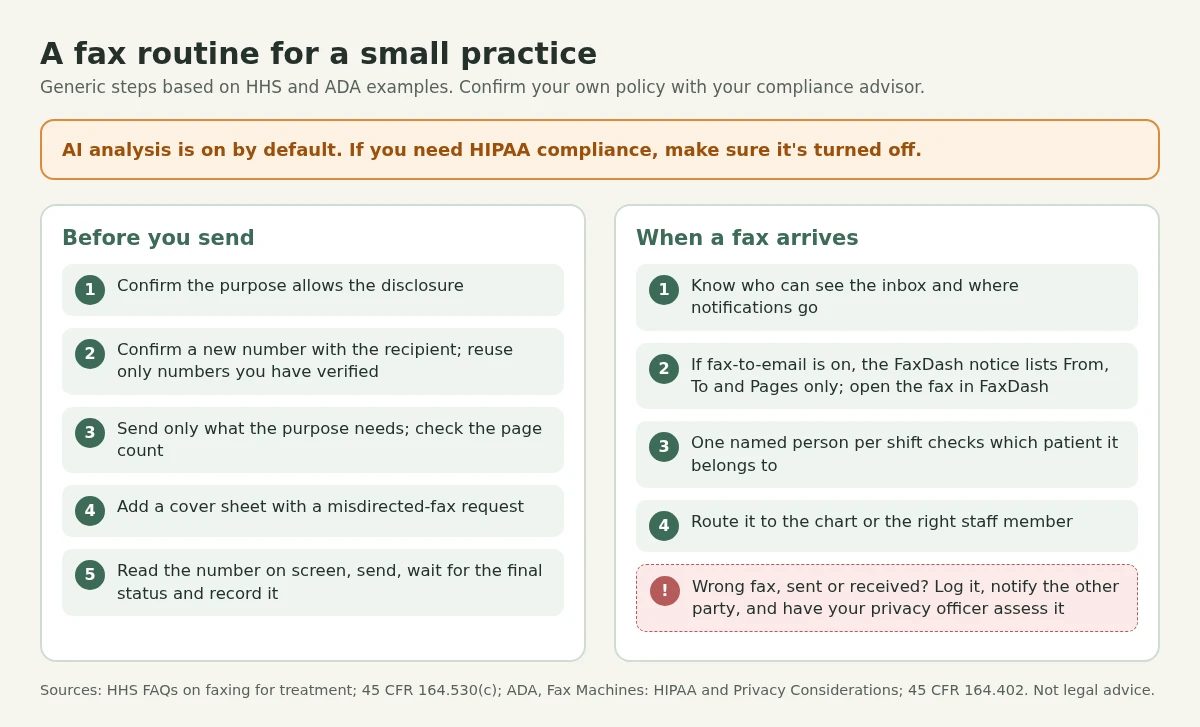
These steps turn the HHS and ADA examples into a front-desk routine.
- Confirm you are allowed to send it. Treatment disclosures to another provider are permitted without authorization. For other purposes, such as some requests from non-providers, check your policy first.
- Confirm the number. For a number you do not use regularly, confirm it with the intended recipient before sending, as HHS suggests. The ADA adds options such as calling to confirm or sending a test fax asking the recipient to confirm their identity.
- Reuse verified numbers for regular recipients. HHS mentions pre-programming frequently used numbers. The same idea applies to any fax tool: keep a list of numbers you have verified once, and re-verify when a recipient tells you their number changed.
- Send only what the purpose needs. For non-treatment disclosures, apply minimum necessary. Count the pages before sending and remove anything that does not belong in this packet.
- Add a cover sheet. The ADA suggests a cover sheet stating that the information may be confidential and asking anyone who receives it by mistake to destroy it and notify you. It is a courtesy and a prompt, not a fix for a wrong number.
- Avoid redial for sensitive sends. The ADA suggests prohibiting redial unless the sender is certain no one else used the machine since their last transmission. With online fax, the equivalent check is to read the destination number on screen before you send, rather than reusing the last one.
- Check the result and keep the record. Wait for a final status. A completed transmission tells you the call finished, not that the right person read it. For time-sensitive records, follow up with the recipient through a number you already trust.
Hypothetical example: a two-provider dental office refers a patient to an oral surgeon whose office it has never faxed before. The front desk lead calls the surgeon's office using the number on its website, confirms the fax number, adds it to the office's list of verified numbers, attaches the referral letter and recent X-ray report, checks the page count, sends with a cover sheet and notes the final status in the patient's referral log. Each step has a single owner, and each leaves a trace someone can check later.
A receiving routine that limits who sees what
HHS's second example, placing the fax machine in a secure location, is about incoming pages sitting where anyone can read them. The ADA makes the same point: place the machine "in a secure location to protect against unauthorized access to information on incoming faxes."
With online fax, the "location" is the account and every place it forwards to. FaxDash's receiving guide describes the inbox and notification path. Answer these for your routine:
- Who can see the inbox? List the people with access, and remove access when someone leaves.
- Where do notifications go? You get an email notification when a fax arrives, then open FaxDash to review the document and any available AI summary. The notice does not attach the PDF or include the AI summary. Check which mailboxes receive it.
- Who owns triage? Name one person per shift who checks new faxes, confirms which patient each belongs to and routes it to the chart or the right staff member.
- What happens to faxes that are not yours? If a fax arrives for another practice or the wrong patient, tell the sender and follow your policy for the pages.
Decision rule: if you cannot name who reads incoming faxes today, and where else copies or notifications go, write that down before changing tools.
When a fax goes to the wrong place
A misdirected fax is the failure the safeguards above are meant to prevent, so plan the response before it happens.
Under the Breach Notification Rule, a breach is generally an impermissible use or disclosure that compromises the security or privacy of protected health information. The definition in 45 CFR 164.402 says such a disclosure "is presumed to be a breach" unless the covered entity demonstrates "a low probability that the protected health information has been compromised" based on a risk assessment of at least four factors: the nature and extent of the information, the unauthorized person who received it, whether it was actually acquired or viewed, and the extent to which the risk has been mitigated. The rule also lists exceptions, including a good-faith belief that the unauthorized recipient "would not reasonably have been able to retain such information."
HHS's Breach Notification Rule overview explains the follow-on duties. Individual notices are due "without unreasonable delay and in no case later than 60 days following the discovery of a breach." For breaches affecting fewer than 500 individuals, a covered entity may notify the Secretary annually, no later than 60 days after the end of the calendar year in which the breaches were discovered. Covered entities carry the burden of showing that notifications were made or were not required, so document either way.
The ADA adds that HIPAA-covered practices must track disclosures other than those for treatment, payment and health care operations, so they can provide an accounting of disclosures under 45 CFR 164.528. Logging misdirected faxes also shows which step in your routine failed.
A simple incident log for a misdirected fax could record:
- date and time sent, and who sent it
- intended recipient and the number actually used
- what was sent (document type and page count, not the content)
- how and when you learned of it
- who you contacted, and what the recipient said they did with the pages
- the risk assessment outcome and who made it
- whether notification was made, and when
- what you changed in the routine afterward
Decision rule: treat every misdirected fax as an incident to assess and document, then let your privacy officer or advisor decide whether it is a reportable breach.
Misconceptions worth correcting
"Fax isn't allowed under HIPAA." HHS's own FAQs say fax is a permitted channel for treatment communications with reasonable safeguards.
"A confidentiality notice on the cover sheet makes it compliant." The ADA lists a cover sheet as one safeguard among several. It does not undo a wrong number.
"Encryption means no BAA is needed." HHS's cloud guidance says a cloud provider that stores ePHI is a business associate "even if it does not hold a decryption key."
Where FaxDash fits
FaxDash is an online fax service, so it sits on the computer-fax side of the paper-versus-electronic line above. These documented features map onto the routine in this guide:
- Retries and refunds. A fax shows as Failed only after its final retry, and failed faxes have their credits returned automatically. Wait for that final status before you record the result. See sending faxes.
- Fax-to-email notices without the document. You get an email notification when a fax arrives, then open FaxDash to review the document and any available AI summary. The notice lists From, To and Pages with a sign-in link. It does not attach the PDF and does not include the AI summary (receiving faxes).
- A healthcare cover sheet. For outgoing patient faxes, our free healthcare fax cover sheet carries a HIPAA confidentiality notice and a place for your practice name. A cover sheet does not make a fax secure on its own; sending to a verified number still matters most. Substance use disorder programs covered by 42 CFR Part 2 must add their own required redisclosure statement.
- AI analysis and BAA. AI analysis is on by default for accounts without a FaxDash BAA, and you can turn it off in Settings. Accounts with a signed FaxDash BAA start with AI analysis off and can turn it on; analysis runs on Amazon Bedrock, inside FaxDash's AWS BAA. Turning AI off is not by itself a HIPAA compliance guarantee (HIPAA, Privacy Policy).
- Team seats on Standard and above. Teams come with the Standard and Business plans. Business includes you plus 2 seats; Standard starts with none, and each seat is $2.99 a month. Teams, members and roles are managed in the web dashboard at dash.faxdash.io, not in the mobile app. Members can still send, receive and view faxes in the app.
FaxDash signs a BAA on the Business plan only. To request one, email support@faxdash.io or hipaa@faxdash.io. For how summaries fit triage without replacing the original page, see AI fax summaries.
FaxDash, Sfax, Documo and eFax Corporate: BAA and proof of send
If you are comparing online fax services for patient documents, two questions matter most for the routine in this guide: which plan comes with a signed BAA, and what record you can show later of what was sent and to whom. This table summarizes what each company's public pages said when we checked them on November 5, 2026. Plans and terms change, so confirm the current details with each company before you sign.
| FaxDash | Sfax | Documo | eFax Corporate | |
|---|---|---|---|---|
| Which plan gets a BAA | Business plan only | Its pricing lists "BAA Available" on the Plus, Contender and Enterprise plans | Says all plans are HIPAA compliant and that it signs a BAA for healthcare customers | Its HIPAA page lists a BAA on the Business and Corporate plans, not Personal |
| Audit trail and proof of send | Each fax shows a final status in your history, and a delivered fax has a downloadable receipt with the destination number, page count, and when it was sent and completed. Business adds a document vault with an audit trail | Lists detailed logging and audit trails for every transaction, plus delivery confirmations | Lists detailed audit trails and controlled access | Lists complete audit trails and says all products in its HIPAA suite include audit trail capabilities |
| People on one account | Team seats on Standard and above. Business includes you plus 2 seats; extra seats are $2.99 a month | Lists unlimited users on its plans | 1, 10 or 50 users by plan, with additional users priced on its site | eFax Business lists 5 user licenses; Corporate plans are customized |
| Healthcare extras it lists | AI analysis starts off on accounts with a signed FaxDash BAA, and they can turn it on | EHR use alongside or inside many EHRs, and a fax API on higher plans | EHR integrations, Direct Secure Messaging and AI document processing as plan options or add-ons | HITRUST certification, dedicated account management, an admin portal and a fax API |
| Price | Business is $12.99 a month | See their pricing page | See their pricing page | Custom quote; see their pricing page |
Where a healthcare-focused vendor may fit better. If your practice needs fax built into an EHR, Direct Secure Messaging, automatic classification of incoming documents, HITRUST certification or a dedicated account manager, Sfax, Documo and eFax Corporate list those on their sites, and they are worth a look. FaxDash fits a small office that wants one shared inbox, a downloadable receipt for each delivered fax and a BAA on the Business plan.
Whichever service you choose, the checks from earlier still apply: get the BAA signed before patient documents go through, and confirm which features it covers.
Verify with the official source
Rules and guidance change, and this guide quotes HHS, CMS, ADA and eCFR pages as checked in October 2026. Each source is linked where it is cited. Read the current version before you rely on any point, and confirm how it applies to your practice with your compliance or legal advisor.
FAQ
Does switching from a fax machine to online fax change anything? Usually yes. Documents that exist electronically before they are sent fall within HIPAA's definition of electronic media, so the Security Rule's ePHI safeguards and a BAA with the service become part of the picture. Confirm with your advisor.
A fax went to the wrong number. Is that automatically a breach? It is presumed to be a breach unless a documented risk assessment shows a low probability of compromise or an exception applies. Log it and involve your privacy officer.
Is FaxDash AI analysis on by default? AI analysis is on by default for accounts without a FaxDash BAA, and those accounts can turn it off. Accounts with a signed FaxDash BAA start with AI analysis off and can turn it on. Turning AI analysis off is not by itself a guarantee of HIPAA compliance.
The decision rule
Write your fax routine down before choosing or changing a tool. Name who confirms numbers, who reads incoming faxes, where notifications go and who handles a misdirected fax. Then check each tool against that routine: is a BAA in place for the features you will use, is AI analysis off when your compliance plan requires it (a FaxDash BAA account starts with it off), and can you show what was sent and to whom. If any answer is unclear, resolve it with your compliance advisor before patient documents go through.
If your office shares fax work across a front desk, billing and providers and needs a BAA, see the FaxDash Business plan.
This guide is general information, not legal or tax advice. Fax numbers, forms and agency rules change, so check the agency's official page before you send. FaxDash isn't responsible for decisions made or actions taken based on this guide. For advice about your situation, talk to a qualified tax professional or attorney.