
The short answer
If your fax failed to connect, wait for the final status before you send it again. Many failures are retried automatically while the fax is still in progress. A wrong or invalid number is not retried. After the status shows a final Failed, check the number, the destination country, the file and your credits, then resend once.
Start with the result for that specific fax, not with a second send. Temporary problems, such as a busy line, can still be on a retry. Fix the number only when Failed is final, then send once more. A failed connection is evidence of the result, not proof of a particular cause.
For the product rules on failures, retries and credits, see Sending faxes and Account troubleshooting.
Confirm the result for that specific fax
In your fax history, match the recipient number, page count and send time to find the right fax.
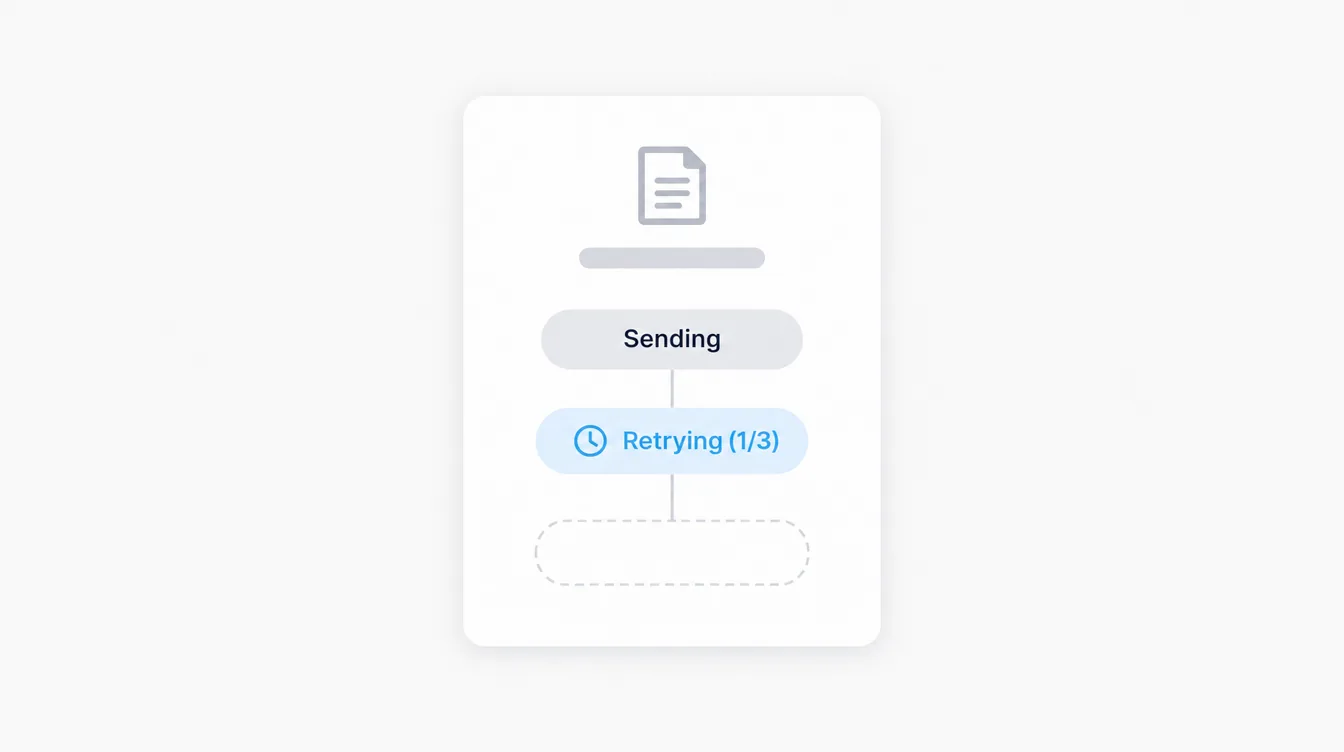
- Any status other than Delivered or Failed, such as Sending or Retrying: the fax is not finished. Do not resend.
- Failed: the final result after any automatic retries. The failure email and push notification say: "Any credits for this fax have been returned to your balance automatically."
- Delivered: the transmission completed. It does not establish that the intended person has read the document.
While a retry is pending, the mobile app shows Retrying with a count, for example Retrying (1/3). The web dashboard doesn't currently show Retrying, so check the app.
Record what you see before changing anything
Before you edit the number, swap the file or send again, write down:
- The recipient number exactly as you entered it.
- The status and where you saw it (app or dashboard).
- The date and time you sent it.
- The number of pages.
Support will need this record if the checks below do not explain the result.
What FaxDash does after a failed attempt
Whether FaxDash retries depends on the kind of failure:
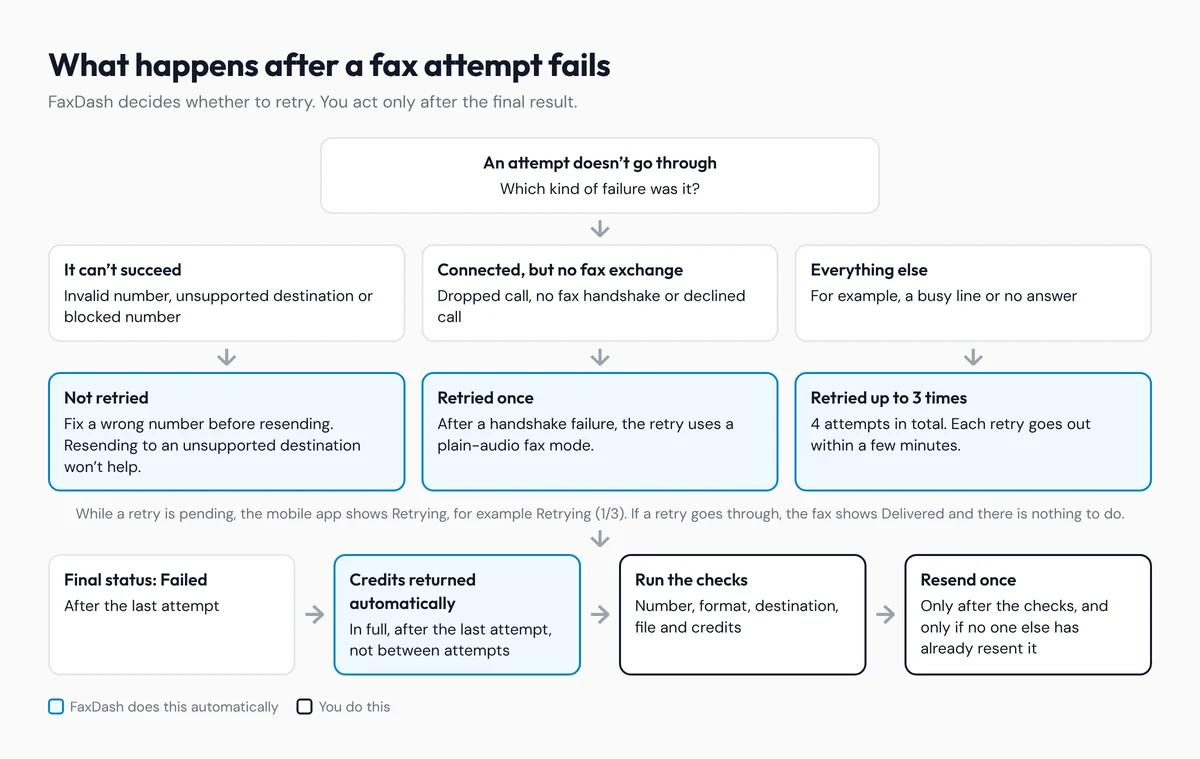
- Never retried: failures that cannot succeed on another try. These are an invalid number, an unsupported destination, and a blocked number.
- Retried once: the call was answered but not by a fax machine. This includes a dropped call, a call with no fax handshake and a declined call. After a handshake failure, the retry uses a plain-audio fax mode that more lines accept.
- Retried up to 3 times (4 attempts in total): everything else, such as a busy line or no answer.
Each automatic retry goes out within a few minutes. Credits are returned in full and automatically only after the last attempt fails. They are not returned between attempts. Failed shows only after the final retry.
Why a fax might fail to connect
A fax call starts with a short exchange of fax signals, called the handshake. If the receiving end never answers with those signals, the call cannot continue. Possible explanations, not confirmed causes:
- The number reaches a voice line, voicemail or phone menu.
- The receiving machine is off, disconnected or set to answer manually.
- The line is busy, or the call dropped.
- The receiving side declined the call.
- The number is incomplete or in the wrong format.
The final status confirms the result, not which of these applies.
Checks after a final Failed
Work through these in order, from checks that change nothing to a single resend. The Help Center covers many of the same checks in Sending faxes and Account troubleshooting.
- Confirm the status is a final Failed. Check the mobile app. If it shows Retrying, wait for the final result.
- Look for a later fax to the same number. If you're on a FaxDash Business team, check whether a teammate already resent it.
- Confirm the number is a fax line. The FaxDash Help Center lists a voice line as a first thing to rule out. If you are not sure, confirm the number with the recipient through a channel you already use, such as a known phone number or email.
- Check the number format. For an international fax, enter the number with the country code and leave off the national trunk prefix. For example, enter +44 20 3988 3922 rather than +44 020 3988 3922.
- Check whether FaxDash supports the destination. These 16 destinations are not supported: Antigua & Barbuda, Anguilla, Barbados, Dominica, Grenada, St Kitts & Nevis, St Lucia, Montserrat, Sint Maarten, Turks & Caicos, St Vincent & the Grenadines, British Virgin Islands, Ecuador, Kosovo, Ascension Island and Tristan da Cunha. A fax to one of them ends as Failed, is not retried, and its credits are refunded automatically. Resending will not help. If you are sending with free signup credits, some of them, such as Barbados and Ecuador, show an error before sending instead.
Some other international destinations, such as Jamaica, Qatar and Lithuania, need purchased credits. This is checked before sending, so it never appears as a failed fax. If you are using free signup credits, FaxDash shows: "Free credits cannot be used for this destination. Buy a credit pack or plan to fax it." No fax is created and nothing is charged. Any credit pack or paid plan lifts this block, but a free trial does not. Team members see "Ask your team's owner to buy credits" instead. In a batch, one such destination refuses the whole batch. If you are not sure whether your destination is covered, contact support@faxdash.io.
- Check the file. Make sure the document is not password-protected, which the Help Center names as a reason a fax can fail.
- Check your credit balance. Pages to a +1 number use one credit each, and other destinations use two credits per page. A +1 number is not automatically supported or covered by free signup credits, so see step 5 for those cases. Credits from the failed fax are returned automatically after its final attempt.
- Ask the recipient whether their machine is ready. If the number is correct, ask whether their fax machine is on, connected and set to answer automatically.
How FaxDash compares on retries and failed-send charges
Before switching services, check what “failed” means and whether the current job is still retrying. We make FaxDash. These are four providers' documented workflows, checked November 7, 2026, not a reliability test.
| Service | Retry and status handling | Failure billing or partial-send catch |
|---|---|---|
| FaxDash | Retries temporary failures automatically; wait for the final result in history | Credits return if every attempt fails. The reviewed help does not establish a separate partial-page resume policy |
| Fax.Plus | Configure up to three retries and the delay; optional partial-send resume continues from unsent pages | A connected call can consume credit even if no page arrives; partial sends can also be billed |
| iFax broadcast workflow | Documents configurable attempts and intervals, plus Sending, Delivered and Failed views | This source concerns broadcast faxing; ordinary-send retry limits and failure refunds were not established |
| FaxZero | An email confirmation link is described in its FAQ; queued faxes are tried five times before giving up. Retry intervals are not specified | Failed U.S./Canada premium faxes receive the full $3.29 back; failed international faxes receive a 90% refund |
Our advice: Fax.Plus is worth comparing if configurable retry timing or resuming a long interrupted packet matters. For FaxZero, check the confirmation email before treating silence as a failed transmission. With any provider, a partial send can leave the recipient with some pages, so confirm what arrived before manually sending a duplicate packet. Follow the FaxDash final-status checks above for a FaxDash job.
When a manual resend makes sense
A manual resend is reasonable when all of these are true:
- The fax shows a final Failed in the mobile app, not Retrying.
- No later fax to that number exists, from you or a teammate.
- You have confirmed or corrected the number.
- FaxDash supports the destination, the file opens without a password, and you have enough credits, purchased if your destination needs them.
Send once. FaxDash retries the new fax automatically as needed. Wait for its final status before doing anything else.
When to stop and contact support
Also stop and contact support if:
- The recipient confirms their machine is on and ready, and the fax still ends in Failed.
- You are not sure whether your destination is supported or needs purchased credits.
- The status does not match what you expected, or you cannot tell which fax it refers to.
Email support@faxdash.io. Do not reply to the notification email, since replies do not reach support. Include the recipient number, the status, the date and time of each send and the page count from your record. Share only the information needed to investigate. Leave the document's contents out unless they are necessary and appropriately authorized.
If your team also sends from email, confirm the email-to-fax rules in Integrations before you treat a refused email as a failed fax. For a fuller small-team send-and-receive process, see Fax-to-email and email-to-fax for small teams.
FAQ
Why did my fax fail to connect?
A failed connection means the transmission did not complete. Common possibilities include a voice line instead of a fax line, a busy or unanswered machine, a dropped call, or a number in the wrong format. The final Failed status confirms the result. It does not by itself identify which of those applied.
Does FaxDash retry a failed fax automatically?
Yes, for many failures that look temporary, such as a busy line. Once a fax is accepted for transmission, FaxDash retries those cases automatically. Failures that cannot succeed on another try, such as an invalid number, an unsupported destination or a blocked number, are not retried. Failed appears only after the last attempt.
When should I resend after a Failed status?
Resend once after the fax shows a final Failed, you have checked or corrected the number, FaxDash supports the destination, the file opens without a password, and you have enough credits. Do not resend while the status is still in progress, such as Sending or Retrying.
Do I get credits back if a fax fails?
Yes. If every attempt fails, the credits for that fax return to your balance automatically. The failure email and push notification say the credits have been returned. Credits are not returned between retry attempts. If a fax cannot be submitted at all, you are not charged.
What should I check before I resend?
Confirm the status is a final Failed, then check that no teammate already resent it. Confirm the number is a fax line and is formatted correctly. Check that FaxDash supports the destination, that the file is not password-protected, and that you have enough credits. Ask the recipient whether their machine is on and set to answer if the number is already correct.
Is Delivered the same as the recipient reading the fax?
No. Delivered means the transmission completed. It does not establish that the intended person has seen or read the document.
If your office faxes as a team
Duplicate sends are more likely when several people can resend a document. Teams are part of the FaxDash Business plan and are set up from the web dashboard. Each teammate has their own sign-in and can work with faxes in the mobile app, depending on their role (the finance role can't send), and the shared sent history shows who sent each fax, so anyone can check for an earlier send first. See how FaxDash Business works for small teams.