
The short answer
A Delivered status tells you the transmission completed. It does not tell you that a person has seen the document, read it or acted on it. To confirm that, ask the recipient through a channel you already use with them. Do not resend the fax as a way of checking, because a second copy can create more confusion than the first.
What Delivered establishes
In your FaxDash history, find the fax by matching the recipient number and send time. Every fax shows a live status there: sending, delivered or failed. When a fax completes, you get a push notification and, unless you have turned it off, an email.
- Sending: the fax is not finished. Wait for the final status before you act.
- Delivered: the transmission to the recipient's fax number completed. Delivered faxes include a confirmation you can download.
- Failed: FaxDash retries automatically when a failure looks temporary, and marks the fax Failed only if every attempt fails. The fax did not reach the recipient. For the next steps, see how to resend a failed fax, and for causes, why a fax fails to connect.
Delivered is evidence that the pages reached the number you entered. It does not establish:
- that the number belongs to the person or department you intended,
- that the pages were printed, stored or routed to the right inbox on their side,
- that anyone has looked at them yet.
Keep those three questions separate. Each one has a different check.
Save your record first
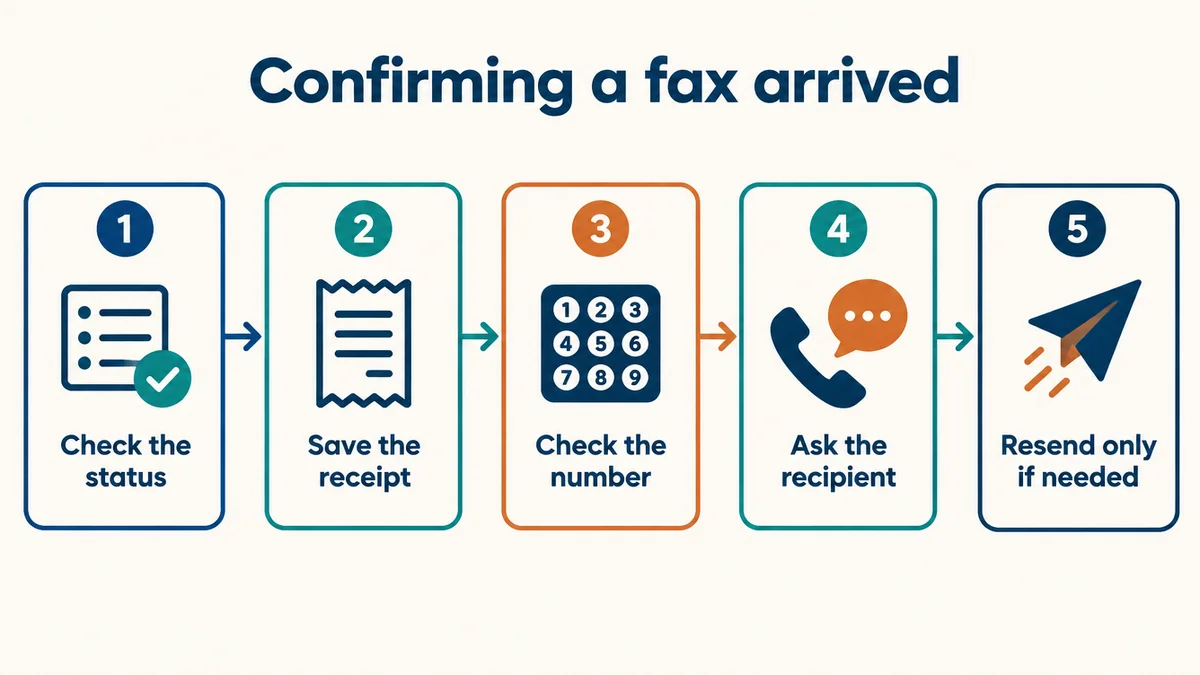
Before you contact anyone, save the delivery confirmation. In the app, tap the delivered fax. On the web dashboard, open it on the Sent Faxes page and choose Download Receipt. The receipt lists the destination number, the page count, and when the fax was sent and completed.
Also keep a copy of exactly what you sent. Together, these give you:
- The recipient number exactly as you entered it.
- The date and time you sent the fax.
- The number of pages.
- The final status.
You will use these details in the follow-up. They let the recipient look for a specific fax instead of a general "did you get my fax?"
How other services record a sent fax
Other online fax services keep similar records of the transmission.
- Fax.Plus includes a Fax Confirmation Report with every sent fax, available from the Sent list in its web and mobile apps. Fax.Plus says the report shows the transmission date and time, the number of pages sent, a thumbnail of the first page and a QR code for checking that the report is authentic. The thumbnail and QR code are useful extras if you need to show which document went out.
- FaxZero sends a confirmation email and, according to its FAQ, gives you a link to a private fax status page when you confirm or pay for a fax. FaxZero says you get that link only once, so save it, along with the confirmation email.
Our advice: whichever service you use, keep its record together with a copy of what you sent. A confirmation report from any of them shows that the fax was transmitted to a number. It does not show that a person read it, or that an agency or office accepted or processed it. Only the recipient can confirm that.
Check the number you sent to
If the status is Delivered but the recipient says nothing arrived, start with the number. Compare it with the number the recipient gave you, digit by digit. A fax can complete to a valid fax number that belongs to someone else.
If the number is wrong, correct it before doing anything else. That fax went to another machine, and a resend to the right number is reasonable once you have confirmed it.
Follow up with the recipient
If the document is time-sensitive, such as a signed form with a deadline, follow up soon after the fax shows Delivered rather than waiting to hear back. A completed transmission can still sit unseen on the other end.
Contact the recipient through a channel you already trust, such as a phone number or email address you have used with them before. Avoid using contact details printed only on the document you sent.
Ask a specific question:
"I faxed 4 pages to [fax number] on Tuesday at 10:42 AM. Can you confirm you received them?"
That example is hypothetical. Give the number, the date and time, and the page count from your record. Don't repeat the document's contents in the message.
Then follow the answer:
- They have it. Ask them to confirm all pages arrived and are readable. Note who confirmed and when.
- They don't see it yet. Ask whether faxes to that number go to a machine, a shared inbox or another department. These are possible explanations, not confirmed causes: the fax may be waiting in a tray, routed to a colleague, or held in a digital inbox. Ask them to check before you send anything else.
- The number isn't theirs, or has changed. Get the correct number, then send once to it.
- They can't find it after checking. Ask whether they want you to send it again, and to which number.
When a resend makes sense
A resend is reasonable when one of these is true. The step-by-step version is in how to resend a failed fax.
- The fax ended as Failed, after any automatic retries.
- You sent it to the wrong number and have confirmed the right one.
- The recipient has checked and asked you to send it again.
When you resend, make the second copy easy to tell apart. The FaxDash cover page builder lets you add a subject and a short message to the front of a fax. A line such as "Resent copy of the fax sent Tuesday, 4 pages" helps the recipient avoid processing the same document twice.
Send once, then wait for the final status of the new fax.
When to stop
At that point, ask the recipient whether another route works better for this document, such as a different fax number or a method they specify. For a status that doesn't match what you expected, email support@faxdash.io with the recipient number, the status, and the date and time of the send. Share only the information needed to investigate.
If your office sends faxes as a team
Follow-ups are easier when everyone can see what was already sent. On a FaxDash team, every fax in the shared sent history shows who sent it, so a colleague can check for an earlier send before contacting the recipient or sending again. Teams are managed in the web dashboard and are available on the Standard and Business plans.
For a worked example of a time-sensitive follow-up, see what to do when a payoff request fax is "never received".
This guide is general information, not legal or tax advice. Fax numbers, forms and agency rules change, so check the agency's official page before you send. FaxDash isn't responsible for decisions made or actions taken based on this guide. For advice about your situation, talk to a qualified tax professional or attorney.