
Resend a fax only after it shows Failed, and only after you have checked why. Until a fax is marked Failed, FaxDash may still be retrying it, so a manual resend can create a duplicate. Once it shows Failed, the credits it used go back to your balance. Check that the number is a fax line, fix anything that is wrong, and send it again once. If it fails a second time, stop and call the recipient before you try again.
This page covers the resend itself. For why a fax fails in the first place, see why a fax fails to connect.
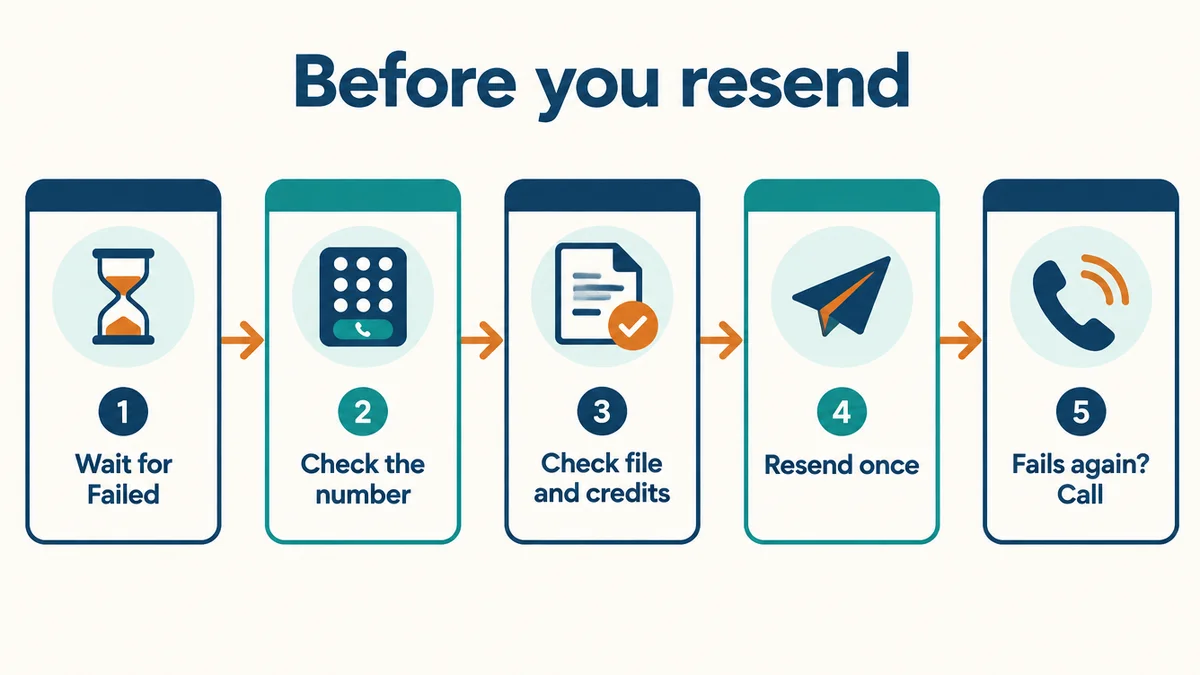
Step 1: Confirm that this fax actually failed
Open your history and find the specific fax. Check its status before you do anything else.
- Delivered. Do not resend. Delivered means the transmission completed. If the recipient says they don't have it, ask them to check their machine or inbox before you send a second copy.
- Sending. Wait. FaxDash retries automatically when a failure looks temporary, such as a busy line, and a fax shows Failed only after its last attempt. Resending now can put two copies in the recipient's tray.
- Failed. Go to step 2.
FaxDash reports failed faxes in your history and normally sends a push notification and an email. Turning off delivered-fax emails does not by itself stop failed-fax emails, but turning off email notifications globally stops them; push notifications also have a separate switch.
Step 2: Check the number
The most common fix is the number. Confirm that:
- the destination is a fax number, not a voice line;
- every digit is right, including the area code;
- the recipient hasn't given you a newer fax number.
If the first attempt failed in a way that retrying rarely fixes, FaxDash tells you straight away instead of after every retry. Either way, correct the number before you resend.
Step 3: Check the file and your credits
- The document isn't password-protected. FaxDash Help lists this as a check when a fax keeps failing. Save an unlocked copy.
- The pages are right. Upright, readable and in order. See how to prepare a document so it faxes cleanly.
- You have enough credits. The credits from the failed fax are returned to your balance automatically, in full, once the last attempt has failed. They come back as send credits, not as money to your card. If they are not back in your balance, contact support.
Step 4: Resend once
When the number, the file and your credits are right, send the fax again.
- Web dashboard. The Failed faxes widget on the Overview lists failures from the last 7 days, with Retry. If it isn't on your Overview, click Customize, then Add widget. You can also start a new fax on the Send page with the corrected number and the same file.
- Mobile app. Start a new fax with the same document and the corrected number.
Send it once, then wait for the result before doing anything else.
Step 5: If it fails again, stop
If the fax fails again on a number you have checked, stop resending. More attempts are not automatically better, and the next step is to talk to the recipient.
- Call the recipient. Confirm the fax number and ask whether their machine is on, connected and has paper, or whether they prefer another route.
- Note the details. Write down the number you sent to and the date and time of each attempt.
- Contact support. If the number is confirmed and it still fails, email support@faxdash.io with those details. Leave the document's contents out of the email.
How Fax.Plus handles retries, for comparison
Fax.Plus documents configurable automatic retries. In its Send Fax settings you can turn on Auto Retry on Failure and choose up to 3 retries, with a delay of up to 720 minutes between attempts. It also offers Auto Resume on Partial Send, which picks up from the next unsent page when a call drops partway through a fax. Fax.Plus notes that each resumed attempt reaches the recipient as a separate transmission, and suggests turning the option off when the recipient needs all pages in one continuous fax.
FaxDash works differently. It retries on its own when a failure looks temporary, such as a busy line, and tells you straight away when retrying is unlikely to help. The linked FaxDash sending and troubleshooting Help pages do not describe retry-count or delay settings, or a resume-from-page option. If some pages may have arrived, check with the recipient before manually resending, rather than assuming a resend will continue from an unsent page.
Our advice: if you send long faxes to busy lines and want to tune retries yourself, Fax.Plus's settings are worth a look. Whichever service you use, a completed transmission only shows that the pages went through. It does not show that anyone has read or accepted them, so confirm with the recipient when it matters, and mention it if they may receive pages in more than one transmission.
Why a duplicate matters
If the first fax did arrive, a resend gives the recipient a second copy. For offices that process what they receive, such as a tax agency, a lender or a clinic, a duplicate can mean extra work or a second record on their side. That is why the check in step 1 comes before every resend.
FAQ
Does FaxDash retry a failed fax by itself? Yes, when a failure looks temporary, such as a busy line. If the failure is one that retrying rarely fixes, you are told straight away. A fax shows Failed only after its last attempt.
Do I get my credits back when a fax fails? Yes. Once the last attempt has failed, the credits it used return to your balance automatically, in full, as send credits.
Should I resend while a fax is still in progress? No. Wait for Delivered or Failed. A resend while FaxDash is still trying can send the recipient two copies.
The fax shows Delivered but the recipient can't find it. Should I resend? Not straight away. Delivered means the transmission completed. Ask the recipient to check first, then decide together.
How many times should I resend? Once, after checking the number and the file. If it fails again, call the recipient and then contact support.
Sources checked October 30, 2026, and rechecked November 8, 2026: FaxDash Help Sending faxes ("What happens if a fax fails?", "How do I know my fax was delivered?"), Pricing, credits & billing ("Can I get a refund?"), Account & troubleshooting ("My fax keeps failing"), Getting started (Overview widgets); FaxDash product facts. Fax.Plus Help Center pages on Auto Retry on Failure and Auto Resume on Partial Send, checked November 8, 2026.
This guide is general information, not legal or tax advice. Fax numbers, forms and agency rules change, so check the agency's official page before you send. FaxDash isn't responsible for decisions made or actions taken based on this guide. For advice about your situation, talk to a qualified tax professional or attorney.