

Here's a hypothetical. A title processor faxed a signed borrower authorization to the seller's mortgage servicer on Monday, asking for a payoff statement. It's now Thursday, closing is next Wednesday, and the servicer's rep says there's nothing on file. The natural move is to fax it again, then again an hour later. That usually adds more copies to the same pile without getting anyone closer to a payoff letter.
The plain answer: build one complete packet, send it once to a number you confirmed yourself, keep the confirmation, and call the payoff desk the same day on a number you also confirmed yourself. If they still say "never received," do one labeled resend or use their portal, and know the federal timeline you can point to. And whatever happens with the payoff request, don't let it become a reason to accept new wire instructions without verifying them.
Who this is for: title and escrow processors, real estate investors and property managers who request payoff statements for a mortgage, often with a closing date coming up. For context on fax in this kind of work, see FaxDash for mortgage and title.
The short answer
One packet, one confirmation, one same-day call, then escalate.
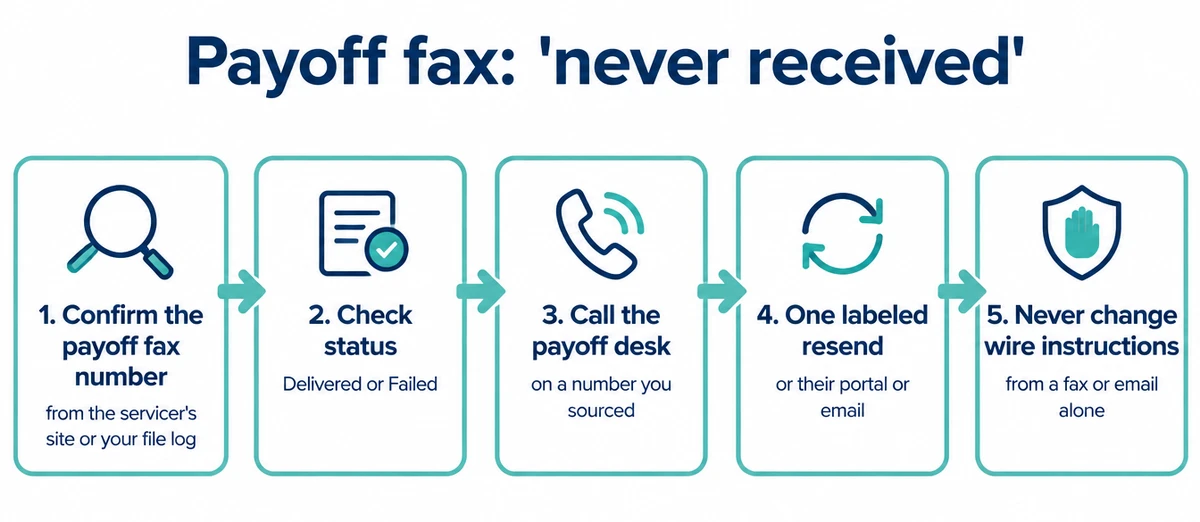
The rest of this guide fills in each step, with a log you can copy into your file template.
Why payoff authorizations "disappear"
When a servicer says a fax never arrived, it doesn't always mean the pages vanished. A few common explanations are worth checking before you resend anything.
It went to the wrong department number
Many servicers have separate numbers for payoff requests, general customer service, loss mitigation and so on. A number from an old statement, a search result or a generic contact page may reach a fax line that nobody on the payoff team checks. The federal commentary on payoff statements says a servicer may specify reasonable requirements for payoff requests, including a specific mailing address, email address or fax number. If a request doesn't follow those requirements, a longer response time may be considered reasonable (more on that below).
Something was missing, or the signature type wasn't accepted
A request without a loan number, property address, borrower signature or a clear authorization for the third party can sit unprocessed. Some servicers also say on their own forms which signature types they accept. Read the servicer's form or instructions rather than assuming, and use their form if they have one.
It arrived but hasn't been worked yet
A fax can reach the right inbox and still wait in a queue. The rep you reach may only see requests that have been indexed to the loan. "We don't have it" can sometimes mean "it isn't in my system yet." That's why the call matters as much as the confirmation.
Real-world threads on investor forums show how long these loops can run. Posters on BiggerPockets describe a mortgage holder that wouldn't share a payoff amount and waiting almost a month for a payoff. Those are individual accounts, but the pattern is familiar to anyone who has chased one.
Build the packet once
A complete packet is the best defense against "we can't process this." Put it together once, save it as a single PDF, and reuse that exact file for any resend.
- Signed borrower authorization that names who may receive the payoff (your company, the investor or the property manager). Use the servicer's own authorization form if it has one.
- Loan number and the borrower's name as it appears on the loan.
- Property address.
- Good-through date you need the payoff figured to, usually a few days past the expected closing or funding date.
- Requester contact: your name, company, direct phone and the fax number or email where the payoff should be sent.
- A cover sheet with the page count, the date, "Payoff request" in the subject, and your return fax number.
Check that every page is readable before you send it. Faded signatures and dark scans are a common reason a request stalls. If you need help with that, see how to prepare a document so it faxes cleanly.
Send it, and keep the confirmation
Send the packet to the payoff fax number you confirmed from the servicer's official website, your own file log or a call to a number you sourced (not a number printed on a document someone else sent you).
Then wait for the final status. With FaxDash, a send ends in either Delivered or Failed. If the line is busy or doesn't answer, FaxDash retries automatically, so wait for the final status before you resend. A wrong or invalid number isn't retried, so fix the number and send again. If a send ends in Failed, start with why a fax fails to connect.
Here's the important part. Delivered means the transmission completed. It doesn't prove a person received, read or processed the request. Save the confirmation with the date, time, destination number and page count, because it's useful on the call. Just don't treat it as the end of the job.
Same-day call on a number you sourced yourself
Call the payoff department the same day you send. Use a phone number from the servicer's official website (typed into your browser, not reached from a link in a message) or from your file's contacts log. Avoid numbers printed on a document that arrived unexpectedly.
A short script keeps the call focused:
"Hi, I'm calling about a payoff request for loan number [number], property at [address]. We faxed a signed borrower authorization to [fax number] on [date] at [time], [X] pages. Can you confirm it's been received and indexed to the loan, and tell me when to expect the payoff statement? If it isn't there, can you confirm the correct fax number or portal for payoff requests?"
Write down who you spoke with, the number you called, the date and time, and what they told you. If they give you a reference number or a different fax number, record that too. A clean log turns the next call into "here's what we sent and who we spoke with" instead of starting over.
When they still say "never received"
One labeled resend, plus their portal or email if offered
If the rep confirms a different number, or still can't find it, resend once. Use the same PDF and add "2nd send, originally sent [date and time]" to the cover sheet so it doesn't look like a new, separate request. If the servicer offers a portal or a payoff email address, use that too, and note it in your log.
Avoid a string of blind resends. Several identical faxes in the queue can make it harder for the servicer to tell which one to work.
Escalate in parallel
Ask for the payoff department supervisor or a case number. If you're the investor or property manager, let the title or escrow office know and ask them to push their own payoff request in parallel, since they may have an established contact at that servicer. Keep the borrower in the loop, because some steps below need to come from them.
The federal clock: seven business days for a written payoff request
For a consumer credit transaction secured by a consumer's dwelling, Regulation Z requires the creditor, assignee or servicer to send an accurate payoff statement "within a reasonable time, but in no case more than seven business days, after receiving a written request from the consumer or any person acting on behalf of the consumer." That's 12 CFR 1026.36(c)(3) (also on eCFR), checked October 29, 2026.
The rule has exceptions. When the servicer can't meet seven business days because the loan is in bankruptcy or foreclosure, is a reverse mortgage or shared appreciation mortgage, or because of natural disasters or other similar circumstances, the payoff statement must be provided "within a reasonable time." A creditor or assignee that doesn't currently own the loan or the servicing rights isn't subject to this requirement.
Two details from the official commentary matter for third-party requests:
- A servicer may take reasonable steps to verify the identity of a person acting for the borrower and get the borrower's authorization before the "reasonable time" period starts. A missing or unclear authorization can delay the clock.
- A servicer may require payoff requests to go to a specific mailing address, email address or fax number. If a request doesn't follow those requirements, a longer timeframe may be reasonable. That's one more reason to confirm the payoff desk's number first.
What counts is the loan being paid off, not who's asking. Regulation Z doesn't cover credit taken mainly for a business purpose or made to a company such as an LLC (12 CFR 1026.3(a)). The official commentary treats a loan on a rental property the owner doesn't live in as business purpose. So an investor's own rental or LLC loan usually isn't covered, while a homeowner seller's mortgage usually is. Check the loan type before you rely on the seven-day figure.
A notice of error under Regulation X
If a covered servicer fails to provide an accurate payoff balance, the borrower can send a written notice of error. Regulation X, 12 CFR 1024.35, lists "failure to provide an accurate payoff balance amount upon a borrower's request" as a covered error. That error is tied to the Regulation Z payoff rule above, so the same loan-type limits apply. Checked October 29, 2026, the rule says the servicer must:
- Acknowledge the notice in writing within five days, excluding legal public holidays, Saturdays and Sundays, unless it corrects the error first.
- Respond (correct the error, or explain after a reasonable investigation why no error occurred) within seven days, excluding legal public holidays, Saturdays and Sundays. The rule doesn't allow an extension for payoff errors.
A few practical points. The notice comes from the borrower, so it's a step to coordinate with them, not one a title office or investor sends on its own. If the servicer has designated an address for notices of error, the notice must go there. The CFPB explains how in How do I dispute an error or request information about my mortgage? and offers a sample error resolution letter with payoff language. Regulation X's servicing rules don't cover home equity lines of credit, and other exemptions can apply.
Treat this as an escalation option, not a first step. Most payoff loops clear with the right number, a complete packet and a good call log.
Before any money moves: verify payoff and wire instructions
A payoff statement that finally arrives after a frustrating delay, especially with "updated" bank details or a note to wire by noon, needs a call-back before anyone acts on it.
Fax doesn't prevent wire fraud, and neither does email or a portal. A faxed page can carry altered account numbers and a fake phone number just as easily. Verify the payoff amount and the wire instructions by calling back on a number you sourced yourself, have a second person sign off, and never change wire instructions based on a fax or email alone. The full routine, with a log, is in the wire and payoff instructions verification checklist.
If money has already gone out to the wrong account, contact your bank right away to request a recall, and file a complaint with the FBI's Internet Crime Complaint Center at ic3.gov.
A copyable payoff request log
Copy this into your file template and fill it in as you go.
PAYOFF REQUEST LOG

File / property:          [Address or file number]
Borrower:                 [Name as on the loan]
Loan number:              [ ]
Servicer:                 [ ]
Good-through date needed: [ ]
Closing / funding date:   [ ]

PAYOFF DESK CONTACT (sourced by you)
Fax number:               [ ]  Source: [Servicer website / file log / call]
Phone number:             [ ]  Source: [Servicer website / file log]
Portal or email, if any:  [ ]

SEND 1
Date / time sent:         [ ]
Pages:                    [ ]
Final status:             [Delivered / Failed]
Confirmation saved:       Y / N

SAME-DAY CALL
Date / time:              [ ]
Number called:            [ ]
Spoke with:               [Name, department]
Received and indexed?     Y / N
Reference number:         [ ]
Expected payoff date:     [ ]

SEND 2 (only if needed, labeled "2nd send")
Date / time sent:         [ ]
Number or portal:         [ ]
Final status:             [Delivered / Failed]

ESCALATION
Supervisor / case no.:    [ ]
Title office notified:    [Name, date]
Borrower notice of error sent? Y / N   Date: [ ]

PAYOFF RECEIVED
Date / time:              [ ]
Verified by call-back:    [Name, number called, date]
Second sign-off:          [Name, date]
How FaxDash fits, and how it compares
FaxDash gives you a record for every send (Delivered or Failed, with the date and time), a receive number you can put on the cover sheet so the payoff letter comes back to a monitored inbox, and, on the Business plan, a shared inbox and sent history so the processor and closer see the same thing. Received faxes can trigger an email notice to you and a front-desk address. The email is a notice with a link to view the fax in FaxDash, and the PDF isn't attached. More on that loop in fax-to-email and email-to-fax for small teams.
FaxDash can't make a servicer process a request, and it can't verify wire instructions or tell you whether a payoff statement is genuine. No fax service can. That's the job of your call-back and your log.
Here's how it compares with two well-known online fax services on the points that matter for an occasional payoff request or a small title team. Prices are from each company's own pricing page, checked October 29, 2026. They change, so check before you buy.
| FaxDash | Documo | Nextiva vFAX | |
|---|---|---|---|
| Send without a subscription | Yes. Credit packs from $0.99 for 5 pages; purchased credits never expire | Not listed; plans are monthly or annual | Not listed; monthly or annual plans |
| Entry plan with a fax number | Starter $3.99/month: 50 received pages + 10 send credits | Solo $25/month billed annually: 300 pages, 1 number, 1 user | Essential from $7.95/month billed annually (from $9.95 month to month, per the page title): a 500-page pool shared by sending and receiving |
| Team option | Business $12.99/month: 500 received pages + 60 send credits, you + 2 team seats | Business $100/month (or $80/month billed annually): 1,500 pages, 10 users | Professional from $13.95/month billed annually: 1,000-page pool; seat details not listed on the page |
Sources: FaxDash pricing, Documo pricing, Nextiva online fax. Nextiva's page title says plans start at $9.95; the plan cards show the 20%-off annual price.
Who should skip FaxDash: if your office sends and receives thousands of pages a month or needs deep integrations with document-management systems, a larger plan from a service built around high volume may suit you better. If you fax a payoff request a few times a year, pay-as-you-go means you're not paying a monthly fee in between.
Frequently asked questions
Does a Delivered status prove the servicer received the payoff request? It shows the transmission completed to the number you dialed. It doesn't prove a person saw it, that it reached the payoff team, or that it was processed. Call to confirm.
How long does a servicer have to send a payoff statement? For consumer credit secured by a consumer's dwelling, Regulation Z says within a reasonable time and no more than seven business days after a written request, with exceptions for bankruptcy, foreclosure, reverse or shared appreciation mortgages, and natural disasters or similar circumstances. If someone other than the borrower asks, the servicer may verify that person and get the borrower's authorization before the clock starts. Investor and commercial loans may not be covered. State law can add its own rules.
Can a fax prove the payoff statement we got back is real? No. Verify the payoff figures and any wire instructions by calling a number you sourced yourself, as described in the verification checklist.
Your next step
Copy the payoff request log into your file template, and add the servicer's payoff fax and phone numbers to it the next time you open a file. If you'd like a monitored receive number and a shared inbox for your title team, the FaxDash Business page covers the plan with you + 2 team seats. Sending never needs a subscription, and purchased credits never expire.
This guide is general information, not legal or tax advice. Fax numbers, forms and agency rules change, so check the agency's official page before you send. FaxDash isn't responsible for decisions made or actions taken based on this guide. For advice about your situation, talk to a qualified tax professional or attorney.