

Here's a hypothetical. It's Thursday afternoon, and a transaction coordinator is pulling together the file for a Friday closing. A payoff statement comes in for the seller's mortgage. It looks right: the lender's logo, the loan number, a good-through date. But the bank account on it is different from the one on the statement that arrived last week, and there's a note asking for the funds by noon.
The answer to "is this real?" isn't on the page. It doesn't matter whether the statement came by email, fax, a portal or a phone call. Before any money moves, call the sender back on a number you got somewhere else, confirm every detail, and have a second person sign off. This guide turns that habit into a checklist a small office can run on every file.
Who this is for: transaction coordinators and office admins at small brokerages, and office managers at small property management companies. If wire instructions or payoff statements pass through your hands, it's for you. For industry context on fax in mortgage and title work, see FaxDash for mortgage and title.
This article is general information, not legal, tax or compliance advice. Agency rules and fax numbers change, so confirm with the agency or a qualified professional before you send.
Where fax still shows up in a real estate or property management file
Depending on who you work with, documents in a file may arrive by fax, email, a portal or a phone call, and a single transaction can use several of them. Your own mix will depend on your market and your partners.
Whatever the channel, what matters is what you do with a document that tells someone where to send money.
What the FBI's IC3 data shows
The FBI's Internet Crime Complaint Center (IC3) publishes an annual report of the complaints it receives. In its 2025 report, IC3 lists 24,768 business email compromise (BEC) complaints across all industries, with reported losses of $3,046,598,558. IC3 doesn't publish a separate figure for real estate closings, so these numbers cover every business and individual who reported BEC, not closings alone. IC3 defines BEC as a scam aimed at businesses or individuals who regularly send wire transfers, carried out by compromising email accounts and other forms of communication, including phone numbers and virtual meeting apps.
IC3 also has a Real Estate category, but it covers losses from real estate investments and fraud involving rental or timeshare property, not closing wire fraud. For that category, the 2025 report lists 12,368 complaints and $275,110,419 in reported losses, up from 9,359 complaints and $173,586,820 in 2024. A diverted closing wire may be reported as BEC instead.
Two cases in the 2025 report show what this looks like in practice:
- In March 2025, a senior citizen in Missouri was closing on a property and received a compromised email, apparently from the "title company," with wire instructions for over $1.3 million to a fraudulent account. IC3's Recovery Asset Team worked with banks to freeze the receiving account.
- In August 2025, buyers closing on a home received an email impersonating their attorneys and wired over $449,000. After they filed an IC3 complaint, the receiving bank reported that the full amount was still in the account and on hold.
These are complaints people chose to report, so they don't show the whole picture. They do show the pattern: the request looks like it comes from someone the client already trusts, at the moment money is about to move.
Why the channel doesn't settle the question
A fax can feel official, and a familiar email signature can feel safe. Neither proves who sent the document.
A faxed page shows whatever letterhead, account numbers and phone numbers the sender put on it. That's why the Texas Land Title Association's wire fraud guidance tells title companies not to use a number provided by an unverified email or fax. It also suggests accepting post-closing changes to instructions only in person, and never by email or fax.
The protection is the verification habit, not the channel. IC3's business email compromise PSA gives the same direction: use secondary channels or two-factor authentication to verify requests to change account information.
The call-back rule
The core rule fits on a sticky note: call back on a number you sourced yourself, never one from the fax, email or instructions.
"Sourced yourself" means the number came from somewhere the sender of the instructions couldn't control. Good sources:
- A contacts log your office made when the file opened, with numbers confirmed at that time.
- The company's official website, typed into your browser rather than reached through a link in the message.
- A number you've verified on an earlier file with the same company.
Do not dial the phone number printed on the payoff statement, wire instructions or cover sheet, and do not use a number from the message that delivered them.
The TLTA guidance recommends exactly this kind of log: record every approved party's phone numbers and email addresses at the start of a transaction, and don't use numbers that show up later, such as in a new email signature, until you've verified them through a validated number. The CFPB's mortgage closing checklist asks home buyers to do the same on their side. It has them record two trusted contacts and confirm payment details using only the phone numbers they saved.
On that call, the person you reached on the number you sourced reads the payment details back to you. You compare what they say with the document in front of you. If you read the account numbers out first, a person who isn't who they claim to be only has to agree.
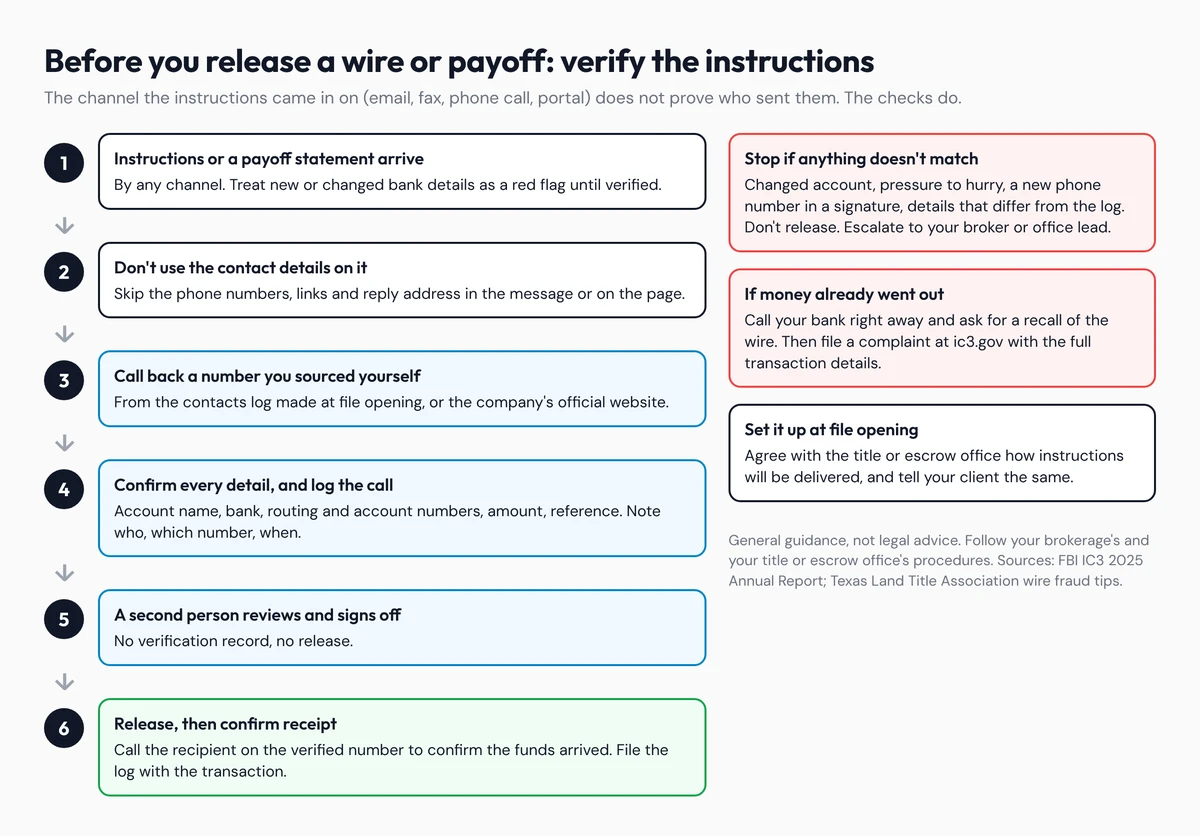
The wire and payoff verification checklist
Use this on every file where your office receives, passes on or acts on instructions for moving money. Each item is something a person can see was done.
When the file opens
- Start a contacts log for the file. Record the title or escrow office, lender, other agent and client, with the phone number for each and where you got it.
- Agree with the title or escrow office how wire instructions will be delivered, and who will send them.
- Tell your client, in writing and by phone, who will send wire instructions and that changed instructions will always be confirmed by phone first. The TLTA guidance recommends educating every party about wire fraud at the start of a transaction.
- Name who in your office verifies instructions, and who gives the second sign-off.
When instructions or a payoff statement arrive
- Compare the document with anything you received earlier for the same file. Treat any new or changed bank details as a red flag until verified.
- Don't call, click or reply using contact details from the document or message.
- Call the sender on the number in your contacts log or from their official website (a number you sourced, not the one on the fax or instructions).
- Ask them to read back the account name, bank name, routing number, account number, amount and reference or loan number. For a payoff, confirm the good-through date too.
- Check that the account name matches the party you expect to receive the funds. The TLTA guidance calls for wires to go to the exact name of the party on the transaction.
- Write down who you spoke with, the number you called, the date and time, and what they confirmed.
- If anything doesn't match, or you're being pushed to hurry, stop and escalate. The TLTA guidance notes that criminals create false urgency, and that Friday and pre-holiday disbursements are extra targets.
Before funds are released
- A second person reads the verification log and signs off. The TLTA guidance describes this as centralized wire approval, with documentation of how the instructions were confirmed.
- If the verification record is missing or incomplete, the wire waits.
After funds are sent
- Call the recipient on the verified number to confirm the funds arrived. The TLTA guidance recommends calling right after funding and following up within a few hours if you don't hear back.
- Save the verification log, the instructions as received and any delivery confirmations with the transaction file.
A call script and log you can copy
Copy this into your file template. Fill one in for every set of instructions, even ones that look the same as last time.
WIRE / PAYOFF VERIFICATION LOG

File / property:        [Address or file number]
Document received:      [Wire instructions / payoff statement]
Received by:            [Email / fax / portal / phone] on [date, time]
Received from (claimed):[Company and person named on the document]

CALL-BACK
Number called:          [Number you sourced, not from the fax or instructions]
Where the number came from: [Contacts log at file opening / official website / verified on earlier file]
Spoke with:             [Name, title]
Date and time:          [Date, time]

DETAILS READ BACK BY THE PERSON YOU CALLED (not read to them by you)
Account name:           [ ]  matches expected party? Y / N
Bank name:              [ ]
Routing number:         [ ]  matches document? Y / N
Account number:         [ ]  matches document? Y / N
Amount:                 [ ]  matches document? Y / N
Reference / loan no.:   [ ]
Payoff good-through:    [ ]

Changed from earlier instructions?  Y / N  (if Y, escalate before release)

Verified by:            [Name]          Date: [ ]
Second sign-off:        [Name]          Date: [ ]
Receipt confirmed with: [Name, number]  Date: [ ]
A short phone script helps when the call feels awkward: "Before we act on these instructions, our office confirms them by phone on a number from our file. Could you read me the account name, routing number, account number and amount you have on record?"
If something looks wrong, or money has already moved
If a check fails before funds go out, don't release them. Tell your broker or office lead, and contact the other parties on the numbers in your contacts log, not the numbers on the suspect document.
If money has already been sent, speed matters. Both IC3's annual report and its BEC PSA give the same two steps:
- Contact your financial institution right away and ask for a recall of the funds, along with any indemnification documents the bank needs.
- File a complaint at ic3.gov, whatever the amount, with the full transaction details. IC3 says it may be able to help banks and law enforcement freeze funds.
Keep the log and the documents as you received them, and follow your company's incident procedures.
A verification workflow for a small team
Verification works best when everyone knows who handles what. Here's one setup with FaxDash. The same roles work with any fax service.
FaxDash teams are available on Standard and Business. Business includes you + 2 team seats; Standard includes no seats, and each added seat costs $2.99/month. The owner or an admin invites members from the web dashboard at dash.faxdash.io, and team members can then send, receive and view faxes from the mobile app. Team management itself (members, roles and settings) happens only in the web dashboard, not the app. A member with the finance role can't send faxes. With each person on their own seat, the team can split the verification work so that no single person both receives and approves instructions.
A simple division of work:
- One person handles incoming faxes each day. They sort them into files, and flag any wire instructions or payoff statements for verification.
- A different person verifies. They run the call-back on a number from the contacts log and fill in the log.
- A third person, or the broker, gives the second sign-off before funds are released.
If you use FaxDash's fax-to-email, the email is a notice, not the document. Get an email notification when a fax arrives, then open FaxDash to review the document. The email lists From, To and Pages, with a View in FaxDash button, and no PDF is attached. Don't reply to those notification emails. For help, contact support@faxdash.io. More on that receive-and-return loop: Fax-to-email and email-to-fax for small teams.
When you send a fax, such as signed paperwork to a title office, check for the final status: Delivered or Failed. FaxDash retries automatically when a failure looks temporary, such as a busy line, so wait before you resend. If a failure is one that retrying rarely fixes, FaxDash tells you straight away, so check the number before you send again. Delivered means the fax transmission completed. It doesn't mean anyone read it, and it says nothing about whether instructions on a page are genuine. For anything time-sensitive, call to confirm receipt. If a send ends in Failed, see Why a fax fails to connect.
Where FaxDash fits, and where it doesn't
FaxDash is a way to send and receive faxes without a machine, and, on the Business plan, for a small team to fax on one plan. It doesn't verify wire instructions, and it can't tell you whether a payoff statement is genuine. No fax or email service can. That job belongs to your call-back, your log and your second sign-off.
If your title or escrow office uses a portal for instructions, use the portal, and still verify by phone.
How FaxDash compares on records and access
Choose the service around who can see the file and what records you need to retain. We make FaxDash; this comparison uses the providers' own documentation, checked November 7, 2026.
- FaxDash gives team members their own logins, a shared inbox and sent history with sender attribution. Save the downloadable transmission receipt alongside your callback log. See teams and receipts.
- Fax.Plus documents optional two-factor authentication on every plan, owner enforcement and Enterprise SSO. Its confirmation reports record transmission outcomes; its logs are not an exhaustive record of every document view, download or edit. See its security explanation.
- eFax Corporate documents an admin portal for account setup and reporting. The separate eFax Secure workflow describes searchable storage and logging of access through controlled retrieval. That access tracking should not be read as proof someone opened an ordinary fax delivered to a machine. Confirm the exact product and configuration in the security-audit documentation.
- MyFax offers usage reports and a searchable archive. Its Share With 5 feature links email addresses to one account; that does not establish independent, role-based seats. See features and email sharing.
Our advice: eFax Corporate is worth evaluating if admin reporting and a controlled-retrieval workflow are requirements. FaxDash's shared history suits a small team's handoff, but it does not replace a verification log. None of these records authenticates the bank instructions. Keep the independent callback and second sign-off, whichever service you choose. Features change, so check the linked pages before deciding.
Frequently asked questions
Is fax safer than email for wire instructions? Don't rely on either. A faxed page can carry altered account details and a fake phone number just as an email can. TLTA's guidance warns against using numbers from an unverified email or fax. Verify by calling a number you sourced yourself, not the number on the fax or instructions.
The phone number on the payoff statement matches our contacts log. Can we call it? Yes. Dial the number from your log, not the one on the page. If they match, you've lost nothing. If they don't, you've found a red flag.
What if instructions change after we've already verified them? Treat the change as a new set of instructions and run the full checklist again. TLTA's guidance calls for extreme caution with changes after instructions are verified, and notes that last-minute changes are often fraudulent.
Who should we report suspected wire fraud to? If money has moved, call your bank first and ask for a recall. Then file at ic3.gov. Tell your broker or office lead, and the other parties on the transaction, using numbers from your log.
Your next step
Copy the verification log into your file template today, and decide who in your office gives the second sign-off. Start the contacts log on the next file you open. If your team wants to fax on one plan, with members working from the app, the FaxDash business page covers the Business plan and its team seats.