

Say you've got a USCIS notice on the kitchen table and a stack of supporting documents next to it. Before choosing a sending method, check what your notice actually permits. USCIS says to fax documents only when one of its employees specifically requests it.
This is general information about how to send documents, not immigration or legal advice. For questions about your case, ask USCIS or your attorney or accredited representative.
The short answer
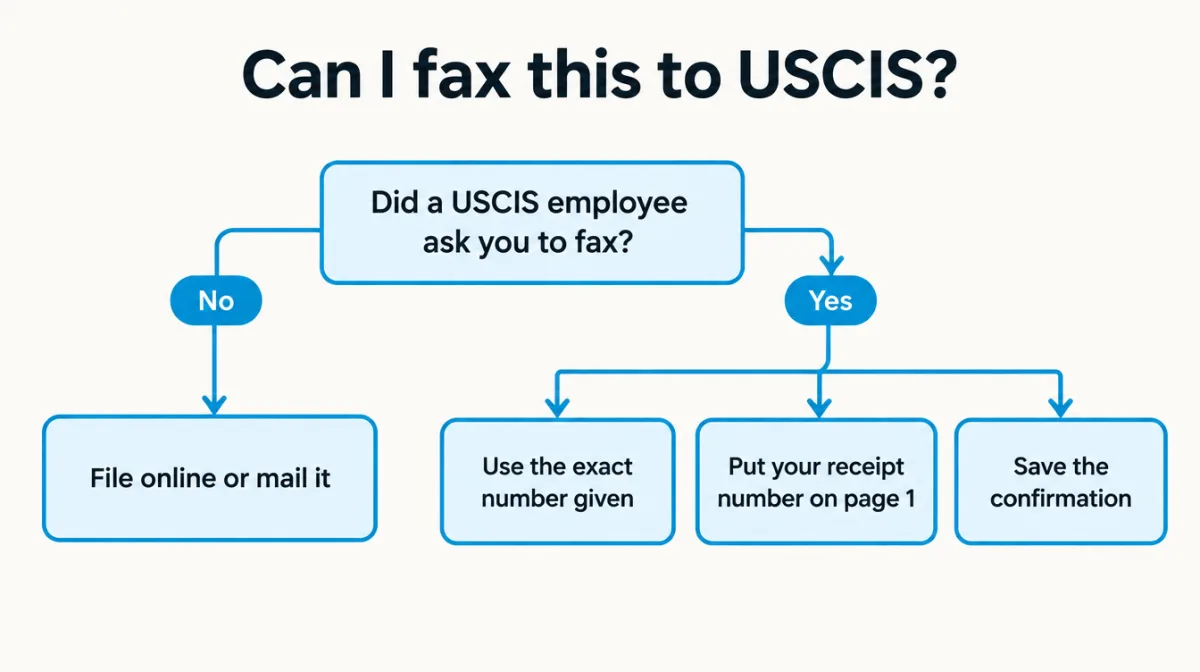
USCIS doesn't have a general fax number, and it doesn't want documents by fax unless one of its employees asks for them that way. Its Policy Manual says:
"USCIS does not provide general delivery facsimile (fax) numbers, but USCIS offices may provide a fax number in specific circumstances when appropriate." ... "Documents should not be submitted by fax unless specifically requested by a USCIS employee."
Source: USCIS Policy Manual, Volume 1, Part A, Chapter 3, checked November 9, 2026 (PT).
So for most people the right routes are your USCIS online account or mail. Fax only comes into it when an officer or office gives you a number for your case.
Official USCIS fax numbers
There isn't a general one to list, and this page doesn't list any. For filing applications or sending evidence, fax only when a USCIS employee asks. If you find a "USCIS fax number" on a third-party site, don't use it. For your application or evidence, the fax number to use is the one a USCIS employee gives you for your case, in writing or on the phone, and only for what they asked you to send.
| What you're sending | Fax? | Where to send it | Source (checked Nov 9, 2026) |
|---|---|---|---|
| A new application or petition | Not a general filing route | Online, if your form is available to file online, or by mail to the address on the form's page | Online filing options, Tips for filing by mail |
| A response to a Request for Evidence (RFE) | Only if the RFE or an officer says so | Follow the RFE's instructions and deadline; use the online response option if available for your linked case | Tips for filing by mail, Online filing options |
| Documents an officer asked for | Yes, if the officer gave you a fax number | The exact number the officer gave you | Policy Manual Vol. 1, Part A, Ch. 3 |
| A question about your case | Use the stated inquiry route unless specifically asked to fax | Your USCIS online account (secure messaging) or the USCIS Contact Center, 1-800-375-5283 (TTY 1-800-767-1833) | Policy Manual Vol. 1, Part A, Ch. 3 |
What you can fax to USCIS, and what you can't
You can fax documents that a USCIS employee specifically asked you to send by fax, to the number they gave you. The Policy Manual permits offices to provide a number in specific circumstances; that is not permission to fax unrelated filings or evidence.
Do not treat fax as a general filing route for applications, petitions or correspondence. Check the current form page, accepted edition and category-specific filing instructions. Use an eligible online option or the stated mailing address unless USCIS specifically requests a fax for your case.
Two USCIS rules are worth knowing even if you never fax:
- RFE responses go where the RFE says. USCIS tells filers not to mail RFE responses to a lockbox and to "follow the instructions in the RFE regarding where to send your response."
- Online accounts can take uploads. USCIS describes RFE responses and evidence uploads for linked cases in online accounts. Check the notice and whether your account actually offers the response option; do not assume that creating an account changes the required route. USCIS calls the online account "the preferred method of contacting the agency" for case-specific questions.
Before you send a fax USCIS asked for
If an officer did give you a fax number, a few checks make the fax easy to match to your case.
- Use exactly the number you were given. Write it down while you're on the phone, or copy it from the letter or message. Don't swap in a number from a search result.
- Check the complete response and deadline. Follow the notice and any specific fax instructions. The USCIS evidence policy says all requested RFE or NOID materials must be submitted together at one time, along with the original RFE or NOID; a partial response is treated as a request for a decision on the record. Do not split a response across methods without clarification from USCIS or your representative.
- Identify the case, following the request. If a cover sheet is appropriate under those instructions, put your name as it appears on the case, your receipt number, the name of the officer or office that asked, the total page count including the cover, and a phone number. See what to put on a fax cover sheet.
- Make the pages legible. USCIS scans paper filings in black and white or grayscale and asks for copies that aren't blurry, faded, skewed or cut off. The same standard makes sense for a fax. See how to prepare a document so it faxes cleanly.
- Keep proof. Save a copy of exactly what you sent, plus the delivery confirmation with the date and time.
Sending a fax without a fax machine
You don't need a fax machine or a phone line to send a fax an officer asked for. With FaxDash you can scan pages with your phone's camera in the app, or upload a PDF in the web dashboard, then enter the exact requested number with + and the country code, check the pages and send. There's no subscription to send. A fax to US (+1) numbers, including Canada, uses 1 credit per page; more credits per page elsewhere. A cover page has no feature fee but uses 1 send credit.
When the fax finishes, check your history for Delivered or Failed. On the web dashboard you can open a delivered fax on the Sent Faxes page and choose Download Receipt. It lists the destination number, the page count, and when the fax was sent and completed. Delivered means the fax transmission completed, not that an officer has reviewed the pages.
If it fails, check the number against what the officer gave you before you resend. If you're unsure, call the office or the Contact Center rather than trying other numbers.
Compare sending tools only after USCIS authorizes fax
For a one-off requested packet, FaxDash's dashboard workflow accepts PDFs or images, merges several files into one fax, and shows the recipients and credit cost before sending. Fax.Plus's document workflow accepts up to 10 supported files, including office formats, and lets you arrange their order. That can suit a mixed-file packet; converting it to PDF first lets you inspect the final pages either way.
For an office handling repeated correspondence, eFax's pricing and features page documents searchable stored faxes and email-to-fax on its plans. That record-finding workflow may matter more than a one-off send price. Keep your own copy and transmission confirmation with whichever service you choose. None of these vendor features authorizes a USCIS fax, changes a notice deadline or proves that USCIS accepted or reviewed your response.
If USCIS faxes something back
If an officer says they'll send something by fax, you need a number that can receive. A FaxDash receive number starts at $3.99 a month (Starter), which includes 50 received pages and 10 send credits. If this is a one-time need, you can cancel the plan afterward.
The honest catch
A fax transmission is not a substitute for the filing route USCIS requires. Eligible online filing provides submission confirmation and account records, but a submission confirmation is not necessarily acceptance of the filing. For paper filings, use the current form's mailing instructions. Fax is only for the specific case where USCIS asks for it.
FAQ
Does USCIS have a fax number? Not a general one. USCIS offices may give a fax number in specific cases, and you should fax documents only when a USCIS employee asks you to.
Can I fax my RFE response? Only if the RFE or an officer tells you to. Otherwise follow the RFE's instructions and deadline. Use an online response only when available for your linked case and consistent with the notice.
Where do I find the fax number for my case? From the USCIS employee who asked you to fax. If you've lost it, contact USCIS through your online account or the Contact Center at 1-800-375-5283 rather than using a number from another website.
What should I keep after faxing USCIS? A copy of exactly what you sent, any cover sheet you included under the request’s instructions, and the delivery confirmation with the date and time.
Can a fax replace an online filing? No. Use the filing option USCIS permits for that form and category. A fax requested for specific documents does not establish that a new application was properly filed.
This guide is general information, not legal or tax advice. Fax numbers, forms and agency rules change, so check the agency's official page before you send. FaxDash isn't responsible for decisions made or actions taken based on this guide. For advice about your situation, talk to a qualified tax professional or attorney.