
The short answer
Fax claim documents to the number your insurer gave you for that claim: the one on the claim acknowledgment letter, in the adjuster's email signature, or in the claims section of the insurer's own website. Put a cover sheet on top with the adjuster's name, the claim number, the policy number, the insured's name and the date of loss, so the pages land in the right file.
Our free insurance claim fax cover sheet has all of those fields. You can fill it in online and download a PDF.
This guide is about sending documents. It is not legal or insurance advice, and your policy is what decides your coverage.
Report the claim first
Faxing is usually how you send documents for a claim that already exists, not how you open one. The NAIC's guide to filing a homeowners claim suggests telling your insurer promptly, documenting the damage with photos or video, and having your policy number ready when you call. It also notes that the time you have to report a claim depends on your state.
Once the claim is reported, you get a claim number and, usually, an adjuster. Those two things are what make a faxed document findable.
Find the right fax number
Insurers often have separate fax lines for new claims, for documents on open claims, and for different lines of business. The right number is the one tied to your claim:
- Your claim acknowledgment letter or email. It often lists where to send documents.
- Your adjuster. Ask directly: "What fax number should I use for documents on this claim?" Write down their name and the number.
- The insurer's website, in the claims section, if it lists a document fax for your type of policy.
Do not use a number from a search result page or a third-party list. If a number does not match what the insurer has told you, call the insurer at the number on your policy documents and check.
What to put on the cover sheet
- Adjuster. The adjuster's name. If you do not have one yet, write "Claims" and the department named in your letter.
- Insurer. The insurance company's name.
- Fax. The number you confirmed.
- From and phone. Your name and a number where the adjuster can reach you.
- Date and pages. Count every page, including the cover.
- Claim number. The most important field. Copy it exactly.
- Policy number. As shown on your declarations page.
- Insured. The policyholder's name.
- Date of loss. The date the damage, accident or loss happened.
- Message. A short list of what is enclosed, for example "Contractor estimate (4 pages), receipts for temporary repairs (3 pages)."
Leave Social Security numbers and bank account numbers off the cover sheet. If the insurer needs one of them, it will usually be on a specific form; if you must reference one, use only the last four digits. Medical records sent for an injury claim are sensitive too. A cover sheet with a confidentiality notice, such as our confidential fax cover sheet, is a sensible choice for those pages.
See the cover before you fill it in
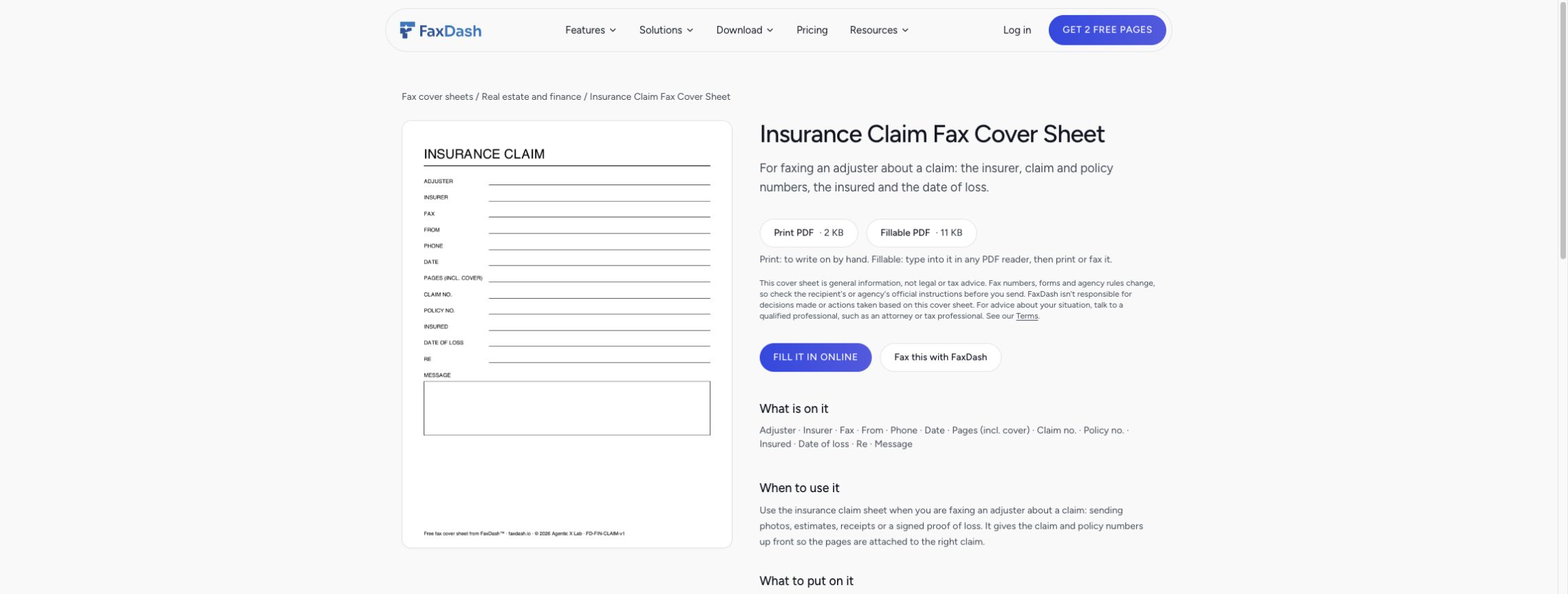
The Adjuster, Insurer, Claim no. and Date of loss fields help distinguish this packet from another claim. Include only the identifiers the insurer needs. Keep medical details and financial account information inside the supporting documents, not in the cover message.
Choose Print PDF to write by hand, Fillable PDF to type into the downloaded file, or Fill it in online to use the browser maker. Count the cover in the total pages, then check the completed packet before sending.
How to send it
If you don't have a fax machine, where you can send a fax compares office stores, libraries and online services, and how to fax from a computer, phone or email walks through each online route.
- Put the cover sheet first, then the documents in the order listed in your message.
- Label what matters. Estimates, invoices and receipts are easier to process when the claim number is written at the top of each page.
- Scan clearly. Receipts on thermal paper fade and lose contrast. Our guide to preparing a document to fax cleanly explains how to get faint pages to read.
- Photos usually fax poorly. A fax is black and white at low resolution, so damage photos turn into dark blocks. Ask the adjuster how they want photos, often by email or through the insurer's portal or app.
- Send once. Any fax service works. FaxDash lets you send from your phone and keeps a record of each fax.
If the fax will not go through, see why a fax fails to connect.
After you send
A Delivered status means the fax transmission completed. It does not mean the adjuster has read the pages, added them to the claim, or agreed with anything in them.
Keep a claim file of your own. The NAIC's consumer tips on getting smart about your coverage recommend keeping copies of everything you send your insurer and notes on every call: the date, who you spoke with and what was said. For faxes, that means:
- The sent record with the date, time and page count
- A copy of exactly what you faxed
- A note of any follow-up call confirming the adjuster has the documents
A few days after sending, a short call or email to the adjuster asking them to confirm they have the documents is reasonable. Do not fax the same packet again until you know it was not received.
If you have a problem with how a claim is handled, your state's insurance department is the regulator. The NAIC keeps a page to find state insurance departments.
Compare packet preparation and claim follow-up
A claim packet often combines a signed form, photos and supporting pages. FaxDash's web sender combines PDF and image uploads into one fax and provides a downloadable receipt, so you can keep the submitted version and transmission record in the claim file.
| Feature to compare | FaxDash | Other documented approaches |
|---|---|---|
| Assemble supporting pages | Merge PDFs and images in the web sender | Fax.Plus documents multiple-file uploads; check its current route-specific limits |
| Save the result | Download a receipt from sent history | Fax.Plus offers a confirmation report |
| Handle fax replies | Dedicated number and app/web inbox with a paid receive plan | MyFax documents a searchable archive for sent and received faxes |
We make FaxDash; this is a workflow comparison, not a test of claim outcomes. Use a receive plan only if the adjuster will reply by fax. Save your own copy and receipt whichever service you use. Neither proves claim approval. For medical claims or an organization handling patient information, assess the healthcare agreement, configuration and privacy controls separately.
Checklist
- Claim reported and claim number in hand
- Fax number from your claim letter, adjuster, or the insurer's site
- Cover sheet has the claim number, policy number, insured and date of loss
- No full SSN or account numbers on the cover sheet
- Photos sent the way the adjuster prefers
- Sent once; copy and sent record in your claim file
Get the cover sheet
Download the insurance claim fax cover sheet as a print or fillable PDF, or fill it in online.
This guide is general information, not legal or tax advice. Fax numbers, forms and agency rules change, so check the agency's official page before you send. FaxDash isn't responsible for decisions made or actions taken based on this guide. For advice about your situation, talk to a qualified tax professional or attorney.