
The short answer
Social Security does not have one national fax number for documents. Fax to the office that is handling your case, using the fax number that office or its employee gave you, or the number on the letter that asked you for documents. If you do not have one, look up your local office in the Social Security office locator or call and ask before you send.
Put a cover sheet on top with the office or employee's name, the name on the record, the last four digits of the Social Security number, and any claim or notice number. Our free Social Security fax cover sheet has those fields, and you can fill it in online.
This guide covers sending a fax. It is not legal advice about benefits.
Start with the online services
Social Security's contact page says its website is the best way to get help, and many tasks never need paper. Before you fax, check the list of online services. Applying for benefits, checking a claim, and getting a benefit verification letter are all there.
Fax makes sense when an office has asked you for a document and told you to fax it, or when the letter you received gives a fax number.
Where to find the right fax number
The letter or the employee
If Social Security wrote to you asking for something, read the letter for where and how to send it. If you spoke to an employee who asked you to fax, use the number they gave you, and write down their name. Put that name on the cover sheet so the pages reach the person waiting for them.
Your local office
Each office has its own contact numbers. In the office locator, search by address or ZIP code and open the office details. The contact numbers listed for an office can include a fax line. Make sure you pick the office that handles your matter. Some locations only offer card services and do not take benefit applications or appeals.
By phone
If you cannot find a number, Social Security's phone page lists the national toll-free line and its hours, and also points to the office locator for your local office's number. Ask which fax number to use and who to address the cover sheet to.
Avoid fax numbers from lists on other websites. They may be out of date, or for an office that is not handling your case.
What not to fax
Some evidence has to be an original or a certified copy. Social Security's rule on original records or copies as evidence says you may be asked to show an original document, and it lists who can certify a copy. A fax of a birth certificate or ID may not be enough for that kind of evidence.
If you are not sure whether a faxed copy will be accepted for a document, ask the office first. It saves a second trip.
What to put on the cover sheet
- SSA office or employee. The office name, or the employee who asked for the document.
- Fax. The number you are sending to.
- From and phone. Your name and a phone number where you can be reached during office hours.
- Date and pages. Count every page, including the cover.
- Name on the record. The person whose record this is, as it appears on their Social Security letters.
- SSN (last 4). Only the last four digits. The office can find the record from the name, the claim number and those digits.
- Claim or notice number. If your letter has one, copy it here.
- Message. A line on what is enclosed, such as "Pay stubs requested in your letter dated October 3."
Keep the full Social Security number off the cover sheet. A fax can sit in an output tray where other people walk by. If a form you are sending asks for the full number, write it on the form, not the cover.
See the cover before you fill it in
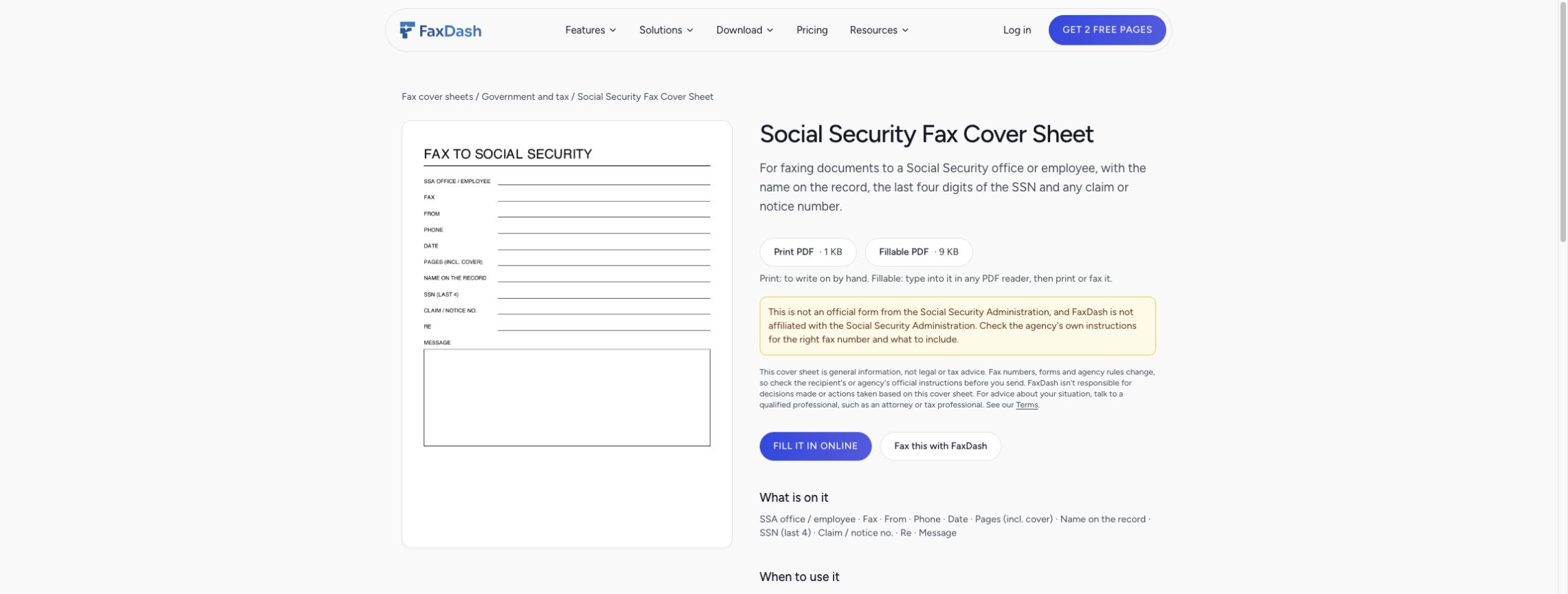
Use SSA office / employee and Claim / notice no. to identify the specific request you are answering. Follow the office's instructions for any identifier it needs. The template is a routing cover, not a substitute for original documents or an official SSA form.
Choose Print PDF to write by hand, Fillable PDF to type into the downloaded file, or Fill it in online to use the browser maker. Count the cover in the total pages, then check the completed packet before sending.
How to send it
You don't need a fax machine. How to fax from a computer, phone or email covers each route, and where you can send a fax compares office stores, libraries and online services.
- Put the cover sheet first, then the pages in the order the letter listed them.
- Follow the letter's instructions on anything it asks you to include with the pages, such as a copy of the letter itself.
- Scan clearly. Flat pages, dark text, no shadows. See our guide to preparing a document to fax cleanly.
- Double-check the fax number against the letter or what the employee told you.
- Send once. Any fax service works. FaxDash lets you send from your phone or browser and keeps a record of what you sent.
If the fax will not go through, read why a fax fails to connect before you redial many times. Office fax lines can be busy during the day.
After you send
A Delivered status means the fax transmission completed. It does not mean anyone has reviewed the pages, or that Social Security has accepted them as evidence.
Keep the sent record, with the date, time and page count, and a copy of exactly what you faxed. If you were given a deadline and have not heard anything after a reasonable wait, call the office and ask whether your fax arrived before you send it again. A second copy of the same pages can slow things down.
Compare the workflow for a requested SSA submission
Choose the submission route with SSA first. If the office asks for fax, FaxDash gives you a public SSA cover template, a phone or browser sending route and a downloadable transmission receipt.
| What to compare | FaxDash workflow | Why it matters |
|---|---|---|
| Prepare one complete packet | The web sender combines PDF and image uploads into one fax | Keep the cover, signed pages and attachments together |
| Keep a transmission record | Download a receipt with destination, page count and transmission times | File it with the exact version you sent |
| Continue from a phone or computer | Scan or select a PDF in the app, or upload from the dashboard | Use the document you already have without finding a fax machine |
Fax.Plus also offers a confirmation report; FaxZero provides email status. Compare whether the result and your own copy can be kept together, rather than choosing only from a headline sending allowance.
Review data handling before uploading identity or financial documents to any provider. SSA's original-document rules still apply. No fax service gives evidence special acceptance or speeds up a benefit decision.
Checklist
- Fax number from your letter, the employee, or the office locator
- Cover sheet addressed to the office or employee handling your case
- Name on the record and SSN (last 4) only
- Claim or notice number filled in
- Original or certified documents not sent by fax unless the office said a copy is fine
- Sent once; record saved
Get the cover sheet
Download the Social Security fax cover sheet as a print or fillable PDF, or fill it in online. It is not an official Social Security form, and FaxDash is not affiliated with the Social Security Administration.
This guide is general information, not legal or tax advice. Fax numbers, forms and agency rules change, so check the agency's official page before you send. FaxDash isn't responsible for decisions made or actions taken based on this guide. For advice about your situation, talk to a qualified tax professional or attorney.