
Suppose you're faxing a client's signed engagement letter and a page of financial statements to their bookkeeper. The pages will land on a machine or in an inbox that other people can see, and you'd like a line on top telling anyone who isn't the bookkeeper what to do. That line is a confidentiality notice.
This article is general information, not legal, tax or compliance advice. Agency rules and fax numbers change, so confirm with the agency or a qualified professional before you send.
The short answer
A confidentiality notice is a short paragraph on your fax cover sheet that asks anyone who gets the fax by mistake to tell you and destroy it. Keep it short and plain, put it on the cover page, and make sure the phone number it points to is on the same page. Here's wording you can copy:
This fax may contain confidential information intended only for the recipient named above. If you received it in error, please call the sender at the number above and destroy all copies.
Then do the thing that actually prevents most mistakes: check the fax number before you send.
Who uses a confidentiality notice
Any office that faxes pages it wouldn't leave on a shared counter. A few common ones:
- Tax and accounting offices sending client documents, returns or authorization forms.
- Law offices sending correspondence, signed agreements or filings. The legal / court filing cover sheet has its own notice written for privileged material.
- Title and escrow teams sending payoff requests and loan details.
- HR and office managers sending personnel matters, offer letters or payroll questions.
You don't need to be in one of these fields to use one. If the pages are meant for one person, a notice on the cover is a reasonable habit.
What a confidentiality notice can't do
A notice is a courtesy request, not protection. It can't stop the wrong person from reading the pages, and it can't pull back a fax that went to the wrong number. It doesn't make a fax secure.
What it does is give an honest person clear instructions: who the fax was for, that it reached them by mistake, and what you'd like them to do next. That's useful, and it's also the whole job.
If you need to know whether a notice matters in a dispute, or what your field's rules require, ask an attorney.
How to add a notice in four steps
- Start from a cover sheet. The free confidential fax cover sheet already has a notice printed on it, in longer wording than the version above. To fill it in online instead of by hand, open it in the cover sheet maker. If you'd rather use the shorter wording above, start from the basic cover sheet and write it in the message area. The sheets are PDFs.
- Put your phone number on the same page. The notice asks the reader to "call the sender at the number above," so the number has to be there. A notice with no way to reach you is only a warning.
- Keep the details inside, not on the cover. The cover is the page a stranger is most likely to see. A full account number or a client's private details on the cover undercut the notice right below them. For what belongs on the cover page, see what to put on a fax cover sheet.
- Make the cover sheet page one of the same PDF. That keeps the notice attached to the pages it describes.
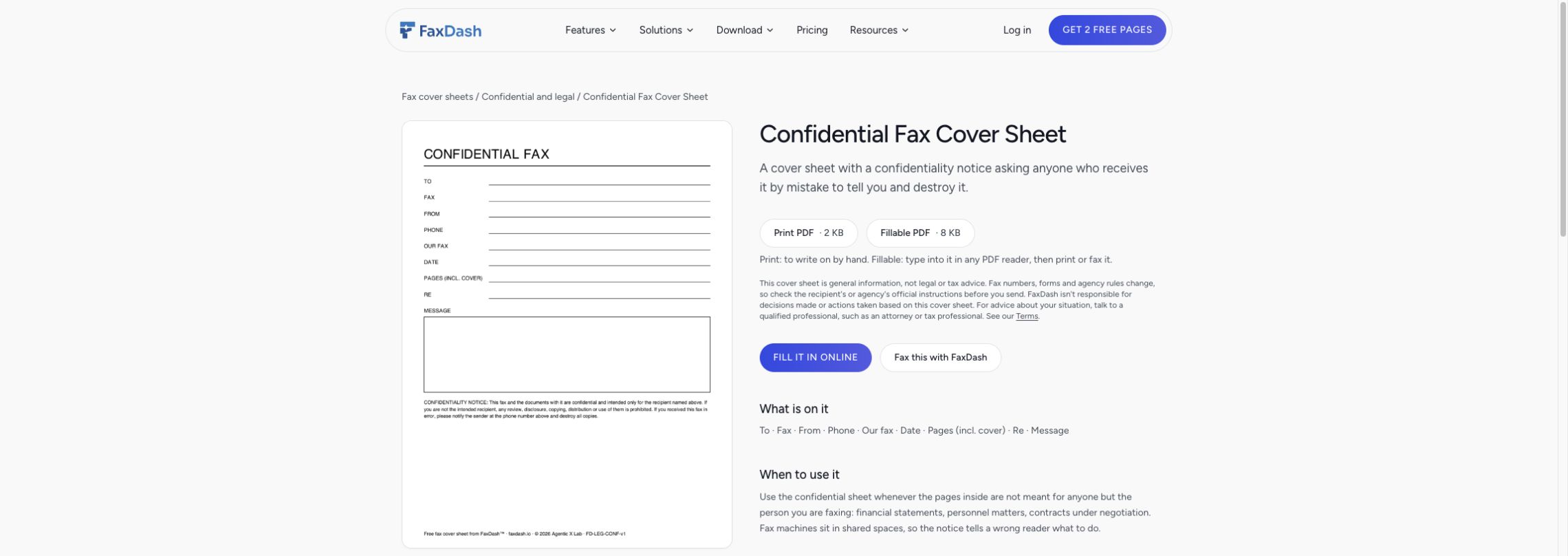
Choose Print PDF if you want to write on paper, Fillable PDF to type into the downloaded file, or Fill it in online to use the browser maker. Whichever route you choose, check the finished cover for a reachable sender phone number and keep confidential details in the supporting document rather than the subject or message.
Check the number before you send
A notice only matters after something has gone wrong. The most likely thing to go wrong is a misdialed or outdated number, and that's the part you control.
- Get the number from a source you trust, such as the recipient's letterhead, a recent letter from them or a phone call, not an old email thread or a search result.
- Read it back digit by digit before you press send. In FaxDash, a U.S. number is +1 followed by the ten digits.
- Call ahead for anything sensitive, so the recipient can confirm the number and watch for the pages.
- Check the result afterward. Look in your fax history for Delivered or Failed. Delivered means the fax transmission completed, not that the right person has read it. The delivery confirmation lists the destination number, so save it and glance at that number once more.
A notice versus a CONFIDENTIAL watermark
They do different jobs, and you can use both.
- The notice sits on the cover page. It explains who the fax is for and what a wrong reader should do.
- A watermark puts a label such as CONFIDENTIAL over the document itself, so the label is on the document, not only on the cover.
In FaxDash, you add a watermark on the Send Fax page under Finishing touches, and it's free. Neither one hides what's on the page. For the steps, see Before you fax: add a signature or watermark.
The honest catch
A cover page is a page, and fax services charge by the page. With FaxDash, the cover page is free to make but uses 1 send credit, the same as any other page to a U.S. or Canada number. For a one-page fax to someone who's expecting it, a notice at the bottom of the document itself may be enough.
The bigger catch is false comfort. A careful notice on a fax sent to the wrong number is still a fax sent to the wrong number.
How FaxDash compares with Fax.Plus and eFax on default covers and notices
If you're choosing a service for a saved default cover or a confidentiality notice on every fax, here is how three online fax services describe those features on their own pages, checked November 6, 2026.
- Fax.Plus lets you set a default cover for outgoing faxes, includes a cover-sheet maker with an editable sector confidentiality notice and downloadable confidential templates, offers a custom Cover Sheet Gallery on Premium and above, and documents org-wide Cover Sheet Enforcement on Enterprise only. See the cover sheet templates page and Cover Sheet Enforcement.
- eFax says a cover sheet is automatically generated when you send an online fax, provides downloadable confidential and HIPAA cover-sheet templates, and documents customizing a cover page with a confidentiality statement through Create Cover Page. See fax cover sheets, confidential fax cover sheets and how to fax medical records.
- FaxDash documents a built-in cover page builder with a short message field, a default cover sheet for every fax under Settings → Cover sheet, and a saved default note used when an email-to-fax or default-cover message is empty, plus a free confidential cover sheet and a free CONFIDENTIAL page watermark. You can put your confidentiality notice in the cover message or the saved default note, or use the free confidential sheet. The cover page has no feature fee and uses 1 send credit. See sending faxes and integrations.
Our advice: if you need enforced org-wide cover templates across users, Fax.Plus Enterprise documents that. FaxDash documents an account default cover and a saved default note rather than admin enforcement. Features and prices change, so check each service's own page before you decide.
Your next step
Before your next sensitive fax, confirm the number with the recipient, then add the notice to your cover page. The number check matters more.