
The short answer
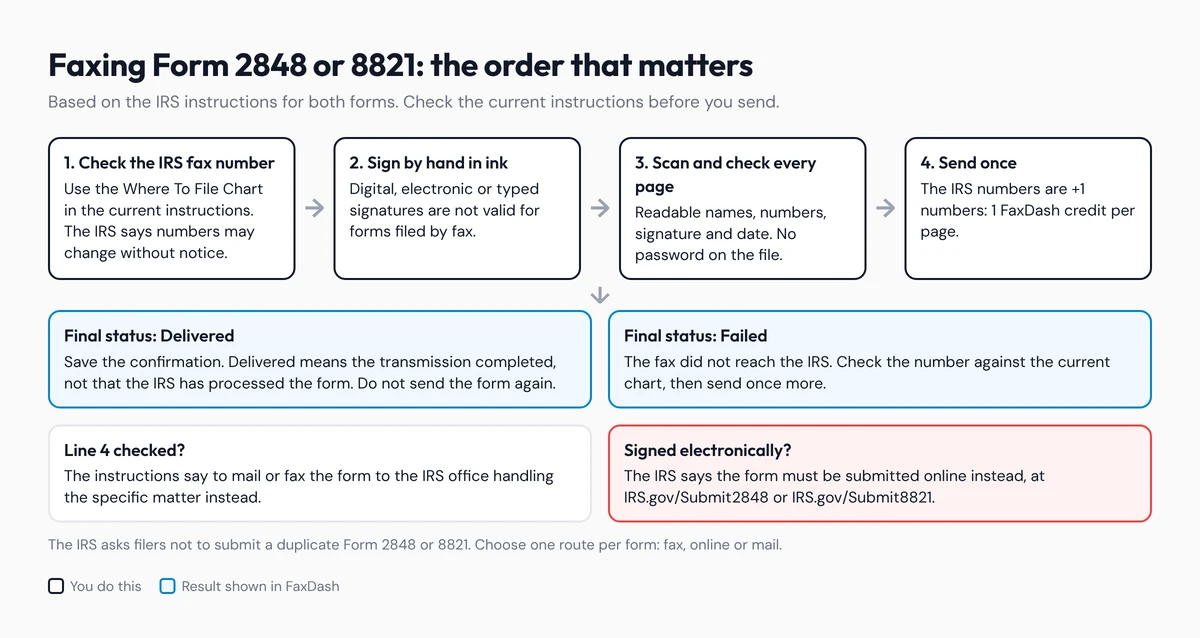
Where to fax Form 2848 or Form 8821: the IRS fax number for where you live, listed in the current form instructions. Sign the form by hand in ink, then fax it once to that number. The IRS says digital, electronic and typed signatures are not valid on these forms when they are filed by fax. After the fax shows Delivered, keep your record and do not send the same form again. The IRS asks filers not to submit duplicates.
This guide covers sending the form. It is not tax or legal advice. Check the current IRS instructions before you send, because the IRS notes that its fax numbers may change without notice.
For the office handoff log and when to choose fax versus Tax Pro Account or upload, see A fax workflow for small tax offices. For FaxDash plans aimed at accounting practices, see FaxDash for accounting. If the CAF unit already rejected the form, read why CAF rejected your Form 2848 before you send it again. For other IRS forms, see IRS fax numbers by form.
Find the current IRS fax number
The Instructions for Form 2848 and the Instructions for Form 8821 each include a Where To File Chart. On October 26, 2026, both charts listed the same fax numbers:
| If you live in | IRS fax number |
|---|---|
| Alabama, Arkansas, Connecticut, Delaware, District of Columbia, Florida, Georgia, Illinois, Indiana, Kentucky, Louisiana, Maine, Maryland, Massachusetts, Michigan, Mississippi, New Hampshire, New Jersey, New York, North Carolina, Ohio, Pennsylvania, Rhode Island, South Carolina, Tennessee, Vermont, Virginia, or West Virginia | 855-214-7519 |
| Alaska, Arizona, California, Colorado, Hawaii, Idaho, Iowa, Kansas, Minnesota, Missouri, Montana, Nebraska, Nevada, New Mexico, North Dakota, Oklahoma, Oregon, South Dakota, Texas, Utah, Washington, Wisconsin, or Wyoming | 855-214-7522 |
| All APO and FPO addresses, American Samoa, the Commonwealth of the Northern Mariana Islands, Guam, the U.S. Virgin Islands, Puerto Rico, a foreign country, or otherwise outside the United States | 855-772-3156, or 304-707-9785 (Outside the United States) |
The charts carry this note: "These numbers may change without notice." The IRS points readers to IRS.gov/Form2848 and IRS.gov/Form8821, under Recent Developments, for updates. Check there on the day you send.
One exception changes the destination. If you check the box on line 4 (a specific use not recorded on the Centralized Authorization File), the instructions say to mail or fax the form to the IRS office handling the specific matter, not to the numbers above.
Sign by hand before you scan
The instructions for both forms say you must handwrite your signature if you file by mail or by fax. They also say a form with an electronic signature must be submitted online instead.
That affects how you use FaxDash:
- Print the completed form.
- Sign and date it by hand in ink.
- Scan the signed paper copy.
Do not use the FaxDash app's draw-a-signature feature for these forms. A signature placed on the screen is the kind of signature the IRS says is not valid for a faxed Form 2848 or 8821.
The instructions also include timing rules that can matter before you fax. For example, the Form 2848 instructions describe a window for the representative to sign after the taxpayer signs, and the Form 8821 instructions describe a 120-day rule for some purposes. Read the section that applies to you.
Prepare the scan
Work from the signed paper form and check it before you send.
- Scan every page. In the FaxDash app, you can scan several pages into a single fax. From the web dashboard, upload a PDF.
- Check each page on screen. Names, taxpayer identification numbers, CAF numbers, tax periods, signatures and dates should all be readable. A fax arrives in black and white, so faint ink can be harder to read.
- Check the page order and include any attachment the instructions call for, such as an added list of designees on Form 8821.
- Make sure the file opens without a password. The FaxDash Help Center lists a password-protected document as a reason a fax can fail.
Send it with FaxDash
- Enter the IRS fax number from the current chart. All of the numbers above are US numbers in the +1 region, so each page uses one credit. The United States is not in FaxDash's unsupported or purchase-only destination groups.
- Review the pages and cost shown before you confirm.
- Send once.
If you send by email-to-fax, you need an active FaxDash receive number. Put only the destination fax number in the subject line, for example 8552147519. For US and Canadian numbers, use 10 digits, or 1 followed by 10 digits. Every digit in the subject is read as part of the number, so leave out reference numbers and dates.
After you send
Many failed attempts are retried automatically, so wait for the final status before you act.
- Delivered means the transmission to the IRS fax number completed. The FaxDash Help Center says delivered faxes include a confirmation you can download. Save it with your records. Delivered does not establish that the IRS has processed the form or recorded the authorization.
- Failed means the fax did not reach the recipient. Check the number against the current IRS chart, then send once more.
The IRS publishes its own processing status for these forms. On October 26, 2026, the IRS processing status page listed both Form 2848 and Form 8821 as "Processed 3 business days after receipt." That estimate comes from the IRS and can change, so check the page for the current figure.
Do not send the same form again after it shows Delivered. The IRS processing status page says: "If you already submitted Forms 2848 or 8821: Please don't submit a duplicate form." The IRS online submission page adds: "If you already faxed or mailed a form, don't submit it online."
Need a cover sheet for the CAF unit? Our free IRS power of attorney (Form 2848 / 8821) fax cover sheet has places for the taxpayer, the form, your CAF number and only the last four digits of the SSN or EIN. You can download it or fill it in online.
Compare the handoff for signed authorization packets
FaxDash supports a single person's phone or browser send and a team's shared record. The useful distinction is whether your office can find the exact signed version, its sender and the final transmission result.
| Feature to compare | FaxDash | Other documented approaches |
|---|---|---|
| Individual accountability | Standard and Business teams use individual logins, with shared sent history showing who sent a fax | Fax.Plus documents a shared Sent option requiring support activation; pending Outbox items remain sender-only |
| A common place for replies | Shared team inbox with role-based access | MyFax's Share With 5 shares an account through email addresses; that is a different model from individual role-based seats |
| A record for the client file | Download the transmission receipt and keep it with the signed packet | Check that any alternative lets the next person find and save the prior send's result |
See FaxDash's team guide and sending guide. Team features require Standard or Business; receiving needs an active receive number.
We make FaxDash. Whichever service you choose, assign one person to send and put the final result in the client log before anyone retries.
The Form 2848 and Form 8821 instructions still require handwritten signatures for fax filing. Upload a scan of the ink-signed form. A provider's electronic-signing feature does not change that rule, and a delivery receipt does not prove CAF recording.
Other ways to submit
The IRS lists other options in the form instructions:
- Online. Submit at IRS.gov/Submit2848 or IRS.gov/Submit8821, as described on the IRS page Submit Forms 2848 and 8821 online. This requires a Secure Access account, and it is the required route if the form has an electronic signature.
- Tax Pro Account. The instructions say this all-digital account gives faster processing of certain authorizations. It is at IRS.gov/TaxProAccount.
- Mail. Use the address in the Where To File Chart.
Choose one route per form. Sending the same form by fax and online creates the duplicate the IRS asks you to avoid.
When to ask for help
Questions about which form to use, what to enter, or who can act as a representative are tax questions. Check the current IRS instructions and, where needed, ask a qualified tax professional. For a fax that will not go through after you have checked the number and the file, email support@faxdash.io with the destination number, the status and the time you sent it. Leave the form's contents and any taxpayer identification numbers out of the email.
If your office faxes forms for several clients
When more than one person in an office sends authorizations, a shared record helps prevent duplicates. FaxDash Business teams are set up from the web dashboard, and the shared sent history shows who sent each fax, so a colleague can check before sending a form again. See how FaxDash Business works for small teams.
This guide is general information, not legal or tax advice. Fax numbers, forms and agency rules change, so check the agency's official page before you send. FaxDash isn't responsible for decisions made or actions taken based on this guide. For advice about your situation, talk to a qualified tax professional or attorney.