

The short answer
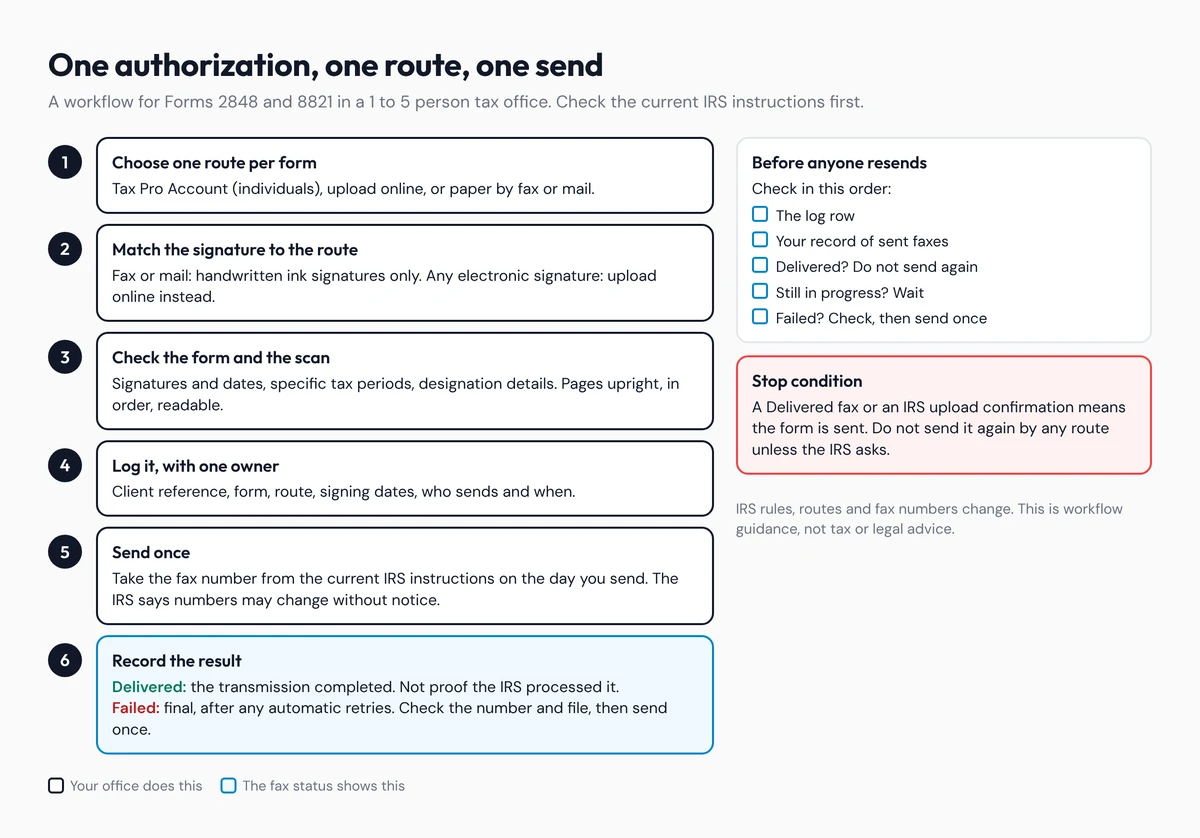
In a small tax office, faxing Form 2848 or Form 8821 is one of three IRS routes, not the default. Choose the route for each form first. Then make sure everyone in the office can see what has already been sent, because the IRS asks you not to submit the same authorization twice.
For the fax route, three rules carry most of the weight:
- The IRS requires a handwritten signature on any Form 2848 or 8821 filed by fax or mail.
- Each form goes by one route, once.
- A Delivered fax means the transmission completed. It does not mean the IRS has processed the form.
This guide is for owners and office managers at 1 to 5 person accounting and tax practices. It is general workflow guidance, not tax or legal advice. IRS rules and fax numbers change, so check the current IRS instructions before you act on anything here.
If you need the fax-once how-to for a single Form 2848 or 8821 (ink signature, the current IRS fax number, and what Delivered does and does not mean), see How to fax IRS Form 2848 or 8821. This article stays on the office workflow: routes, tracking and handoffs.
Choose the route before you pick up the form
The IRS page Request a POA or TIA lists three ways to submit a power of attorney (POA) or tax information authorization (TIA). On October 24, 2026, it described them this way:
| Route | What the IRS says it covers | Signature | What the IRS says you get back |
|---|---|---|---|
| Tax Pro Account | Requests to an individual taxpayer's IRS account. Listed matters include Form 1040, for the "Last 20 years plus 3 future years; exceptions apply" | The client approves the request in their own IRS account | "Real-time processing" once the client approves |
| Upload online | "an individual or business POA or TIA", for "All forms" and "All years" | Ink or an accepted electronic signature | "Email confirmation of receipt" |
| Paper, by fax or mail | Individuals and businesses | "Handwritten signatures" | Nothing stated. Processed in the order received |
A few details from the IRS pages affect which route fits:
- Tax Pro Account is for individuals. The Tax Pro Account page says it handles "authorization requests to individuals" who have an address in a US state or the District of Columbia. To request a POA there, you must be an attorney, certified public accountant, enrolled agent, enrolled actuary or enrolled retirement plan agent. It also says prior authorizations on file for the same matters, periods and types "will be revoked." Read that page before you use it for a client who already has a representative.
- Upload accepts electronic signatures. The IRS page Submit Forms 2848 and 8821 online lists the electronic signature types it accepts and requires a Secure Access account.
- Fax fits paper forms signed in ink. The same page says that if you "need to immediately discuss the taxpayer's case with the IRS," one option is to "Fax the form with a 'wet' ink signature to the IRS employee handling the taxpayer's matter."
- Line 4 changes the destination. If you check the box on line 4 (a specific use not recorded on the Centralized Authorization File, or CAF), the Form 2848 instructions say to "mail or fax Form 2848 to the IRS office handling the specific matter."
Whichever route you use, the IRS processes uploaded, faxed and mailed forms "in the order we receive them." Decide the route once per form and record it.
The signature rule for faxed and mailed forms
The Form 2848 instructions, line 7, state:
"You must handwrite your signature on Form 2848 if you file it by mail or by fax. Digital, electronic, or typed-font signatures are not valid signatures for Forms 2848 filed by mail or by fax."
The Form 8821 instructions, line 6, use the same words for Form 8821. The online submission page puts it more briefly: "For security reasons, all forms mailed or faxed to the IRS must have a 'wet' ink signature."
The instructions also explain what counts as an electronic signature. Among the listed types are "A scanned or digitized image of a handwritten signature that is attached to an electronic record" and "A handwritten signature, mark, or command input on a display screen with a stylus device." A form signed either way "may only be submitted to the IRS online."
In practice, that gives your office one test before any authorization goes to the fax queue: has everyone who needs to sign done so by hand, in ink, on the paper form? If not, the IRS instructions direct the form to the online upload route, not the fax route.
Two timing rules in the instructions are worth a line in your log:
- For Form 2848, "for domestic authorizations, the representative must sign within 45 days from the date the taxpayer signed (60 days for authorizations from taxpayers residing abroad)," when the taxpayer signs first.
- For Form 8821, when the purpose is something other than a tax matter with the IRS, such as lender income verification, "the IRS must receive the Form 8821 within 120 days of the taxpayer's signature date."
For signatures on behalf of a corporation, an estate or another fiduciary situation, the Form 2848 instructions refer to 26 CFR 601.503(d). Check the instructions and that regulation for the case in front of you.
Check the form before it leaves the office
The cheapest check is the one you do before the form leaves the office. The IRS page Common reasons for power of attorney (POA) rejection lists, among others:
- missing taxpayer or representative signatures, or signature dates,
- tax periods written as generalizations, such as "All Years" or "All future periods",
- the retention box on line 6 checked without a copy of the power of attorney being retained,
- a missing designation, jurisdiction, or license or enrollment number,
- no title for a business taxpayer signing the form,
- an incorrect EIN or SSN on Form 8821.
The IRS also posted Items to consider while completing Form 2848 on July 8, 2026. It explains that certain entries on lines 5a and 5b cause the authorization to be recorded as "modified," which keeps the representative from using some IRS tools for those matters, such as the Transcript Delivery System. Read it before you fill in those lines.
Then check the scan itself. Every page should be upright, in order and readable, including signatures and dates, and the file should open without a password.
The IRS fax number
Take the fax number from the current IRS instructions on the day you send, not from a saved contact. For the current IRS fax numbers, see where to fax Form 2848 and 8821, which also covers the fax-once steps: sign in ink, scan, send once and keep the confirmation.
Keep an authorization tracking log
A shared log lets a second person pick up a form without guessing. Use one row per form, per taxpayer, and copy this template into a spreadsheet:
| Column | What to enter |
|---|---|
| Client reference | Your internal client code. Leave full SSNs and EINs out of the log |
| Form | 2848 or 8821 |
| Tax matters and periods | As written on the form, for example "Income, 1040, 2023 through 2025" |
| Taxpayer signed | Date |
| Representative signed | Date (Form 2848). Note the 45 or 60 day window |
| Route | Tax Pro Account, upload, fax or mail. One only |
| Owner | The one person responsible for this row |
| Sent by and when | Name, date and time |
| Sent to | IRS fax number used, or the online route |
| Send result | For fax: the final status, with the date and time. For upload: the IRS email confirmation |
| IRS status checked | Date you checked the IRS processing status page, and what it said |
| Recorded on CAF | Yes, no or unknown, and how you confirmed it |
| Next action | One action, with a date |
Two columns do most of the work. Route stops the same form from going by fax and online. Send result and Recorded on CAF stay separate on purpose, because a completed send and a processed authorization are different facts.
The IRS processing status page listed Forms 2848 and 8821 as "Processed 3 business days after receipt" on October 24, 2026. The online submission page says, "We don't notify you when the form is processed." Treat the IRS estimate as the point to check status, and recheck the page because the estimate changes.
Handing off work during tax season
In a small office, the riskiest moment for an authorization is the handoff. One person faxes a form late in the day, someone else sees an open row the next morning, and the form goes again. The IRS request page explains why that matters: "Submitting duplicate Forms 2848 or 8821 increases overall inventory and may delay processing for everyone. Please verify current processing status before submitting another authorization."
The following is FaxDash editorial guidance for office routine, not an IRS rule or product behavior.
Give every row one owner. The owner can change, but only by a written handoff in the log.
Write handoff notes as state, not intent. A useful note says what is true now and what happens next. For example, a hypothetical note: "8821 for client C-114. Signed in ink by taxpayer Oct 20. Faxed Oct 21, 4:10 PM, final status Delivered. Next: check IRS status Oct 27." Avoid notes like "should be sent."
Before anyone sends a form that might already have gone, check in this order:
- Read the log row. If it shows a send by any route, stop and go to step 3.
- Check your record of sent faxes for that IRS number around the date in question. Match the date and time to the log, not just the number, because many clients share the same IRS fax number.
- If a fax for that form shows Delivered, do not send it again, by fax or online. The online submission page says, "If you already faxed or mailed a form, don't submit it online."
- If the status is anything other than Delivered or Failed, the fax is not finished. Wait for the final status.
- If the final status is Failed, check the number against the current IRS chart and the file against the checks above. Then send once, and update the row.
- If the IRS estimate has passed and the authorization still is not showing, use the routes the IRS gives on its own pages. The online submission page points to viewing "all your active authorizations in Tax Pro Account," and, if you need to discuss the case immediately, to faxing the form to the IRS employee handling the matter or contacting the Practitioner Priority Service.
Stop condition (FaxDash editorial guidance). Once a form has a Delivered fax or an IRS upload confirmation, the office does not send that form again by any route unless the IRS tells you to. If that rule is ever in doubt, the person who owns the row decides, after checking the IRS status.
What Delivered does and does not tell you
Delivered means the transmission to the IRS fax number completed.
Delivered does not establish that:
- the IRS has opened, accepted or processed the form,
- the authorization has been recorded on the CAF,
- the form had no errors that could lead to rejection.
The IRS answers those questions, not the fax status. Keep them in their own log columns.
Failed is the final result. It appears only after the last automatic retry, and the credits for that fax are returned automatically. If the status is neither Delivered nor Failed, the fax is not finished, so wait rather than resending. FaxDash's sending guide covers retries and what to do after a failure.
To keep client faxes consistent across your office, use our free tax client documents fax cover sheet. It lists the client, the tax year and what is enclosed, so the person at the other end can file the pages without calling you. You can also fill it in online.
Where FaxDash fits
A fax service handles only the paper route. It does not replace Tax Pro Account or the IRS upload, and when one of those routes fits the form, use it.
For an office that sends some authorizations by fax, these FaxDash details are relevant:
- One plan for the office. Teams are available on Standard and Business. Business includes you plus 2 team seats; Standard includes no seats. Each added seat costs $2.99 a month.
- Roles. Admins can invite members. The finance role cannot send faxes.
- Team setup on the web. The team, its members and roles are managed in the web dashboard at dash.faxdash.io, not in the mobile app. Team members can send, receive and view faxes in the mobile app.
- Email-to-fax. Email-to-fax needs an active FaxDash receive number. From the email address on your FaxDash account, or your verified contact email, send one PDF to yourfaxnumber@fax.faxdash.io. Mail from any other address is refused. The subject line holds only the destination fax number: for a US number, 10 digits, or 1 followed by 10 digits. Every digit in the subject is read as part of the number, so leave client codes and dates out of it. Other file types are ignored, and if several PDFs are attached only the first is sent. The body text is not faxed. See integrations help and sending faxes.
For received-fax triage with a summary you still check against the page, see AI fax summaries.
See how FaxDash Business works for small teams.
How FaxDash compares for a three-person tax office
Suppose three people send 50 pages to U.S. numbers and receive 120 pages a month. The plan needs to cover the people and the pages, while letting the next person check what already went out. We make FaxDash; provider documentation checked November 7, 2026.
| Service | Monthly cost and allowance | Team handoff |
|---|---|---|
| FaxDash Business | $12.99; owner plus two seats, 500 received pages and 60 send credits | Individual logins; shared incoming and sent views with sender attribution. See plans and teams |
| Fax.Plus Business | $34.99 billed monthly; five members and 1,000 pages | Shared Sent box needs support activation and excludes queued Outbox items. See monthly pricing and sharing setup |
| eFax Business | Base price not verified; 500 pages, five user licenses and one number | Searchable storage is listed; confirm shared sent visibility and sender attribution for your setup. See plans |
| MyFax Home Office | $12/month; 100 sent and 100 received pages, separately | Share With 5 connects email addresses to one account, not verified independent role-based seats. See pricing |
In this example, FaxDash's separate allowances cover the usage. With a Fax.Plus number assigned to all three people, 120 incoming pages count as 360, before outbound usage. MyFax's incoming allowance is 20 pages short despite spare outgoing pages; budget for overage or a larger plan. These are illustrative counts, not checkout quotes. Confirm chargeable pages, taxes and extras with each provider.
Our advice: Fax.Plus or eFax may fit a team that wants five included licenses. Before choosing, ask each person to show how they would find a prior send and its confirmation. Keep the office log whichever service you use: an archive or receipt does not track IRS acceptance, and no provider prevents duplicate submissions for you. Features and prices change.
When to stop and ask
Questions about which form to file, what to enter on it, or who may sign are tax questions. Check the current IRS instructions, and ask a qualified tax professional where you need one.
If a fax will not go through after you have checked the number and the file, email support@faxdash.io with the destination number, the status, and the date and time you sent it. Leave taxpayer names, identification numbers and form contents out of the email. Do not reply to FaxDash notification emails, because replies do not reach support.
This guide is general information, not legal or tax advice. Fax numbers, forms and agency rules change, so check the agency's official page before you send. FaxDash isn't responsible for decisions made or actions taken based on this guide. For advice about your situation, talk to a qualified tax professional or attorney.