
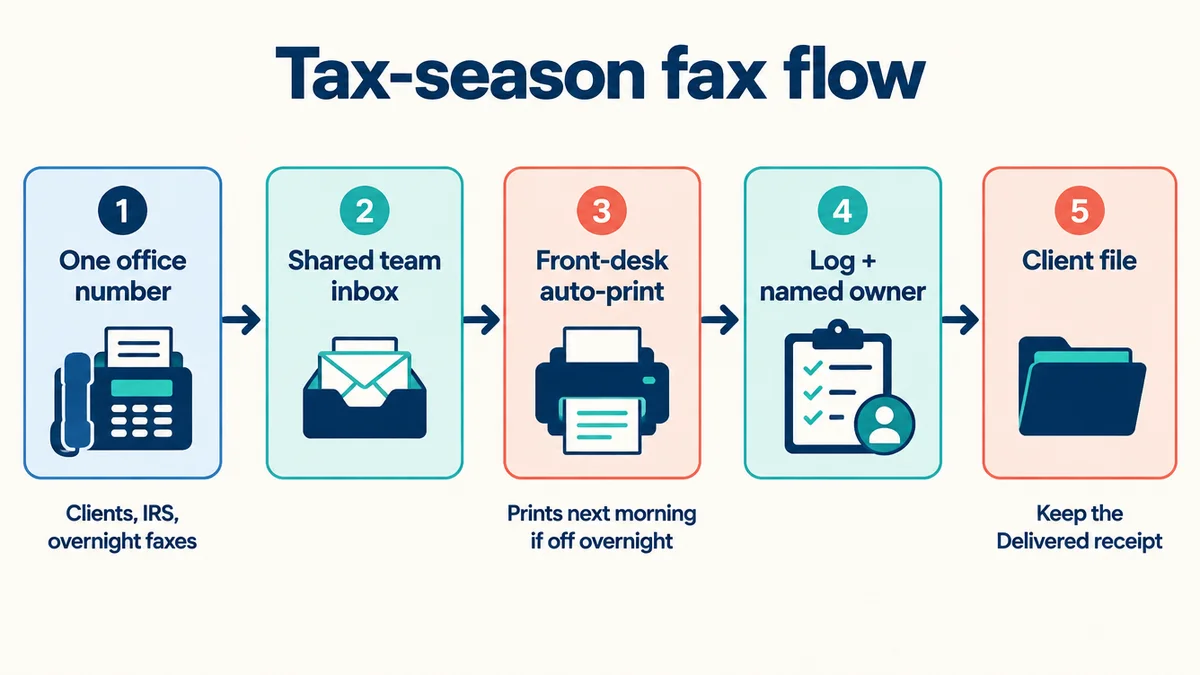
If you run a one-to-five person tax or bookkeeping office, plan tax-season fax before January. Give the office one fax number. Have everyone work from one shared inbox, and make a written rule for who owns each incoming fax. Treat Form 8879 and Forms 2848/8821 according to their own IRS rules. Before you call the IRS, have the client's authorization in place. Faxes that arrive overnight should land on a desk the next morning, not sit in someone's email. The rest of this page is the routine, in order, with a daily checklist you can copy.
FaxDash moves pages. It does not prepare, file or accept anything for the IRS, and a Delivered status is not an IRS decision on anything. This is general workflow guidance, not tax or legal advice.
Who this is for
This is for the owner or office manager of a small tax or bookkeeping practice with a few preparers, maybe one seasonal helper, and a fax line clients and the IRS still use. If you mostly need the form-by-form steps for Forms 2848 and 8821, start with How to fax IRS Form 2848 or 8821 and the small tax office fax workflow. This page covers the season around those forms.
Before January: one number, one inbox, one owner per fax
Put one receive number everywhere
Pick the number clients and agencies will use and print it on the engagement letter, the website, your intake checklist and the fax line of any authorization you prepare. One number means one place to look. In FaxDash, a receive number is local or toll-free, and it needs a receive plan. Sending never needs a subscription.
Share the inbox and write down who owns what
Teams come with the Standard and Business plans. On Business, a team is you plus 2 team seats; Standard starts with none. Each extra seat is $2.99/month. Everyone signs in as themselves and works from the same shared inbox and sent history, and every sent fax shows who sent it. Roles are admin, member and finance. Finance can see faxes, credits and billing but does not send. Admins can set a monthly page limit per member. You create the team and invite people in the web dashboard, not the mobile app. The details are on the Teams help page.
The shared inbox shows everyone what arrived. Who handles it is still an office rule, so write that rule down before the first busy week. A simple version:
- The front desk logs every received fax within an hour of opening.
- The preparer on the client's file owns it from there.
- Anything from the IRS goes to the owner or the person named on the authorization.
Put paper where paper is still expected
This is where FaxDash Connect fits a tax office. Run it on the front-desk computer and each new fax to the team's number prints once on that printer, with the sender's number and arrival time stamped on each page by default. On a team, it prints the shared inbox, so the person who logs the morning pile does not need to open anything first. Faxes that come in after hours, while the computer is off, print when it starts the next morning. Run it on one computer only, because every copy prints every fax. Connect only prints: sending and the shared history stay in FaxDash.
Client intake by fax: what arrives and who logs it
In season, expect signed Forms 8879, engagement letters, IRS notices clients forward to you, and the occasional W-2 or 1099 from a client without a scanner. Log each one before anyone works on it:
| Column | Example |
|---|---|
| Received (date and time) | 2027-02-14 08:12 |
| From (fax number) | 555-0100 |
| Client | Rivera |
| What it is | Form 8879, TY2026, signed |
| Pages | 2 |
| Owner | Sam |
| Next step | Attach to return, file in client folder |
| Done | ✓ |
Name saved files the same way every time, for example Client_FormOrDoc_TaxYear_YYYY-MM-DD. A naming rule matters more than which rule you pick.
One catch with email notices: the FaxDash email for a new fax tells you who sent it and when, with a link to open it in FaxDash. The fax itself is not attached. Do not train staff to look for attachments. For more on email routing, see fax-to-email and email-to-fax for small teams.
Signatures: two different IRS rules
Form 8879 comes back to you and stays with you
Form 8879 is the e-file signature authorization between the taxpayer and the ERO (electronic return originator). The IRS e-file signature FAQ says taxpayers may sign by hand and return the form to the ERO in person, by U.S. mail, private delivery, fax, email or an internet website. Publication 1345 (Rev. 12-2025) says the ERO must keep Forms 8878 and 8879 for three years from the return due date or the IRS received date, whichever is later, and must not send them to the IRS unless the IRS asks.
In practice, a faxed 8879 comes into your inbox and goes into the client file. It does not go out again to an IRS fax number.
Forms 2848 and 8821 have an ink rule
If a Form 2848 or 8821 is filed by mail or fax, it needs a handwritten signature; if you use an electronic signature, you must submit it online. The IRS also says not to submit a form online if you already faxed or mailed it. The full rule, the fax numbers and the common rejection reasons are in How to fax IRS Form 2848 or 8821 and Why CAF rejected your Form 2848. Do not keep a copy of the IRS fax table in your office binder. Check the current instructions each time.
IRS calls: have the authorization ready first
The IRS Practitioner Priority Service (PPS) line is 866-860-4259. It is available to tax professionals with valid third-party authorizations (Forms 2848, 8821 and/or 8655), on weekdays from 7 a.m. to 7 p.m. local time (Alaska and Hawaii follow Pacific time). If you are registered for e-Services and your authorization is recorded on the CAF, the IRS says you can get a transcript there without calling PPS.
Before you dial:
- Confirm the client's authorization is on file, or have the signed form scanned and ready.
- Open FaxDash on the computer you are calling from, signed in as yourself on the team.
- Have the client's file and your log open.
If the call ends with a request to fax something, write down the fax number you are given and read it back. Send it while you're on the team, so the shared sent history shows who sent it. If you can, stay on the line until the fax shows Delivered. Then download the receipt and attach it to the client file.
After hours: faxes arrive overnight
Faxes keep arriving after you close. Each one triggers a push notification and an email notice (unless you've turned the email off). You can add up to five more addresses to that email, such as a front-desk inbox, in Settings. If Connect runs on the front-desk computer, overnight faxes print when it starts in the morning. The person who opens up logs the pile first.
Peak-week daily checklist
Copy this into your office manual:
OPEN
[ ] Front-desk computer on, FaxDash Connect running (overnight faxes print)
[ ] Log every received fax: time, sender, client, document, pages, owner
[ ] Check the email notices against the log; nothing in email without a log line

DURING THE DAY
[ ] Each preparer works only the faxes logged to them
[ ] Signed 8879s go to the client file, not to the IRS
[ ] 2848/8821 signed in ink if faxing; check the current IRS instructions for the number
[ ] Before an IRS call: authorization on file, FaxDash open, client file open
[ ] Every outbound fax: wait for Delivered, download the receipt, file it

CLOSE
[ ] Any fax still unowned? Assign it before leaving
[ ] Any Failed fax? Check the number is a fax line, then resend once
[ ] Check the received-page allowance (alerts arrive at 80% and 100%)
What Delivered does and does not tell you
Delivered means your fax transmitted to the number you dialed, and FaxDash gives you a receipt with the destination number, page count and send times. It does not mean the IRS accepted an authorization, processed an election, or recorded anything on the CAF. For forms with their own follow-up, see the guides for Form 2553, Form SS-4 and Form 4506-T.
If a fax fails, FaxDash retries automatically when the failure looks temporary. If every attempt fails, the fax is marked Failed, you get a push and an email, and the credits come back to your balance.
Costs in season
- Sending is pay-as-you-go with no subscription. Credit packs run from 5 pages for $0.99 to 150 pages for $9.99, and credits never expire. A fax to a US (+1) number, including Canada, uses 1 credit per page, including a cover page.
- Receiving needs a plan. Starter is $3.99/month (50 received pages + 10 send credits), a fit for a solo preparer. Business is $12.99/month (500 received pages + 60 send credits, you plus 2 team seats, extra seats $2.99/month), for an office that shares one inbox. Standard sits in between at $6.99/month (200 + 25).
- Over the allowance: faxes keep arriving. Each received page beyond the monthly allowance uses one send credit, and you get alerts at 80% and 100%. If your credit balance runs out, received faxes still arrive, the balance goes below zero, and sending pauses until you top up. For example, a Business office that receives 620 pages in a month uses 120 send credits for the extra pages.
Plan details are on Pricing, credits and billing.
How this compares, checked November 8, 2026
For a tax office, the useful comparison is what each service gives you for the season: how you pay to send, how you get a number for replies, and how many people can work one account. This is what each company's own pages said on November 8, 2026.
| FaxDash | Fax.Plus | eFax | PayPerFax | |
|---|---|---|---|---|
| Paying to send | Credit packs that never expire, with no subscription needed to send | Monthly plans with included pages, plus Automatic Top-Up for credit on every plan | Monthly plans with a page allowance that counts both sent and received pages | Pay per fax, with no account registration and no subscription |
| A number for replies | A local or toll-free receive number on a Starter, Standard or Business plan | Receiving needs an active paid plan, which includes a fax number | Personal and Business each include 1 fax number | Built for sending; each sent fax gets a confirmation email with a PDF copy |
| People on one account | Team seats on Standard and above; Business includes you plus 2 seats | Teams need Business (five members included) or Enterprise (unlimited members) | Personal has 1 user; Business has 5 user licenses, with extra users for a monthly fee | No account to share |
Current prices are on each company's pricing page: Fax.Plus, eFax and PayPerFax.
Which fits. If you send only a few faxes a season and expect replies by phone or mail, a pay-per-fax service like PayPerFax can be enough. If your office wants one monthly allowance that covers sending and receiving, eFax plans work that way, and Fax.Plus Business and Enterprise add team setup and an admin console. FaxDash fits an office that wants a receive number and a shared inbox for the season while paying for sends by the page.
FAQ
Does FaxDash prepare or file tax forms? No. FaxDash sends and receives fax pages. Preparing, signing and filing stay with you and your client, under the IRS instructions for each form.
Can seasonal staff use the mobile app? Yes. Once they join the team, they sign in with their own account and the app shows which team they're on. Admins and members send from the team's credits and work the shared inbox; the finance role can see the team's faxes but doesn't send. Creating the team, inviting people and changing roles happen in the web dashboard.
Can I fax a Form 8879 to the IRS? The ERO keeps Form 8879 and does not send it to the IRS unless the IRS asks, per Publication 1345.
What happens if we receive more pages than the plan includes in April? Faxes keep arriving, and the extra pages use send credits. See Costs in season above.
Should we fax a Form 2848 or submit it online? The IRS offers both. Pick one route per form and do not submit online a form you already faxed or mailed. The small tax office workflow covers how to choose.
Set up your office number before January
Get the number on your engagement letters before the first client asks where to send their 8879. A shared office should start with FaxDash for Business (you plus 2 team seats, $12.99/month). A solo preparer can start with a Starter receive plan at $3.99/month and send with credits that never expire. If you want paper at the front desk, download FaxDash Connect. For more ideas by industry, see FaxDash for accounting.
Sources checked October 29, 2026: IRS e-file signature authorization FAQ, Publication 1345 (Rev. 12-2025), Instructions for Form 2848, Submit Forms 2848 and 8821 online, and the Practitioner Priority Service page on irs.gov; FaxDash Help pages for teams, receiving, sending, pricing and FaxDash Connect.
This guide is general information, not legal or tax advice. Fax numbers, forms and agency rules change, so check the agency's official page before you send. FaxDash isn't responsible for decisions made or actions taken based on this guide. For advice about your situation, talk to a qualified tax professional or attorney.