
There is no single IRS fax number. Each form, and sometimes each letter, has its own number, and many depend on where you live. Find your form in the table below, open the IRS page it links to, and take the number from that page on the day you send. Then fax the form once and keep your delivery record.
IRS numbers checked October 30, 2026. The IRS says some of these numbers "may change without notice." We recheck this page before each update. This page explains how to send forms by fax. It is not tax or legal advice.
IRS fax numbers by form
| Form | What it's for | Can you fax it? | Where the number comes from | Our guide |
|---|---|---|---|---|
| 2848 and 8821 | Power of attorney; tax information authorization | Yes, to the number for where you live. A line 4 (specific use) form goes to the IRS office handling the matter | Where To File Chart in the Instructions for Form 2848 and the Instructions for Form 8821 | How to fax Form 2848 or 8821 |
| 2553 | S corporation election | Yes, two numbers that depend on the state | Instructions for Form 2553 | How to fax Form 2553 |
| SS-4 | Applying for an EIN | Yes. 855-641-6935 if you have a legal residence, principal place of business or principal office in one of the 50 states or DC. Otherwise 855-215-1627 from within the U.S. or 304-707-9471 from outside it. IRS.gov offers an online EIN application and says that if you can't apply online, you can apply by phone, fax or mail | Instructions for Form SS-4, "Apply by fax" | How to fax Form SS-4 |
| 4506-T | Requesting a tax transcript | Yes, to the RAIVS Team number for your state | "Where to file" chart on Form 4506-T | How to fax Form 4506-T |
| 3911 | Tracing a missing refund | Yes, to the number for your state. The IRS says to send nothing other than Form 3911 to those numbers | About Form 3911 | None yet |
| 911 | Asking the Taxpayer Advocate Service for help | Yes. (855) 828-2723. From overseas, 1 (304) 707-9793, which the IRS notes is not toll-free | "How to Send this Form" on Form 911 | None yet |
| 8802 | U.S. residency certification | Yes. 877-824-9110 (within the U.S. only, toll-free) or 304-707-9792 (inside or outside the U.S., not toll-free). Up to 10 Forms 8802, 100 pages at most, per transmission, with a cover sheet stating the page count. Fax only after you pay the user fee on Pay.gov and enter the e-payment confirmation number on page 1 of Form 8802 | Instructions for Form 8802 | None yet |
| 8655 | Reporting agent authorization | Yes. 855-214-7523. No more than 25 forms in a single transmission | Form 8655 | None yet |
| Letter 12C response | Sending Form 8962 and Form 1095-A for the premium tax credit | Yes, to the fax number printed on your letter. There is no general 12C number | Reconciling your advance payments of the Premium Tax Credit | None yet |
For forms with a FaxDash guide, the full state-by-state numbers are in that guide and on the IRS page. We keep them in one place so they are easier to keep current.
Which cover sheet to use
- Most IRS forms and notices: the free IRS fax cover sheet.
- Form 2848 or 8821: the IRS power of attorney fax cover sheet.
- The Taxpayer Advocate Service, about an open case: the Taxpayer Advocate fax cover sheet.
You can also fill in the IRS cover sheet online and download a PDF. For what to write on it, see the IRS sheet page and what to put on a fax cover sheet.
How to read an IRS fax instruction
IRS fax instructions come in a few shapes. Read the one for your form before you send.
- By where you live. Forms 2848, 8821, 2553, 4506-T and 3911 use different numbers for different states. Use the row for the taxpayer's location as the instructions define it.
- Only in some situations. Some instructions change the destination for certain cases. For example, a Form 2848 with the line 4 box checked goes to the IRS office handling the specific matter, not to the Where To File numbers.
- On your letter. For responses such as Letter 12C, the number is printed on the letter itself. Use that number, not one from a list.
- Limits per transmission. Form 8802 allows up to 10 forms and 100 pages per fax. Form 8655 allows up to 25 forms.
- Cover sheets. Form 8802 requires a cover sheet stating the number of pages. For what to put on one, see what to put on a fax cover sheet.
If a form's instructions or your IRS letter give no fax number, use the route they do give, such as mail, e-file or upload.
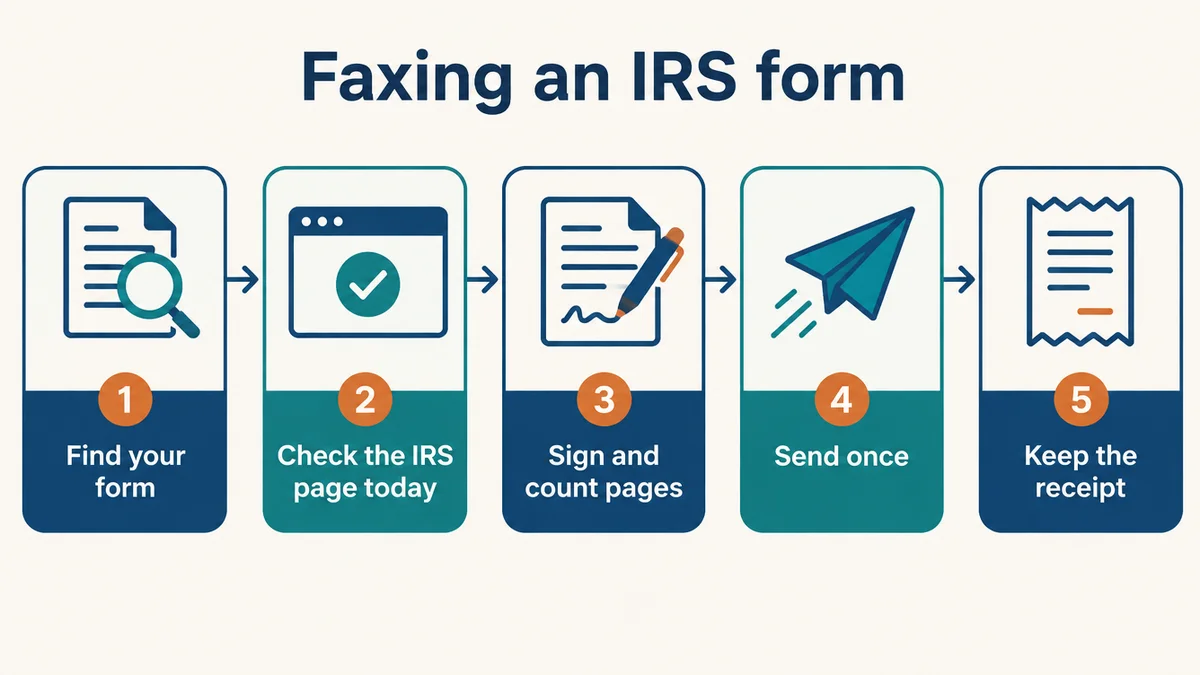
Before you send: a 5-point check
- The current form. Download it from the IRS page linked above, not from a saved copy.
- The signature rule. Check what the instructions say. For example, the instructions for Forms 2848 and 8821 say a form with an electronic signature image or a digitized image of a handwritten signature may only be submitted online. A missing or wrong signature is a common reason for rejection; see why CAF rejected your Form 2848.
- The page count. Count every page, including a cover page if you add one, and check it against any limit for that form.
- A cover sheet, if required. Form 8802 requires one. For other forms, follow the instructions.
- One transmission. Send the form once. If the result is unclear, check its status before you send it again.
Sending without a fax machine
You can fax an IRS form from your phone or computer. With FaxDash:
- Scan the signed form with the phone app, or open the web dashboard and add the PDF.
- Enter the IRS fax number from the IRS page, checked the same day.
- Add a cover page if the form needs one. The built-in cover page builder adds your name and number, the recipient, a subject and a short message.
- Check the page count, then send.
For scanning tips, see how to prepare a document to fax cleanly.
Sending from the app or the web dashboard needs no subscription. Sending by email also works, but it needs an active FaxDash receive number.
What to keep
Keep three things for each form you send:
- The delivery receipt. When the fax shows Delivered, open it on the Sent Faxes page of the web dashboard and choose Download Receipt. It lists the destination number, the page count, and when the fax was sent and completed.
- A copy of exactly what you sent, including the cover page.
- The date and time, in your own log if you track several clients.
If you run a small tax office, the tax-season fax playbook covers the season-wide routine around these sends: intake, signing and IRS calls. For the everyday routine, see our tax office fax workflow, and for more on firms like yours, FaxDash for accounting.
Delivered means the transmission to the IRS fax number completed. It does not show that the IRS has processed the form. Check the IRS processing status where the form's instructions say you can, and do not send the same form again while you wait.
Getting faxes back from the IRS
Some IRS replies come by fax. For example, under the Fax-TIN program the IRS says you can receive your EIN by fax, generally within 4 business days, when you apply with Form SS-4 by fax.
To receive a fax, you need a fax number that can receive. A FaxDash receive number starts with Starter at $3.99/month. Received faxes arrive in the app and the web dashboard. If your office wants paper copies, FaxDash Connect is a free Mac and Windows app that prints each fax you receive on the printer you choose.
How FaxDash handles this
FAQ
Is there one IRS fax number for everything? No. Each form or letter has its own number, and many depend on where you live. Use the IRS page for your form.
Can I use a number from this page without checking IRS.gov? No. The IRS says some numbers may change without notice. Open the linked IRS page on the day you send.
Can I fax a form signed electronically? It depends on the form. For Forms 2848 and 8821, the IRS says a form with an electronic signature image may only be submitted online. Check your form's instructions.
Does Delivered mean the IRS received and processed my form? Delivered means the fax transmission to the IRS number completed. It does not show processing. Keep your receipt and check status the way the IRS instructions describe.
What if my form is not in the table? Check the form's own instructions on IRS.gov. If they list no fax number, use the route they give.
Sources checked October 30, 2026 (IRS.gov): Instructions for Forms 2848, 8821, 2553, SS-4 and 8802; About Form 3911; Forms 4506-T, 911 and 8655 (PDF); Reconciling your advance payments of the Premium Tax Credit. FaxDash Help: sending faxes, pricing and billing, FaxDash Connect.
This guide is general information, not legal or tax advice. Fax numbers, forms and agency rules change, so check the agency's official page before you send. FaxDash isn't responsible for decisions made or actions taken based on this guide. For advice about your situation, talk to a qualified tax professional or attorney.