

Say a client in Germany or Japan won't pay you at the treaty rate until you prove you're a U.S. resident for tax purposes. The proof is Form 6166, and you get it by filing Form 8802. Fax is one of three ways to send the application, but only after you've paid the user fee online, and the IRS sets specific limits for faxed applications, including a required cover sheet.
This is general workflow guidance, not tax advice. Follow the current Form 8802 instructions for your situation.
What Form 8802 is for, and who files it
Form 8802, Application for United States Residency Certification, is how individuals and entities ask the IRS for Form 6166. The instructions describe Form 6166 as a computer-generated letter printed on stationery bearing the U.S. Department of the Treasury letterhead, certifying that you were a U.S. resident for purposes of U.S. taxation for the certification year. Unless otherwise directed, you send it to the foreign withholding agent or appropriate foreign authority when claiming treaty benefits. It can also support certain VAT exemption requests. What the certification states depends on the applicant type; fiscally transparent and disregarded entities have separate rules. Residency certification alone does not establish every treaty or VAT condition: the IRS does not certify beneficial ownership or satisfaction of a treaty limitation-on-benefits article, and Form 6166 is not proof that U.S. taxes were paid for a foreign tax credit.
The current revision of both the form and its instructions is October 2026 (About Form 8802, checked November 9, 2026).
Can you fax Form 8802?
Yes, once the user fee is paid. The instructions say that after you've received your e-payment confirmation number and entered it on page 1, "you can submit Form 8802 and all required attachments by mail, private delivery service, or fax."
"You can fax up to 10 Forms 8802 (including all required attachments) for a maximum of 100 pages to fax numbers 877-824-9110 (within the United States only, toll free) or 304-707-9792 (inside or outside the United States, not toll free). You must use a fax cover sheet stating the number of pages included in the transmission."
Source: Instructions for Form 8802, Rev. October 2026, checked November 9, 2026 (PT).
Individuals have an online option. The IRS says its Mobile-friendly forms have been available for Form 8802 since September 28, 2025, for individual applications only, not business entities (About Form 8802). Businesses and other entities send by mail, private delivery service or fax.
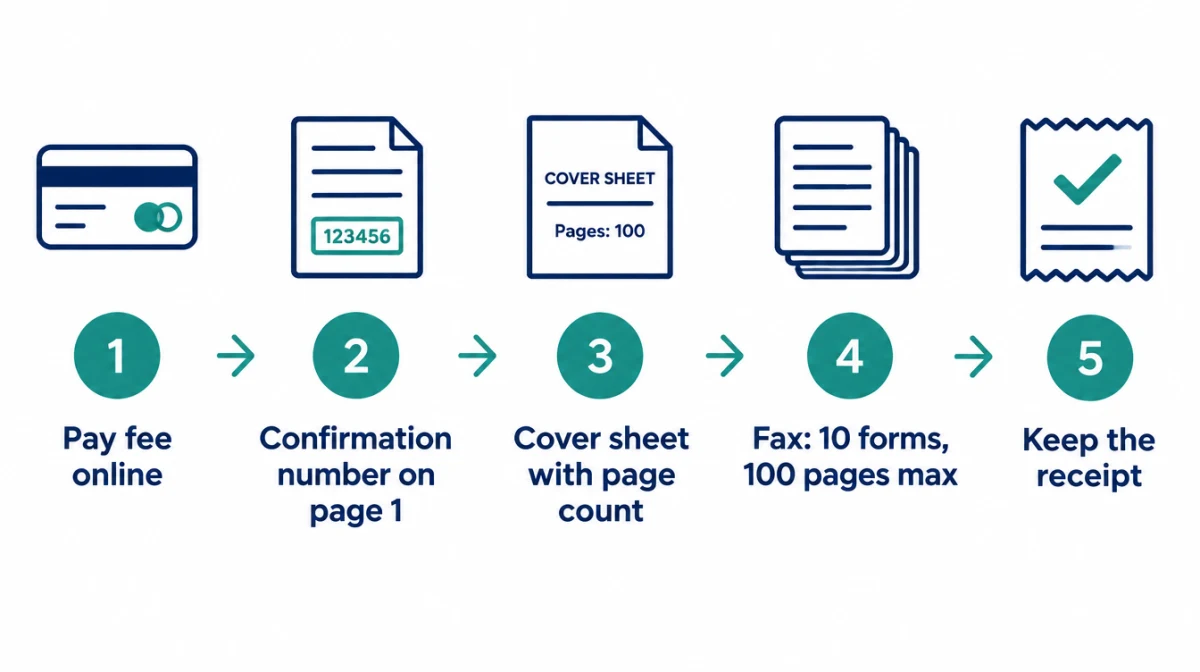
The diagram's confirmation number and page count are illustrative. Use your actual payment confirmation and total transmitted pages, including the cover; 10 applications and 100 pages are maximums, not targets.
The fax numbers and addresses
| Route | Where | Verified on IRS.gov |
|---|---|---|
| Fax, from within the U.S. | 877-824-9110 (toll free) | November 9, 2026, i8802 |
| Fax, from inside or outside the U.S. | 304-707-9792 (not toll free) | November 9, 2026, i8802 |
| Department of the Treasury, Internal Revenue Service, Philadelphia, PA 19255-0625 | November 9, 2026, i8802 | |
| Private delivery service | Internal Revenue Service, 2970 Market Street, BLN# 3-E08.123, Philadelphia, PA 19104-5016 | November 9, 2026, i8802 |
For other forms, see where to fax IRS forms.
Pay the user fee first
Effective October 1, 2026, the nonrefundable user fee is $105 per Form 8802 for an individual applicant and $230 per Form 8802 for a non-individual applicant, not per certificate or country requested. You pay on Pay.gov (search "IRS Certs") and upload a copy of Form 8802 there, but the instructions say that upload is "only for payment validation/reconciliation purposes." It doesn't file your application.
Then write the Agency Tracking ID or Pay.gov ID as the e-payment confirmation number on page 1. For a payment covering multiple Forms 8802, enter the same confirmation number on each covered form. The instructions are blunt: "The IRS will not process Form 8802 if the application does not include the e-payment confirmation number."
Limits and the cover sheet
- Up to 10 applications per fax, including all required attachments.
- No more than 100 pages per fax. Keep each fax within both limits, counting the cover and attachments. Do not assume that splitting a single oversized application across faxes satisfies the instructions; use the permitted mail or private-delivery route, or ask the IRS how to submit it.
- A cover sheet is required, and it must state the number of pages in the transmission. Count the cover itself so the number matches what arrives, for example "Pages: 8 (including this cover sheet)." A cover with the wrong count means you haven't followed the instruction. For what else to include, see what to put on a fax cover sheet.
- Sensitive numbers. Your full taxpayer identification number belongs on the form. As a privacy precaution, avoid unnecessary full identification numbers on a cover; provide all required identifiers where the form and instructions require them.
- Third-party appointee. If Form 6166 should go to a preparer or other appointee, complete the line 3a mailing address and follow line 3b authorization instructions. In general, if attaching Form 8821 or Form 2848, write “See attached authorization” on line 3b. Form 8821 permits disclosure, not representation or signing Form 8802 for you. See how to fax Forms 2848 and 8821.
The October 2026 instructions permit a digital signature on Form 8802 itself, but give separate signature rules for attached Forms 2848 and 8821. Do not assume one signature method works for the whole packet. If using FaxDash's signature feature, its documented workflow is in the web dashboard, not the phone app; that feature does not establish your authority to sign.
How to fax Form 8802
- Pay the user fee on Pay.gov and note the e-payment confirmation number.
- Enter the confirmation number on page 1. Check the certification calendar year on line 7 separately from the supporting tax period on line 8, the purpose on line 9, and all required line 10 statements and attachments. Sign and date under Signature and Date and Table 3; a joint application requires both spouses. Include any applicable current-year penalties-of-perjury statement, and sign and date separately submitted statements as instructed. Applicable additional-request and 3-year-procedure exceptions have their own instructions.
- Scan everything into a PDF, in order, and check that every page is readable. See how to prepare a document so it faxes cleanly.
- Add the cover sheet with the total page count. You can fill one in with the free fax cover sheet maker and make it page one of your PDF. If you use FaxDash's built-in cover page instead, state the page count in its subject or message and verify the final packet. Use one cover route rather than adding a duplicate saved default cover to a PDF that already includes one.
- Send from the FaxDash web dashboard or app using +1 877 824 9110 for the IRS within-U.S. route, or +1 304 707 9792 for its inside/outside-U.S. route. Check the current IRS route and your service's support for it; do not assume a U.S. toll-free number works from overseas.
- Check for Delivered or Failed. If Delivered, download the receipt; if Failed, check the reported status before deciding whether to resend. Delivered means the fax transmission completed, not that the IRS accepted the application or certified residency.
What to keep
- The Pay.gov confirmation and the e-payment confirmation number.
- A copy of exactly what you faxed, cover sheet included.
- The delivery receipt. In the FaxDash web dashboard, open the fax on the Sent Faxes page and choose Download Receipt. It lists the destination number, the page count and when the fax was sent and completed.
Timing and what happens next
- Apply early. The instructions say to mail the application, with full user-fee payment, at least 45 days before you need to submit Form 6166. Treat this as IRS planning guidance, not a 45-day completion guarantee or a promise that fax changes the timetable.
- Check advance-year requests. The instructions specifically state a postmark rule: the IRS cannot accept an early current-year certification request postmarked before December 1 of the prior year. Do not turn that mailed-request wording into an invented fax timestamp cutoff. Check the applicable certification-year documentation and ask the IRS about an advance request if uncertain.
- Questions or delays. The instructions describe contacting applicants after 30 days if there will be a processing delay; that is not a guaranteed decision or delivery date. Questions go to the U.S. residency certification line at 267-941-1000 (not toll free).
- Delivery. The instructions describe mailing Form 6166 to the address on line 2, or to the line 3a address if provided. Do not treat the fax receipt as the certificate or approval.
A third-party appointee can optionally provide a phone or fax number for IRS questions. Providing it authorizes contact with the appointee; it is not a promised response time. Avoid duplicate applications while waiting unless the IRS directs a resubmission or you are following its additional-request procedure.
Compare tools for sending and keeping the application
We make FaxDash. Provider documentation checked November 9, 2026. These are workflow differences, not authority for IRS acceptance or foreign tax benefits.
- FaxDash: the dashboard workflow merges PDFs or images into one fax, shows recipients and credit cost before sending, and provides a downloadable receipt. That can fit a prepared application without a monthly sending subscription; include the required cover exactly once.
- Fax.Plus: its document workflow accepts up to 10 supported files, including Word and spreadsheet formats, and allows ordering before sending. Its 10-file limit is not the IRS's 10-application limit: prepare a complete packet within both the service's limits and the IRS's 100-page ceiling.
- eFax: its plan features include searchable stored faxes and email-to-fax. That can suit repeated certification correspondence where finding prior records matters; compare current subscription terms against a one-off application.
Retain your payment confirmation, exact application packet and transmission result outside the service too. No vendor can establish residency eligibility, entitlement to treaty benefits or IRS processing time from a successful fax.
What it costs to fax
FaxDash sending has no subscription. Both IRS numbers are U.S. numbers, so it's 1 credit per page from anywhere, and the required cover sheet has no feature fee but uses 1 send credit. For example, a 7-page application plus its cover is 8 credits. Packs start at $0.99, and credits you buy never expire. The IRS user fee is separate and paid on Pay.gov.
FAQ
What is the fax number for Form 8802? 877-824-9110 (within the U.S., toll free) or 304-707-9792 (inside or outside the U.S., not toll free). Verified on IRS.gov November 9, 2026.
Can I fax Form 8802 before paying? No. The IRS won't process it without the e-payment confirmation number on page 1.
How many pages can I fax? Up to 10 applications and no more than 100 pages per transmission, with a cover sheet stating the page count.
Does the cover sheet count toward the page total? Count it, so the number on the cover matches what the IRS receives.
How do the instructions describe receiving Form 6166? By mail to you or your designated appointee at the applicable line 2 or 3a address.
I'm an individual. Do I need to fax at all? No. Individuals can use the IRS's Mobile-friendly forms for Form 8802.
This guide is general information, not legal or tax advice. Fax numbers, forms and agency rules change, so check the agency's official page before you send. FaxDash isn't responsible for decisions made or actions taken based on this guide. For advice about your situation, talk to a qualified tax professional or attorney.