
The California Franchise Tax Board (FTB) publishes fax numbers by purpose and unit, and many FTB notices print the number to use. If you are answering a notice, use the fax number on your notice. If you are sending something without a notice, find its purpose in the table below and confirm the number on the linked FTB page the day you send. Keep your delivery receipt and avoid duplicate submissions unless the FTB directs a resubmission.
FTB numbers checked November 9, 2026 on ftb.ca.gov. Each row links the FTB page it came from. Check that page on the day you send. This page explains how to send documents to the FTB by fax. It is not tax or legal advice; follow your notice or form instructions.
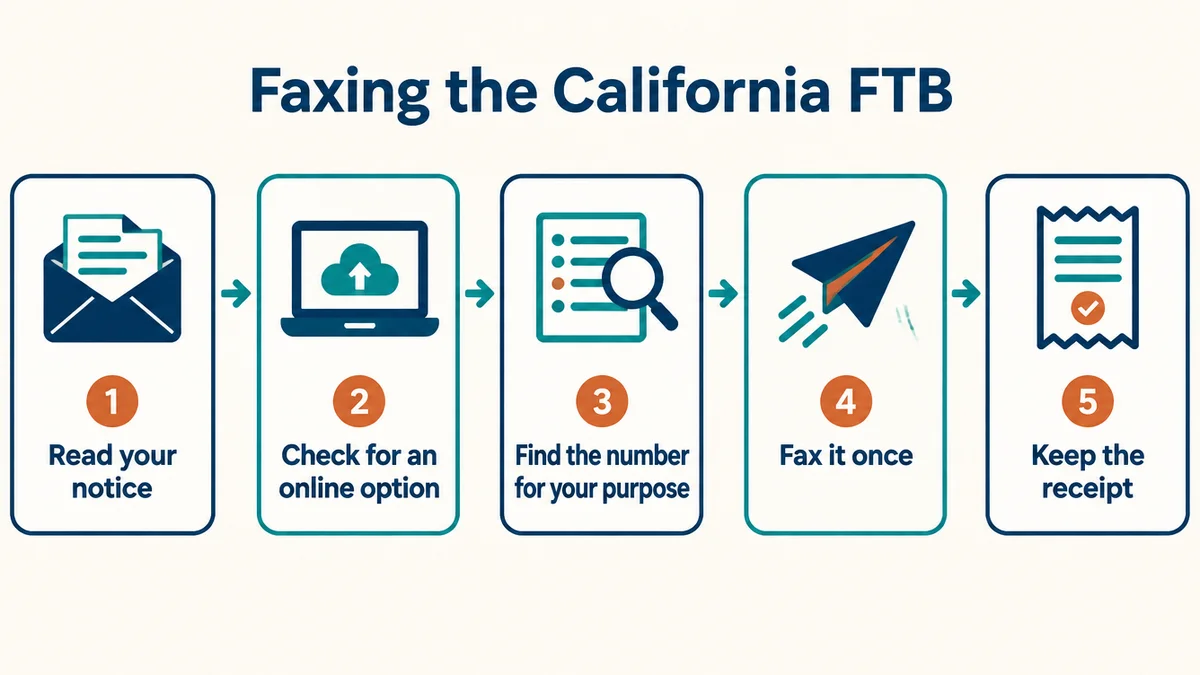
Step 1: Read your notice
The FTB's notices and letters page says to read your notice carefully and to "Respond as outlined on your notice or letter by mail, fax, or online." It also says that if you agree with a notice, you don't need to contact the FTB; just follow its instructions.
On your notice, find:
- The notice number and name, such as FTB 4502.
- The response date. FTB 4502 and FTB 4734D require the supporting documentation within 30 days of the notice date. Do not apply that period to every notice or protest; follow your actual instructions.
- How to respond. If it lists a fax number, that is the one to use.
Step 2: Check whether you can respond online
The same FTB page says you can create a MyFTB account for online access to your tax account, and that you can use it to send a message about a recent notice. It also says not all notices or letters can be answered by Electronic Upload, so check your notice for the options it gives.
If your notice offers an online route and you have MyFTB access, that may suit you better than fax. Avoid duplicate submissions unless the FTB asks you to resend or supply more information. A MyFTB message or upload option does not by itself extend a notice deadline.
Step 3: Find the fax number for your purpose
These are fax numbers the FTB publishes on its current pages:
| What you are sending | FTB fax | FTB source (checked Nov 9, 2026) |
|---|---|---|
| Supporting documents for an Additional Documentation Required, Refund Pending notice (FTB 4502), for Cal EITC, YCTC or FYTC | 916-845-9351 | Notices and letters (updated 10/14/2026) |
| Tax Information and Document Request (FTB 4734D), sent with the required items | 916-843-6036 | Notices and letters |
| A signed Demand to Furnish Information (FTB 4579) | 916-843-6036 | Notices and letters |
| Taxpayer Advocate Assistance Request (FTB 914) | 916-843-6022 | Taxpayer Advocate Services (updated 02/05/2026) |
| Nonresident Withholding Waiver Request (Form 588) | 916-855-5742 | Withholding on nonresidents |
| Nonresident Reduced Withholding Request (Form 589) | 916-855-5743 | Withholding on nonresidents |
| Nonwage withholding contact correspondence (nonresident, real estate or backup); not blanket permission to file every withholding form by fax | 916-845-9512 | Phone / fax |
The FTB's Information Directory (FTB 1240) lists more fax numbers by unit, including:
| FTB unit | Fax |
|---|---|
| Tax Practitioner Hotline | 916-845-9300 |
| Filing Enforcement, personal income tax | 916-855-5646 |
| Filing Enforcement, business entities tax | 916-843-6169 |
| Protest Section | 916-364-2754 |
| Identity Theft Team | 916-843-0561 |
| Bankruptcy (personal income tax and business entities) | 916-845-9799 |
The directory page shows “Revised: 03/2025.” These are unit contacts, not proof that any particular return, protest or document is accepted there. Follow the current form or notice instructions and clarify any conflict with the FTB rather than treating the directory as a universal filing guide.
If your purpose isn't listed, don't guess a number. Use the FTB contact page to find the right channel.
Form-specific checks before using these routes
- Forms 588 and 589: the current instructions require completed, signed requests and treat electronic signatures as valid. Check the nonwage eligibility exclusions in their instructions: these are not wage, backup-withholding or real-estate seller requests, and a foreign partner/member cannot use Form 588 for a waiver. Use the appropriate tax year and attachments; a generic signing feature is not a substitute for the signer's authority. The linked Form 588 and Form 589 PDFs currently show 2026 headers but 2025 footers. Confirm the appropriate form version with the FTB before submitting rather than guessing from those inconsistent labels.
- Online Form 589 supporting documents: its instructions say to fax required additional documentation to 916-855-5743 with your name, TIN and online submission confirmation number. That is different from simply sending an unidentified duplicate application.
- FTB 914: follow the July 2024 form's taxpayer, joint spouse/RDP and representative authorization/signature instructions. Its page 2 says the request does not suspend periods for you to act regarding assessment, collection or requesting a hearing. Do not use advocate assistance as a substitute for a timely protest or other required response.
Step 4: Prepare the fax
- Follow the requested packet order. Include the completed notice or form and all supporting documents it requires, not a substitute message or unrelated return.
- Use a cover only if appropriate under your instructions. This is a workflow suggestion, not an FTB requirement. If using one, identify the unit, notice, your name and actual total page count. Avoid unnecessary full SSNs or ITINs on the cover as a privacy precaution, but supply required identifiers where instructed. If a cover should not be included, disable any saved default cover before sending, including by email-to-fax. See what to put on a fax cover sheet.
- Check signatures, required records and completeness. FTB 4579 must be complete and signed. Follow each form's signer and date requirements; if an original or certified record is specifically required, clarify how to provide it rather than treating a fax image as equivalent. Keep pages upright and readable. See how to prepare a document so it faxes cleanly.
Step 5: Send to the verified destination
With FaxDash, you can send from your phone or computer:
- Scan the pages with the FaxDash app, or open the web dashboard and add your PDFs. Several files are merged into one fax.
- Enter the scoped fax number from your notice or the FTB page with + and the country code. Compare it digit by digit.
- Check the actual pages, any permitted cover, recipient and credit cost before sending.
If the fax fails, check the number and the status before you send it again. See why a fax fails to connect.
Step 6: Keep your record
- The delivery receipt. When the fax shows Delivered, open it on the Sent Faxes page of the web dashboard and choose Download Receipt, or tap the delivered fax in the app. It lists the destination number, the page count, and when the fax was sent and completed.
- A copy of exactly what you sent, including any permitted cover sheet.
- The notice itself. The FTB says to keep a copy of all notices and letters with your tax records.
Delivered means the transmission to the FTB fax number completed. It does not show that the FTB has reviewed your documents. See what a fax confirmation proves.
Compare tools for sending and retaining the packet
We make FaxDash. Provider documentation checked November 9, 2026. These differences concern workflow and records, not FTB acceptance or eligibility.
- FaxDash: the dashboard workflow merges PDFs or images into one fax, previews recipients and credit cost, and provides a downloadable receipt. That can fit one completed response without a monthly sending subscription.
- Fax.Plus: its document workflow accepts up to 10 supported files, including Word and spreadsheet formats, and lets you arrange their order. That can suit mixed-format supporting records; inspect final pages and file/per-fax limits.
- eFax: its plan features include searchable stored faxes and email-to-fax. That can suit repeat correspondence where locating prior records matters; compare current subscription terms against a one-off response.
Keep your exact signed packet and transmission result outside the service. No service can determine the correct FTB unit or prove application approval, valid signatures or deadline compliance from a completed transmission.
Step 7: What happens next, and when to follow up
- Notice questions. For FTB 4502 and FTB 4734D, the FTB lists 916-845-7088. Published review estimates are not promises of acceptance or a reason to miss the response date.
- Withholding requests. The 2026 Form 588 instructions say to submit at least 21 business days before making a payment; the withholding agent must receive the waiver determination before eliminating withholding. The Form 589 instructions require filing before payment for services and FTB approval of the reduced amount. A fax receipt is not that approval.
- Follow-up. Call the number on your notice to check receipt before resending, unless the FTB has already requested another submission. Do not wait past a notice or protest deadline for a fax status.
- If you are stuck. The FTB's Taxpayer Advocate Services says it can help with account, collections or wage garnishment issues if you meet its criteria and have exhausted all other remedies. Review its criteria on the Taxpayer Advocate Services page before you send FTB 914.
For federal forms, see IRS fax numbers by form and how to fax the IRS. For another state, see whether New York's tax department has a fax number.
FAQ
Which FTB fax destination should I use? Use the purpose-specific form or notice instructions, not a unit contact number as blanket filing permission.
Which number do I use to answer an FTB notice? The one printed on your notice. If the notice has none, check the FTB's notices and letters page for that notice, or use the contact page.
Can I respond to an FTB notice online instead? Sometimes. The FTB says not all notices can be answered by Electronic Upload, so check your notice. A MyFTB account lets you send a message about a recent notice.
Should I fax my documents again if I haven't heard back? Check receipt with the number on your notice before duplicating a response, unless the FTB directs you to resubmit. Follow any notice deadline and corrected-submission instructions.
Does Delivered mean the FTB accepted my documents? No. It means the fax transmission completed. Keep the receipt as your record of when you sent it.
Sources checked November 9, 2026, on ftb.ca.gov: Contact us (updated 10/12/2026); Phone / fax; Notices and letters (10/14/2026); Taxpayer Advocate Services (02/05/2026); Withholding on nonresidents; FTB 1240 (revised 03/2025); Create a MyFTB account (07/29/2026). FaxDash Help: sending faxes, pricing and billing.
This guide is general information, not legal or tax advice. Fax numbers, forms and agency rules change, so check the agency's official page before you send. FaxDash isn't responsible for decisions made or actions taken based on this guide. For advice about your situation, talk to a qualified tax professional or attorney.