

Say a letter from the New York State Department of Taxation and Finance asks you for documents, and your first thought is to fax them back. Before you search for a number, read what the department says, because the honest answer is that there's no general one.
This is general information about sending documents, not tax advice. Follow the instructions on your notice, and ask a tax professional about the substance of your case.
The short answer
New York State Tax doesn't have a central fax number. Its contact page says:
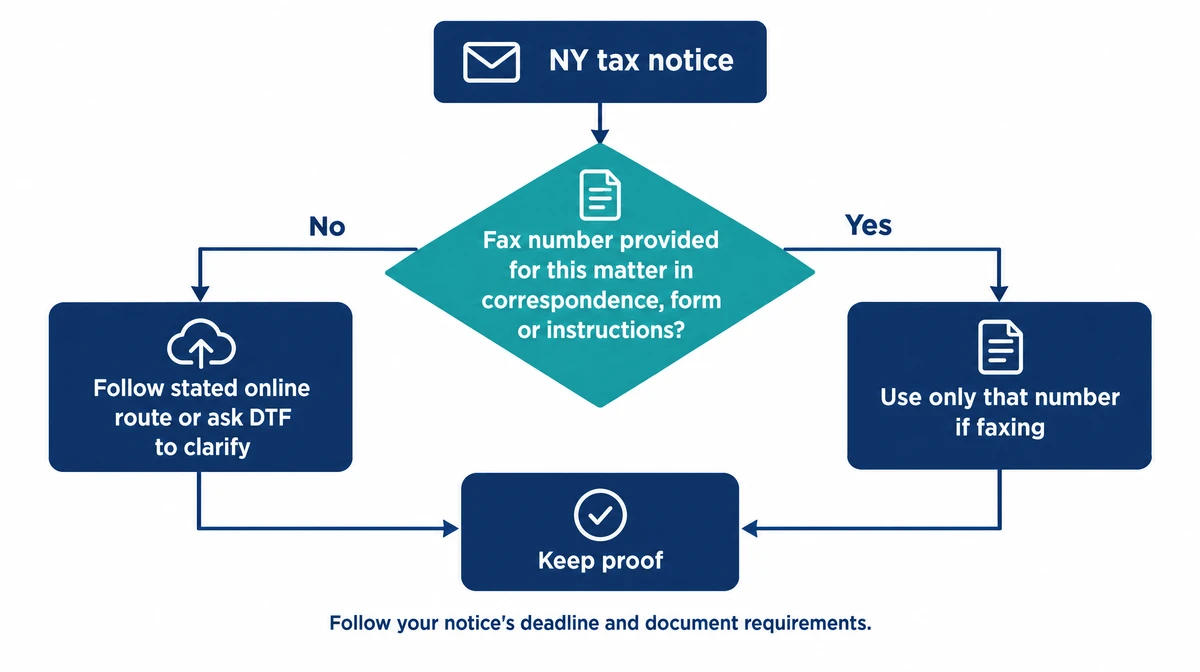
"There is no central fax number for the New York State Department of Taxation and Finance. To avoid delays, use Respond to Department Bill or Notice to upload documentation we request from you. If we provide a fax number in correspondence we send you or on a form or instructions, use only that number to fax us information. Do not send documentation to just any fax number."
Source: NYS Tax Department, Contact us, checked November 9, 2026 (PT).
The department directs requested-document uploads to Respond to Department Bill or Notice. For fax, use only the number it provides in correspondence or on the applicable form or instructions. A number published for another unit or purpose is not permission to send your notice response there.
Official New York DTF fax numbers
There's no general number to list, and this page doesn't list any. Any fax number you use should come from one place: the letter, notice, form or instructions the department sent you for that specific matter.
| What you need to send | Fax? | Where to send it | Source (checked Nov 9, 2026) |
|---|---|---|---|
| Documents a notice or bill asks for | Only to a number printed on that notice, form or instructions | Respond to Department Bill or Notice (upload) | Contact us |
| A response to a Request for Information letter (DTF-948 or DTF-948-O) | Only to the number provided in the applicable correspondence, form or instructions | Online Services, Respond to department notice | Respond to a letter |
| A general question | Use the stated contact route | Phone or online services listed on the contact page | Contact us |
What you can fax, and what you can't
You can fax information the department asked for, to a fax number it gave you in its correspondence or on a form or its instructions, and only that number.
You shouldn't fax documents to a number you found anywhere else. The department says plainly: "Do not send documentation to just any fax number."
Two department rules are worth knowing before you choose a route (Respond to your notice or bill online, checked November 9, 2026):
- Check supported upload formats and size. You can upload one or more files with a combined total of 50 MB or less, in formats including PDF, JPG, TIFF, Word and Excel. ZIP files aren't accepted.
- You don't need a scanner. The department says you can take a picture of paper documents with a smartphone or tablet, as long as the copy is clear and every word can be read.
For a request for information, Respond to a letter says to respond by the date on your letter and use its checklists to include everything needed. Follow the actual notice for any questionnaire, signature or other requirements; the upload option does not extend a response deadline.
Before you send a fax the department asked for
If your notice or form does print a fax number:
- Copy the number from that notice. Not from an older letter, a search result or another form.
- Find the notice ID. The department points you to the form number in the bottom-left or upper-right corner of the notice. Bills carry an assessment ID beginning with L, and review or audit cases a case ID beginning with X.
- Check whether a cover is appropriate. Follow the notice's instructions, including any restriction on extra pages. If using a cover, identify your name, notice or assessment ID, total pages including the cover and daytime phone number. As a privacy precaution, avoid unnecessary full Social Security numbers on a cover; provide any required taxpayer identifiers where the notice or form instructs. If no cover is appropriate, disable any saved default cover before sending, including by email. See what to put on a fax cover sheet, or fill one in with the free fax cover sheet maker.
- Send only what was requested, in the order the notice lists it, and make sure every page is readable. See how to prepare a document so it faxes cleanly.
- Keep proof. Save a copy of exactly what you sent and the delivery confirmation with the date and time, and respond by the date on your letter.
Sending without a fax machine
If you do have a number from your notice, you don't need a fax machine or a phone line. With FaxDash you can scan pages with your phone's camera in the app, or upload a PDF in the web dashboard, then enter the number and send. There's no subscription to send. A fax to US (+1) numbers, including Canada, uses 1 credit per page, and a cover page has no feature fee but uses 1 send credit.
Check your history for Delivered or Failed. On the web dashboard you can open a delivered fax on the Sent Faxes page and choose Download Receipt, which lists the destination number, the page count and when the fax was sent and completed. Delivered means transmission completed, not that the department reviewed, matched or accepted your response. Avoid duplicate submissions while waiting unless the department instructs you to resend.
Compare the tools only after checking the response route
We make FaxDash. Provider documentation checked November 9, 2026. These are preparation and record-keeping choices, not evidence that a New York tax unit accepts your response by fax.
- FaxDash: the dashboard workflow merges PDFs or images into one fax, previews recipients and credit cost, and provides a downloadable receipt. That can suit a prepared notice-response packet without a monthly sending subscription. Include only the documents the notice requires.
- Fax.Plus: its document workflow accepts up to 10 supported files, including Word and spreadsheet files, and lets you arrange them in order. That may suit mixed-format records, but inspect the final pages for cut-off columns or missing entries.
- eFax: its plan features include searchable stored faxes and email-to-fax, which can suit repeat correspondence where finding earlier records matters. Compare current subscription terms against a one-off response and retain your own copies outside the service too.
Whichever service you use, follow the notice's cover and signature instructions, check file and per-fax limits, and keep the exact packet and transmission result. No sending service can determine the department's acceptance, review outcome or deadline compliance for you.
If the department faxes something back
Follow the department's stated contact method and monitor your Online Services account and correspondence. You do not need a fax number of your own to send from the FaxDash app or dashboard. If the department specifically asks for a fax number to reply to, a FaxDash receive number starts at $3.99 a month (Starter), with 50 received pages and 10 send credits.
If your letter is from the IRS rather than New York State, the rules are different. See where to fax IRS forms.
The honest catch
Use the response route appropriate to your notice, not whichever fax number is easiest to find. The department directs requested-document uploads to Online Services and restricts fax to the number it provides in correspondence or on the applicable form or instructions. If you cannot use the stated route or the instructions conflict, ask the department to clarify before sending.
FAQ
What is the NYS Department of Taxation and Finance fax number? There isn't a central one. Use the number printed on your notice, form or instructions, if there is one, or upload through Respond to Department Bill or Notice.
Can I fax my response to a DTF-948 letter? Use only a fax number the department provides for that response in the applicable correspondence, form or instructions. The RFI page documents responding through your Individual Online Services account; follow your actual letter and its deadline.
I found a NYS tax fax number online. Can I use it? Not unless it matches the number on your own notice or form. The department says to use only the number it provides.
What should I keep after I fax? A copy of exactly what you sent, any permitted cover sheet and the delivery confirmation. Those records do not prove substantive acceptance or change the notice deadline.
This guide is general information, not legal or tax advice. Fax numbers, forms and agency rules change, so check the agency's official page before you send. FaxDash isn't responsible for decisions made or actions taken based on this guide. For advice about your situation, talk to a qualified tax professional or attorney.