
The Texas Comptroller of Public Accounts doesn't publish a general fax number. Its contact page lists phone numbers and email, and fax numbers appear only on the pages for a few specific purposes, listed below. If you are answering a notice or letter, use the fax number on it, if there is one. If not, file or reply online, or call the number for your tax type and ask where to send it.
This article is general information, not legal, tax or compliance advice. Agency rules and fax numbers change, so confirm with the agency or a qualified professional before you send.
Comptroller numbers checked October 31, 2026 on comptroller.texas.gov. Each row links the Comptroller page it came from. Check that page on the day you send. This page explains how to send documents by fax. It is not tax or legal advice; follow your notice or form instructions.
Fax numbers the Comptroller publishes
| What you are sending | Comptroller fax | Other route on the same page | Source (checked Oct 31, 2026) |
|---|---|---|---|
| Form AP-201, Texas Application, when you can't use the online application because a sole owner, partner, officer or director has no Social Security number | 512-936-0010 | Email sales.applications@cpa.texas.gov | Texas Online Tax Registration Application |
| The tax permit application from a remote seller located outside the United States | 512-936-0010 | Email sales.applications@cpa.texas.gov | Remote Sellers |
| An open records (Public Information Act) request | 512-475-1610 | The online Comptroller Record Request System, email, mail or in person | Open Records |
We found no other fax numbers on the Comptroller's contact pages. If your purpose isn't in this table, don't use a fax number from another website. Some sites list numbers for purposes the Comptroller's own pages don't connect them to.
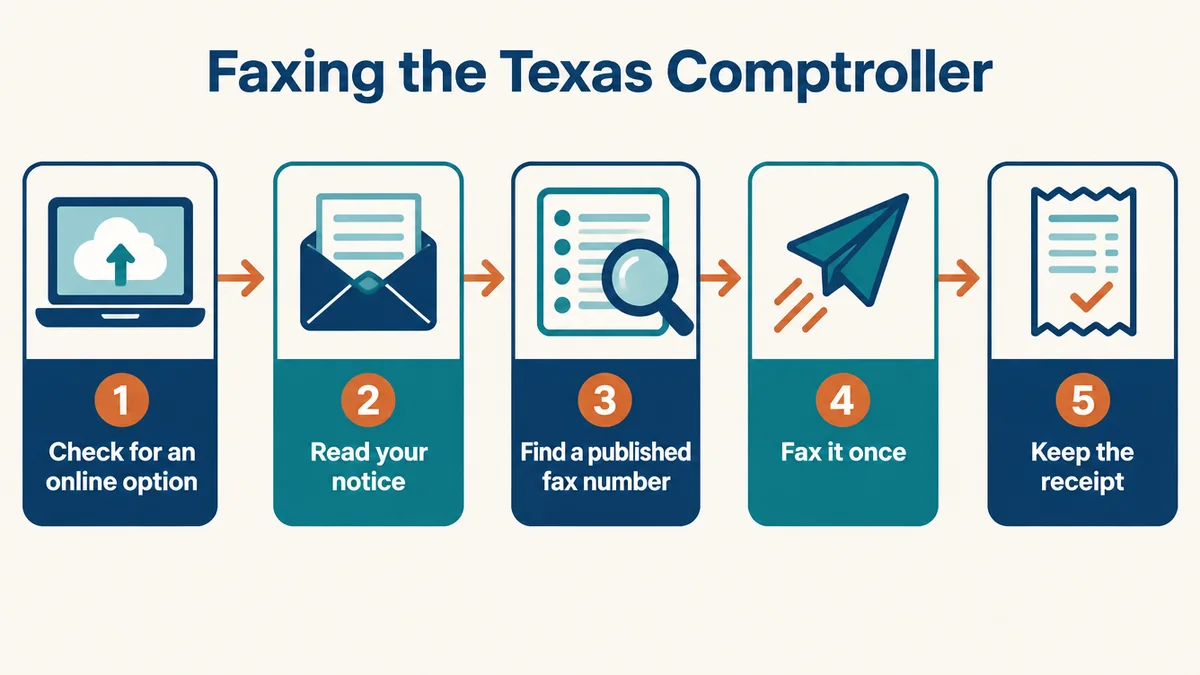
Step 1: Check whether you can do it online
- Filing and paying. The Comptroller calls Webfile its online tax filing system for reports and payments. Its eSystems dashboard also links online services such as permit applications and document requests.
- A sales tax permit. The Comptroller's permit page points new applicants to its online application in eSystems. The Comptroller says to allow 2 to 3 weeks to receive a permit.
- Open records. The Comptroller Record Request System lets you make a request and track it online.
Our advice: if an online route covers what you need, use it and skip the fax. Pick one route and use only that one.
Step 2: Read your notice or letter
If the Comptroller wrote to you, the notice is the authority for your case. Look for what it asks for, the response date, and how to respond. Our advice: if it gives a fax number, use that number, compared digit by digit.
Step 3: If there's no fax number, call before you send
The Comptroller's contact page lists a phone number for each tax and program, including:
- Sales and Use Tax: 800-252-5555
- Franchise Tax: 800-252-1381
- Electronic Reporting and Webfile Technical Support: 800-442-3453
It says the office is open Monday through Friday, 8 a.m. to 5 p.m. Central, except state and national holidays. Our suggestion: ask which route to use and, if fax is acceptable, which number and whose attention to mark it for.
Step 4: Prepare and send it once
- Cover sheet first. Our suggestion: name the Comptroller section or the "Attention" line from the page, your taxpayer number if you have one, the form or notice number, and the page count. See what to put on a fax cover sheet.
- Check every page. Upright, readable and in order, with signatures and dates visible. See how to prepare a document so it faxes cleanly.
- Send from the FaxDash app or web dashboard. Enter the number from the table or your notice, compare it digit by digit, count the pages including the cover, then send.
If the fax fails, check the number and the status before you send it again. See why a fax fails to connect.
Step 5: Keep your record
- The delivery receipt. When the fax shows Delivered, open it on the Sent Faxes page of the web dashboard and choose Download Receipt, or tap the delivered fax in the app. It lists the destination number, the page count, and when the fax was sent and completed.
- A copy of exactly what you sent, including the cover sheet.
- The notice or form instructions you followed.
Delivered means the transmission to the fax number completed. It does not show that the Comptroller has processed your documents. See what a fax confirmation proves.
Step 6: Follow up before you send again
Our advice: if you haven't heard back by the time your notice or the Comptroller's page gives, call the number for your tax type and ask whether your fax arrived before you send the pages again.
For other tax agencies, see California FTB fax numbers, whether New York's tax department has a fax number and IRS fax numbers by form.
How other fax services compare, checked November 12, 2026
Most online fax services sell sending as part of a monthly plan. For a few pages to the Comptroller, the useful comparison is how you pay to send, whether you can send from your phone, and what you need for a reply by fax. This is what each company's own pages said on November 12, 2026.
| FaxDash | Fax.Plus | eFax | |
|---|---|---|---|
| Paying to send | Credit packs that never expire, with no subscription needed to send | Monthly or annual plans with a set number of pages a month | Monthly plans with a page allowance that counts both sent and received pages; unused pages don't roll over |
| Sending from your phone | Mobile app with camera scan, or a PDF | Mobile app | iOS and Android apps |
| A number for a faxed reply | A receive number on a Starter, Standard or Business plan | Receiving needs an active paid plan, which includes a fax number | Personal and Business each include 1 fax number |
Current prices are on each company's pricing page: Fax.Plus and eFax. FaxDash's are on Pricing, credits and billing.
FAQ
Does the Texas Comptroller have a general fax number? Not one it publishes. Its contact page lists phone numbers and email. Fax numbers appear only on the pages for specific purposes, such as Form AP-201 and open records requests.
Can I fax my sales tax permit application? Only in the cases the Comptroller describes: Form AP-201 when you can't use the online application because an owner or officer has no Social Security number, or a remote seller outside the United States. Both go to 512-936-0010, or by email.
Can I fax a franchise tax report? The Comptroller's pages we checked don't publish a fax number for franchise tax reports. Use Webfile, or call Franchise Tax at 800-252-1381 and ask.
What if my notice gives a fax number not listed here? Our advice: use the number on your notice. It is specific to your case.
Does Delivered mean the Comptroller processed my documents? No. It means the fax transmission completed. Keep the receipt as your record of when you sent it.
Sources checked October 31, 2026, on comptroller.texas.gov: Contact Us; Texas Online Tax Registration Application; Remote Sellers; Open Records; Webfile. FaxDash Help: sending faxes, pricing and billing.