
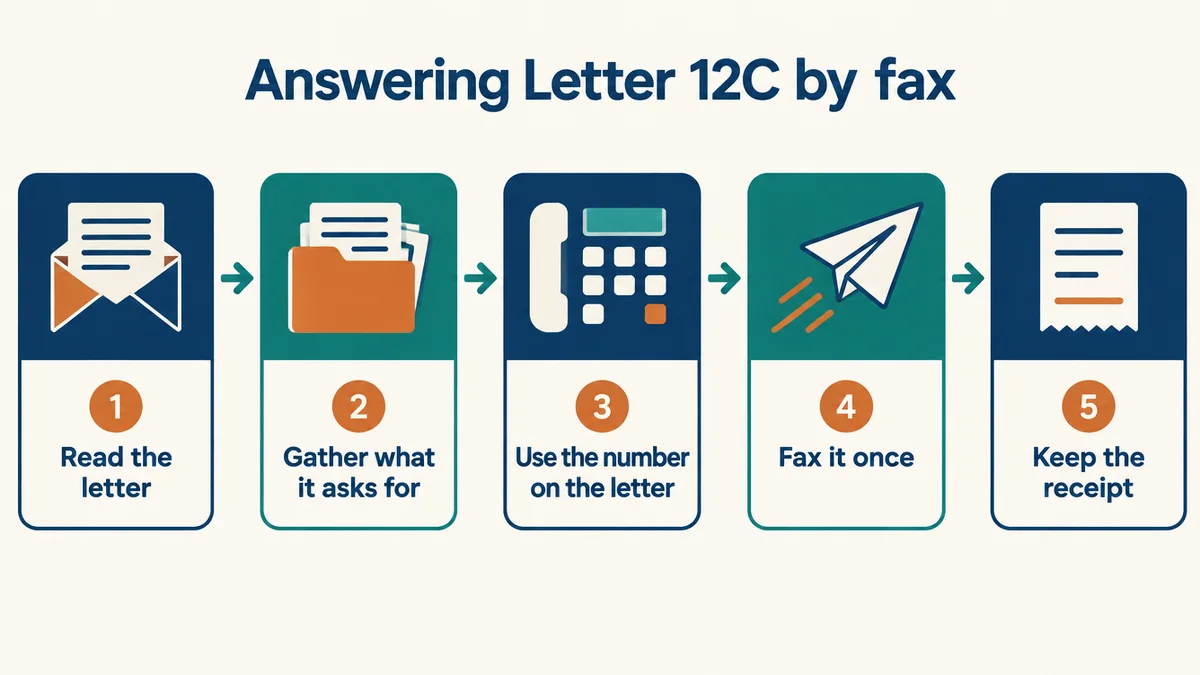
To answer IRS Letter 12C by fax, send what the letter asks for to the fax number printed on your letter, within the time the letter gives. IRS.gov says to send the requested information within 20 days. Use your own letter's destination, not a number copied from another taxpayer's letter or a directory. Keep the delivery receipt and avoid duplicate responses unless the IRS directs a resubmission. Do not file Form 1040-X as your response to Letter 12C.
IRS instructions checked November 9, 2026 on IRS.gov's Understanding your Letter 12C and Reconciling your advance payments of the Premium Tax Credit pages. Check them again on the day you send. This page explains how to send your response. It is not tax or legal advice; follow your letter's instructions.
What Letter 12C means
IRS.gov says Letter 12C means the IRS needs more information to process your individual income tax return. It lists what that can be:
- Missing or corrected forms or schedules that support entries on your Form 1040 or Form 1040-SR.
- Verification of income, withholding and credit amounts.
- Verification of taxpayer identification numbers or Social Security numbers.
A common version is about the premium tax credit. The IRS sends it when the Health Insurance Marketplace made advance payments of the premium tax credit for you, and your return did not include Form 8962, Premium Tax Credit, to reconcile them.
Step 1: Read the letter
On your actual letter, find:
- What it asks for. Your letter, not this page, is the list to work from.
- The deadline. IRS.gov says to send the information within 20 days.
- The response section. It shows how you can reply. For the premium tax credit version, IRS.gov says, "Your Letter 0012C provides a fax number, if you want to send the information by fax."
The letter number (LTR) is in the right corner of the letter. If the letter doesn't appear when you search for it on IRS.gov, or it looks suspicious, the IRS page on understanding your notice or letter says to call 800-829-1040. Do not fax anything to a number on a letter you are unsure about.
Step 2: Gather what the letter asks for
For the premium tax credit version, IRS.gov lists:
- A completed Form 8962 for the tax year your letter concerns, not automatically the newest year displayed on a download page.
- A copy of the Form 1095-A your Marketplace sent you. You use it to complete Form 8962.
If you did not receive Form 1095-A, IRS.gov says to log in to your HealthCare.gov or state Marketplace account, or contact your Marketplace. It says the IRS cannot answer questions about the form or reissue it.
You must respond even if you disagree. IRS.gov says to send a letter explaining what you think is in error, and if you did not buy a Marketplace policy, to tell the IRS.
Do not file Form 1040-X as the response to this request. IRS.gov says it uses the requested information to process your original return. Include all items your letter requires, not just this article's two examples. For an older return originally filed on Form 1040EZ, the premium-tax-credit page specifically instructs transferring the information to Form 1040 and including it because Form 1040EZ lacks the needed lines.
Step 3: Choose one way to send it
| Route | Where | What IRS.gov says |
|---|---|---|
| Fax | The number printed on your letter | Fax "using either a fax machine or an online fax service." It also says to understand the fax service's privacy and security policies |
| Upload | The IRS Document Upload Tool | Accepts documents in response to an IRS notice or letter, and says you get confirmation that the IRS received them. Check your actual letter and the tool's applicable notice selection before choosing this route. The tool is not for filing tax returns. |
| The address on your letter | Use only what the letter gives |
For fax, the premium-tax-credit instructions explicitly direct you to the number in your own Letter 0012C. Avoid duplicate submissions through several methods unless the IRS asks you to resend or provide more information. If an IRS employee gives you updated instructions, clarify the destination and follow that request.
Step 4: Prepare the fax
- Follow the letter's packet instructions. Include its response page or identifying material if requested, then the complete requested forms, explanation and supporting copies. Keep the originals the instructions do not ask you to send.
- Add a cover only if appropriate under your letter's instructions. This is a workflow suggestion, not an IRS requirement. If using one, identify the IRS unit, letter number, your name and actual page count. Avoid unnecessary full SSNs on a cover as a privacy precaution, while providing required identifiers where instructed. If a cover should not be included, disable any saved default cover before sending, including by email-to-fax. See what to put on a fax cover sheet or fill in the FaxDash IRS fax cover sheet, which is not an IRS form.
- Check completeness, signatures and originals requirements. Follow the actual letter and each form's applicable signature/date instructions; a sending app cannot establish signature acceptance. If an instruction requires an original or certified record and you are unsure how fax fits, clarify with the IRS rather than treating a scanned copy as equivalent. Check that every page is upright, readable and in order. See how to prepare a document so it faxes cleanly.
Step 5: Send to the verified destination
With FaxDash, you can send from your phone or computer:
- Scan the pages with the FaxDash app, or open the web dashboard and add your PDFs. Several files are merged into one fax.
- Enter the fax number from your letter with + and the country code. Compare the destination digit by digit.
- Check the actual pages, any permitted cover, recipient and credit cost before sending.
If the fax fails, check the number and the status before you send it again. See why a fax fails to connect.
Step 6: Keep your record
- The delivery receipt. When the fax shows Delivered, open it on the Sent Faxes page of the web dashboard and choose Download Receipt, or tap the delivered fax in the app. It lists the destination number, the page count, and when the fax was sent and completed.
- A copy of exactly what you sent, including any permitted cover sheet.
- The letter itself.
Delivered means the transmission to the IRS fax number completed. It does not show that the IRS has processed your response. See what a fax confirmation proves.
Compare sending tools, not IRS acceptance
We make FaxDash. Provider documentation checked November 9, 2026. Choose the response route your letter allows before comparing services.
- FaxDash: the dashboard workflow merges PDFs or images into one fax, previews recipients and credit cost, and provides a downloadable receipt. That can fit one prepared response without a monthly sending subscription.
- Fax.Plus: its document workflow accepts up to 10 supported files, including Word and spreadsheet formats, and lets you arrange their order. That may suit mixed-format supporting records, but inspect the final converted pages and check the file/per-fax limits.
- eFax: its plan features include searchable stored faxes and email-to-fax. That can suit repeat correspondence where finding prior records matters; compare current subscription terms against a one-off response.
Keep your exact packet and transmission result outside the service too. No vendor can establish IRS acceptance, completeness or deadline compliance from a successful fax.
Step 7: What happens next, and when to follow up
- Processing and refunds. The IRS uses your response to continue processing the original return. Its published refund estimate depends on receipt of the necessary information and whether a refund is due; it is not a fax-delivery or refund guarantee.
- Questions about the premium tax credit version. The IRS page lists 866-682-7451, extension 568.
- No word after the deadline. Call the number on your letter and ask whether your response was received, before resending, unless the IRS has already asked for another submission. Do not let follow-up replace acting by your response deadline.
- If you are stuck. IRS.gov says you may be eligible for free help from the Taxpayer Advocate Service. See how to fax Form 911 to the Taxpayer Advocate Service. You may also qualify for help from a Low Income Taxpayer Clinic.
For other IRS forms and letters, see IRS fax numbers by form and how to fax the IRS.
FAQ
What is the Letter 12C fax number? Use the number printed on your own letter, checked digit by digit, or clarify any updated IRS instruction. Do not substitute another letter's or unit's number.
How long do I have to respond? IRS.gov says to send the information within 20 days. Your letter is the authority for your case.
Should I file an amended return instead? No. IRS.gov says not to file Form 1040-X in response to Letter 12C.
What do I send for the premium tax credit version? IRS.gov lists a completed Form 8962 and a copy of your Form 1095-A. Send anything else your letter asks for.
Can I use an online fax service? Yes. For the premium tax credit version, IRS.gov says to fax "using either a fax machine or an online fax service."
Does Delivered mean the IRS processed my response? No. It means the fax transmission completed. Keep the receipt as your record of when you sent it.
Sources checked November 9, 2026: Understanding your Letter 12C (page updated Nov 7, 2026); Reconciling your advance payments of the Premium Tax Credit (updated Jul 22, 2026); IRS Document Upload Tool (updated Aug 27, 2026); FaxDash Help: sending faxes, pricing and billing.
This guide is general information, not legal or tax advice. Fax numbers, forms and agency rules change, so check the agency's official page before you send. FaxDash isn't responsible for decisions made or actions taken based on this guide. For advice about your situation, talk to a qualified tax professional or attorney.