

Say you run payroll for a dozen small businesses and a new client has just signed Form 8655 so you can file their employment tax returns. The IRS needs that authorization on file with the right team, and the current Form 8655 instructions publish a fax number and ask for computer-sent faxes where possible. Here's how to send it correctly and what to keep.
This is general workflow guidance, not tax advice. Follow the current Form 8655 instructions and Publication 1474.
What Form 8655 is for, and who files it
Form 8655, Reporting Agent Authorization, lets a business authorize a reporting agent, usually a payroll provider, to:
- sign and file certain returns,
- make deposits and payments for certain returns,
- receive duplicate copies of tax information, notices and other communication about the authority granted, and
- give the IRS information to help with penalty relief decisions about that authority.
Source: About Form 8655. The current revision is January 2024 (Form 8655 PDF). Both checked November 9, 2026 (PT).
The person authorized to sign for the taxpayer signs and dates the form, and the reporting agent submits it under the RAF procedures. Check the entity-specific Who Must Sign instructions on page 3. It isn't a power of attorney. The IRS says the authorization on Form 8655 "does not allow you to represent your client before the IRS" (RAF tips and tricks). Representation is what Form 2848 is for. See where to fax Form 2848 and 8821.
Can you fax Form 8655?
Yes. The form's instructions say:
"You can fax Form 8655 to the IRS. The number is 855-214-7523. When faxing Forms 8655, please send no more than 25 forms in a single transmission. If possible, please send faxes from your computer instead of a fax machine."
Publication 1474 (Rev. 4-2026) confirms that "Forms 8655 and paper Reporting Agent Lists may also be faxed to the RAF Team at 855-214-7523."
The fax number and mailing address
| Route | Where | Verified on IRS.gov |
|---|---|---|
| Fax | 855-214-7523 (Reporting Agents File team) | November 9, 2026, in the Form 8655 instructions and Publication 1474 |
| Internal Revenue Service, Accounts Management Service Center, MS 6748 RAF Team, 1973 North Rulon White Blvd., Ogden, UT 84404 | November 9, 2026, Form 8655 instructions |
This published RAF route covers Forms 8655 and paper Reporting Agent Lists; do not treat it as a general IRS fax destination. The IRS warns that "Faxing Form 8655 to an organization within the IRS, other than the RAF Team, does not satisfy the requirement" to file the authorization with that team (RAF tips and tricks). For other forms, see where to fax IRS forms.
Limits and the checks that prevent rejections
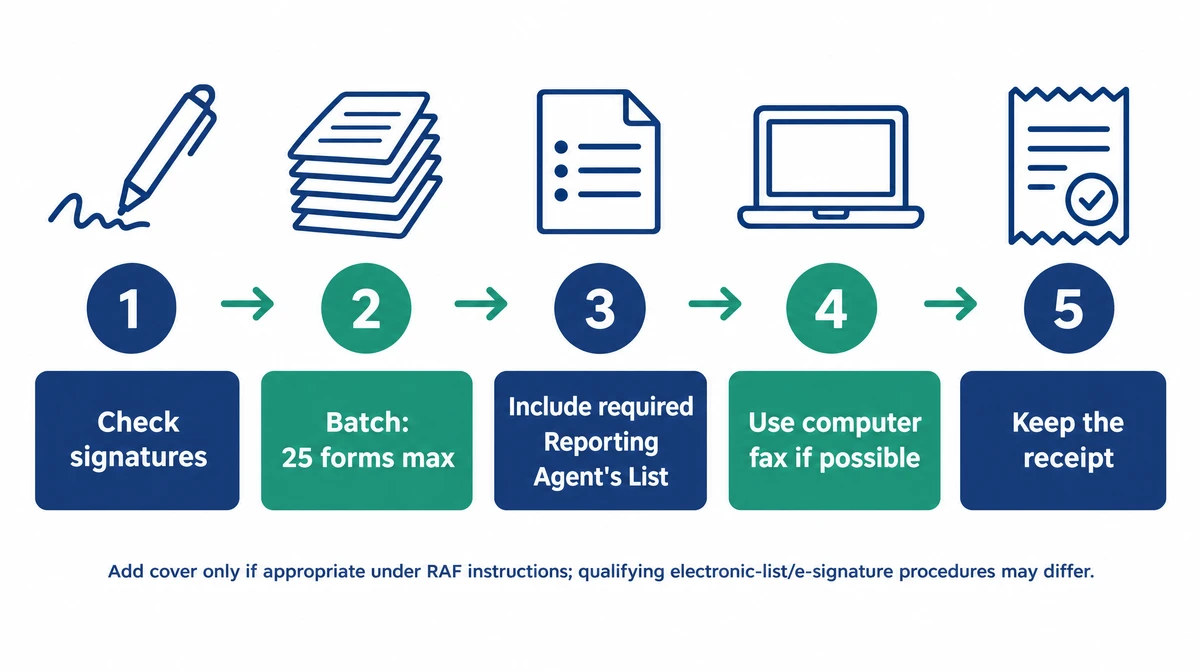
- 25 Forms 8655 per fax, at most. This is a form-count limit, not a 25-page allowance. Include the required Reporting Agent's List and check your sending service's file and per-fax page limits too. For paper lists and accompanying forms, Publication 1474 requires ascending numerical order by EIN.
- Over 100 client submissions a week? Publication 1474 requires the Reporting Agent's List to be filed electronically through Secure Large File Transfer Business 2 Business (SLFT B2B). The list data must match the authorizations. Section 01.04 separately describes an exception to submitting authorization copies for qualifying electronically signed forms when lists must be filed electronically; do not assume every electronic-list submission also requires faxing copies. Read the applicable procedure before batching.
- Fix the common errors first. The IRS lists these as the most common mistakes: a missing taxpayer signature, a missing signature date, a signer who isn't authorized to bind the company, and no beginning periods or dates on lines 15, 16 or 18.
- Cover sheet. Follow any RAF instructions you received. If a cover is appropriate, identify your agency, contact phone number, form count and actual total page count. If no cover should be included, disable any saved default cover before sending, including by email. A cover is a workflow aid here, not a substitute for the required Reporting Agent's List. See what to put on a fax cover sheet, or fill one in with the free fax cover sheet maker.
How to fax Form 8655 from a computer
- Collect valid signed authorizations and the required list. Check the signer's authority, signature, date and beginning periods. For electronic signatures, follow Publication 1474's authentication, capture and retained-evidence requirements; a drawn app signature alone is not proof of compliance. Scan paper-signed forms or retain compliant electronically signed copies.
- Split into batches of 25 Forms 8655 or fewer. Keep the required list and authorizations matched and in the prescribed EIN order. Add a cover only when appropriate under the instructions, and count every transmitted page.
- Open Send Fax in the FaxDash web dashboard and drop in the files for one batch. Several files merge into one fax, so check the page order before you send.
- Enter +1 855 214 7523, check the document, recipient and credit cost, and click Send Fax. On a phone, the FaxDash app can scan a single signed form with the camera.
- Check the result in your history for Delivered or Failed before you send the next batch.
A computer-based fax workflow can fit the IRS preference, but using it does not establish a valid signature, RAF enrollment or acceptance of any payroll return.
What to keep
- The delivery receipt for each batch. In the web dashboard, open the fax on the Sent Faxes page and choose Download Receipt. It lists the destination number, the page count and when the fax was sent and completed.
- A copy of exactly what you sent, batch by batch.
- A simple log: client, date faxed, batch number and the beginning periods on lines 15 and 16.
For how a small tax or payroll office can run this as a routine, see our tax office fax workflow.
What happens next
The form says disclosure authority "is effective upon signature of taxpayer and IRS receipt of Form 8655." The IRS also says that although the authorization is executable on signature, it "is required to be filed promptly" with the RAF team. Do not treat a transmission receipt as confirmation that the IRS added the authorization to RAF or accepted a tax return. Publication 1474 describes IRS validation and add/error results for Reporting Agent's Lists. The taxpayer remains responsible for timely returns, deposits and payments.
If you need to confirm a client's entity information before the authorization has been added to the Reporting Agents File, the RAF tips page says you can call Practitioner Priority Service at 866-860-4259 and then fax the signed Form 8655 to the assistor. Use the fax number the assistor gives you on that call for that purpose. This entity-information check does not replace filing the authorization with the RAF Team.
Avoid duplicate submissions unless the IRS directs a resubmission or the authorization needs a prescribed change. Keep the original sent record with any corrected submission.
The RAF team also sends agents a monthly Revoke Listing of any clients who have started service with another reporting agent.
Compare sending tools for a batch and its records
We make FaxDash. Provider documentation checked November 9, 2026. These differences are about preparation and records, not IRS authorization validity or payroll filing acceptance.
- FaxDash: the dashboard workflow merges PDFs or images into one fax and previews the recipients and credit cost. That can fit a prepared batch without a monthly sending subscription; retain the downloadable receipt for each batch.
- Fax.Plus: its document workflow accepts up to 10 supported files and lets you arrange them in order. That can help with mixed-format source files, but its file limit is not the IRS's 25-form limit. Prepare a complete batch within both sets of limits and verify final pages.
- eFax: its plan features include searchable stored faxes and email-to-fax. That can suit repeat client correspondence where locating older records matters; compare current subscription terms against your actual volume.
Keep your own exact packet and transmission result with your authorization records. No service's Delivered status proves that RAF validated the list, recorded the authority or accepted a return.
What it costs
FaxDash sending is pay as you go with no subscription. A fax to US (+1) numbers, including Canada, uses 1 credit per page. Count the actual transmitted pages, including the required list and any permitted cover; a cover has no feature fee but uses 1 send credit. Packs start at 5 pages for $0.99 and go up to 150 pages for $9.99, and credits you buy never expire, so a pack bought in January still works in October.
FAQ
What is the IRS fax number for Form 8655? 855-214-7523, the Reporting Agents File team, per the Form 8655 instructions and Publication 1474 (verified on IRS.gov November 9, 2026).
How many Forms 8655 can I fax at once? No more than 25 in a single transmission.
Does Form 8655 let me represent my client? No. The IRS says it doesn't allow you to represent your client before the IRS. Representation needs Form 2848, for those who qualify.
Can I fax Form 8655 to a different IRS number? Faxing it to another IRS unit does not meet the RAF filing requirement. A PPS assistor may request a copy for the separate entity-information check described above; that is not a substitute RAF submission.
Do I need a fax machine? No. The IRS asks for faxes from a computer where possible, and an online fax service does that.
This guide is general information, not legal or tax advice. Fax numbers, forms and agency rules change, so check the agency's official page before you send. FaxDash isn't responsible for decisions made or actions taken based on this guide. For advice about your situation, talk to a qualified tax professional or attorney.