
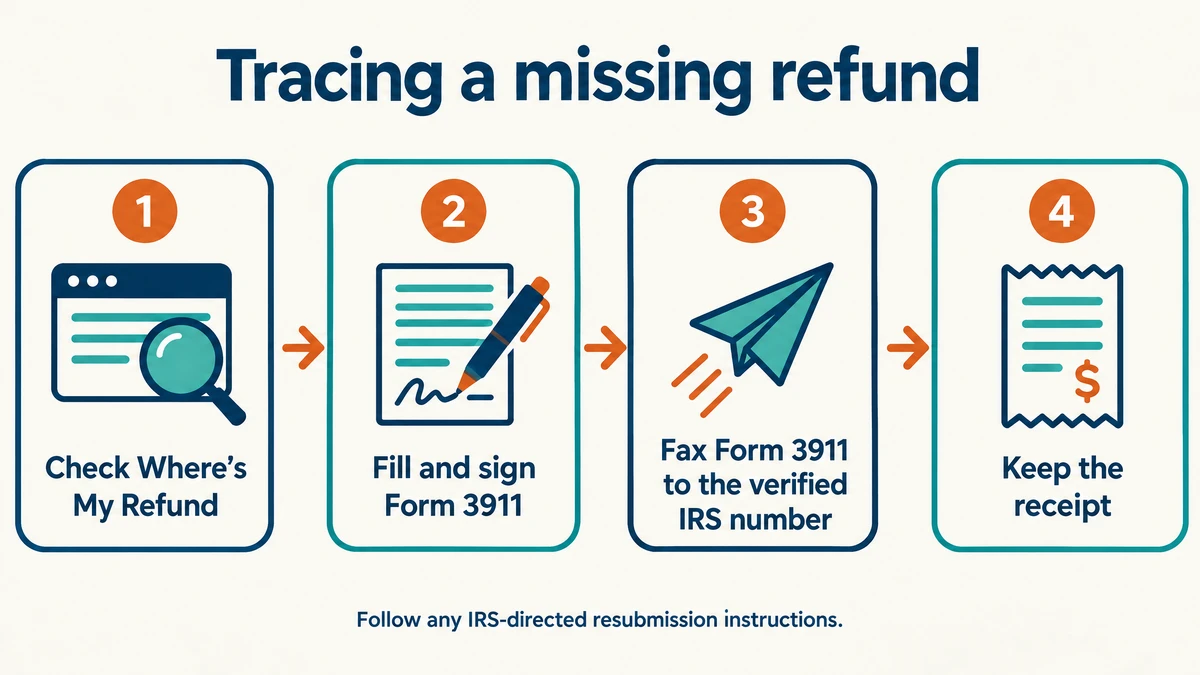
To trace a missing federal tax refund by fax, complete and sign Form 3911, then fax it to the IRS Refund Inquiry Unit number for the state you live in, listed on the IRS's About Form 3911 page. If the IRS sent you the form with a letter, use the fax number or envelope it gave you instead. Send only Form 3911 to those numbers, with no added cover page. Keep your delivery receipt, and avoid duplicate submissions unless the IRS instructs you to resend.
IRS numbers checked November 9, 2026. IRS fax numbers and addresses change. The IRS updated this list recently, so check the About Form 3911 page on the day you send. This page explains how to send the form. It is not tax or legal advice; follow the form and the IRS's instructions.
What Form 3911 is for
Form 3911, Taxpayer Statement Regarding Refund, gives the IRS the information it needs to trace a refund that was issued but that you did not receive, or a refund check that was lost, stolen or destroyed.
Before you fax: try the IRS's own trace tools first
For a missing paper refund check, first check the status and confirm the full processing time has passed. Use the IRS refunds page to check the issue date and current waiting guidance rather than treating a delayed return as an already issued missing check. Its refund tracker and app trace route is currently limited to current-year refunds and depends on filing status. The IRS FAQ lists these ways to start:
- Where's My Refund. Check the status on IRS.gov/refunds.
- By phone. Call 800-829-1954 and use the automated system, or speak with a representative at 800-829-1040.
- Form 3911. Complete and send the form.
If you filed a married filing jointly return, the IRS says you can't start a trace with the automated systems. Call and speak with a representative, or complete Form 3911.
Where to fax Form 3911
The IRS's About Form 3911 page lists a mailing address and a fax number for each Refund Inquiry Unit. It says: "Do not send anything other than a Form 3911 to the fax numbers below."
Individuals, by the state you live in (as listed November 9, 2026):
| If you live in | Refund Inquiry Unit | Fax number |
|---|---|---|
| Maine, Maryland, Massachusetts, New Hampshire, Vermont | Andover | 855-253-3175 |
| Georgia, Iowa, Kansas, Kentucky, Virginia | Atlanta | 855-275-8620 |
| Florida, Louisiana, Mississippi, Oklahoma, Texas | Austin | 855-203-7538 |
| New York | Brookhaven | 855-297-7736 |
| Alaska, Arizona, California, Colorado, Hawaii, Nevada, New Mexico, Oregon, Utah, Washington, Wisconsin, Wyoming | Fresno | 855-332-3068 |
| Arkansas, Connecticut, Delaware, Indiana, Michigan, Minnesota, Missouri, Montana, Nebraska, New Jersey, Ohio, West Virginia | Kansas City | 855-344-9993 |
| Alabama, North Carolina, North Dakota, South Carolina, South Dakota, Tennessee | Memphis | 855-580-4749 |
| District of Columbia, Idaho, Illinois, Pennsylvania, Rhode Island | Philadelphia | 855-404-9091 |
| A foreign country, a U.S. possession or territory, an APO or FPO address, or you file Form 2555 or 4563, or are a dual-status alien | Austin | 855-203-7538 |
Business entities. The IRS says states west of the Mississippi go to Ogden (855-578-2550) and states east of it go to Cincinnati (855-307-3124). The exceptions: Arkansas and Louisiana go to Cincinnati, and Wisconsin goes to Ogden.
To mail the form instead, use the address listed for the same unit on the About Form 3911 page. For other IRS forms, see IRS fax numbers by form.
If the IRS sent you the form. The form itself says to return it "in the envelope provided or fax the form to" a number the IRS fills in. If your copy came with a letter and shows a fax number, use that number.
Fill it in and sign it
Follow the form itself. A few points from the current form (Rev. 10-2022):
- One form per refund. The form says to complete a separate Form 3911 for each refund you are asking about.
- Joint returns. Enter both spouses on lines 1 and 2. The form says both spouses must sign "before we can begin a trace."
- Business returns. The signature is from the person authorized to sign the check, with their title on line 11.
- Signature. Follow the certification and signature instructions on page 1. One conservative workflow is to sign the paper form in ink and scan the complete signed form. Do not assume an app signature feature establishes IRS acceptance.
If you still possess a check that was not cashed within 1 year of issue, page 1 says to contact the IRS for instructions on returning it. Do not assume the lost-check process is the right route.
Then check the scan: every page upright, readable and in order, including the signatures and dates. For more on that, see how to prepare a document so it faxes cleanly.
Send the form without an added cover
With FaxDash, you can send from your phone or computer:
- Scan the signed form with the FaxDash app, or open the web dashboard and add the PDF.
- Enter the fax number for your Refund Inquiry Unit as +1 followed by the ten digits, checked on the IRS page the same day.
- Check the complete form, page count, recipient and credit cost. Disable any saved default cover, remove any added cover page, then send.
The exact IRS instruction for this published fax list is: “Do not send anything other than a Form 3911 to the fax numbers below.” To follow that restriction, send the form alone, not a cover or unrelated attachments. In FaxDash, check Settings, Cover sheet and turn off any default cover before sending, especially by email: an enabled default adds a first page automatically. This is specific to these Refund Inquiry Unit numbers, not a general rule for every IRS form. If the IRS gave you targeted instructions, follow them or clarify any conflict with the IRS.
If the fax fails, check the number and the status before you send it again. See why a fax fails to connect.
What to keep
- The delivery receipt. When the fax shows Delivered, open it on the Sent Faxes page of the web dashboard and choose Download Receipt. It lists the destination number, the page count, and when the fax was sent and completed.
- A copy of the signed form exactly as you sent it.
- The date you sent it, in case you call the IRS about the trace.
Delivered means the transmission to the IRS fax number completed. It does not show that the IRS has started the trace. Do not send the same form again while you wait unless the IRS instructs you to do so.
Compare sending and record-keeping workflows
We make FaxDash. Provider documentation checked November 9, 2026. These differences concern preparing the form and retaining records, not IRS acceptance or trace eligibility.
- FaxDash: the dashboard workflow accepts a prepared PDF and shows the recipient and credit cost before sending, with a downloadable receipt afterwards. This can suit one signed form without a recurring sending subscription. For this task, do not use the merge feature to add unrelated records or a cover.
- Fax.Plus: its document workflow supports multiple file formats and page-order checks, with a confirmation report. Those options may suit forms already stored in different formats, but verify the final converted pages and send only Form 3911 here; check applicable destination and credit terms.
- eFax: its plan features include searchable stored faxes and email-to-fax, which can help with finding records of repeat correspondence. Compare the current subscription terms against a one-off trace request, and save your signed copy and transmission result outside the service too.
Whichever tool you use, disable any automatically added cover for these listed numbers. A successful transmission does not establish that the IRS started a trace, accepted the form or will issue a replacement refund.
What happens next
The IRS describes two outcomes for a missing refund claim:
- The check wasn't cashed. You get a replacement refund once the original check is canceled.
- The check was cashed. The Bureau of the Fiscal Service sends you a claim package with a copy of the cashed check. Follow its instructions. The Bureau decides whether a replacement can be issued; a fax service cannot determine that outcome.
The form also notes that the IRS can't issue a replacement if you endorsed the check and someone else cashed it.
How FaxDash handles this
FAQ
Is there one IRS fax number for Form 3911? No. It depends on the state you live in, or on the number the IRS gave you with the form. Businesses use Ogden or Cincinnati.
Can I send other documents to the Form 3911 fax number? No. The published list says to send nothing other than Form 3911. Do not add a cover, including a saved default cover. If your targeted IRS instructions differ, clarify them with the IRS.
Do I need one form for each refund? Yes. The form says to complete a separate Form 3911 for each refund.
I filed jointly. Can one of us sign? No. The form says both spouses must sign before the IRS can begin a trace.
Does Delivered mean the trace has started? No. It means the fax transmission completed. Keep your receipt and follow up with the IRS if you need a status.
Sources checked November 9, 2026: IRS.gov About Form 3911 (page updated October 14, 2026); Form 3911 (Rev. 10-2022) PDF; IRS FAQ Refund inquiries: I lost my refund check (updated October 21, 2026). FaxDash Help: sending faxes, pricing and billing.
This guide is general information, not legal or tax advice. Fax numbers, forms and agency rules change, so check the agency's official page before you send. FaxDash isn't responsible for decisions made or actions taken based on this guide. For advice about your situation, talk to a qualified tax professional or attorney.