
Before a fax that matters, such as a signed contract, a filing with a deadline or a long medical record request, a one-page test can tell you whether your file reads clearly and whether your sending setup works. It can't tell you everything. What a test proves depends on where you send it.
This guide sits under our main guide to how to fax from your computer, phone or email. If a fax has already failed, start with why a fax fails to connect.
Short answer
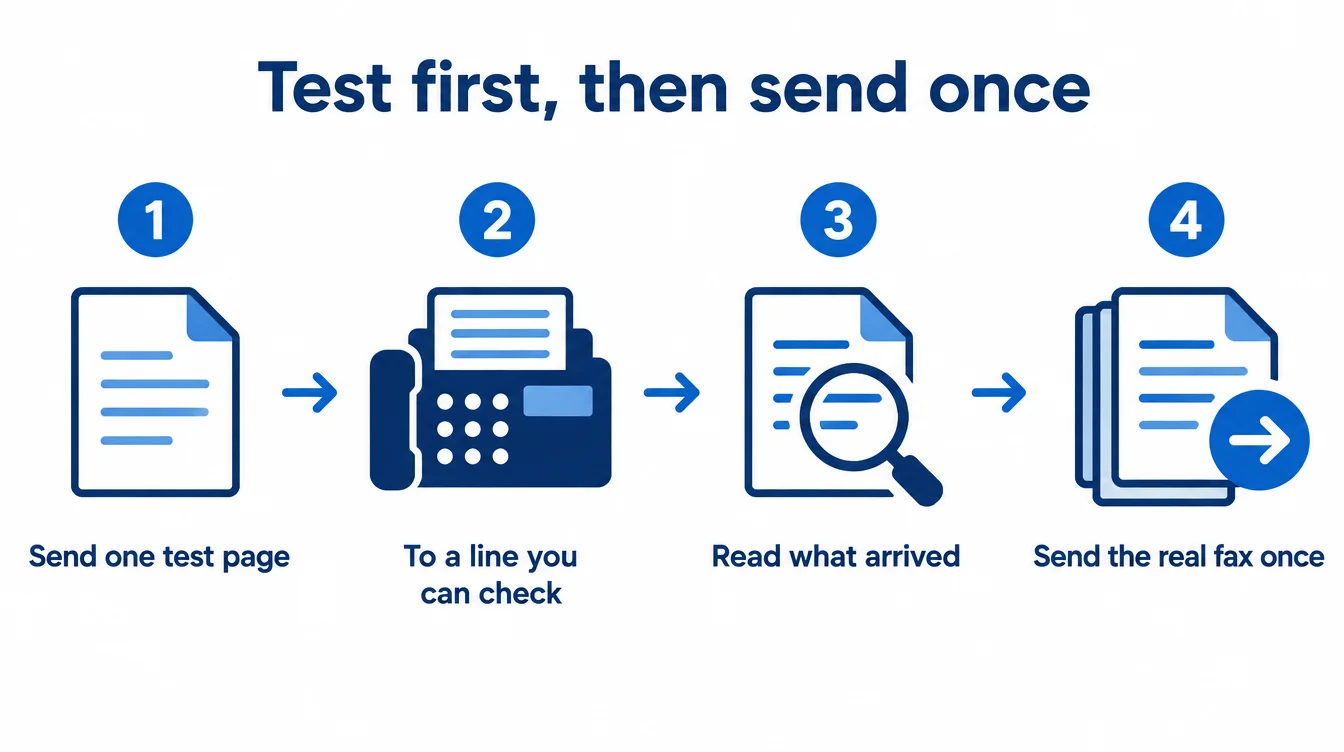
Send a single page with nothing sensitive on it to a fax line you can check yourself, such as a colleague's fax machine or another fax number you control. Watch it reach Delivered, then look at the received page for legibility. In FaxDash a one-page test to a +1 number costs 1 credit.
A test to a different number checks your file and your setup. Only a send to the real destination number checks that line. If you want to test the recipient's line too, ask them first.
What a test proves, and what it doesn't
| What you want to know | Does a test to another number show it? |
|---|---|
| The file opens and isn't password-protected | Yes |
| Text, signatures and stamps stay readable in black and white | Yes, if you can see the received page |
| Every page of the final document arrives in order | No. A one-page test cannot establish completeness or order for a longer document |
| Your account has credits and the route works | Yes |
| The recipient's number is a working fax line | No. Only a send to that number shows it |
| A person at the other end has read it | No. Delivered doesn't tell you that |
Step by step in FaxDash
These steps follow FaxDash's sending help, checked on October 31, 2026.
- Make a one-page test file. Use the page that's hardest to read: the one with small print, a signature or a stamp. Remove anything sensitive, or use a blank copy of the form.
- Pick a test destination you can check. A colleague's fax machine, or another fax line you control. FaxDash's help doesn't say whether you can send a fax from your account to your own FaxDash number, so don't count on that.
- Send it the way you'll send the real fax. In the web dashboard, open Send Fax, add the page, enter the number in international format (+ and the country code, +1 for the US and Canada) and send. In the phone app, scan or pick the PDF, confirm the page and send. By email-to-fax, use the same From address, subject format and single PDF you'll use for the real one.
- Watch the status. Every fax shows a live status: sending, delivered or failed. You get a push notification when it completes and, unless you turned it off, an email.
- Check the received page. Ask your colleague for a photo or a scan of what came out. Look at the smallest text, the signature and anything in color, since a fax arrives in black and white.
- Fix and send the real fax. If the test looked wrong, fix the file and test again. If it looked right, send the real fax once.
Symptoms, likely causes and fixes
On your side (file, account, route):
- The test fails straight away, or you're told before any retries. FaxDash's help says that if the first attempt fails in a way retrying rarely fixes, you're told at once. Check the number is a fax line, the document isn't password-protected, and you have enough credits (troubleshooting help).
- An email-to-fax test gets a reply instead. FaxDash replies when it can't send: no PDF attached, a number it can't read, an address that isn't allowed, or not enough credits. Nothing is charged.
- Delivered, but the page is hard to read. The source file, fax conversion or receiving equipment may affect legibility. Check the original and the received page, darken faint text or rescan a crooked page as needed, and see our checklist for preparing a document so it faxes cleanly.
On the recipient's side (line, machine):
- Your test delivered, but the real number fails. The earlier test worked at that time, but it does not rule out a later file, account or route issue. Also check the destination: it may be a voice number, unavailable fax equipment or a busy line. FaxDash retries automatically when a failure looks temporary.
When to stop resending and call
If a fax to the real number ends as Failed, FaxDash returns its credits automatically. Before you resend, call the recipient and confirm the fax number digit by digit and that their machine or service is on. Confirm first, then resend once.
Cost
A one-page test costs 1 credit to US (+1) numbers, including Canada, or more credits elsewhere, and a failed fax's credits go back to your balance. FaxDash's pricing help lists credit packs from 5 pages for $0.99 to 150 pages for $9.99. No subscription is needed to send, and purchased credits never expire. FaxDash offers 2 free pages when you sign up.
FAQ
Is there a free test fax number I can use?
We don't list one, because we haven't verified any as official and current. A colleague's fax line also lets you see the page that arrived.
Should I test every fax?
No. Test when the document is new to you, hard to read, long, or time-sensitive, or when you're using a route for the first time, such as email-to-fax.
Does Delivered mean the recipient has it?
Delivered is FaxDash's status for a fax that completed. It doesn't tell you a person has read the pages. When it matters, keep the delivery receipt and call to confirm.
Can I test email-to-fax without a fax number?
No. Email-to-fax needs an active FaxDash number. Without one, test from the web dashboard or the app.