
For a small tax office, the service to pick is usually the one that gives you a fax number clients and the IRS can send to, a shared inbox for the people who work it, and sending you only pay for when you use it. If you only ever send, a pay-per-fax service can be enough.
We make FaxDash, so we're not neutral. Below we compare it with other services on the things this kind of office cares about, using each company's own published prices as of October 31, 2026. Where another service fits better, we say so.
This article is general information, not legal, tax or compliance advice. Agency rules and fax numbers change, so confirm with the agency or a qualified professional before you send.
What a small tax office needs from a fax service
Start with the needs that change the least, and only pay for the ones you have.
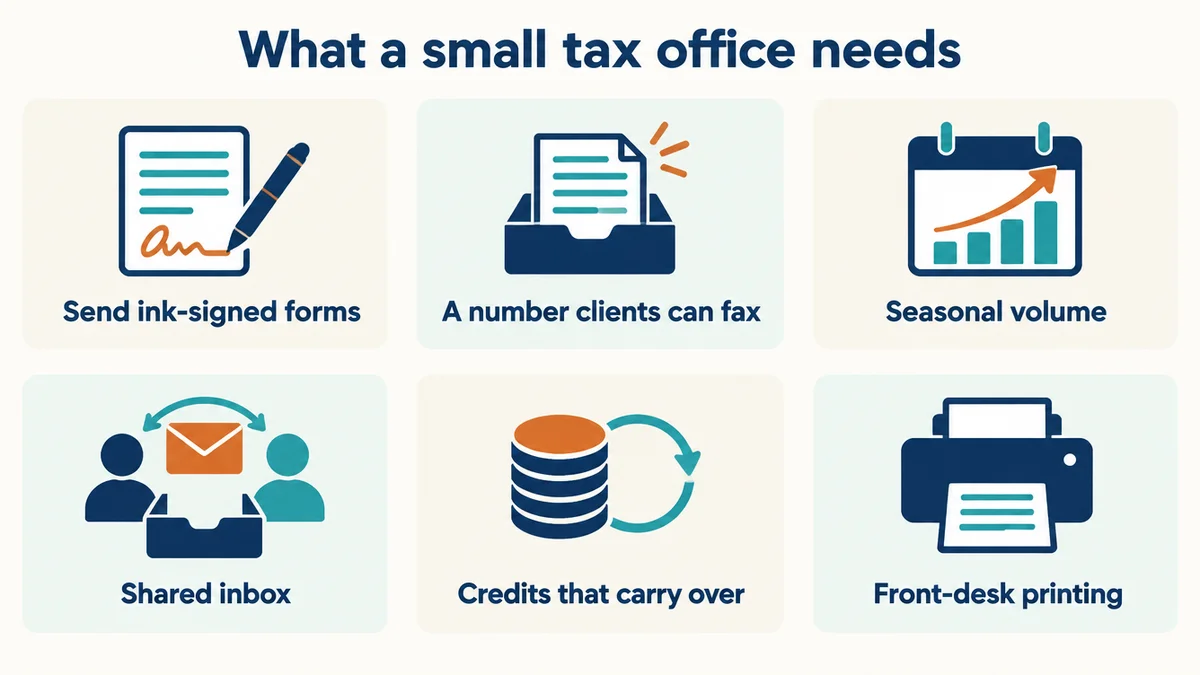
- Sending signed IRS forms. The Form 2848 instructions say you must handwrite your signature on Form 2848 if you file it by mail or by fax, and the IRS page Submit Forms 2848 and 8821 online says all forms mailed or faxed to the IRS must have a "wet" ink signature (both checked October 31, 2026). Any service can send the scan. What matters is a record of what went where. See how to fax Form 2848 or 8821.
- A number clients can fax to. The IRS e-file signature FAQ says taxpayers who sign Form 8879 by hand can return it to the ERO in person, by U.S. mail, private delivery, fax, email or an internet website (checked October 31, 2026). If your clients fax them back, you need a number that can receive.
- Seasonal volume. Our advice: most small tax offices generally have a busy spring and quieter months, so plan for both and check what happens when a month goes over its page allowance.
- More than one person on the same inbox. In season, a preparer and a front-desk person often both need the faxes, and you want to see who sent what.
- Credits that carry over seasons. Our advice: if you send in bursts, credits that don't expire generally suit you better than a monthly allowance that resets.
- Paper at the front desk, if your office still works from a printed pile. This one is optional.
Your authorizations also matter when you call the IRS: its Practitioner Priority Service page says PPS is available to tax professionals with valid third-party authorizations, that is Forms 2848, 8821 and/or 8655 (checked October 31, 2026). For how to run the office day to day, see the small tax office fax workflow and the tax-season fax playbook. This page is only about choosing the service.
The options
FaxDash
Who it's for: offices of 1 to 3 people that want a receive number and send in bursts.
Price as of October 31, 2026 (FaxDash Help): sending needs no subscription. Credit packs run from 5 pages for $0.99 to 150 pages for $9.99, and credits never expire. To receive, Starter is $3.99/month (50 received pages + 10 send credits), Standard is $6.99/month (200 + 25) and Business is $12.99/month (500 + 60).
Team and receive notes: Business is for you + 2 team seats, and extra seats are $2.99/month. Admins and members send from the team's credits, everyone works from one shared inbox and sent history, and each sent fax shows who sent it. An admin can set a monthly page limit per member. If you receive more pages than the plan includes, faxes keep arriving and each extra page uses one send credit. You get an alert at 80% of the allowance and again when it runs out.
Choose it if: you want one office number, a shared inbox for 2 or 3 people, and credits left over from one season for the next.
Fax.Plus
Who it's for: offices that want a larger pooled page allowance or more people on one plan.
Price as of October 31, 2026 (Fax.Plus pricing): on monthly billing, Basic is $8.99/month with 200 pages a month, one fax number and one member, and $0.10 per extra page. Premium is $17.99/month with 500 pages a month and $0.07 per extra page. Business is $34.99/month with 1,000 pages a month, five members, two dedicated fax numbers and $0.05 per extra page. Enterprise starts at $99.99/month. Billed annually, Basic is $6.99/month ($83.99 a year), Premium $13.99/month ($167.99 a year) and Business $27.99/month ($335.99 a year). Its prices don't include taxes.
Team and receive notes: its pricing page says teams need Business or Enterprise, and lists team setup and an admin console on Business. Every paid plan includes a fax number.
Choose it if: you have more than three people, or your monthly pages in and out run well past what a FaxDash plan includes.
eFax
Who it's for: offices that want a monthly plan with more user licenses and a provider with enterprise options.
Price as of October 31, 2026 (eFax pricing): its plan for individuals and small business is $18.99/month on monthly billing, or $15.83/month billed annually, with 200 pages a month to the U.S. and Canada, $0.10 per page over the plan, 1 user license and 1 fax number. Its plan for growing teams is $39.99/month on monthly billing, or $33.33/month billed annually, with 500 pages a month, $0.07 per page over the plan, 5 user licenses (+$10/month for extra users) and 1 fax number (+$5/month for extra lines). Corporate pricing is custom.
Team and receive notes: the page says that if you use all your monthly pages, service continues and extra pages are billed at the plan's overage rate.
Choose it if: you need five user licenses on one plan, or the integrations and admin tools its page describes for larger organizations.
PayPerFax
Who it's for: offices that only send now and then and don't need a number.
Price as of October 31, 2026 (PayPerFax pricing): generally $2.50 for the first three pages (an optional cover page plus two document pages) and $0.75 for each additional page, with no account and no subscription.
Team and receive notes: its homepage and FAQ describe sending. A number for receiving faxes isn't listed there as of October 31, 2026.
Choose it if: you send a few faxes a season and clients never need to fax you back.
Side by side, as of October 31, 2026
| FaxDash | Fax.Plus | eFax | PayPerFax | |
|---|---|---|---|---|
| Subscription needed to send | No | Paid plans | Plans only on its pricing page | No |
| Receive number | On a receive plan, from $3.99/month | Included with paid plans | Included with plans | Not listed |
| Entry price | Credit packs from $0.99; receive from $3.99/month | Basic $8.99/month (annual billing: $6.99/month) | $18.99/month (annual billing: $15.83/month) | $2.50 for the first 3 pages |
| Pages | Received allowance plus separate send credits (Business: 500 + 60) | Pooled allowance (Business: 1,000) | Pooled allowance (growing teams: 500) | Pay per fax |
| People | Business: you + 2 team seats, +$2.99/month each | Business: five members | Growing teams: 5 user licenses, +$10/month each | Not listed |
| Credits carry over | Yes, credits never expire | Not listed on its pricing page | Not listed on its pricing page | No credits; pay per fax |
FaxDash counts received pages and send credits separately, while Fax.Plus and eFax list one pooled page allowance. Neither approach is better on its own. Our advice: compare them against your own months, in and out.
Sources: FaxDash pricing and billing help and teams help, Fax.Plus pricing, eFax pricing, and PayPerFax pricing and FAQ, all checked October 31, 2026.
When FaxDash isn't the best fit
- You have more than three people who all send. Each extra FaxDash seat is $2.99/month, so compare that with a plan that includes more members.
- Your monthly volume is high in both directions. A large pooled allowance may suit you better than a received allowance plus send credits.
- You only send, a few times a year, and never need replies. A pay-per-fax service needs no account at all.
How to switch without missing faxes
Do these in order, from least to most disruptive:
- Keep your current number running while you set up the new one.
- Get the new number and send a test fax to it from another line. See how to send a test fax.
- Update your engagement letters, letterhead and website with the new number. Our advice: it generally helps to do this before January, so clients have it before they return their 8879s.
- Run both numbers for an overlap period, and check the old one until faxes to it stop.
- Want to keep your existing number? Contact us at support@faxdash.io.
Paper at the front desk
If your office works from a printed pile in season, FaxDash Connect prints each fax you receive on the printer you choose, once, so the front desk has it on paper. See how to keep the paper fax workflow without a fax machine.
FAQ
Can a fax service file my clients' returns? No. A fax service sends and receives pages. Preparing, signing and filing stay with you and your client, under the IRS instructions for each form.
Can I fax Form 2848 with an electronic signature? No. The Form 2848 instructions say faxed or mailed forms need a handwritten signature, and a form with an electronic signature must be submitted online.
Can clients fax a signed Form 8879 to my office? Yes. The IRS e-file signature FAQ lists fax among the ways a taxpayer can return a hand-signed Form 8879 to the ERO. You need a number that can receive.
What happens in April if we receive more pages than our FaxDash plan includes? Faxes keep arriving, and each extra page uses one send credit. You get alerts at 80% of the allowance and when it runs out.
Can seasonal staff share one FaxDash account? Each person signs in as themselves on the team. Business includes 2 team seats, and each extra seat is $2.99/month. An admin can suspend a seat and restore it later.
Prices and plan details checked October 31, 2026, on each company's own pricing pages, linked above. IRS details checked the same day: Instructions for Form 2848, Submit Forms 2848 and 8821 online, the IRS e-file signature authorization FAQ, and the Practitioner Priority Service page. FaxDash details from FaxDash Help: pricing and billing; teams and seats; FaxDash Connect.