Điện thoại làmáy fax.
Quét trang bằng camera, nhập số, gửi. Chỉ từ $0,07 một trang, không cần gói đăng ký để gửi.
Tặng 2 trang miễn phí khi đăng ký — không cần thẻ



- Sẵn sàng cho HIPAA, có BAA với gói Business
- Mã hóa khi truyền và khi lưu trữ
- Dùng được với Claude, ChatGPT và Grok
Gửi và nhận fax với FaxDash
FaxDash gửi và nhận fax thật từ điện thoại, máy tính hoặc email của bạn, không cần máy fax hay đường dây điện thoại. Trả theo trang bằng lượt gửi trả trước, hoặc chọn gói gửi Unlimited nếu bạn gửi fax thường xuyên. Để nhận fax, bạn cần một gói trả phí, gói này đã bao gồm một số fax riêng.
Tài khoản mới được tặng 2 trang miễn phí sau khi xác minh email. Không thể dùng trang miễn phí cho một số điểm đến. Mỗi trang gửi đến số +1 dùng 1 lượt gửi, còn mỗi trang gửi đến các quốc gia khác dùng 2 lượt. Một số điểm đến không thể gửi tới. Nếu fax vẫn thất bại sau lần thử lại cuối cùng, lượt gửi sẽ được hoàn lại tự động.
Bạn có thể kết nối FaxDash với ChatGPT, Claude, Grok hoặc trợ lý khác có hỗ trợ MCP. Trước tiên, bạn đăng nhập và phê duyệt từng quyền. Tùy theo những gì bạn phê duyệt, trợ lý có thể gửi fax bằng lượt gửi của bạn, kiểm tra trạng thái gửi và đọc fax đã nhận. Trợ lý không thể thanh toán, thuê hay trả lại số fax, thay đổi cài đặt của bạn hoặc xóa bất cứ thứ gì. Để mua lượt gửi, trợ lý sẽ đưa bạn một đường link để bạn tự mở.
Hướng camera vào. Phần còn lại cứ để chúng tôi.
FaxDash biến ảnh chụp điện thoại thành tài liệu sắc nét, sẵn sàng gửi fax — tự động chỉnh thẳng, khử nhiễu và làm nét trước khi gửi.
- 1
Đã tìm thấy cạnh.
Hướng camera vào — trang giấy được nhận diện tự động.
- 2
Đã chỉnh độ nghiêng.
Phối cảnh và góc xoay được chỉnh thẳng lại.
- 3
Đã khử nhiễu.
Loại bỏ bóng đổ và ám màu, cân bằng độ tương phản.
- 4
Đã ký.
Vẽ chữ ký một lần — đặt ngay trên trang.
- 5
Sẵn sàng gửi fax.
Bản xuất sắc nét ở 204×196 dpi — sẵn sàng để gửi.


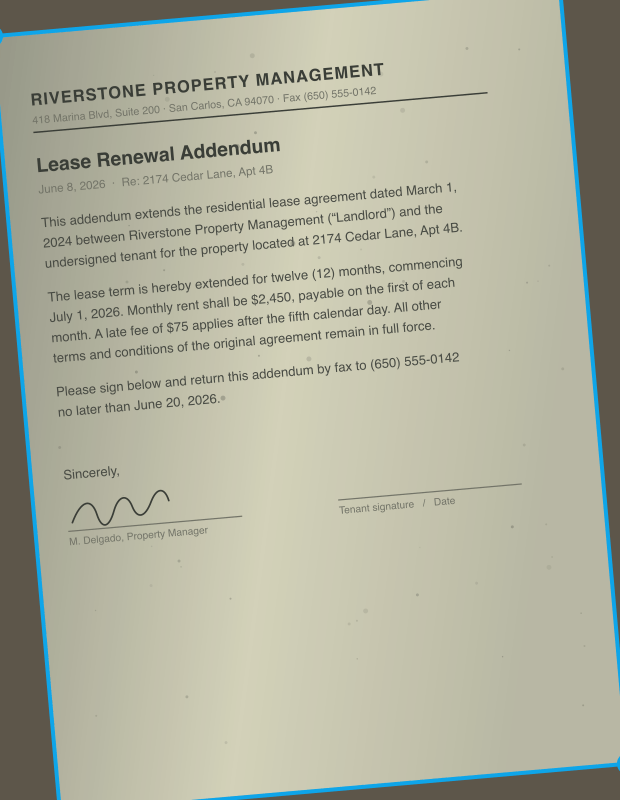 1
Đã tìm thấy cạnh.
Hướng camera vào — trang giấy được nhận diện tự động.
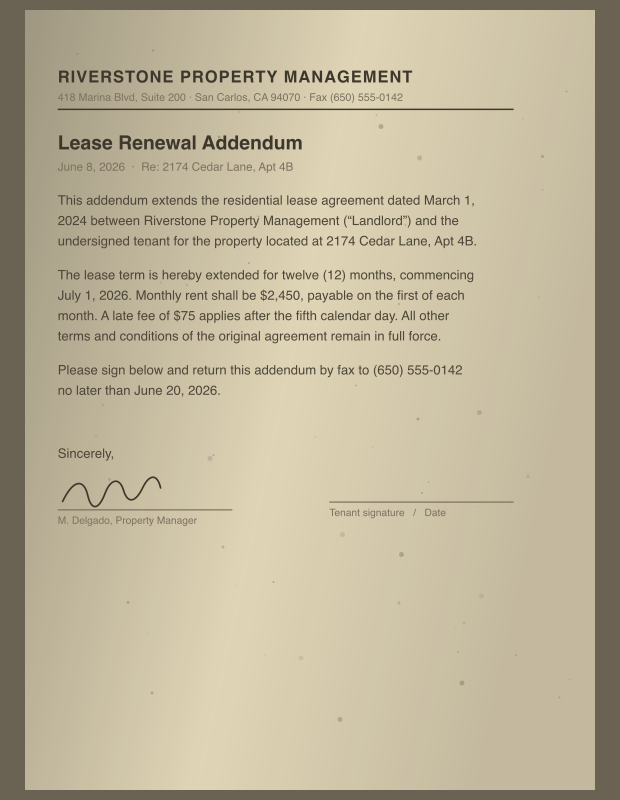 2
Đã chỉnh độ nghiêng.
Phối cảnh và góc xoay được chỉnh thẳng lại.
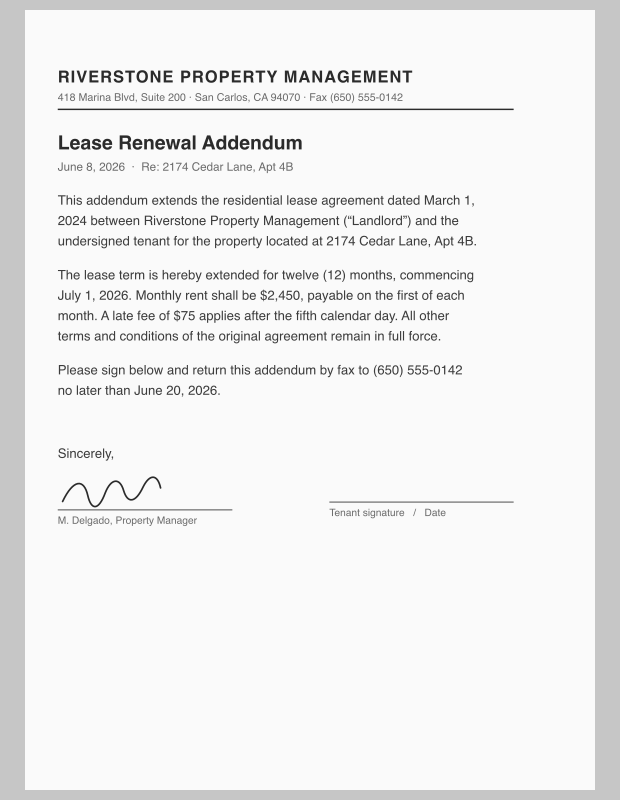 3
Đã khử nhiễu.
Loại bỏ bóng đổ và ám màu, cân bằng độ tương phản.
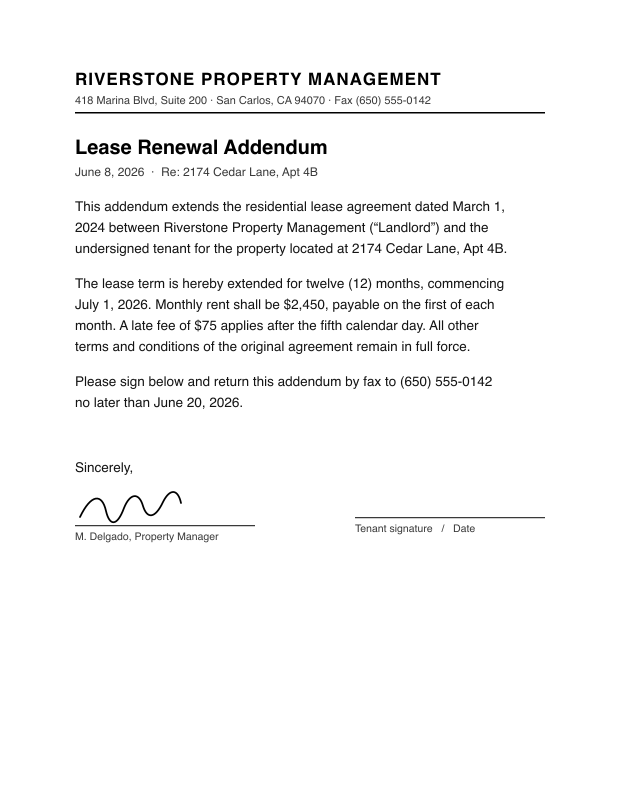 4
Đã ký.
Vẽ chữ ký một lần — đặt ngay trên trang.
- 5
Sẵn sàng gửi fax.
Bản xuất sắc nét ở 204×196 dpi — sẵn sàng để gửi.
Tự mình trải nghiệm.
Một bên là ảnh chụp điện thoại bị lệch, có bóng đổ — bên kia là bản sạch, sẵn sàng gửi fax. Kéo thanh trượt để so sánh.


Một tài liệu — từ ảnh chụp điện thoại đến bản sẵn sàng gửi fax.
Ký ngay trên điện thoại.
Một nửa công việc gửi fax là ký giấy tờ rồi gửi lại. Vẽ chữ ký, đặt lên trang và gửi — không cần máy in, không cần scan lại.
- Vẽ bằng ngón tay, đặt ở bất kỳ đâu trên trang
- Dùng được cho bản quét, PDF và fax đã nhận
- Miễn phí — không tính phí theo chữ ký
Số fax riêng của bạn. Ngay trong túi áo.
Nhận fax trên số nội hạt hoặc số miễn cước dành riêng cho bạn. Mọi trang đều về ứng dụng, và bạn nhận thông báo qua email khi có fax đến. Mở FaxDash để xem tài liệu và bản tóm tắt AI nếu có.
- Thông báo đẩy ngay khi fax đến
- Thông báo qua email cho mỗi fax mới
- Tóm tắt AI, phân loại và văn bản có thể tìm kiếm
- Nhiều số trên một tài khoản với tiện ích bổ sung
Hoặc khỏi cần mở ứng dụng.
Soạn email, đính kèm file PDF và gửi từ email tài khoản của bạn đến your-fax-number@fax.faxdash.io, với số fax người nhận ở dòng tiêu đề. Email sẽ đến nơi dưới dạng fax, kèm xác nhận gửi thành công trả về hộp thư của bạn. Dùng được với Gmail, Outlook, Apple Mail — ở bất cứ đâu.
Biết fax nói gì. Trước cả khi mở.
Có sẵn tóm tắt AI — bản tóm tắt, phân loại, các trường dữ liệu chính và toàn bộ văn bản có thể tìm kiếm cho từng fax nhận được, để bạn ưu tiên việc quan trọng mà không cần đọc từng trang. Cần tuân thủ HIPAA? Điều này có trong gói Business: hãy yêu cầu BAA (hipaa@faxdash.io); khi đã ký BAA, tính năng phân tích AI sẽ tắt cho đến khi bạn bật lên.
Tóm tắt tức thì
AI đọc tài liệu và đưa ra bản tóm tắt dễ hiểu chỉ trong vài giây.
Tự động phân loại
Gắn nhãn theo danh mục — Y tế, Pháp lý, Chính phủ, Tài chính và nhiều hơn nữa.
Trích xuất dữ liệu chính
Số tiền, ngày tháng và tên được trích xuất tự động.
OCR toàn văn
Mỗi fax đều trở thành văn bản có thể tìm kiếm và sao chép.
Gửi fax chỉ bằng một lời yêu cầu.
Kết nối FaxDash với Claude, ChatGPT, Grok hoặc bất kỳ trợ lý nào hỗ trợ Model Context Protocol, và gửi fax trở thành việc bạn chỉ cần yêu cầu thay vì tự tay làm.
Tài khoản của bạn, lượt gửi của bạn
Trợ lý đăng nhập với tư cách của bạn và dùng số dư của bạn — không có gì phải thiết lập hay trả tiền riêng.
Bạn phê duyệt từng quyền
Quyền gửi fax, xem lịch sử và xem số dư được cấp từng mục một, trên màn hình bạn thấy trước khi kết nối.
Trợ lý không thể tiêu tiền
Khi mua lượt gửi, trợ lý đưa bạn đường link thanh toán để bạn tự mở. Không giao dịch nào diễn ra nếu thiếu bạn.
Ngắt kết nối bất cứ lúc nào
Gỡ trình kết nối hoặc thu hồi quyền trong Settings. Mọi quyền truy cập còn lại sẽ hết hiệu lực trong vòng 5 phút.
Small app. Full fax machine.
Sign, watermark, redact, batch-send, and archive — everything you need to send a fax from your phone, nothing you don't.
Crumpled paper in. Fax-ready out.
Deskewed, denoised, sharpened — automatically.
Bringing your number over
Want to keep your existing fax number? Number transfers are available on the Business plan. Contact support@faxdash.io and we’ll handle it.
Fax numbers worldwide.
One credit a page to +1 numbers, two anywhere else.
CONFIDENTIAL, in one tap.
Watermarks are free here.
per page to send. No subscription. Pricing
One tap. Every recipient.
Batch the same document to a whole list.
Your team. One plan.
On Standard and Business, with you + 2 team seats on Business.
Shared credits, with a monthly page limit per member.
A vault. With receipts.
Immutable audit trail — who accessed what, and when.
A proper first page.
Built-in cover pages with your name and message.
Numbers, remembered.
Contacts for the places you fax every week.
Gửi fax đến hầu hết mọi nơi trên thế giới.
Gửi đến số fax ở hầu hết các quốc gia, ngay từ điện thoại của bạn. Mỗi trang gửi ra ngoài khu vực +1 tốn 2 lượt gửi.
Trả tiền cho số trang. Không phải cho lời hứa.
Gửi fax trả theo trang. Chỉ đăng ký gói tháng nếu bạn muốn có số để nhận fax. Lượt gửi không bao giờ hết hạn.
Gửi ra nước ngoài, và nơi bạn có thể đăng ký số›
Gửi fax được đến số fax ở hầu hết các quốc gia. Mỗi trang gửi đến số +1 tốn 1 lượt gửi; các điểm đến khác tốn 2 lượt gửi mỗi trang. Một số điểm đến không thể gửi tới, bao gồm nhiều đảo vùng Caribe dùng chung mã +1. Nếu fax không thể gửi đến nơi, lượt gửi sẽ được hoàn về tài khoản của bạn. Nhận fax cần có số riêng, hiện có tại Hoa Kỳ, Canada, Vương quốc Anh, Đức, Pháp, Hà Lan, Thụy Điển, Úc và Israel. Số tại Úc và Israel cần tiện ích bổ sung Premium Fax Number. Số miễn cước chỉ có tại Hoa Kỳ và Canada.
Các gói
Đã bao gồm số fax riêng để nhận fax trong ứng dụng, kèm thông báo qua email.
- 1 dedicated number
- Email notice for each new fax
- Push notifications
- Team account: add seats at $2.99/mo each
- Admin, member and finance roles, shared inbox and per-member page limits
- 1 dedicated number
- Email notice for each new fax
- Push notifications
- Priority support
- Team account: you + 2 team seats, +$2.99/mo per extra seat
- Admin, member and finance roles, shared inbox and per-member page limits
- 1 dedicated number
- Email notice for each new fax
- Push notifications
- Priority support, with a guaranteed reply within one business day
- HIPAA support (BAA)
Need more receiving pages? No problem, contact us at support@faxdash.io.
- Unlimited sending
- Unlimited sending
- you + 2 team seats
- Unlimited sending, shared by the team
- HIPAA support (BAA)
- API access
Unlimited means no credits per page, within a monthly fair-use limit and 100 pages a day. International pages count double. A few high-cost destinations use credits. Past a limit, faxes use credits as usual. Held alongside any receive plan. Prices on faxdash.io; $1.00 more in the App Store and Google Play.
Thêm số riêng cho bất kỳ gói nhận fax nào.
Dành cho các nhóm đã vượt quá gói Business: hạn mức yêu cầu API cao hơn, nhiều số fax cho các địa điểm hoặc tài khoản khách hàng, gửi số lượng lớn, tích hợp xây dựng riêng cho hệ thống của bạn, hỗ trợ ưu tiên cam kết phản hồi trong vòng một ngày làm việc, và BAA. Chúng tôi cùng bạn xác định phạm vi và gửi báo giá.
The math, since you asked.
| FaxDash | eFax | Fax.Plus | |
|---|---|---|---|
| Send without a subscription | From $0.07/page | Plan required | $0.20/page prepaid |
| Receive plan (monthly) | From $3.99 · 50 pages | $18.99 · 200 pages | $8.99 · 200 pages |
| Team plan (monthly) | $12.99 · 3 users | $39.99 · 5 users | $34.99 · 5 users |
| Free pages on signup | Yes | No | Yes |
eFax and Fax.Plus prices from their own pricing pages (efax.com/pricing, fax.plus/pricing, and Fax.Plus's “how much does it cost to fax” page for prepaid sending), billed monthly, checked Oct 23, 2026.
Được xây dựng cho những tài liệu quan trọng.
Hồ sơ y tế, hồ sơ pháp lý, yêu cầu bồi thường bảo hiểm — FaxDash sẵn sàng cho HIPAA khi gửi fax thông tin sức khỏe được bảo vệ, kèm giấy tờ để chứng minh.
BAA, đã ký
Với gói Business, chúng tôi sẽ ký Thỏa thuận Hợp tác Kinh doanh (Business Associate Agreement) với các tổ chức thuộc diện điều chỉnh (covered entities) và nhà cung cấp của họ.
Luôn được mã hóa
AES-256 khi lưu trữ, TLS khi truyền — mọi trang, mọi lúc.
Hạ tầng tuân thủ
Xây dựng trên AWS, theo một BAA bao trùm mọi tài khoản trong tổ chức của chúng tôi.
Nhật ký kiểm tra
Kho tài liệu lưu hồ sơ không thể sửa đổi về việc ai đã truy cập gì và khi nào.
Câu hỏi thường gặp
Can I send and receive faxes online for free?+
You can try sending with FaxDash’s free signup credits. Eligible new accounts receive two sending credits, with no card required. That covers two pages sent to a US or Canadian fax number; destinations outside the +1 region use two credits per page. Caribbean islands that share the +1 code, and a few other destinations, need purchased credits, and several of those islands can’t be reached at all. The signup offer does not include a free number for receiving faxes.
After using your free credits, buy a credit pack when you need to send again. Sending does not require a monthly subscription, and purchased credits do not expire. You can upload a PDF from your computer or scan a document with your phone.
To receive faxes, choose a paid plan with a dedicated fax number. Monthly receive plans start at $3.99. Incoming faxes appear in your inbox, and you get an email for each one.
How does pay-as-you-go work?+
Buy a credit pack once — credits never expire. Pages sent to a +1 number use one credit each; every other destination uses two credits per page. No subscription required to send faxes. You only subscribe if you need to receive.
Do I need a subscription to send faxes?+
No. You can send faxes with just a credit pack. Subscriptions are only needed if you want a dedicated fax number to receive incoming faxes.
How do I receive faxes?+
Subscribe to a receive plan to get a dedicated local or toll-free fax number. Incoming faxes are delivered to your app with a push notification and an email for each one, with a link to view it; you can turn the email off in settings.
What if I receive more pages than my plan includes?+
Your faxes keep arriving; FaxDash never stops receiving because you went over. Each page beyond your plan’s monthly allowance uses one send credit, and you’re notified as you near the allowance and when it runs out, so it never comes as a surprise.
Can my team share one FaxDash account?+
Yes, without sharing a login, on the Standard and Business plans. Business ($12.99/month) includes you + 2 team seats (3 people), so you can invite 2 people; on Standard you add each seat yourself. Every extra seat is $2.99 a month.
Everyone signs in with their own account; admins and members send from the team’s credits, and finance sees the team’s faxes, inbox, credits and billing, but doesn’t send faxes or manage members. The team shares one inbox and one sent history that shows who sent each fax, and admins can set a monthly page limit per member. You invite people and manage the team from the web dashboard.
What file formats can I fax?+
You can scan paper documents with your camera, or attach PDFs, JPEGs, and PNGs. Multi-page documents are merged automatically.
Can I use FaxDash from Claude or ChatGPT?+
Yes. Add FaxDash to Claude, ChatGPT, Grok or any assistant that supports MCP (Model Context Protocol) as a custom connector, sign in, and approve what it may do. Then you can ask it to send a PDF, check whether a fax was delivered or read a received fax. It uses your own account and credits, and you can revoke it at any time in your dashboard settings.
Can I send a fax by email?+
Yes. Email a PDF from your account’s email address to your own FaxDash number at fax.faxdash.io, for example 12025550123@fax.faxdash.io, and put the destination fax number in the Subject. It goes out from your number and uses credits like any other fax. It needs a FaxDash fax number.
Can received faxes go to my email?+
Yes, and it’s on by default once you have a fax number. Each new fax sends an email with who it’s from, which number it came to, the page count, when it arrived and a link that opens it in FaxDash. The fax itself isn’t attached, so its contents stay out of your inbox. You can turn the email off, or add up to five more addresses, such as a front desk, in settings.
Is there an API?+
Yes, on the Business plan. Create an API key under Settings → Integrations in the web dashboard, then call the REST API at api.faxdash.io to send faxes, check their status, read your inbox and manage contacts. You can also get Slack, Microsoft Teams or webhook messages (Zapier and Make work this way) when a fax is received, delivered or fails.
Is my data secure?+
Yes. Documents are encrypted in transit and at rest. The Document Vault provides an immutable audit trail so you always know who accessed what.
Can I send faxes internationally?+
Yes. You can send to fax numbers in most countries. Pages to a +1 number cost one credit each; every other destination costs two credits per page. A few destinations can’t be reached, including several Caribbean islands that share the +1 code. Enter the number in international format with the country code, and leave off the national trunk prefix: +44 20 3988 3922 rather than +44 020 3988 3922. If a fax cannot be delivered, including to the few destinations we can’t reach, the credits are returned to your account.
Which countries can I get a fax number in?+
Numbers for receiving faxes are available in the United States, Canada, the United Kingdom, Germany, France, the Netherlands, Sweden, Australia and Israel. Numbers in Australia and Israel need the Premium Fax Number add-on. Toll-free numbers are available in the United States and Canada. Sending is not limited to these countries — you can send to most countries from any FaxDash number.
What does the AI Summary do?+
AI summaries are available for received faxes, and AI analysis is on unless you turn it off. Analysis runs on Amazon Bedrock, inside our AWS BAA. Need HIPAA compliance? On the Business plan, request a BAA (hipaa@faxdash.io); for accounts with a signed BAA, AI analysis is off until you turn it on. You get an instant plain-language summary, document category (Medical, Legal, Government, etc.), key data extraction (amounts, dates, names), and full searchable OCR text.
Do credits expire?+
No. Once you buy credits, they stay in your account until you use them.
Lần gửi fax tới của bạn chỉ mất một phút.
Tặng 2 trang miễn phí khi đăng ký. Không cần thẻ, không cần gói tháng để gửi fax.