


- HIPAA対応可能、BusinessプランでBAA締結
- 通信時・保存時ともに暗号化
- Claude、ChatGPT、Grokに対応
FaxDashでFAXを送受信
FaxDashなら、FAX機も電話回線もなしで、スマホ、パソコン、メールから本物のFAXを送受信できます。料金はプリペイドのクレジットでページごとにお支払いいただけるほか、FAXをよく使う方はUnlimited(送信し放題)プランもお選びいただけます。受信には有料プランが必要で、プランには専用のFAX番号が含まれます。
新規アカウントは、メールアドレスの確認後に2ページ分を無料でご利用いただけます。無料ページは一部の宛先には使えません。+1番号宛てはページあたり1クレジット、その他の国宛てはページあたり2クレジットを消費します。一部の宛先には送信できません。最後の再試行でもFAXが失敗した場合、クレジットは自動で返還されます。
FaxDashは、ChatGPT、Claude、GrokなどMCPに対応したアシスタントと連携できます。まずサインインし、それぞれの権限を承認します。承認した内容に応じて、アシスタントはあなたのクレジットでFAXを送信したり、配信状況を確認したり、受信したFAXを読んだりできます。支払い、番号の契約や解約、設定の変更、削除は一切できません。クレジットを購入する際は、ご自身で開くためのリンクが提示されます。
カメラを向けるだけ。あとはおまかせ。
FaxDashはスマホの写真を、くっきりとしたFAX品質の書類に変換します。傾き補正、ノイズ除去、シャープ化を送信前に自動で行います。
- 1
輪郭を検出。
カメラを向けると、ページが自動で検出されます。
- 2
傾きを補正。
遠近のゆがみと回転をまっすぐに整えます。
- 3
ノイズを除去。
影や色かぶりを取り除き、コントラストを整えます。
- 4
署名完了。
署名は一度描くだけ。ページ上にそのまま配置されます。
- 5
FAX準備完了。
204×196 dpiのくっきりした出力で、すぐに送信できます。


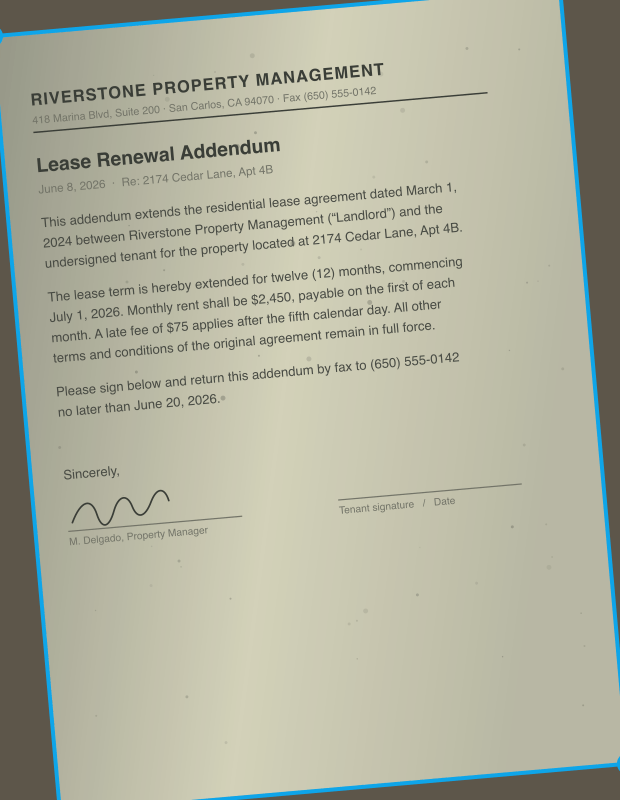 1
輪郭を検出。
カメラを向けると、ページが自動で検出されます。
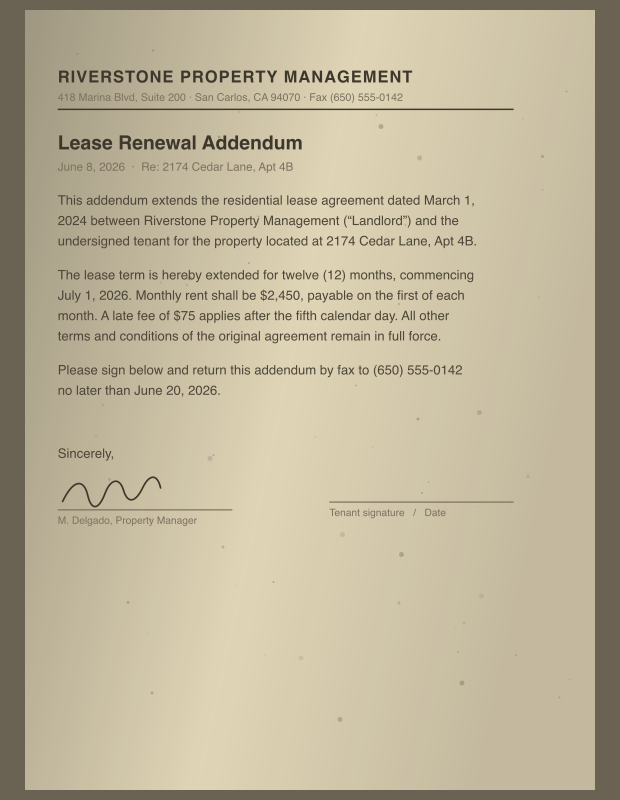 2
傾きを補正。
遠近のゆがみと回転をまっすぐに整えます。
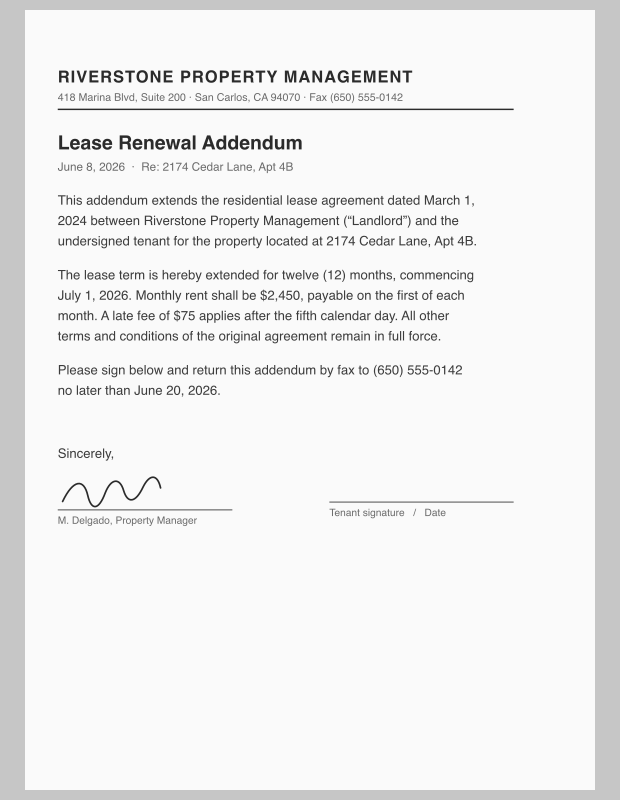 3
ノイズを除去。
影や色かぶりを取り除き、コントラストを整えます。
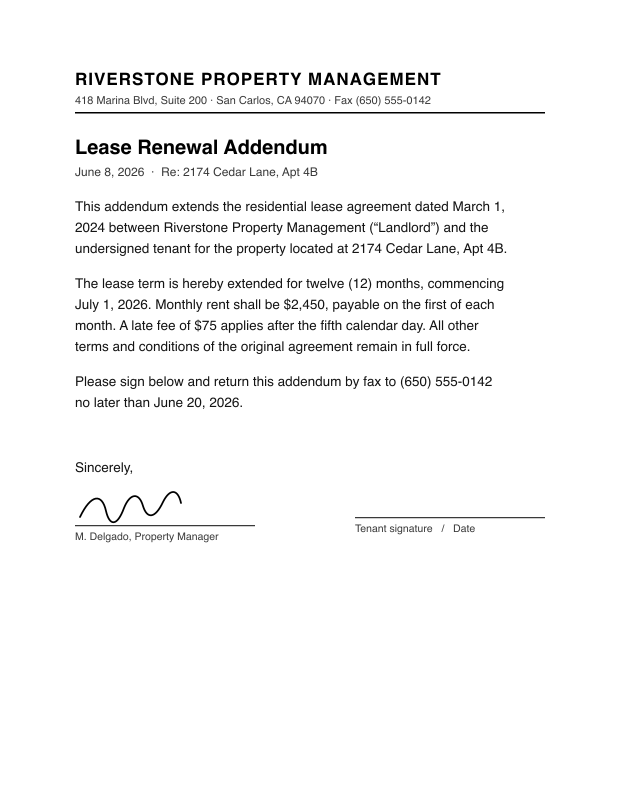 4
署名完了。
署名は一度描くだけ。ページ上にそのまま配置されます。
- 5
FAX準備完了。
204×196 dpiのくっきりした出力で、すぐに送信できます。
その目でお確かめください。
片側は傾いて影の入ったスマホ写真、もう片側はきれいなFAX品質の出力。ハンドルをドラッグして比べてみてください。


同じ書類が、スマホ写真からFAX品質に。
署名も、スマホでそのまま。
FAXの半分は、何かに署名して送り返すこと。署名を描いてページに配置し、送信するだけ。プリンターも、スキャンし直す手間もいりません。
- 指で描いて、ページのどこにでも配置
- スキャン、PDF、受信したFAXに対応
- 無料で利用可能。署名ごとの料金はかかりません
専用FAX番号を、ポケットに。
専用のローカル番号またはフリーダイヤル番号でFAXを受信できます。すべてのページがアプリに届き、FAXが届くとメールでお知らせします。FaxDashを開けば、書類と、利用可能な場合はAI要約を確認できます。
- FAXが届いた瞬間にプッシュ通知
- 新着FAXごとにメールでお知らせ
- AI要約、カテゴリ分類、検索可能なテキスト
- アドオンで、ひとつのアカウントに複数の番号
アプリを使わない方法も。
メールを作成してPDFを添付し、アカウントのメールアドレスからyour-fax-number@fax.faxdash.io宛てに、件名に宛先番号を入れて送信するだけ。FAXとして届き、配信確認がメールで返ってきます。Gmail、Outlook、Apple Mailなど、どこからでも使えます。
開く前に、FAXの内容がわかる。
AI要約をご利用いただけます。受信したFAXごとに要約、カテゴリ、主要項目、検索可能な全文テキストを生成するので、すべてのページを読まなくても大事なものから対応できます。HIPAAへの準拠が必要な場合は、Businessプランでご利用いただけます。BAAをご依頼ください(hipaa@faxdash.io)。BAAを締結すると、ご自身で有効にするまでAI分析はオフになります。
瞬時に要約
AIが書類を読み取り、わかりやすい言葉で数秒のうちに概要をお伝えします。
自動分類
医療、法務、行政、金融などのカテゴリで自動タグ付け。
主要データの抽出
金額、日付、氏名を自動で抽出します。
全文OCR
すべてのFAXが、検索・コピーできるテキストに。
頼むだけでFAXを送信。
FaxDashをClaude、ChatGPT、GrokなどModel Context Protocolに対応したアシスタントと連携すれば、FAXは「自分でする作業」から「頼むだけのこと」に変わります。
あなたのアカウント、あなたのクレジット
あなたとしてサインインし、あなたの残高から支払います。別途の設定や支払いは不要です。
権限はひとつずつ承認
送信、履歴、残高へのアクセスは、接続前に表示される画面でひとつずつ許可します。
お金は使えません
クレジットの購入時は、ご自身で開く決済リンクが渡されます。あなたの操作なしに購入が行われることはありません。
いつでも接続解除
コネクタを削除するか、設定でアクセスを取り消せます。残っているアクセス権も5分以内に失効します。
Small app. Full fax machine.
Sign, watermark, redact, batch-send, and archive — everything you need to send a fax from your phone, nothing you don't.
Crumpled paper in. Fax-ready out.
Deskewed, denoised, sharpened — automatically.
Bringing your number over
Want to keep your existing fax number? Number transfers are available on the Business plan. Contact support@faxdash.io and we’ll handle it.
Fax numbers worldwide.
One credit a page to +1 numbers, two anywhere else.
CONFIDENTIAL, in one tap.
Watermarks are free here.
per page to send. No subscription. Pricing
One tap. Every recipient.
Batch the same document to a whole list.
Your team. One plan.
On Standard and Business, with you + 2 team seats on Business.
Shared credits, with a monthly page limit per member.
A vault. With receipts.
Immutable audit trail — who accessed what, and when.
A proper first page.
Built-in cover pages with your name and message.
Numbers, remembered.
Contacts for the places you fax every week.
世界のほぼどこへでもFAXを送信。
ほとんどの国のFAX番号へ、スマホから直接送信できます。+1地域以外宛てのページは、ページあたり2クレジットです。
払うのはページ分だけ。「使うかも」には払わない。
送信はページ単位でお支払い。FAXを受信する番号が必要な場合だけ、サブスクリプションをお申し込みください。クレジットに有効期限はありません。
海外への送信と、番号を取得できる国›
送信はほとんどの国のFAX番号に対応しています。+1番号宛てはページあたり1クレジット、その他の宛先はページあたり2クレジットです。一部の宛先には送信できず、+1の国番号を共有するカリブ海の島々のいくつかもこれに含まれます。FAXを配信できなかった場合、クレジットはアカウントに返還されます。受信には専用番号が必要で、米国、カナダ、英国、ドイツ、フランス、オランダ、スウェーデン、オーストラリア、イスラエルでご利用いただけます。オーストラリアとイスラエルの番号にはPremium Fax Numberアドオンが必要です。フリーダイヤル番号は米国とカナダのみです。
プラン
専用FAX番号付き。アプリでFAXを受信し、メールでお知らせします。
- 1 dedicated number
- Email notice for each new fax
- Push notifications
- Team account: add seats at $2.99/mo each
- Admin, member and finance roles, shared inbox and per-member page limits
- 1 dedicated number
- Email notice for each new fax
- Push notifications
- Priority support
- Team account: you + 2 team seats, +$2.99/mo per extra seat
- Admin, member and finance roles, shared inbox and per-member page limits
- 1 dedicated number
- Email notice for each new fax
- Push notifications
- Priority support, with a guaranteed reply within one business day
- HIPAA support (BAA)
Need more receiving pages? No problem, contact us at support@faxdash.io.
- Unlimited sending
- Unlimited sending
- you + 2 team seats
- Unlimited sending, shared by the team
- HIPAA support (BAA)
- API access
Unlimited means no credits per page, within a monthly fair-use limit and 100 pages a day. International pages count double. A few high-cost destinations use credits. Past a limit, faxes use credits as usual. Held alongside any receive plan. Prices on faxdash.io; $1.00 more in the App Store and Google Play.
どの受信プランにも、専用番号を追加できます。
Businessでは足りないチーム向け:より多いAPIリクエスト枠、拠点やクライアントアカウントをまたぐ多数のFAX番号、大量送信、お客様のシステムに合わせて構築する連携、1営業日以内の返信を保証する優先サポート、そしてBAA。ご要件をお伺いし、お見積もりをお送りします。
The math, since you asked.
| FaxDash | eFax | Fax.Plus | |
|---|---|---|---|
| Send without a subscription | From $0.07/page | Plan required | $0.20/page prepaid |
| Receive plan (monthly) | From $3.99 · 50 pages | $18.99 · 200 pages | $8.99 · 200 pages |
| Team plan (monthly) | $12.99 · 3 users | $39.99 · 5 users | $34.99 · 5 users |
| Free pages on signup | Yes | No | Yes |
eFax and Fax.Plus prices from their own pricing pages (efax.com/pricing, fax.plus/pricing, and Fax.Plus's “how much does it cost to fax” page for prepaid sending), billed monthly, checked Oct 23, 2026.
大切な書類のために。
診療記録、法的書類、保険請求。FaxDashは保護対象保健情報のFAX送受信においてHIPAAに対応可能で、それを証明する書類もご用意しています。
BAAを締結
Businessプランでは、対象事業者(covered entity)およびその委託業者とBusiness Associate Agreement(BAA)を締結します。
常に暗号化
保存時はAES-256、通信時はTLS。すべてのページを、毎回。
準拠したインフラ
AWS上に構築し、当社組織のすべてのアカウントを対象とするBAAのもとで運用しています。
監査証跡
ドキュメント保管庫(Document Vault)が、誰がいつ何にアクセスしたかを改ざんできない形で記録します。
よくあるご質問
Can I send and receive faxes online for free?+
You can try sending with FaxDash’s free signup credits. Eligible new accounts receive two sending credits, with no card required. That covers two pages sent to a US or Canadian fax number; destinations outside the +1 region use two credits per page. Caribbean islands that share the +1 code, and a few other destinations, need purchased credits, and several of those islands can’t be reached at all. The signup offer does not include a free number for receiving faxes.
After using your free credits, buy a credit pack when you need to send again. Sending does not require a monthly subscription, and purchased credits do not expire. You can upload a PDF from your computer or scan a document with your phone.
To receive faxes, choose a paid plan with a dedicated fax number. Monthly receive plans start at $3.99. Incoming faxes appear in your inbox, and you get an email for each one.
How does pay-as-you-go work?+
Buy a credit pack once — credits never expire. Pages sent to a +1 number use one credit each; every other destination uses two credits per page. No subscription required to send faxes. You only subscribe if you need to receive.
Do I need a subscription to send faxes?+
No. You can send faxes with just a credit pack. Subscriptions are only needed if you want a dedicated fax number to receive incoming faxes.
How do I receive faxes?+
Subscribe to a receive plan to get a dedicated local or toll-free fax number. Incoming faxes are delivered to your app with a push notification and an email for each one, with a link to view it; you can turn the email off in settings.
What if I receive more pages than my plan includes?+
Your faxes keep arriving; FaxDash never stops receiving because you went over. Each page beyond your plan’s monthly allowance uses one send credit, and you’re notified as you near the allowance and when it runs out, so it never comes as a surprise.
Can my team share one FaxDash account?+
Yes, without sharing a login, on the Standard and Business plans. Business ($12.99/month) includes you + 2 team seats (3 people), so you can invite 2 people; on Standard you add each seat yourself. Every extra seat is $2.99 a month.
Everyone signs in with their own account; admins and members send from the team’s credits, and finance sees the team’s faxes, inbox, credits and billing, but doesn’t send faxes or manage members. The team shares one inbox and one sent history that shows who sent each fax, and admins can set a monthly page limit per member. You invite people and manage the team from the web dashboard.
What file formats can I fax?+
You can scan paper documents with your camera, or attach PDFs, JPEGs, and PNGs. Multi-page documents are merged automatically.
Can I use FaxDash from Claude or ChatGPT?+
Yes. Add FaxDash to Claude, ChatGPT, Grok or any assistant that supports MCP (Model Context Protocol) as a custom connector, sign in, and approve what it may do. Then you can ask it to send a PDF, check whether a fax was delivered or read a received fax. It uses your own account and credits, and you can revoke it at any time in your dashboard settings.
Can I send a fax by email?+
Yes. Email a PDF from your account’s email address to your own FaxDash number at fax.faxdash.io, for example 12025550123@fax.faxdash.io, and put the destination fax number in the Subject. It goes out from your number and uses credits like any other fax. It needs a FaxDash fax number.
Can received faxes go to my email?+
Yes, and it’s on by default once you have a fax number. Each new fax sends an email with who it’s from, which number it came to, the page count, when it arrived and a link that opens it in FaxDash. The fax itself isn’t attached, so its contents stay out of your inbox. You can turn the email off, or add up to five more addresses, such as a front desk, in settings.
Is there an API?+
Yes, on the Business plan. Create an API key under Settings → Integrations in the web dashboard, then call the REST API at api.faxdash.io to send faxes, check their status, read your inbox and manage contacts. You can also get Slack, Microsoft Teams or webhook messages (Zapier and Make work this way) when a fax is received, delivered or fails.
Is my data secure?+
Yes. Documents are encrypted in transit and at rest. The Document Vault provides an immutable audit trail so you always know who accessed what.
Can I send faxes internationally?+
Yes. You can send to fax numbers in most countries. Pages to a +1 number cost one credit each; every other destination costs two credits per page. A few destinations can’t be reached, including several Caribbean islands that share the +1 code. Enter the number in international format with the country code, and leave off the national trunk prefix: +44 20 3988 3922 rather than +44 020 3988 3922. If a fax cannot be delivered, including to the few destinations we can’t reach, the credits are returned to your account.
Which countries can I get a fax number in?+
Numbers for receiving faxes are available in the United States, Canada, the United Kingdom, Germany, France, the Netherlands, Sweden, Australia and Israel. Numbers in Australia and Israel need the Premium Fax Number add-on. Toll-free numbers are available in the United States and Canada. Sending is not limited to these countries — you can send to most countries from any FaxDash number.
What does the AI Summary do?+
AI summaries are available for received faxes, and AI analysis is on unless you turn it off. Analysis runs on Amazon Bedrock, inside our AWS BAA. Need HIPAA compliance? On the Business plan, request a BAA (hipaa@faxdash.io); for accounts with a signed BAA, AI analysis is off until you turn it on. You get an instant plain-language summary, document category (Medical, Legal, Government, etc.), key data extraction (amounts, dates, names), and full searchable OCR text.
Do credits expire?+
No. Once you buy credits, they stay in your account until you use them.