Je telefoon ishet faxapparaat.
Scan een pagina met je camera, typ het nummer, verstuur. Vanaf $ 0,07 per pagina, geen abonnement nodig om te versturen.
2 gratis pagina's bij aanmelding — geen creditcard nodig



- Geschikt voor HIPAA, BAA bij Business
- Versleuteld bij verzending en opslag
- Werkt met Claude, ChatGPT & Grok
Faxen versturen en ontvangen met FaxDash
FaxDash verstuurt en ontvangt echte faxen vanaf je telefoon, computer of e-mail, zonder faxapparaat of telefoonlijn. Betaal per pagina met vooraf gekocht tegoed, of kies een Unlimited-abonnement voor verzenden als je vaak faxt. Voor ontvangen heb je een betaald abonnement nodig, met daarbij een eigen faxnummer.
Nieuwe accounts krijgen 2 gratis pagina's na het bevestigen van hun e-mailadres. Voor sommige bestemmingen kun je de gratis pagina's niet gebruiken. Een pagina naar een +1-nummer kost 1 tegoedeenheid, een pagina naar andere landen kost er 2. Sommige bestemmingen zijn niet bereikbaar. Mislukt een fax na de laatste nieuwe poging, dan komt het tegoed automatisch terug.
Je kunt FaxDash koppelen aan ChatGPT, Claude, Grok of een andere assistent die MCP ondersteunt. Je logt eerst in en keurt elke machtiging goed. Afhankelijk van wat je goedkeurt, kan de assistent faxen versturen met jouw tegoed, de bezorging controleren en ontvangen faxen lezen. Hij kan niet betalen, geen nummer huren of opzeggen, je instellingen niet wijzigen en niets verwijderen. Om tegoed te kopen geeft hij je een link die je zelf opent.
Richt je camera. Wij doen de rest.
FaxDash maakt van een telefoonfoto een scherp, faxklaar document — automatisch rechtgezet, ontruist en verscherpt voordat het wordt verstuurd.
- 1
Randen gevonden.
Richt je camera — de pagina wordt automatisch herkend.
- 2
Scheefstand gecorrigeerd.
Perspectief en rotatie worden rechtgezet.
- 3
Ruis verdwenen.
Schaduwen en kleurzweem verwijderd, contrast in balans.
- 4
Ondertekend.
Teken je handtekening één keer — direct op de pagina geplaatst.
- 5
Faxklaar.
Scherp resultaat in 204×196 dpi — klaar om te versturen.


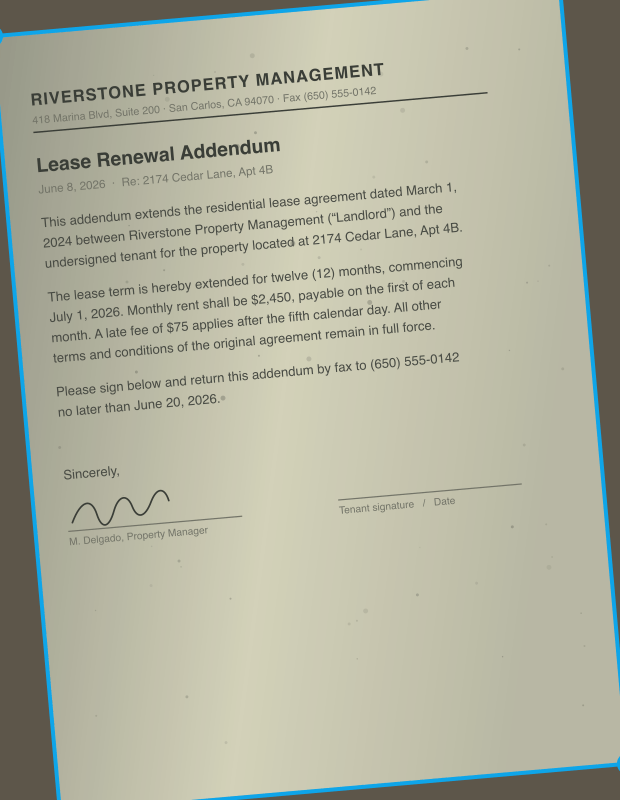 1
Randen gevonden.
Richt je camera — de pagina wordt automatisch herkend.
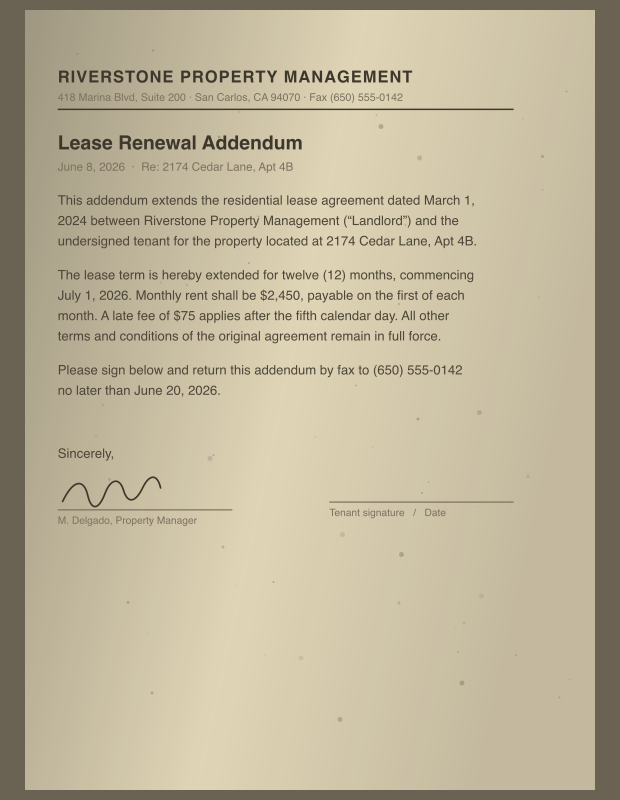 2
Scheefstand gecorrigeerd.
Perspectief en rotatie worden rechtgezet.
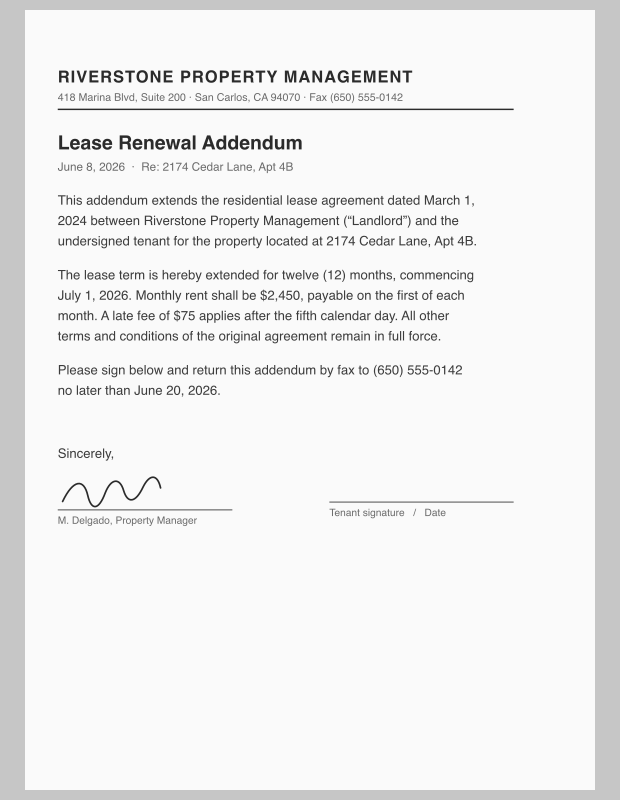 3
Ruis verdwenen.
Schaduwen en kleurzweem verwijderd, contrast in balans.
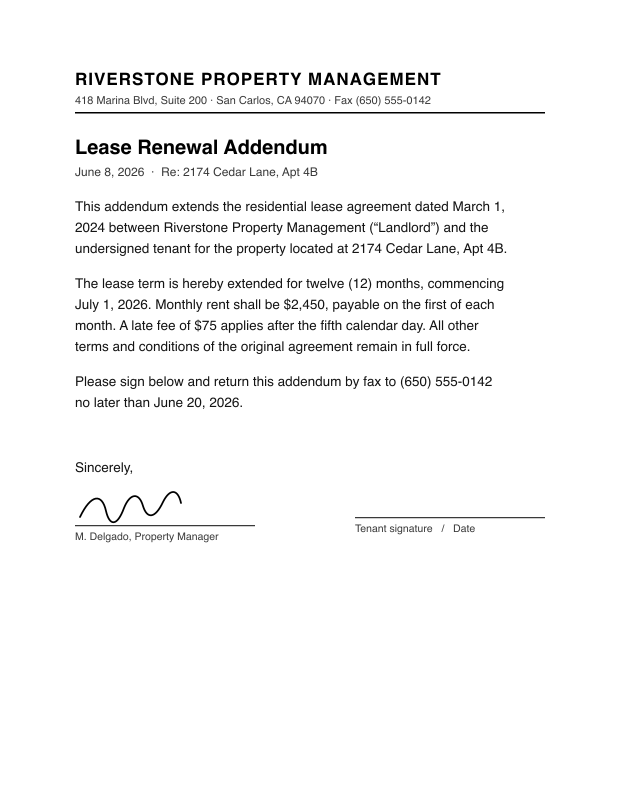 4
Ondertekend.
Teken je handtekening één keer — direct op de pagina geplaatst.
- 5
Faxklaar.
Scherp resultaat in 204×196 dpi — klaar om te versturen.
Zie het zelf.
Aan de ene kant een scheve telefoonfoto met schaduwen — aan de andere kant het strakke, faxklare resultaat. Sleep de schuifregelaar om te vergelijken.


Eén document — van telefoonfoto tot faxklaar.
Onderteken het. Gewoon op je telefoon.
Faxen is voor de helft iets ondertekenen en terugsturen. Teken je handtekening, plaats hem op de pagina en verstuur — geen printer, niet opnieuw inscannen.
- Teken met je vinger, plaats hem overal op de pagina
- Werkt op scans, PDF's en ontvangen faxen
- Gratis inbegrepen — geen kosten per handtekening
Je eigen faxnummer. Gewoon op zak.
Ontvang faxen op een eigen lokaal of gratis nummer. Elke pagina komt binnen in de app en je krijgt een e-mailmelding als er een fax binnenkomt. Open FaxDash om het document en een eventuele AI-samenvatting te bekijken.
- Pushmelding zodra er een fax binnenkomt
- Een e-mailmelding bij elke nieuwe fax
- AI-samenvatting, categorie en doorzoekbare tekst
- Meerdere nummers op één account met de add-on
Of sla de app helemaal over.
Stel een e-mail op, voeg je PDF toe en verstuur hem vanaf het e-mailadres van je account naar your-fax-number@fax.faxdash.io met het bestemmingsnummer als onderwerp. Hij komt aan als fax, met een bezorgbevestiging terug in je inbox. Werkt vanuit Gmail, Outlook, Apple Mail — overal.
Weet wat er in je fax staat. Voordat je hem opent.
AI-samenvattingen beschikbaar — samenvatting, categorie, belangrijke velden en volledige doorzoekbare tekst voor elke ontvangen fax, zodat je voorrang geeft aan wat belangrijk is zonder elke pagina te lezen. HIPAA-compliance nodig? Dat hoort bij het Business-abonnement: vraag een BAA aan (hipaa@faxdash.io); met een ondertekende BAA staat AI-analyse uit totdat je die aanzet.
Directe samenvatting
AI leest het document en geeft je binnen enkele seconden een overzicht in begrijpelijke taal.
Automatische indeling
Gelabeld per categorie — Medisch, Juridisch, Overheid, Financieel en meer.
Belangrijke gegevens eruit gehaald
Bedragen, datums en namen worden automatisch herkend.
OCR van de volledige tekst
Elke fax wordt doorzoekbare, kopieerbare tekst.
Verstuur een fax door het te vragen.
Koppel FaxDash aan Claude, ChatGPT, Grok of een andere assistent die het Model Context Protocol spreekt, en faxen wordt iets wat je vraagt in plaats van iets wat je doet.
Jouw account, jouw tegoed
Hij logt namens jou in en gebruikt je eigen tegoed — niets apart in te stellen of te betalen.
Jij keurt elke machtiging goed
Verzenden, geschiedenis en saldo geef je één voor één vrij op een scherm dat je ziet voordat er iets wordt gekoppeld.
Hij kan geen geld uitgeven
Wil je tegoed kopen, dan krijg je een betaallink die je zelf opent. Zonder jou wordt er niets gekocht.
Altijd los te koppelen
Verwijder de connector of trek de toegang in via Settings. Toegang die hij nog heeft, verloopt binnen 5 minuten.
Small app. Full fax machine.
Sign, watermark, redact, batch-send, and archive — everything you need to send a fax from your phone, nothing you don't.
Crumpled paper in. Fax-ready out.
Deskewed, denoised, sharpened — automatically.
Bringing your number over
Want to keep your existing fax number? Number transfers are available on the Business plan. Contact support@faxdash.io and we’ll handle it.
Fax numbers worldwide.
One credit a page to +1 numbers, two anywhere else.
CONFIDENTIAL, in one tap.
Watermarks are free here.
per page to send. No subscription. Pricing
One tap. Every recipient.
Batch the same document to a whole list.
Your team. One plan.
On Standard and Business, with you + 2 team seats on Business.
Shared credits, with a monthly page limit per member.
A vault. With receipts.
Immutable audit trail — who accessed what, and when.
A proper first page.
Built-in cover pages with your name and message.
Numbers, remembered.
Contacts for the places you fax every week.
Verstuur een fax naar bijna elke plek ter wereld.
Faxnummers in de meeste landen, rechtstreeks vanaf je telefoon. Pagina's buiten de +1-regio kosten elk twee tegoedeenheden.
Betaal voor pagina's. Niet voor beloftes.
Betaal per pagina om te versturen. Neem alleen een abonnement als je een nummer wilt om faxen te ontvangen. Tegoed verloopt nooit.
Faxen naar het buitenland, en waar je een nummer kunt krijgen›
Versturen werkt naar faxnummers in de meeste landen. Pagina's naar een +1-nummer kosten één tegoedeenheid; andere bestemmingen kosten twee tegoedeenheden per pagina. Een paar bestemmingen zijn niet bereikbaar, waaronder verschillende Caribische eilanden die de +1-code delen. Kan een fax niet worden bezorgd, dan gaat het tegoed terug naar je account. Voor ontvangen heb je een eigen nummer nodig; die zijn beschikbaar in de Verenigde Staten, Canada, het Verenigd Koninkrijk, Duitsland, Frankrijk, Nederland, Zweden, Australië en Israël. Voor nummers in Australië en Israël heb je de add-on Premium Fax Number nodig. Gratis nummers zijn er alleen in de VS en Canada.
Abonnementen
Eigen faxnummer inbegrepen, om faxen in de app te ontvangen, met e-mailmeldingen.
- 1 dedicated number
- Email notice for each new fax
- Push notifications
- Team account: add seats at $2.99/mo each
- Admin, member and finance roles, shared inbox and per-member page limits
- 1 dedicated number
- Email notice for each new fax
- Push notifications
- Priority support
- Team account: you + 2 team seats, +$2.99/mo per extra seat
- Admin, member and finance roles, shared inbox and per-member page limits
- 1 dedicated number
- Email notice for each new fax
- Push notifications
- Priority support, with a guaranteed reply within one business day
- HIPAA support (BAA)
Need more receiving pages? No problem, contact us at support@faxdash.io.
- Unlimited sending
- Unlimited sending
- you + 2 team seats
- Unlimited sending, shared by the team
- HIPAA support (BAA)
- API access
Unlimited means no credits per page, within a monthly fair-use limit and 100 pages a day. International pages count double. A few high-cost destinations use credits. Past a limit, faxes use credits as usual. Held alongside any receive plan. Prices on faxdash.io; $1.00 more in the App Store and Google Play.
Voeg extra eigen nummers toe aan elk ontvangstabonnement.
Voor teams die Business ontgroeien: meer API-verzoeken, veel faxnummers verspreid over locaties of klantaccounts, verzenden in grote volumes, integraties gebouwd voor jouw systemen, support met voorrang met gegarandeerd antwoord binnen één werkdag, en een BAA. We bepalen samen de omvang en sturen je een offerte.
The math, since you asked.
| FaxDash | eFax | Fax.Plus | |
|---|---|---|---|
| Send without a subscription | From $0.07/page | Plan required | $0.20/page prepaid |
| Receive plan (monthly) | From $3.99 · 50 pages | $18.99 · 200 pages | $8.99 · 200 pages |
| Team plan (monthly) | $12.99 · 3 users | $39.99 · 5 users | $34.99 · 5 users |
| Free pages on signup | Yes | No | Yes |
eFax and Fax.Plus prices from their own pricing pages (efax.com/pricing, fax.plus/pricing, and Fax.Plus's “how much does it cost to fax” page for prepaid sending), billed monthly, checked Oct 23, 2026.
Gemaakt voor de documenten die ertoe doen.
Medische dossiers, juridische stukken, verzekeringsclaims — FaxDash is geschikt voor HIPAA bij het faxen van beschermde gezondheidsinformatie, met de papieren om het te bewijzen.
BAA, ondertekend
Bij het Business-abonnement sluiten we een Business Associate Agreement af voor covered entities en hun leveranciers.
Altijd versleuteld
AES-256 bij opslag, TLS tijdens verzending — elke pagina, elke keer.
Conforme infrastructuur
Gebouwd op AWS, onder een BAA die elk account in onze organisatie dekt.
Audittrail
De Documentkluis houdt onveranderbaar bij wie wat heeft ingezien, en wanneer.
Veelgestelde vragen
Can I send and receive faxes online for free?+
You can try sending with FaxDash’s free signup credits. Eligible new accounts receive two sending credits, with no card required. That covers two pages sent to a US or Canadian fax number; destinations outside the +1 region use two credits per page. Caribbean islands that share the +1 code, and a few other destinations, need purchased credits, and several of those islands can’t be reached at all. The signup offer does not include a free number for receiving faxes.
After using your free credits, buy a credit pack when you need to send again. Sending does not require a monthly subscription, and purchased credits do not expire. You can upload a PDF from your computer or scan a document with your phone.
To receive faxes, choose a paid plan with a dedicated fax number. Monthly receive plans start at $3.99. Incoming faxes appear in your inbox, and you get an email for each one.
How does pay-as-you-go work?+
Buy a credit pack once — credits never expire. Pages sent to a +1 number use one credit each; every other destination uses two credits per page. No subscription required to send faxes. You only subscribe if you need to receive.
Do I need a subscription to send faxes?+
No. You can send faxes with just a credit pack. Subscriptions are only needed if you want a dedicated fax number to receive incoming faxes.
How do I receive faxes?+
Subscribe to a receive plan to get a dedicated local or toll-free fax number. Incoming faxes are delivered to your app with a push notification and an email for each one, with a link to view it; you can turn the email off in settings.
What if I receive more pages than my plan includes?+
Your faxes keep arriving; FaxDash never stops receiving because you went over. Each page beyond your plan’s monthly allowance uses one send credit, and you’re notified as you near the allowance and when it runs out, so it never comes as a surprise.
Can my team share one FaxDash account?+
Yes, without sharing a login, on the Standard and Business plans. Business ($12.99/month) includes you + 2 team seats (3 people), so you can invite 2 people; on Standard you add each seat yourself. Every extra seat is $2.99 a month.
Everyone signs in with their own account; admins and members send from the team’s credits, and finance sees the team’s faxes, inbox, credits and billing, but doesn’t send faxes or manage members. The team shares one inbox and one sent history that shows who sent each fax, and admins can set a monthly page limit per member. You invite people and manage the team from the web dashboard.
What file formats can I fax?+
You can scan paper documents with your camera, or attach PDFs, JPEGs, and PNGs. Multi-page documents are merged automatically.
Can I use FaxDash from Claude or ChatGPT?+
Yes. Add FaxDash to Claude, ChatGPT, Grok or any assistant that supports MCP (Model Context Protocol) as a custom connector, sign in, and approve what it may do. Then you can ask it to send a PDF, check whether a fax was delivered or read a received fax. It uses your own account and credits, and you can revoke it at any time in your dashboard settings.
Can I send a fax by email?+
Yes. Email a PDF from your account’s email address to your own FaxDash number at fax.faxdash.io, for example 12025550123@fax.faxdash.io, and put the destination fax number in the Subject. It goes out from your number and uses credits like any other fax. It needs a FaxDash fax number.
Can received faxes go to my email?+
Yes, and it’s on by default once you have a fax number. Each new fax sends an email with who it’s from, which number it came to, the page count, when it arrived and a link that opens it in FaxDash. The fax itself isn’t attached, so its contents stay out of your inbox. You can turn the email off, or add up to five more addresses, such as a front desk, in settings.
Is there an API?+
Yes, on the Business plan. Create an API key under Settings → Integrations in the web dashboard, then call the REST API at api.faxdash.io to send faxes, check their status, read your inbox and manage contacts. You can also get Slack, Microsoft Teams or webhook messages (Zapier and Make work this way) when a fax is received, delivered or fails.
Is my data secure?+
Yes. Documents are encrypted in transit and at rest. The Document Vault provides an immutable audit trail so you always know who accessed what.
Can I send faxes internationally?+
Yes. You can send to fax numbers in most countries. Pages to a +1 number cost one credit each; every other destination costs two credits per page. A few destinations can’t be reached, including several Caribbean islands that share the +1 code. Enter the number in international format with the country code, and leave off the national trunk prefix: +44 20 3988 3922 rather than +44 020 3988 3922. If a fax cannot be delivered, including to the few destinations we can’t reach, the credits are returned to your account.
Which countries can I get a fax number in?+
Numbers for receiving faxes are available in the United States, Canada, the United Kingdom, Germany, France, the Netherlands, Sweden, Australia and Israel. Numbers in Australia and Israel need the Premium Fax Number add-on. Toll-free numbers are available in the United States and Canada. Sending is not limited to these countries — you can send to most countries from any FaxDash number.
What does the AI Summary do?+
AI summaries are available for received faxes, and AI analysis is on unless you turn it off. Analysis runs on Amazon Bedrock, inside our AWS BAA. Need HIPAA compliance? On the Business plan, request a BAA (hipaa@faxdash.io); for accounts with a signed BAA, AI analysis is off until you turn it on. You get an instant plain-language summary, document category (Medical, Legal, Government, etc.), key data extraction (amounts, dates, names), and full searchable OCR text.
Do credits expire?+
No. Once you buy credits, they stay in your account until you use them.
Je volgende fax duurt een minuut.
2 gratis pagina's bij aanmelding. Geen creditcard, en geen abonnement om te versturen.