스마트폰이 곧팩스기.
카메라로 문서를 스캔하고, 번호를 입력하고, 보내세요. 페이지당 $0.07부터, 보내기만 하면 구독이 필요 없습니다.
가입 시 2페이지 무료 — 카드 등록 필요 없음



- HIPAA 대응, Business 요금제에서 BAA 제공
- 전송 중 및 저장 시 암호화
- Claude, ChatGPT, Grok과 연동
FaxDash로 팩스를 보내고 받으세요
FaxDash는 팩스기나 전화선 없이 휴대폰, 컴퓨터, 이메일에서 실제 팩스를 보내고 받습니다. 선불 크레딧으로 페이지당 결제하거나, 팩스를 자주 보낸다면 Unlimited 발송 요금제를 선택할 수 있습니다. 수신에는 유료 요금제가 필요하며, 유료 요금제에는 전용 팩스 번호가 포함됩니다.
신규 계정은 이메일 인증 후 무료 2페이지를 받습니다. 일부 목적지에는 무료 페이지를 사용할 수 없습니다. +1 번호로 보내는 페이지는 1크레딧, 그 외 국가로 보내는 페이지는 2크레딧이 사용됩니다. 일부 목적지로는 발송할 수 없습니다. 최종 재시도 후에도 팩스 발송에 실패하면 크레딧은 자동으로 반환됩니다.
ChatGPT, Claude, Grok 또는 MCP를 지원하는 다른 어시스턴트에 FaxDash를 연결할 수 있습니다. 먼저 로그인하고 각 권한을 직접 승인합니다. 승인한 범위에 따라 어시스턴트는 내 크레딧으로 팩스를 보내고, 전송 상태를 확인하고, 받은 팩스를 읽을 수 있습니다. 결제, 번호 임대나 해지, 설정 변경, 삭제는 할 수 없습니다. 크레딧을 구매할 때는 어시스턴트가 링크를 제공하며, 그 링크는 직접 열어야 합니다.
카메라만 대세요. 나머지는 저희가 합니다.
FaxDash는 휴대폰 사진을 선명한 팩스용 문서로 바꿉니다. 발송 전에 기울기 보정, 노이즈 제거, 선명화가 자동으로 이루어집니다.
- 1
가장자리 인식.
카메라를 대면 페이지가 자동으로 인식됩니다.
- 2
기울기 보정.
원근과 회전을 반듯하게 바로잡습니다.
- 3
노이즈 제거.
그림자와 색조 왜곡을 없애고 대비를 맞춥니다.
- 4
서명 완료.
서명은 한 번만 그리면 페이지 위에 바로 배치됩니다.
- 5
팩스 준비 완료.
204×196 dpi의 선명한 결과물로, 바로 보낼 수 있습니다.


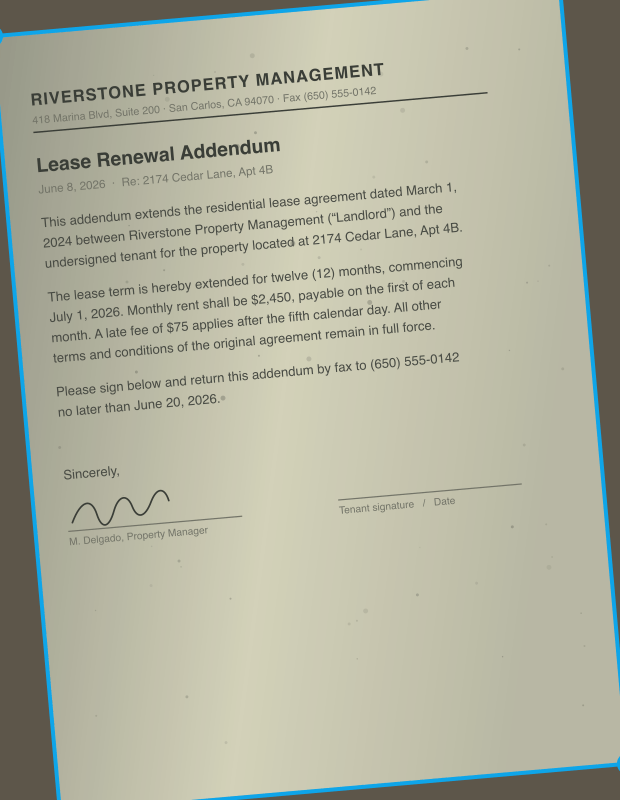 1
가장자리 인식.
카메라를 대면 페이지가 자동으로 인식됩니다.
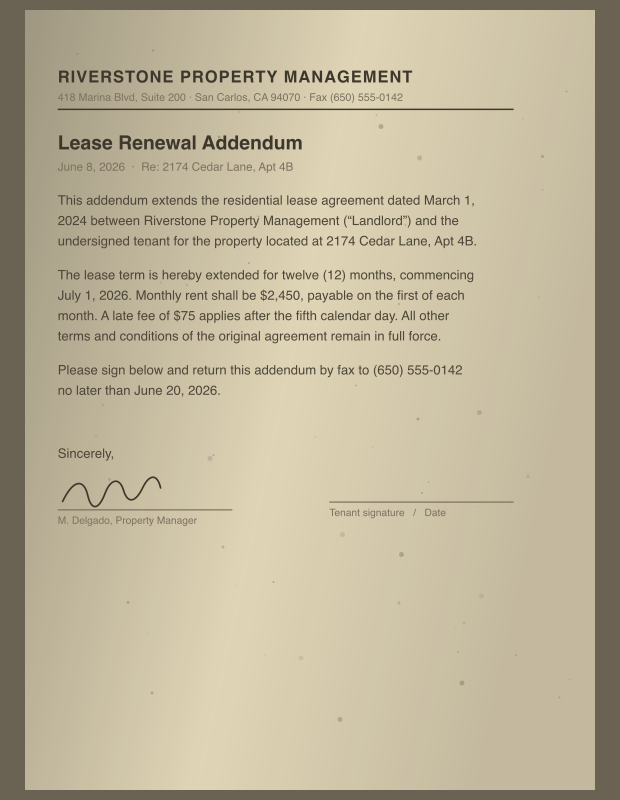 2
기울기 보정.
원근과 회전을 반듯하게 바로잡습니다.
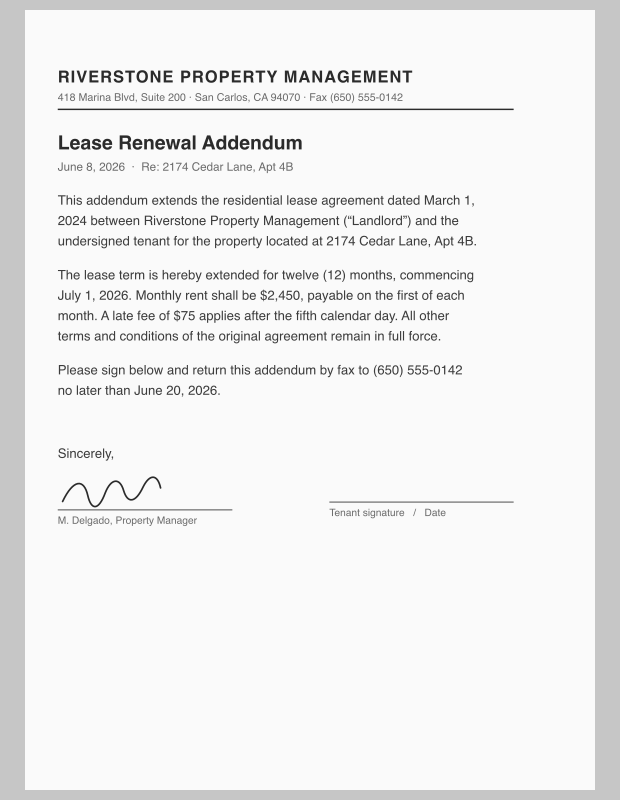 3
노이즈 제거.
그림자와 색조 왜곡을 없애고 대비를 맞춥니다.
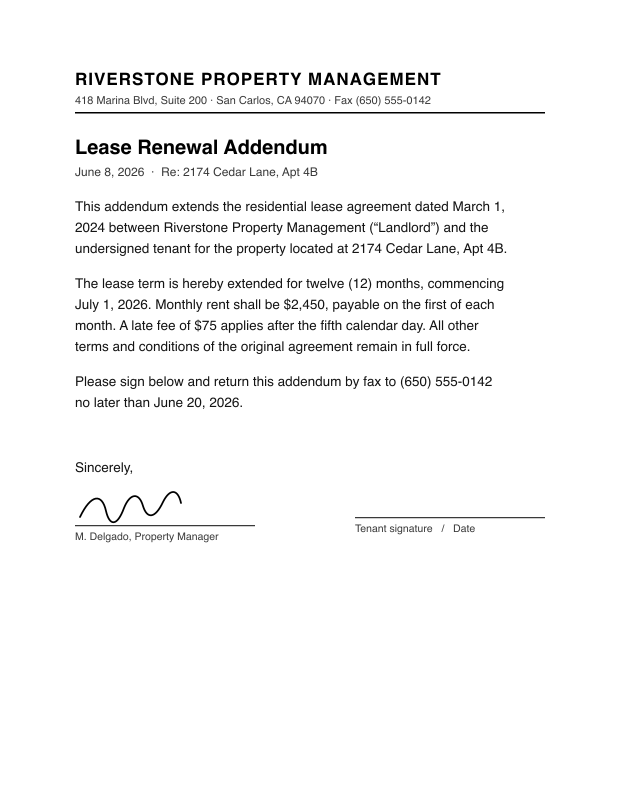 4
서명 완료.
서명은 한 번만 그리면 페이지 위에 바로 배치됩니다.
- 5
팩스 준비 완료.
204×196 dpi의 선명한 결과물로, 바로 보낼 수 있습니다.
직접 확인해 보세요.
한쪽은 비뚤고 그림자 진 휴대폰 사진, 다른 쪽은 깨끗한 팩스용 결과물입니다. 핸들을 드래그해 비교해 보세요.


하나의 문서, 휴대폰 사진에서 팩스용 문서로.
휴대폰에서 바로 서명하세요.
팩스 업무의 절반은 무언가에 서명해 다시 보내는 일입니다. 서명을 그리고, 페이지에 배치하고, 보내기만 하면 됩니다. 프린터도, 다시 스캔하는 수고도 필요 없습니다.
- 손가락으로 그리고 페이지 어디에나 배치
- 스캔본, PDF, 받은 팩스에서 모두 사용 가능
- 무료 포함 — 서명당 수수료 없음
나만의 팩스 번호를 주머니 속에.
지역 번호 또는 수신자 부담 번호를 전용으로 받아 팩스를 수신할 수 있습니다. 모든 페이지는 앱으로 들어오며, 팩스가 도착하면 이메일 알림이 전송됩니다. FaxDash를 열어 문서와, 제공되는 경우 AI 요약을 확인하세요.
- 팩스 도착 즉시 푸시 알림
- 새 팩스마다 이메일 알림
- AI 요약, 분류, 검색 가능한 텍스트
- 애드온으로 한 계정에서 여러 번호 사용
앱 없이도 보낼 수 있습니다.
이메일을 작성하고 PDF를 첨부한 뒤, 제목에 받는 팩스 번호를 입력해 계정 이메일에서 your-fax-number@fax.faxdash.io로 보내세요. 팩스로 전송되며, 전송 확인은 받은편지함으로 돌아옵니다. Gmail, Outlook, Apple Mail 등 어디서든 사용할 수 있습니다.
열어 보기 전에 팩스 내용을 파악하세요.
AI 요약 제공 — 받은 팩스마다 요약, 분류, 주요 항목, 검색 가능한 전체 텍스트를 제공하므로 모든 페이지를 읽지 않아도 중요한 것부터 처리할 수 있습니다. HIPAA 준수가 필요하신가요? Business 요금제에 포함되어 있습니다. BAA를 요청하세요(hipaa@faxdash.io). BAA가 체결되면 AI 분석은 직접 켜기 전까지 꺼져 있습니다.
즉시 요약
AI가 문서를 읽고 몇 초 만에 알기 쉬운 개요를 제공합니다.
자동 분류
의료, 법률, 정부, 금융 등 카테고리별로 태그가 지정됩니다.
주요 데이터 추출
금액, 날짜, 이름을 자동으로 추출합니다.
전체 텍스트 OCR
모든 팩스가 검색하고 복사할 수 있는 텍스트가 됩니다.
요청만 하면 팩스가 발송됩니다.
FaxDash를 Claude, ChatGPT, Grok 또는 Model Context Protocol을 지원하는 어시스턴트에 연결하면, 팩스는 직접 처리하는 일이 아니라 요청하기만 하면 되는 일이 됩니다.
내 계정, 내 크레딧
어시스턴트가 내 계정으로 로그인해 내 잔액에서 차감합니다. 따로 설정하거나 결제할 것이 없습니다.
권한은 하나씩 직접 승인
발송, 내역, 잔액 권한은 연결 전에 표시되는 화면에서 하나씩 부여합니다.
돈을 쓸 수 없습니다
크레딧을 구매할 때는 직접 열어야 하는 결제 링크를 건넵니다. 사용자 없이는 어떤 구매도 이루어지지 않습니다.
언제든 연결 해제
커넥터를 제거하거나 설정에서 권한을 취소할 수 있습니다. 남아 있는 액세스도 5분 이내에 만료됩니다.
Small app. Full fax machine.
Sign, watermark, redact, batch-send, and archive — everything you need to send a fax from your phone, nothing you don't.
Crumpled paper in. Fax-ready out.
Deskewed, denoised, sharpened — automatically.
Bringing your number over
Want to keep your existing fax number? Number transfers are available on the Business plan. Contact support@faxdash.io and we’ll handle it.
Fax numbers worldwide.
One credit a page to +1 numbers, two anywhere else.
CONFIDENTIAL, in one tap.
Watermarks are free here.
per page to send. No subscription. Pricing
One tap. Every recipient.
Batch the same document to a whole list.
Your team. One plan.
On Standard and Business, with you + 2 team seats on Business.
Shared credits, with a monthly page limit per member.
A vault. With receipts.
Immutable audit trail — who accessed what, and when.
A proper first page.
Built-in cover pages with your name and message.
Numbers, remembered.
Contacts for the places you fax every week.
세계 거의 어디로든 팩스를 보내세요.
대부분 국가의 팩스 번호로 휴대폰에서 바로 보낼 수 있습니다. +1 지역 외로 보내는 페이지는 페이지당 2크레딧이 듭니다.
약속이 아닌 페이지에만 비용을 내세요.
발송은 페이지당 결제합니다. 팩스를 받을 번호가 필요할 때만 구독하세요. 크레딧은 만료되지 않습니다.
해외 발송 및 번호 발급 가능 국가›
발송은 대부분 국가의 팩스 번호로 가능합니다. +1 번호로 보내는 페이지는 1크레딧, 그 외 목적지는 페이지당 2크레딧이 사용됩니다. +1 국가 코드를 함께 쓰는 여러 카리브해 섬 등 일부 목적지로는 발송할 수 없습니다. 팩스를 전달할 수 없으면 크레딧은 계정으로 반환됩니다. 수신에는 전용 번호가 필요하며, 전용 번호는 미국, 캐나다, 영국, 독일, 프랑스, 네덜란드, 스웨덴, 호주, 이스라엘에서 발급받을 수 있습니다. 호주와 이스라엘 번호는 Premium Fax Number 애드온이 필요합니다. 수신자 부담 번호는 미국과 캐나다에서만 가능합니다.
요금제
전용 팩스 번호가 포함되어 앱에서 팩스를 받고 이메일 알림을 받을 수 있습니다.
- 1 dedicated number
- Email notice for each new fax
- Push notifications
- Team account: add seats at $2.99/mo each
- Admin, member and finance roles, shared inbox and per-member page limits
- 1 dedicated number
- Email notice for each new fax
- Push notifications
- Priority support
- Team account: you + 2 team seats, +$2.99/mo per extra seat
- Admin, member and finance roles, shared inbox and per-member page limits
- 1 dedicated number
- Email notice for each new fax
- Push notifications
- Priority support, with a guaranteed reply within one business day
- HIPAA support (BAA)
Need more receiving pages? No problem, contact us at support@faxdash.io.
- Unlimited sending
- Unlimited sending
- you + 2 team seats
- Unlimited sending, shared by the team
- HIPAA support (BAA)
- API access
Unlimited means no credits per page, within a monthly fair-use limit and 100 pages a day. International pages count double. A few high-cost destinations use credits. Past a limit, faxes use credits as usual. Held alongside any receive plan. Prices on faxdash.io; $1.00 more in the App Store and Google Play.
어떤 수신 요금제에도 전용 번호를 추가할 수 있습니다.
Business 요금제로는 부족한 팀을 위한 플랜입니다. 더 높은 API 요청 한도, 여러 지점이나 고객 계정에 걸친 다수의 팩스 번호, 대량 발송, 귀사 시스템에 맞춘 연동, 1영업일 이내 답변을 보장하는 우선 지원, BAA를 제공합니다. 함께 범위를 정한 뒤 견적을 보내 드립니다.
The math, since you asked.
| FaxDash | eFax | Fax.Plus | |
|---|---|---|---|
| Send without a subscription | From $0.07/page | Plan required | $0.20/page prepaid |
| Receive plan (monthly) | From $3.99 · 50 pages | $18.99 · 200 pages | $8.99 · 200 pages |
| Team plan (monthly) | $12.99 · 3 users | $39.99 · 5 users | $34.99 · 5 users |
| Free pages on signup | Yes | No | Yes |
eFax and Fax.Plus prices from their own pricing pages (efax.com/pricing, fax.plus/pricing, and Fax.Plus's “how much does it cost to fax” page for prepaid sending), billed monthly, checked Oct 23, 2026.
중요한 문서를 위해 만들었습니다.
의료 기록, 법률 서류, 보험 청구서까지. FaxDash는 보호 대상 건강 정보(PHI)를 팩스로 보낼 수 있도록 HIPAA에 대응하며, 이를 증명하는 서류도 갖추고 있습니다.
BAA 체결
Business 요금제에서는 적용 대상 기관(covered entity)과 그 협력 업체를 위해 업무 제휴 계약(Business Associate Agreement)을 체결해 드립니다.
언제나 암호화
저장 시 AES-256, 전송 중 TLS — 모든 페이지에 매번 적용됩니다.
규정을 준수하는 인프라
AWS 기반으로 구축되었으며, 당사 조직의 모든 계정을 포괄하는 BAA가 적용됩니다.
감사 기록
문서 보관함(Document Vault)은 누가 언제 무엇에 접근했는지 변경할 수 없는 기록으로 남깁니다.
자주 묻는 질문
Can I send and receive faxes online for free?+
You can try sending with FaxDash’s free signup credits. Eligible new accounts receive two sending credits, with no card required. That covers two pages sent to a US or Canadian fax number; destinations outside the +1 region use two credits per page. Caribbean islands that share the +1 code, and a few other destinations, need purchased credits, and several of those islands can’t be reached at all. The signup offer does not include a free number for receiving faxes.
After using your free credits, buy a credit pack when you need to send again. Sending does not require a monthly subscription, and purchased credits do not expire. You can upload a PDF from your computer or scan a document with your phone.
To receive faxes, choose a paid plan with a dedicated fax number. Monthly receive plans start at $3.99. Incoming faxes appear in your inbox, and you get an email for each one.
How does pay-as-you-go work?+
Buy a credit pack once — credits never expire. Pages sent to a +1 number use one credit each; every other destination uses two credits per page. No subscription required to send faxes. You only subscribe if you need to receive.
Do I need a subscription to send faxes?+
No. You can send faxes with just a credit pack. Subscriptions are only needed if you want a dedicated fax number to receive incoming faxes.
How do I receive faxes?+
Subscribe to a receive plan to get a dedicated local or toll-free fax number. Incoming faxes are delivered to your app with a push notification and an email for each one, with a link to view it; you can turn the email off in settings.
What if I receive more pages than my plan includes?+
Your faxes keep arriving; FaxDash never stops receiving because you went over. Each page beyond your plan’s monthly allowance uses one send credit, and you’re notified as you near the allowance and when it runs out, so it never comes as a surprise.
Can my team share one FaxDash account?+
Yes, without sharing a login, on the Standard and Business plans. Business ($12.99/month) includes you + 2 team seats (3 people), so you can invite 2 people; on Standard you add each seat yourself. Every extra seat is $2.99 a month.
Everyone signs in with their own account; admins and members send from the team’s credits, and finance sees the team’s faxes, inbox, credits and billing, but doesn’t send faxes or manage members. The team shares one inbox and one sent history that shows who sent each fax, and admins can set a monthly page limit per member. You invite people and manage the team from the web dashboard.
What file formats can I fax?+
You can scan paper documents with your camera, or attach PDFs, JPEGs, and PNGs. Multi-page documents are merged automatically.
Can I use FaxDash from Claude or ChatGPT?+
Yes. Add FaxDash to Claude, ChatGPT, Grok or any assistant that supports MCP (Model Context Protocol) as a custom connector, sign in, and approve what it may do. Then you can ask it to send a PDF, check whether a fax was delivered or read a received fax. It uses your own account and credits, and you can revoke it at any time in your dashboard settings.
Can I send a fax by email?+
Yes. Email a PDF from your account’s email address to your own FaxDash number at fax.faxdash.io, for example 12025550123@fax.faxdash.io, and put the destination fax number in the Subject. It goes out from your number and uses credits like any other fax. It needs a FaxDash fax number.
Can received faxes go to my email?+
Yes, and it’s on by default once you have a fax number. Each new fax sends an email with who it’s from, which number it came to, the page count, when it arrived and a link that opens it in FaxDash. The fax itself isn’t attached, so its contents stay out of your inbox. You can turn the email off, or add up to five more addresses, such as a front desk, in settings.
Is there an API?+
Yes, on the Business plan. Create an API key under Settings → Integrations in the web dashboard, then call the REST API at api.faxdash.io to send faxes, check their status, read your inbox and manage contacts. You can also get Slack, Microsoft Teams or webhook messages (Zapier and Make work this way) when a fax is received, delivered or fails.
Is my data secure?+
Yes. Documents are encrypted in transit and at rest. The Document Vault provides an immutable audit trail so you always know who accessed what.
Can I send faxes internationally?+
Yes. You can send to fax numbers in most countries. Pages to a +1 number cost one credit each; every other destination costs two credits per page. A few destinations can’t be reached, including several Caribbean islands that share the +1 code. Enter the number in international format with the country code, and leave off the national trunk prefix: +44 20 3988 3922 rather than +44 020 3988 3922. If a fax cannot be delivered, including to the few destinations we can’t reach, the credits are returned to your account.
Which countries can I get a fax number in?+
Numbers for receiving faxes are available in the United States, Canada, the United Kingdom, Germany, France, the Netherlands, Sweden, Australia and Israel. Numbers in Australia and Israel need the Premium Fax Number add-on. Toll-free numbers are available in the United States and Canada. Sending is not limited to these countries — you can send to most countries from any FaxDash number.
What does the AI Summary do?+
AI summaries are available for received faxes, and AI analysis is on unless you turn it off. Analysis runs on Amazon Bedrock, inside our AWS BAA. Need HIPAA compliance? On the Business plan, request a BAA (hipaa@faxdash.io); for accounts with a signed BAA, AI analysis is off until you turn it on. You get an instant plain-language summary, document category (Medical, Legal, Government, etc.), key data extraction (amounts, dates, names), and full searchable OCR text.
Do credits expire?+
No. Once you buy credits, they stay in your account until you use them.