
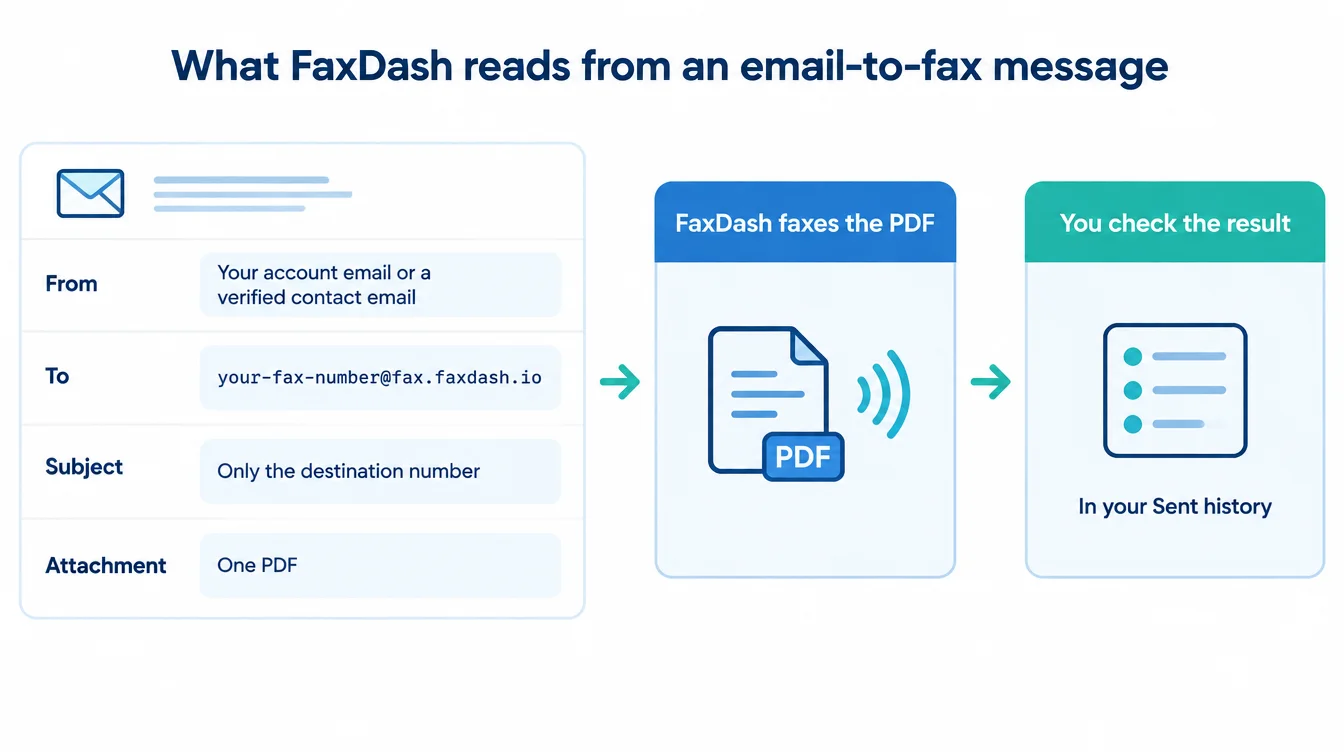
If a signed PDF is already sitting in your inbox, emailing it to a fax number sounds like the shortest path. The useful question is what FaxDash reads from that email, because four fields decide whether the fax goes out: the From address, the To address, the subject line and the attachment.
This guide works in any mail app. It explains what each field does, what a correct email looks like, and why FaxDash refuses an email, so you can fix it and send again.
What email-to-fax does, in one paragraph
Email-to-fax turns an email into an outgoing fax. FaxDash's email-to-fax help puts it this way: "Email a PDF to your own FaxDash number at fax.faxdash.io, with the destination number in the Subject." The fax goes out from your FaxDash number and uses credits like any other send. The recipient does not need to use FaxDash. They receive an ordinary fax.
The mechanism has a strict shape. The From address tells FaxDash the email is really yours. The To address is your own FaxDash number, which, per the help page, "is how FaxDash knows whose credits to use." The subject tells it where the fax goes. The attached PDF is what gets faxed.
Before you start: two requirements
An active FaxDash receive number. FaxDash's sending help says: "Email-to-fax requires an active FaxDash receive number (that's the address you send from); in-app and dashboard sending don't." A receive number comes with a monthly receive plan, from $3.99 a month (Starter). If you only send occasionally and have no receive number, the app or the web dashboard at dash.faxdash.io is the route that works.
An address FaxDash accepts. Send from the email address on your FaxDash account, or your verified contact email. The help page is direct about the rest: "Mail from any other address is refused, a teammate's included." If you signed in with Apple's Hide My Email, add a contact email first, because the relay address can't send mail.
Step 1: Address the email to your own FaxDash number
The To address is built from your FaxDash number, not the recipient's: your number as digits only, with the country code, followed by @fax.faxdash.io.
FaxDash's example: if your number is +1 202 555 0123, you send to 12025550123@fax.faxdash.io. The same rule applies to any FaxDash number: digits only, country code first, no plus sign, spaces or dashes.
Putting the recipient's number before the @ is the most natural mistake to make, because many other services work that way. In FaxDash, the recipient's number goes in the subject.
Step 2: Put only the destination number in the subject
The help page says the subject holds "the destination fax number and nothing else, such as +14155550142 or (415) 555-0142." Anything else you type there, such as a date, an invoice number or "Re:", gets in the way of the number.
- 10-digit numbers: "A 10-digit number is read as US or Canadian."
- Any other country: "start with + and the country code," and put the number at the very start of the subject.
- Trunk prefix: leave off the extra 0 many countries use for domestic calls. FaxDash's homepage gives this example: "+44 20 3988 3922 rather than +44 020 3988 3922."
Subject lines that work and subject lines that don't
Illustrative examples. The numbers below are fictional and are written in the formats FaxDash documents.
| Subject | Result | Why |
|---|---|---|
2125550148 | Accepted format | 10 digits, read as a US or Canadian number |
(212) 555-0148 | Accepted format | The same number in FaxDash's own example style |
+12125550148 | Accepted format | + and the country code |
+44 20 7946 0123 | Accepted format | + and the country code, with no trunk prefix |
Re: +44 20 7946 0123 | Not accepted | The subject must be the number and nothing else |
2125550148 invoice 4471 | Wrong number | The invoice digits get mixed into the number |
Signed lease for Dr. Lee | No number | There is no destination in the subject |
"Accepted format" means the subject follows FaxDash's rules. It doesn't mean the fax transmission will complete: the number still has to be a working fax line, and the destination has to be one FaxDash can reach.
Step 3: Attach one PDF
The help page says: "Attachment: one PDF. Other file types are not read, and if there are several PDFs only the first is sent." So export Word files, photos and scans to PDF first, and send one document per email. Open the PDF once before you send: check that it is the final, signed version, that every page is there and upright, and that it opens without a password.
The body of your email is not faxed on its own. The one exception, per the help page: if your default cover sheet is set to go on every fax (Settings, Cover sheet), the cover goes in front as page 1 and your email text becomes its note, without your signature or a quoted reply. That cover page has no feature fee but uses 1 send credit.
Step 4: Send, then check the result
There is no reply when the email goes through. The fax appears in your Sent history with a live status, and you get the same notifications as for any fax. A Delivered status means the fax transmission completed.
If FaxDash can't send it, it replies to the address that emailed it and says why. The help page lists four reasons: no PDF attached, a number it can't read, an address that isn't allowed, or not enough credits. Nothing is charged. Mail that fails the standard sender checks (SPF, DKIM and DMARC) is dropped without a reply.
Cost works the same as any other fax: 1 credit per page to US (+1) numbers, and international numbers use more credits per page, per the sending help. The app and dashboard show the exact cost before you confirm a send, but an email has no confirmation screen, so count the pages in your PDF, plus any cover page, before you send it. Faxes to countries under comprehensive U.S. sanctions, currently Cuba, Iran and North Korea, are refused before any credits are used.
Why a fax gets refused, and how to fix it
- No PDF attached, or the wrong file type. Only a PDF is read. Export the document to PDF and send a new email.
- A number FaxDash can't read. The subject has extra text, a reply prefix, or an international number without + and the country code. Start a new email with only the number in the subject.
- An address that isn't allowed. The email came from an address that isn't your account email or verified contact email. Send it again from the right address.
- Not enough credits. Buy credits and send again.
- No reply at all, and no fax in your history. Your mail may have failed the sender checks. Send from your account's own mail provider, or use the dashboard.
- The fax went to the wrong place. The recipient's number was in the To address instead of the subject. The To address is always your own FaxDash number.
When email-to-fax is the right route, and when the app is simpler
Email-to-fax fits well when:
- The document already arrives by email and you send it on without editing.
- You have a receive number already, so the requirement costs nothing extra.
- You want to send from whatever mail app you already use.
The app or web dashboard may be the better choice when:
- You don't have a receive number. In-app and dashboard sending don't need one.
- You want to see the exact cost before the fax goes out.
- You need to sign the document first. Signing is done in the FaxDash web dashboard: on the Send Fax page, click Add signature under Finishing touches (scan, sign & enhance help).
A small check before relying on it: send a one-page, non-sensitive PDF to a fax number you can check, using a new email with a clean subject. Confirm that the fax reaches a final status in your history and that the received page is readable. For an office routine that covers both directions, see our guide to running fax-to-email and email-to-fax as one team workflow.
How other services handle email-to-fax
Here's how Fax.Plus handles email-to-fax, checked November 3, 2026.
Fax.Plus's email-to-fax page puts the destination number in the To address, in the form +16692001010@fax.plus, and adds any subject text as a note on the sent fax. It lists PDF, DOC, DOCX, XLS, XLSX, PNG, JPG, RTF and TIFF attachments. Its pricing page lists Email to Fax among the key features of the Basic plan, at $6.99 a month billed annually ($83.99 a year), as of November 3, 2026. FaxDash works the other way around: the To address is your own FaxDash number, the subject holds only the destination number, and only one PDF is read. FaxDash email-to-fax needs a receive plan, from $3.99 a month (Starter).
Next step
If your office sends and receives faxes from shared email, the FaxDash business page explains how a Business plan, with a dedicated number, email-to-fax and you + 2 team seats, fits that workflow. Standard plans can add team seats too, and teams are managed in the web dashboard, not the app (teams help).