
If you fax a few times a year, a signed form for a lender, a records request or a page an agency won't take by email, a monthly plan can cost more than the faxes themselves. The right service depends mostly on how often you send and whether anyone needs to fax you back.
We make FaxDash, so we're not neutral. Below we compare it with other services on the things an occasional sender cares about, using each company's own pages as checked on November 17, 2026. Prices are regular monthly rates in USD before applicable taxes. Where another service fits better, we say so.
If you're still working out how to send at all, start with our guide to how to fax from your computer, phone or email. This page only compares services.
What an occasional sender needs
Five things decide it. Check them against your own last year of faxing before you look at prices.
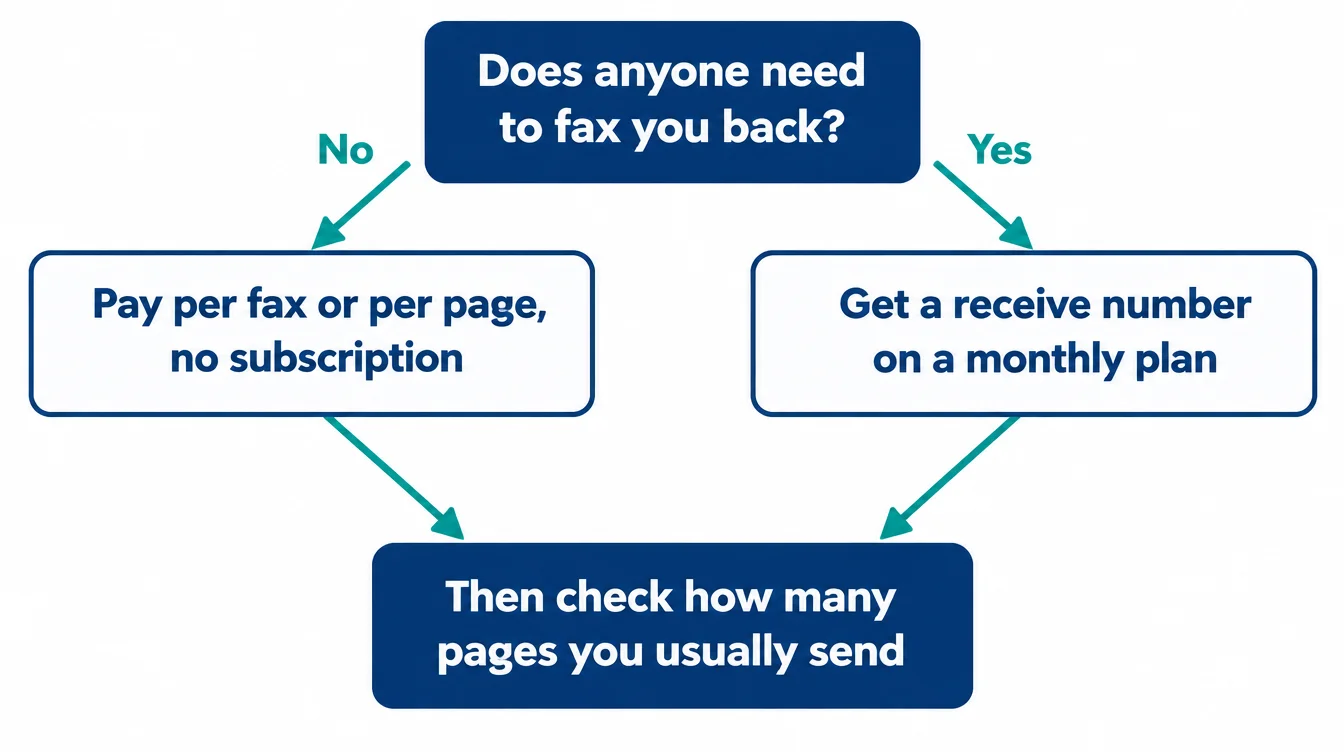
- No subscription. If you send a handful of faxes a year, you want to pay per page, not per month.
- Credits that don't expire. If you prepay, the balance should still be there next spring.
- Page limits. Services cap pages per fax or per month. Check whether your typical document fits.
- A reply number. If the other side needs to fax you back, you need a number that receives, and that usually means a monthly plan.
- Pages per fax. A 12-page application and a 1-page form lead to different answers.
The options
Three services with different approaches. Details come from each company's own pages, checked November 22, 2026. They can change, so check before you use them.
FaxDash
How it works for occasional use: sending is pay-as-you-go by the page, with no subscription. You buy credit packs from 5 pages for $0.99 to 150 pages for $9.99, and purchased credits never expire (pricing and billing help). Sending costs 1 credit per page to US (+1) numbers, including Canada, and more credits per page elsewhere. A cover page has no feature fee but uses 1 send credit.
FaxDash offers 2 free pages when you sign up.
Replies: you need a number only to receive faxes or use email-to-fax. A receive number starts at $3.99 a month (Starter).
Choose it if: you send now and then, want a few prepaid pages on hand that don't expire, and only sometimes need a fax back.
Fax.Plus
How it works for occasional use: Fax.Plus's pricing page lists plans with a monthly page allowance, and says Automatic Top-Up lets you set a balance threshold and a recharge amount.
Billing can use more than one billed page per document page, depending on destination and transmission time; see Fax.Plus's help article "What is the cost of sending a fax?".
Replies: its pricing FAQ says receiving faxes needs an active paid plan. Its official plan guide lists Basic at $8.99 a month with 200 pages and a dedicated fax number.
Choose it if: you want an account-based service with a paid plan to move up to later, or your office also needs features listed on its paid plans.
eFax
How it works for occasional use: eFax's pricing page lists plans rather than per-page pricing. Personal is $18.99 a month, with 200 pages a month to the US and Canada, 1 user and 1 fax number.
Replies: the plan includes a fax number.
Choose it if: "occasional" really means a steady stream of faxes in and out every month, and you want a monthly plan with a number from the start.
Side by side, checked November 22, 2026
| FaxDash | Fax.Plus | eFax Personal | |
|---|---|---|---|
| Subscription needed to send | No | Plans listed on its pricing page | Plans only on its pricing page |
| Paid sending | Packs from $0.99 (5 pages) to $9.99 (150 pages) | Plans with a monthly page allowance and Automatic Top-Up | $18.99/mo, 200 pages a month |
| Prepaid balance expires? | Purchased credits never expire | Not listed on its pricing page | Not listed on its pricing page |
| Receive number | From $3.99/mo (Starter) | Paid plans; Basic $8.99/mo | Included in the plan |
Sources: FaxDash pricing and billing help, Fax.Plus pricing and plan guide, and eFax pricing, all checked November 22, 2026.
Here's how that plays out for a few typical sends to US numbers.
- One 2-page fax: on FaxDash it's 2 credits, and a 5-page pack is $0.99.
- One 10-page fax: on FaxDash it's 10 credits, for example two 5-page packs at $0.99 each.
- A few faxes a year that need replies: you'll need a receive number on a monthly plan with any of these services.
When FaxDash isn't the best fit
- You fax every week, in and out. At that point you're not an occasional user. Compare monthly plans by pages and people instead; our guide to an online fax receiving number without a big monthly bill covers that.
- You want one account for faxing plus other paid plan features. Fax.Plus and eFax list more features on their monthly plans, so check those pages if you need them.
- The recipient takes uploads or email. Many offices now accept documents through a portal. Ask before you fax.
How to switch
- Use up or keep your old balance where it doesn't expire, so you don't lose what you paid for.
- Send a one-page test with the new service to a number you can check, and wait for a final Delivered or Failed status. Our test fax guide walks through it.
- Update your reply number anywhere you've given it out, if you're moving a receive number.
- Cancel the old plan after you've downloaded any faxes you need to keep.
To keep your current fax number, FaxDash's receiving help says number transfers are available on the Business plan through support@faxdash.io.
Before your next send, it helps to prepare the document to fax cleanly.
FAQ
Do I need a fax number to send a fax?
Not with FaxDash. Sending from the app or web dashboard doesn't require one. You need a number only to receive faxes or to use email-to-fax.
Do FaxDash credits expire if I don't fax for a year?
No. Purchased credits never expire.
What happens to my credits if a fax fails?
On FaxDash, credits for a fax that fails are returned to your balance automatically, once the last attempt has failed.
Can I fax another country occasionally?
Yes. On FaxDash, sending to a number outside +1 uses more credits per page; check the destination's displayed rate. Type + and the country code first.