
Say you're a transaction coordinator with three files closing this month. A servicer wants a signed payoff authorization by fax, a listing agent needs one initialed page back from a seller who is traveling, and the title office faxes over a document you'll need in the file. You don't need much fax, but when you need it, the page has to reach the right number and you need a record that it went.
We make FaxDash, so we're not neutral. Below we compare it with other services on the things this kind of office cares about, using each company's own published prices as of November 8, 2026. Where another service fits better, we say so.
Property managers have different needs, so they have their own page: best fax service for property managers.
What a real estate or title office needs from a fax service
Four things change the decision for agents, transaction coordinators and small title or escrow offices.
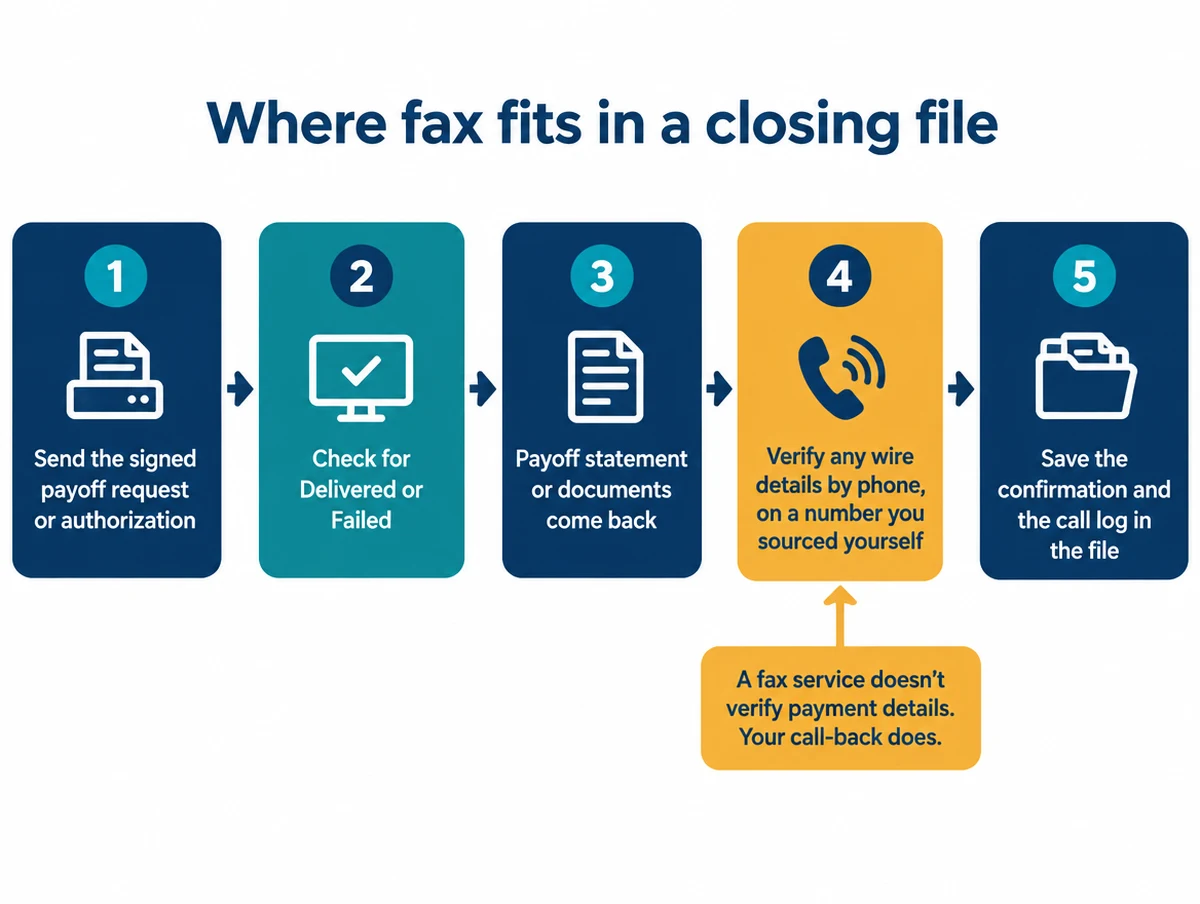
1. Sending to the exact number a servicer specifies. Some servicers still take payoff requests and borrower authorizations by fax. Federal commentary on payoff statements says a servicer may require payoff requests to go to a specific mailing address, email address or fax number, and that a longer response time may be reasonable if a request doesn't follow those requirements (Regulation Z official interpretation 36(c)(3), checked November 8, 2026). So the service has to make it easy to send one complete packet to one confirmed number. Our guide to faxing a payoff request covers what goes in it.
2. A record of each send. When a servicer says it never got the request, a dated confirmation with the destination number and page count is your record of what you sent and when the transmission completed. Call the servicer at a number you already know to confirm they have it. See what to do when a payoff fax is "never received".
3. Scanning and signing without a printer. Agents and clients are often away from a desk. Look for a service that lets you scan from a phone and sign on screen, so nobody has to find a printer.
4. People and volume. A solo agent may send a handful of pages a month. A small title office may have several people sending from one account. Count both before you compare plans.
One thing no fax service does: verify wire instructions. A faxed payoff statement or set of wire instructions can carry altered bank details just like an email can. Whatever service you choose, confirm payment details by calling a number you sourced yourself, and follow your office's wire and payoff verification checklist.
The options
Three services, each with a different strength. Prices are list prices from each company's own pricing page, checked November 8, 2026. They can change, so check before you buy.
FaxDash
Who it's for: solo agents, transaction coordinators and small offices that send signed pages now and then and may want a number for replies.
Price: sending is pay-as-you-go, with credit packs from 5 pages for $0.99 to 150 pages for $9.99, and credits never expire. You don't need a subscription to send. A receive number starts at $3.99 a month (Starter: 50 received pages and 10 send credits a month). Business is $12.99 a month for 500 received pages and 60 send credits, with you + 2 team seats, and extra seats are $2.99 a month each (pricing and billing help).
Sending and signing notes: in the mobile app you can scan a page with the camera, with Enhance cleaning up the photo for fax. Signing happens in the web dashboard: on the Send Fax page, choose Add signature under Finishing touches, draw your signature and place it on the page, and save it to reuse next time (signing help). Each delivered fax has a confirmation, and on the web dashboard you can choose Download Receipt to save one with the destination number, page count and send and completion times (sending help). Check for Delivered or Failed before you note the send in the file. The built-in cover page is free but uses 1 send credit, and the free payoff request cover sheet has fields for the file number, borrower, property and good-through date.
Whether a lender, servicer or title office accepts a signature drawn in an app is their decision, not the fax service's. Check their instructions, or use the signing method the transaction requires.
Team and receive notes: teams are on Standard and Business and are managed in the web dashboard. Standard includes no seats, so the owner adds each one at $2.99 a month, and Starter can't own a team. Admins and members send from the team's credits and work from one shared inbox and sent history. With a receive number you can also use email-to-fax: only the first attached PDF is sent, and the message text isn't sent on its own. If your default cover sheet is set to go on every fax, the email text becomes the cover note. AI summaries of received faxes are on by default, except on accounts with a signed BAA, which start with them off. If you'd rather not have loan documents analyzed, turn off "Summarize received faxes with AI" in Settings.
Choose it if: you fax in bursts around closings, want to scan from a phone and sign in the web dashboard, and don't want to pay a monthly fee just to send.
Dropbox Fax
Who it's for: an office that already keeps transaction files in Dropbox or Google Drive and wants several people sending from one shared page pool.
Price (as of November 8, 2026, Dropbox Fax pricing):
- Home Office: $9.99 a month. 300 pages a month and up to 5 senders.
- Professional: $19.99 a month. 500 pages a month and up to 10 senders.
- Small Business: $39.99 a month. 1,000 pages a month and up to 20 senders.
Annual billing is also offered. See their pricing page for current annual prices.
Its pricing page says the allowance is shared for sending and receiving, and that pages over the allowance cost 5 cents each.
Sending and receive notes: the pricing page lists Edit & Sign Faxes (adding text and your signature before sending), email to fax and integrations with Google Drive, OneDrive and more. Received faxes are forwarded to your email as a PDF. One fax line is included, and extra lines are $4.99 a month or $55 a year (Dropbox help).
Choose it if: several agents or processors send every month, you want one shared allowance, and your files already live in cloud storage.
eFax
Who it's for: an office that wants a long-established service with a desktop app, or international pages included in a team plan.
Price (as of November 8, 2026, eFax pricing):
- Personal (for individuals and small business): $18.99 a month billed monthly. 200 pages a month to the US and Canada, $0.10 per page over the plan, 1 user license and 1 fax number.
- Business (for growing teams): $39.99 a month billed monthly. 500 pages a month to 51 countries, $0.07 per page over the plan, 5 user licenses (+$10 a month per extra user) and 1 fax number (+$5 a month per extra line).
See their pricing page for current annual prices.
Sending and receive notes: the pricing page lists electronic signatures for fax, email to fax, iOS and Android apps, a desktop app and searchable fax storage on every plan.
Choose it if: you need international pages included, want a desktop app, or your brokerage already standardizes on it.
Side-by-side: published prices as of November 8, 2026
| FaxDash | Dropbox Fax Home Office | eFax Personal | |
|---|---|---|---|
| Monthly price | No plan needed to send (packs from $0.99); receive number from $3.99/mo | $9.99/mo (annual billing also offered) | $18.99 billed monthly (annual billing also offered) |
| Pages included | Starter: 50 received pages + 10 send credits a month | 300 pages a month, shared for sending and receiving | 200 pages a month to US and Canada |
| Over the allowance | Each extra received page uses 1 send credit | 5 cents per page | $0.10 per page |
| People | Starter: 1. Business ($12.99/mo): you + 2 team seats (+$2.99/mo each) | Up to 5 senders | 1 user license |
| Signing | Draw and place a signature in the web dashboard | Edit & Sign Faxes listed | Electronic signatures listed |
| Sending without a plan | Yes, credit packs that never expire | See its pricing page for sending options | Not listed on its pricing page |
Sources: FaxDash pricing and billing help, Dropbox Fax pricing and eFax pricing, all checked November 8, 2026. FaxDash sending costs 1 credit per page to US (+1) numbers, including Canada.
A hypothetical solo agent who sends 15 pages a month and doesn't need a fax number could cover that month with one 25-page pack on FaxDash ($2.99), with no monthly plan and 10 credits left over that don't expire. A three-person title team that sends and receives a few hundred pages a month is a different case, and a shared-allowance plan may suit it better. Run your own month through each.
When FaxDash isn't the best fit
- Many people send from one account. Dropbox Fax's Home Office plan lists up to 5 senders, and eFax Business lists 5 user licenses. FaxDash Business includes you + 2 team seats, with extra seats at $2.99 a month each. Price your real headcount.
- You send a lot of international pages. eFax Business includes pages to 51 countries. FaxDash uses more credits per page for destinations outside the +1 region (sending help).
- You want received faxes as PDFs in your email. FaxDash's email notice tells you who sent a fax and links to it, but doesn't attach the fax. Dropbox Fax says it forwards received faxes to email as a PDF.
- Your counterparties use a closing portal. If the title office, lender or servicer takes uploads through a secure portal, use the portal. You may not need fax at all.
How to switch services
- Overlap for a billing cycle. Keep the old service until servicers and title offices that fax you have the new number.
- Send a one-page test to a number you can check, and look for Delivered or Failed.
- Update your number on your cover sheet, email signature, website and any authorization forms you hand out.
- Save past confirmations. Download any send records you need for open files before you cancel the old plan.
If you'd rather keep your current fax number, number transfers are available on the FaxDash Business plan. Contact us at support@faxdash.io before you cancel the old plan.
FAQ
Does faxing wire instructions or a payoff make them safer than email? No. Any channel can carry altered bank details. Verify by calling a number you found yourself, not one printed on the document. Our verification checklist walks through it.
Is a signature drawn in a fax app accepted on real estate documents? That depends on the document and on what the lender, servicer or title office accepts. Check their instructions before you rely on it.
Do I need a fax number just to send a payoff request? No. With FaxDash you can send without a subscription. You need a number only if someone has to fax you back.
What proves I sent the payoff request? Keep the delivery confirmation with the destination number, page count and time. A Delivered status means the fax transmission completed. It doesn't mean the payoff team has worked the request, so call to confirm.
This guide is general information, not legal or tax advice. Fax numbers, forms and agency rules change, so check the agency's official page before you send. FaxDash isn't responsible for decisions made or actions taken based on this guide. For advice about your situation, talk to a qualified tax professional or attorney.