
Picture a small property management office on a Thursday. A housing authority wants a Request for Tenancy Approval back, a lender needs an owner's form, and a rental verification for a former tenant is sitting somewhere in someone's email. None of it is hard. It just needs one place to land and one person who owns it.
We make FaxDash, so we're not neutral. Below we compare it with other services on the things this kind of office cares about, using each company's own published prices as of November 8, 2026. Where another service fits better, we say so.
If you're setting up a fax workflow rather than choosing a service, start with our property management fax setup guide. This page only compares services.
What a property management office needs from a fax service
Five things change the decision. Check them against your own office before you look at prices.
1. Housing authority paperwork. If you rent to voucher holders, you'll handle forms like the Request for Tenancy Approval (HUD-52517) and the Housing Assistance Payments (HAP) contract (HUD-52641). HUD's landlord forms page describes both, and notes that each housing authority sets its own procedures. For example, the King County Housing Authority in Washington asks owners to use its online RFTA portal, accepts printed forms by mail, fax or in person, and asks owners not to email them because they contain personal information (KCHA RFTA page, checked November 8, 2026). Federal rules also say a HAP contract executed more than 60 days after the lease term begins is void, unless HUD approves an extension the housing authority asks for (24 CFR 982.305(c)). So when a housing authority wants a signed page back, you want a send you can prove.
2. Tenant and owner documents. Rental verifications, references, vendor certificates of insurance and lender forms for owners. These carry personal details, so who can see the inbox matters.
3. After-hours receiving. Faxes don't wait for office hours. With an online fax number, they land in the inbox whenever they're sent. The question is whether someone sees them first thing in the morning.
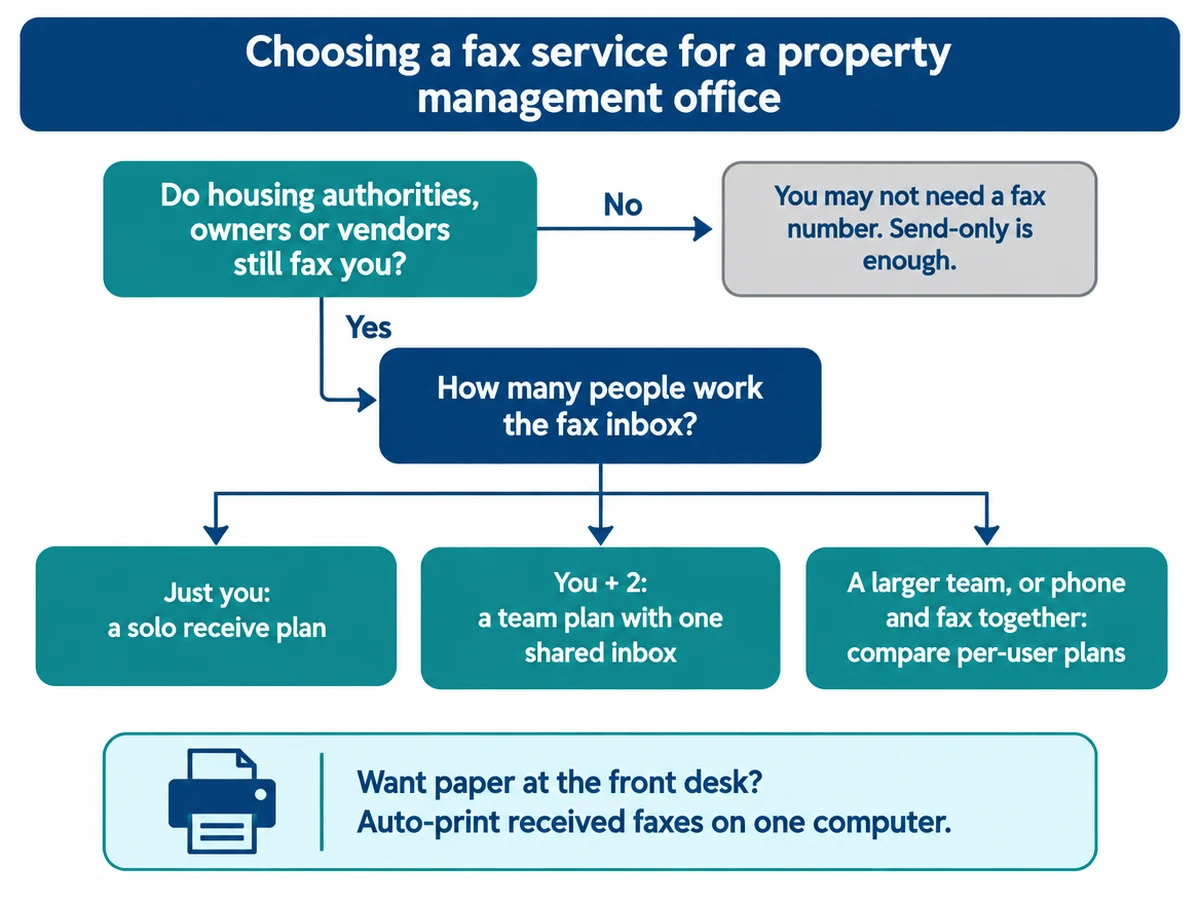
4. Team size. One office manager, a leasing agent and a bookkeeper need different access. Count the people who will actually work the fax inbox.
5. Paper at the desk. Some offices still want received faxes printed automatically, without anyone opening a file.
Send volume matters too, but for many small offices it's a few dozen pages a month. Look at a real month before you pay for a big allowance.
The options
Three services, each with a different strength. Prices are list prices from each company's own pricing page, checked November 8, 2026. They can change, so check before you buy.
FaxDash
Who it's for: a small office of one to three people that receives more than it sends, and may want paper at the front desk.
Price: sending is pay-as-you-go, with credit packs from 5 pages for $0.99 to 150 pages for $9.99, and credits never expire. A receive number starts at $3.99 a month (Starter: 50 received pages and 10 send credits a month). Business is $12.99 a month for 500 received pages and 60 send credits, with you + 2 team seats. Extra seats are $2.99 a month each (pricing and billing help).
Team and receive notes: teams are on Standard and Business, and you manage members and roles in the web dashboard. Standard includes no seats, so the owner adds each one at $2.99 a month, and Starter can't own a team. Admins and members send from the team's credits. Everyone works from one shared inbox, and the sent history shows who sent each fax (teams help). The free FaxDash Connect app for Mac and Windows prints each received fax once on the printer you choose. If that computer is off overnight, faxes that arrived print the next time Connect starts (Connect help). Connect only prints received faxes; it can't send.
A few more details for this kind of office. The built-in cover page has no feature fee but uses 1 send credit. With a receive number you can also use email-to-fax: only the first attached PDF is sent, and the message text isn't sent on its own. AI summaries of received faxes are on by default, except on accounts with a signed BAA, which start with them off. If you'd rather not have tenant documents analyzed, turn off "Summarize received faxes with AI" in Settings.
Choose it if: a few people share one number, most months are light, and you want received faxes printed at the desk without a fax machine.
Fax.Plus
Who it's for: a larger office that wants several people, more than one number and an admin console on one plan.
Price (as of November 8, 2026, Fax.Plus pricing):
- Basic: $8.99 a month billed monthly, or $6.99 a month billed annually ($83.99 a year). 200 pages a month, one fax number, one member, $0.10 per extra page.
- Business: $34.99 a month billed monthly, or $27.99 a month billed annually ($335.99 a year). 1,000 pages a month, five members, $0.05 per extra page. Its pricing page says Business includes 2 dedicated fax numbers, with more at $4.99 a month each.
Team and receive notes: the pricing page says teams need the Business or Enterprise plan, and lists team setup, an admin console and Slack integration on Business. Receiving needs an active paid plan.
Choose it if: you have four or five people on fax, want a separate number for a second property or department, or already work in tools like Slack.
RingCentral Fax
Who it's for: an office that is also replacing its phone system, or wants fax on the same provider as its calls.
Price (as of November 8, 2026, RingCentral fax plans):
- Fax 3000: $22.99 per user a month, which the page says is based on an annual plan. Check the page for monthly billing. It lists 3,000 pages per user per month, with additional pages at 4.9 cents, and a local fax number.
- RingCentral Advanced: from $25 a month per user on an annual contract. It adds a business phone system with unlimited internet fax.
Team and receive notes: the page lists the mobile app and cloud storage integrations on both plans. Using the same number for calls, SMS and fax, and admin controls over which extensions can fax, are listed for RingCentral Advanced only. Extra numbers are $4.99 a month, and the page says added numbers are shared numbers managed by a single administrator.
Choose it if: you want one provider and one bill for phones and fax, or you send a lot of pages.
Side-by-side: published prices as of November 8, 2026
| FaxDash Business | Fax.Plus Business | RingCentral Fax 3000 | |
|---|---|---|---|
| Monthly price | $12.99 (billed monthly) | $34.99 billed monthly, or $27.99/mo billed annually | $22.99 per user a month, based on an annual plan (check the page for monthly billing) |
| Pages included | 500 received pages + 60 send credits a month | 1,000 pages a month | 3,000 pages per user per month |
| Over the allowance | Each extra received page uses 1 send credit | $0.05 per page | 4.9 cents per page |
| People | You + 2 team seats (+$2.99/mo each) | 5 members | Priced per user |
| Fax numbers | 1 (extra numbers are an add-on) | 2 dedicated numbers (+$4.99/mo each after that) | 1 local number (+$4.99/mo each) |
| Smaller option | Starter $3.99/mo for one person; or credits only, no subscription | Basic $8.99/mo for one member | Not listed on the fax plans page |
| Auto-print received faxes | Free Connect app (Mac, Windows) | Not listed on its pricing page | Not described; the page lists compatibility with physical devices |
Sources: FaxDash pricing and billing help, Fax.Plus pricing and RingCentral fax plans, all checked November 8, 2026. FaxDash sending costs 1 credit per page to US (+1) numbers, including Canada.
The services count pages differently, so compare one real month. A hypothetical office that receives 150 pages and sends 40 pages a month to US numbers fits inside FaxDash Business's 500 received pages and 60 send credits. It also fits inside Fax.Plus Business's 1,000 pages and RingCentral's 3,000 pages per user. At that volume, the deciding questions are how many people need access and whether you want phones or auto-print in the same setup.
When FaxDash isn't the best fit
Be honest with yourself about these.
- You're replacing the office phones too. If you want calls, texts and fax on one number and one bill, a phone-system plan like RingCentral Advanced is built for that. FaxDash only does fax.
- You have a bigger team on fax. FaxDash Business includes you + 2 team seats, and each extra seat is $2.99 a month. Fax.Plus Business includes five members and an admin console. Price your real headcount on both.
- You want a separate number for each property or department. Fax.Plus Business includes two numbers. On FaxDash, each extra number is an add-on.
- You receive well over 500 pages a month. Above the Business allowance, each received page uses a send credit. A plan with a larger allowance may be simpler.
- Your partners have all moved to portals. If every housing authority and lender you work with takes uploads, you may not need a fax number at all.
How to switch without missing faxes
- Keep the old service running for a short overlap, at least one billing cycle, so a late housing authority or lender fax still lands.
- Set up the new number and the team before you announce anything. On FaxDash, create the team in the web dashboard and invite people there.
- Send a one-page test to a number you can check, and look for Delivered or Failed in your history.
- Update the number everywhere it appears: owner packets, rental verification request forms, your website and the contact details you've given housing authorities.
- Then cancel the old plan, after downloading any faxes you need to keep.
If you'd rather keep your current fax number, number transfers are available on the FaxDash Business plan. Contact us at support@faxdash.io before you cancel the old plan.
FAQ
Can we send housing authority forms through their portal instead of fax? Yes, if the housing authority offers one. Some, like KCHA, ask for their portal first. Follow each housing authority's own instructions for each form.
Will a fax that arrives at night be waiting in the morning? With an online fax number, received faxes land in your inbox whenever they arrive. If FaxDash Connect is set up and that computer was off overnight, faxes print the next time Connect starts.
Does every team member need their own fax number? No. On FaxDash Business, the team works from one shared inbox, and the sent history shows who sent each fax.
Can team members manage the team from the app? No. The app shows which team you're on. Inviting people and changing roles happens in the web dashboard.
How do I know a HAP or RFTA fax went through? Check for Delivered or Failed in your sent history. Delivered means the transmission completed, not that someone has processed it, so follow up with the housing authority if a deadline depends on it.
This guide is general information, not legal or tax advice. Fax numbers, forms and agency rules change, so check the agency's official page before you send. FaxDash isn't responsible for decisions made or actions taken based on this guide. For advice about your situation, talk to a qualified tax professional or attorney.