
Suppose you finish a signed form at 9 p.m., but the office you're sending it to doesn't open until 8 the next morning. You'd rather the fax go out when they're in, not while you're asleep. FaxDash lets you pick a future date and time when you compose a fax, and sends it for you at that time.
The short answer
On the web dashboard, open Send Fax, add your document and the fax number, then on the Review step turn on Schedule for later and pick a date and time. Click Schedule Fax and FaxDash sends it then. The FaxDash app can schedule too. Credits per page work the same as any other send: 1 credit per page to a US (+1) number, including Canada.
Three things to know before you rely on it. The time is in your own device's time zone, not the recipient's. The credits are taken when you schedule, not when it sends. And there's no button to edit or cancel a fax once it's scheduled. FaxDash offers 2 free pages when you sign up.
What to have ready
- The final document. Check page order, readability and the page count first, because you can't swap the file once it's scheduled.
- A confirmed fax number. Read it back from the recipient's own message or letterhead. A wrong number sends a document to the wrong place on a schedule.
- The time you actually want, in your time zone. If the recipient is in another time zone, work out what their 8 a.m. is on your clock.
- Enough credits. The Review step shows the estimated credits, and they're taken when you click Schedule Fax.
Steps
- Open Send Fax. In the web dashboard, drop in your PDF or images. Several files are merged into one fax.
- Enter the recipient. Type the fax number, or search your saved contacts.
- Turn on Schedule for later. On the Review & Send step, switch on Schedule for later and pick the date and time. It has to be at least 5 minutes from now and at most a year ahead. The time is read in your computer's time zone.
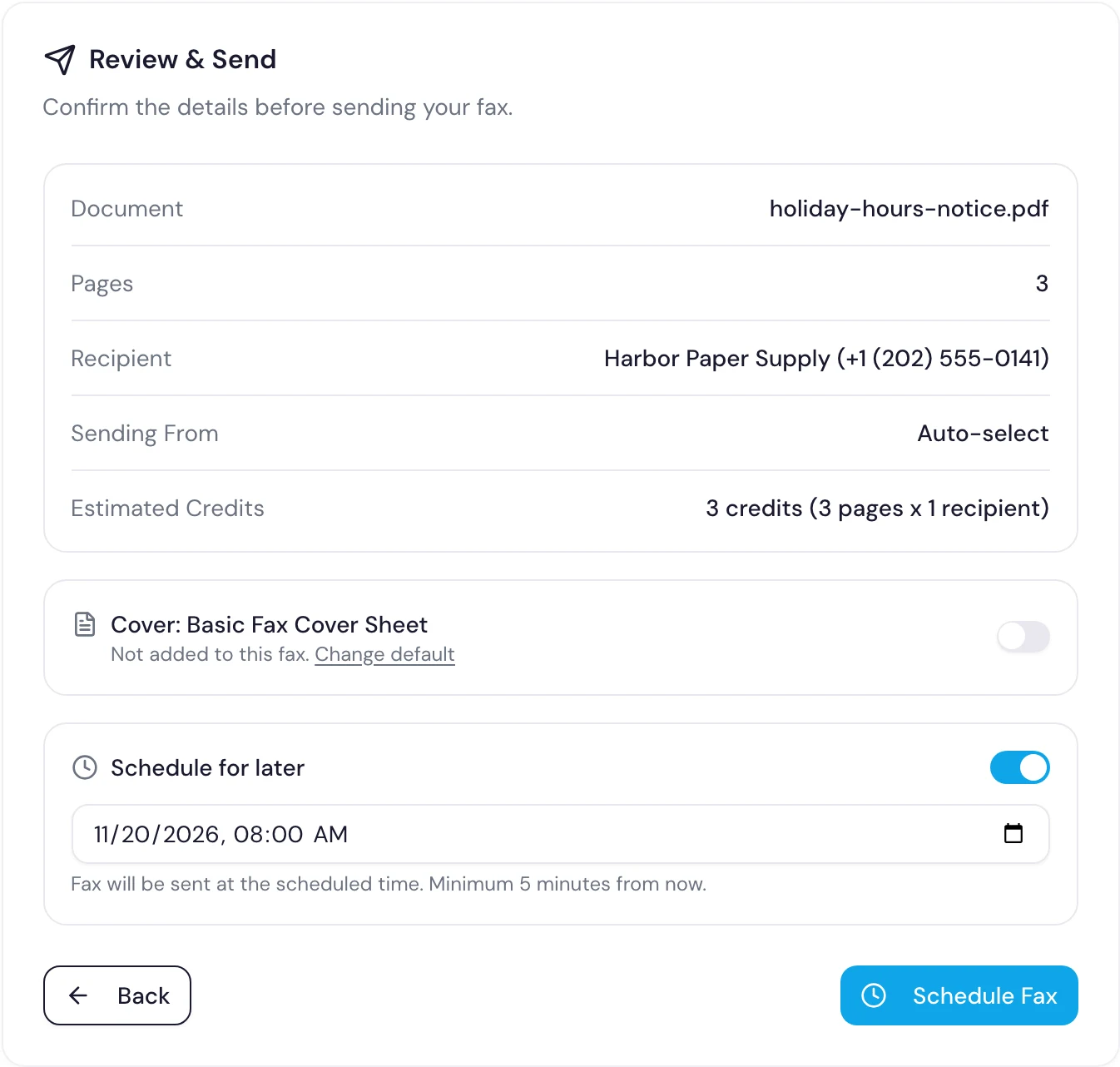
- Check the summary and click Schedule Fax. Look at the document, the recipient, the date and time, and the estimated credits, then click Schedule Fax.
- Check the result afterward. In your Sent list, the Scheduled filter shows what's waiting, and each fax's details show the time it's set for. After that time, the fax ends as Delivered or Failed. Keep push notifications on, because FaxDash sends one when a fax is delivered or fails.
The honest catch
There's no edit or cancel button for a fax once it's scheduled. If plans change, email support@faxdash.io as early as you can, and don't schedule anything you might need to pull back.
A scheduled fax can fail like any other. A busy line or a number that isn't a fax line still means a failed fax, and FaxDash returns the credits for a failed fax automatically. If there's a hard deadline, don't schedule the fax for the last minute. Send it earlier, or send it now. Why a fax fails to connect lists the checks.
Delivered means the transmission completed. It doesn't mean someone at the other end has read it. How to confirm a fax was received covers what to keep as your record.
How FaxDash compares on scheduling
Scheduling features differ more than the basic send. Here is what iFax and Documo document on their own help pages today, next to FaxDash. This compares features, not hands-on tests of iFax or Documo.
| Feature | FaxDash | iFax | Documo |
|---|---|---|---|
| Schedule while composing | Yes, on the dashboard's Review step or the app's Send Fax screen | Yes, Scheduled Send in the Send dropdown | Yes, Send Later in the web portal |
| Where scheduled faxes are listed | A Scheduled filter in Sent | A Scheduled tab | Marked with a watch icon in history |
| Change a scheduled fax | No edit or cancel button; contact support | Reschedule from the Scheduled list | Cancel before it processes |
| Time zone | Your device's time zone | Based on your settings | Not stated on that page |
A fair read: all three let you schedule from the compose screen. iFax and Documo let you change a scheduled fax afterward, and FaxDash doesn't, so if your plans change often, schedule close to the time or send now.
FAQ
Can I schedule a fax from the mobile app? Yes. On the app's Send Fax screen, tap Schedule next to Send immediately and pick a date and time. You can change or clear it until you tap send.
Can I cancel a scheduled fax? Not once it's scheduled. Email support@faxdash.io if you need to stop one.
Does scheduling cost extra? No. A scheduled fax uses the same page credits as any send, and they're taken when you schedule it.
Can I schedule a fax to several numbers? Yes. Add the numbers on the Recipients step, then use Schedule for later on the Review step. See how to send one fax to several recipients.
Can I schedule an email-to-fax message? No. Email-to-fax sends when your email arrives, from your own FaxDash number, with the destination number alone in the subject line.
Do I need a fax number of my own to schedule? No. Sending from the web dashboard or the app doesn't need one.