
Say you run a small office on an eFax plan, and the one thing stopping you from switching is the fax number. Clients, labs, lenders and agencies already have it on file, and you don't want to reprint letterhead or chase every sender. You may not have to: FaxDash supports number transfers on the Business plan, subject to carrier approval.
This guide is published by FaxDash. Competitor prices below come from each company's own pages, checked November 22, 2026, and can change, so check them before you decide.
The short answer
If you want to keep your number, confirm it can transfer before you cancel anything, keep eFax active until the transfer is done, and send a test fax to the number before you close the old account. Number transfers are available on the FaxDash Business plan, which is $12.99 a month for you plus 2 team seats, with 500 received pages and 60 send credits a month.
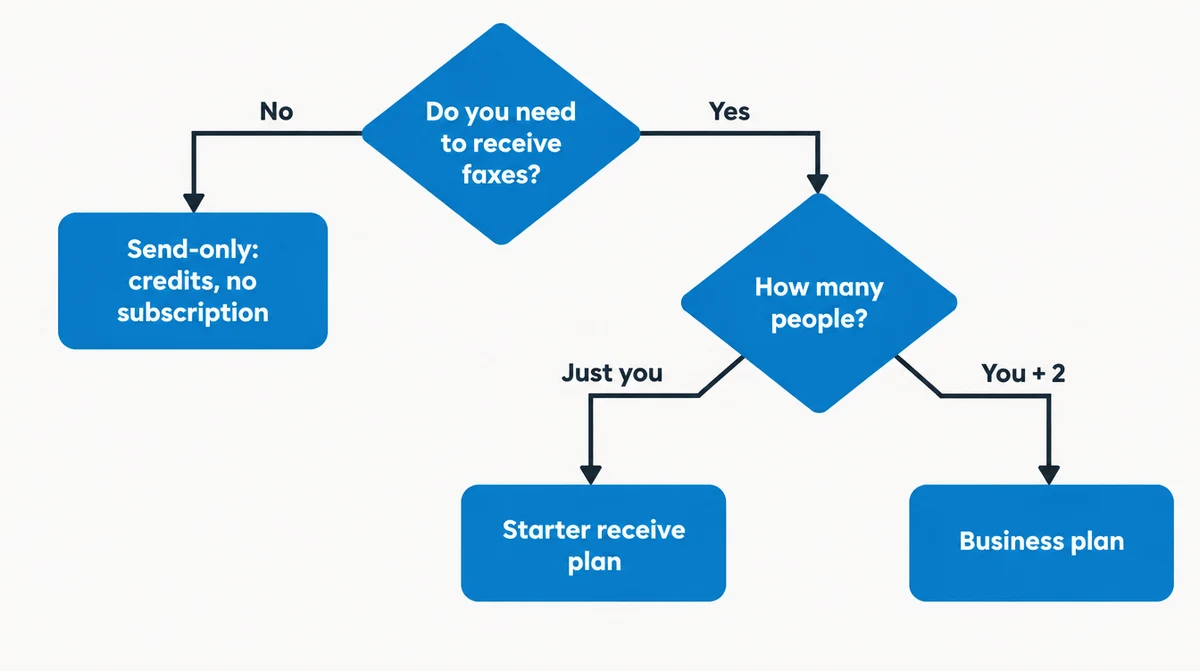
If you don't need to keep the number, or you mostly send, the rest of this guide helps you decide which plan fits.
Switch from eFax without losing your fax number
Work through this list in order. The order matters: the number has to move before the old account closes.
- Confirm the number can transfer. Email support@faxdash.io with the number you want to keep, before you cancel anything. Number transfers are available on the Business plan. Per the FaxDash terms, a transfer is subject to carrier approval and porting availability, so ask first rather than assume.
- Keep the old service active until the transfer completes. The terms say porting timelines vary and depend on your current carrier's processing. Leave your eFax plan running until FaxDash confirms the number is working on your account, so faxes sent to it during the move still reach someone.
- Start a Business receive plan. A number on FaxDash needs an active receive plan, per receiving faxes help. Business covers the number with 500 received pages and 60 send credits a month.
- Add staff to the shared inbox. In the web dashboard, open the Team page, create your team, then invite each person by email and pick a role. Business includes 2 seats, and extra seats are $2.99 a month each. Faxes to the team's number land in one shared inbox that everyone on the team works from, per teams help.
- Send a test fax before cancelling. Once the number is on FaxDash, have someone send a one-page test fax to it. It should appear in the inbox in the app and the web dashboard, with a push notification and an email for the new fax. Then send a one-page test from FaxDash to a number you can check, and look for Delivered or Failed in your history.
- Save what you need, then cancel eFax. Download any past faxes you want to keep from the old account, then cancel. Check eFax's terms for when billing stops.
If the number can't transfer, you can still pick a new local or toll-free number in the dashboard under Fax Numbers and run both numbers for a while. Tell regular senders the new number, and update letterhead, your website, email signatures and intake forms.
Business plans side by side
These are the published business plans from each company, checked November 22, 2026. They are not equivalent: the allowances count different things, and the seat counts differ.
| FaxDash Business | eFax Business | Fax.Plus Business | |
|---|---|---|---|
| Monthly price | $12.99 a month | $39.99 a month | $34.99 billed monthly |
| People | You (the owner) + 2 team seats | 5 user licenses | 5 members |
| Pages | 500 received pages + 60 send credits a month | 500 pages a month, sent and received combined | 1,000 pages a month |
| Extra people | $2.99 a month per seat | $10 a month per user | Not listed on the source page |
Sources: FaxDash pricing, eFax pricing and Fax.Plus's guide to online fax for startups (Fax.Plus notes its own prices there were checked October 14, 2026).
What the differences mean in practice:
- Seats. FaxDash Business covers you plus 2 people. If your office has 4 or 5 people who each need their own login, add $2.99 a month per extra seat, or compare against the 5 licenses eFax and Fax.Plus include.
- Pages. eFax counts sent and received pages against one 500-page allowance, and unused pages don't roll over, per its pricing page. FaxDash splits the allowance into 500 received pages and 60 send credits. Fax.Plus lists 1,000 pages a month on this plan. If you move more than 500 pages a month, run your own month through each plan.
- Going over. On FaxDash, faxes keep arriving after the allowance, and each received page beyond it uses one send credit from your balance, per pricing and billing help. eFax lists $0.07 per page over the plan on Business.
What you're paying for now
As of November 22, 2026, eFax's pricing page describes two self-serve plans:
- eFax Personal (for individuals and small business): $18.99 a month, with 200 pages a month to the US, Canada and Mexico, $0.10 per page over the plan, 1 user and 1 fax number.
- eFax Business (for growing teams): $39.99 a month, with 500 pages a month to 51 countries, $0.07 per page over the plan, 5 user licenses (+$10 a month per extra user) and 1 fax number (+$5 a month per extra line).
Check your own invoice too. Your plan, billing cycle and any add-ons may differ from the current list prices.
If you're a one-person office
FaxDash Starter is $3.99 a month with 50 received pages and 10 send credits, and Standard is $6.99 a month with 200 received pages and 25 send credits. Neither includes number transfers, which are on Business only. If you don't need to keep your old number, a smaller receive plan with a new number may fit.
A worked example (hypothetical). Say you receive 30 pages and send 10 pages a month, all within the US. On FaxDash Starter, the 30 received pages fit in the 50-page allowance and the 10 sent pages use the 10 included credits. On eFax Personal, all 40 pages fit in the 200-page allowance. Compare the monthly prices above for your own numbers.
If you only send
FaxDash doesn't need a subscription to send. You buy credits in packs, from 5 pages for $0.99 up to 150 pages for $9.99, and credits you buy never expire. FaxDash offers 2 free pages when you sign up. Sending costs 1 credit per page to US (+1) numbers, including Canada, and more credits per page elsewhere.
The catch is that a send-only setup has no number for replies, and no number to transfer to. If anyone needs to fax you back, you'll want a receive plan.
When eFax may still fit
eFax could be the better choice if:
- Your team is larger. eFax Business includes 5 user licenses. FaxDash Business includes you + 2 team seats, and each extra seat is $2.99 a month, so price your own headcount on both.
- You need international pages included in the plan. eFax Business lists 500 pages a month to 51 countries.
- You need eFax's API or Corporate tools. eFax's pricing page lists an API on Business at extra cost, and custom Corporate plans for large organizations.
- Your workflows already depend on eFax. If other systems send or file faxes through your eFax account, moving them takes planning.
FAQ
Can I keep my fax number if I leave eFax? Number transfers are available on the FaxDash Business plan, subject to carrier approval. Email support@faxdash.io before you cancel your old plan.
Should I cancel eFax before the transfer? No. Keep it active until FaxDash confirms the number is working on your account and a test fax arrives.
How many people can share a FaxDash Business account? Business includes you + 2 team seats, and extra seats are $2.99 a month each. Teams are managed in the web dashboard, and everyone works from one shared inbox.
Is FaxDash cheaper than eFax? It depends on your pages, people and whether you need to receive. FaxDash Business is $12.99 a month for you + 2 seats, and eFax Business is $39.99 a month for 5 users. Compare using one real month of your own usage.
Can I send faxes without any monthly plan? With FaxDash, yes. Sending uses credit packs with no subscription, and purchased credits never expire.