
The short answer
When you compare "secure" online fax services, look past the encryption badge. Ask four practical questions: who can see each document, what you can mark or black out before it leaves, whether cover pages carry ads or a feature fee, and what happens to AI analysis if you need a Business Associate Agreement (BAA).
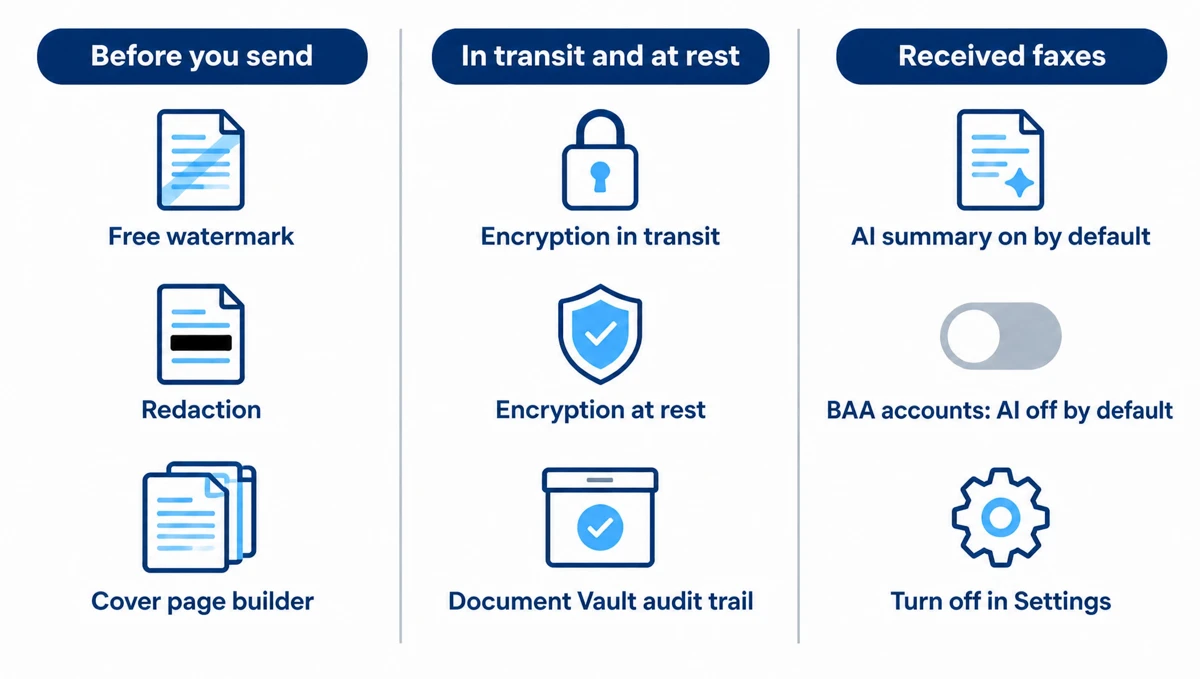
On FaxDash, those answers today are: access is tied to your signed-in account; you can add a free watermark or redact sensitive spots before sending; the cover-page builder has no feature fee and no cover-page ads (a cover page still uses 1 send credit, because it counts as a billed page); and AI analysis of received faxes is on by default for non-BAA accounts and starts off, with the option to turn it on, on signed FaxDash BAA accounts.
This guide compares FaxDash with eFax and Dropbox Fax (formerly HelloFax) on those points. The linked first-party pages were checked on November 8, 2026. Features change, so re-check their pages before you rely on them. It is not legal or compliance advice.
Who can see your documents
Encryption in transit and at rest matters, and most serious online fax products claim some form of it. The Help Center and HIPAA page for FaxDash state that documents are protected in transit and at rest, and that access is tied to your authenticated account. The Business plan's document vault adds an immutable audit trail of who accessed which document and when.
What to verify on any vendor:
- Who is signed in when a fax is sent or opened. Shared passwords and shared inboxes blur that trail.
- Whether a team plan shows who sent each fax. FaxDash teams on Standard and Business do: the Help Center says every fax in the team's sent history shows who sent it.
- Where received faxes appear. FaxDash can email you about a new fax with a link into the inbox; the Help Center says the fax itself is not attached to that email.
eFax markets encryption and HIPAA-oriented plans on its site. Dropbox Fax states that transmissions are encrypted. Those descriptions do not replace reading the vendor's own security and privacy pages for your use case.
Watermarks and redaction before you send
Two finishing tools sit next to each other on FaxDash, under the same "before you send" habit.
Watermark. The Help Center says watermarks are free. On the Send Fax page you can add CONFIDENTIAL, DRAFT, URGENT, COPY, or your own text, then apply it. Watermarks are opt-in: nothing is stamped unless you add one.
Redaction. FaxDash also lets you redact parts of a document before you fax it, so account numbers, dates of birth or other sensitive lines can be blacked out on the pages that leave your account. Use it next to the watermark when a page must travel by fax but must not show every field.
Neither tool is a substitute for choosing the right recipient number. A watermark labels a page. Redaction removes what you mark. Both still leave the rest of the page readable by whoever answers that fax line.
When you compare vendors on this point, check whether a watermark or redaction step is included on the plan you would actually buy.
Cover pages: builder, fees and ads
FaxDash includes a built-in cover page builder. The Help Center says it adds your name and number, the recipient, a subject and a short message to the front of the fax. There is no separate feature fee for that builder, and FaxDash does not put ads on cover pages. A cover page is still a page you send: the Help Center says to count the pages before you send, including a cover page if you add one, and a fax to a US (+1) number uses 1 credit per page. So a free cover page means no feature fee, not a free send credit.
Before you pick a service for client or patient paperwork, send yourself a test fax and read the cover that arrives.
Check each service's current cover-page instructions for whether your plan includes a builder, whose branding appears and whether the cover counts as a billed page.
AI summaries, and what a BAA changes
FaxDash can generate an AI summary for faxes received on your number: a plain-language summary, a document category, key fields such as amounts, dates and names, and searchable text. Summaries are available for faxes up to 5 pages; longer faxes arrive without one. Per the receiving-faxes Help page:
- AI analysis is on unless you turn it off.
- Accounts with a signed FaxDash BAA start with AI analysis off and can turn it on. Analysis runs on Amazon Bedrock, inside FaxDash's AWS BAA.
- On other accounts, you can turn off "Summarize received faxes with AI" in Settings in the app or the web dashboard. With it off, no fax content is sent for analysis.
- Turning AI off in Settings is a control for where content goes. It is not, by itself, a HIPAA compliance guarantee. FaxDash signs a BAA on the Business plan only. To request one, email support@faxdash.io or hipaa@faxdash.io.
If you connect an AI assistant (for example over MCP) so it can send or read faxes, that is a separate path. Content the assistant handles goes to that assistant's provider under its terms. The FaxDash HIPAA page says FaxDash's BAA does not extend to those providers. If HIPAA applies to you, get the right agreements in place before you connect an assistant to PHI.
When evaluating AI or automation, confirm whether it runs on received faxes, sent faxes or both, whether a BAA changes its behavior, and which plan includes it.
A short comparison checklist
Use this when you open each vendor's site. Fill it in from their current pages, not from memory.
| Check | What to record |
|---|---|
| Sign-in and audit | Can you see who sent or opened a fax? Is there an audit trail on the plan you would buy? |
| Watermark | Free? Opt-in? Custom text? |
| Redaction | Available before send on your plan? |
| Cover page | Builder included? Feature fee? Any ads or third-party branding on the cover? Does a cover count as a billed page? |
| Encryption | What the vendor states for transit and at rest |
| AI on received faxes | On by default? How do you turn it off? What happens under a BAA? |
| BAA | Which plan? How do you request it? |
| Receive number | Local or toll-free? Which countries? |
| Send pricing | Pay-as-you-go credits vs monthly page pool; what happens when you go over |
For FaxDash, the live Help answers include: pay-as-you-go sending with purchased credits that never expire; receive plans from $3.99 a month with a dedicated number; Business at $12.99 a month with you plus 2 team seats and BAA support; free watermark; free cover-page builder with no cover-page ads (cover still uses 1 send credit per page); redaction before send; AI on received faxes with the BAA behavior above.
Checked November 8, 2026: FaxDash, eFax and Dropbox Fax
The eFax pricing and features page, Dropbox Fax features and Dropbox Fax team-plan FAQ, checked November 8, 2026, show different strengths on the points in this guide.
| FaxDash | eFax | Dropbox Fax | |
|---|---|---|---|
| Before you send | Free watermark (CONFIDENTIAL, DRAFT, URGENT, COPY or your own text) and redaction before you fax | Electronic signatures for fax on every plan | Edit and sign faxes, and add optional fields such as your signature before sending |
| Team access | Team seats on Standard and above, and every fax in the team's sent history shows who sent it | Business includes 5 user licenses, with extra users for a monthly fee | Add users to a team that draws from one pool of fax pages, on one shared number or several |
| Storage and records | The Business plan's document vault keeps an audit trail of who accessed which document and when | Secure online storage and searchable faxes on every plan; Business and Corporate plans offer a BAA | Secure cloud storage, with received faxes arriving as PDFs in your email inbox |
Which fits. eFax fits an office that wants e-signatures, searchable storage and email-to-fax on one monthly plan, with a BAA available on Business or Corporate. Dropbox Fax fits a team that already keeps documents in Dropbox or Box and wants received faxes delivered to email as PDFs. FaxDash fits an office that wants to watermark or redact pages before they leave, pay for sending by the page, and control AI analysis on received faxes.
A worked example: one outbound packet
Suppose you need to fax a four-page authorization that includes a full taxpayer identification number on page 2.
- Open the final signed file.
- Redact the identification number on page 2.
- Add a CONFIDENTIAL watermark if your office uses one for that document type.
- Add a cover page with the recipient department and a short subject, using the free cover-page builder. Plan for that cover to use 1 send credit, the same as any other page to a +1 number.
- Enter the destination number, review the pages and cost, and send once.
- When the fax shows Delivered, save your record. Delivered means the transmission completed. It does not mean a person has read the pages.
That sequence uses only tools available before send. It does not replace checking the number digit by digit.
What this guide does not claim
- It does not claim that fax encryption alone makes a workflow HIPAA compliant.
- The eFax and Dropbox Fax details above were checked on November 8, 2026. Re-check before you buy.
If you want one place for the office
For a small office that needs shared history, roles and a BAA path, start with the Business plan details and the Help pages on teams, security and receiving. See how FaxDash Business works for small teams.
This guide is general information, not legal or tax advice. Fax numbers, forms and agency rules change, so check the agency's official page before you send. FaxDash isn't responsible for decisions made or actions taken based on this guide. For advice about your situation, talk to a qualified tax professional or attorney.