
If your phone company is retiring the copper line your office fax machine uses, your faxing does not have to stop. You can keep a line that still supports fax, test the machine on the replacement service your carrier offers, or move fax online and print received faxes automatically. Start with the least disruptive check, which is reading your carrier's notice for the date and what it says about fax. Then pick the option that fits how your office works.
As of October 30, 2026. Carrier plans and dates change. We recheck this page on November 15, 2026 and quarterly after that.
What's actually changing
"Copper retirement" means a phone company stops offering traditional landline service (often called POTS, for plain old telephone service) over its copper network and moves customers to newer services. It happens area by area, not everywhere at once.
The clearest current example is AT&T:
- The FCC notice. FCC Public Notice DA 25-1043 (released December 12, 2025, WC Docket No. 25-335) covers AT&T's application to discontinue two legacy voice services, AT&T Residential Local Service and AT&T Business Local Exchange Access Line Service. The area is "portions of certain wire centers" in 18 states: Alabama, Arkansas, Florida, Georgia, Indiana, Kansas, Kentucky, Louisiana, Michigan, Mississippi, Missouri, North Carolina, Ohio, Oklahoma, South Carolina, Tennessee, Texas and Wisconsin. The authorized date is "on or after November 15, 2026."
- What "on or after" means. AT&T may discontinue those services in those areas from that date. It does not mean every line goes dead on November 15, and it covers legacy POTS lines only, not every AT&T phone service.
- How many customers. AT&T's application puts the affected services at "approximately 90,000 customers."
- The longer plan. In its 2025 Annual Report, AT&T says it is "on track to shut down a large majority of our copper-based services by the end of 2029."
- The rules. On March 26, 2026, the FCC adopted a Report and Order (FCC 26-19) that streamlines how carriers apply to discontinue legacy services as part of a technology transition.
Other carriers run their own programs. Your carrier's notice is the document that applies to your line.
Will my fax machine work on the replacement line?
It depends on the service and the machine, so test it rather than assume. In the sample customer notice in its application, AT&T says its replacement service, AT&T Phone - Advanced, "supports your essential needs, including phone calls, fax machines, alarms, medical monitoring, and 911 access." Ask your carrier what it supports for fax on your line, and send and receive a few test faxes after the switch, before you rely on it.
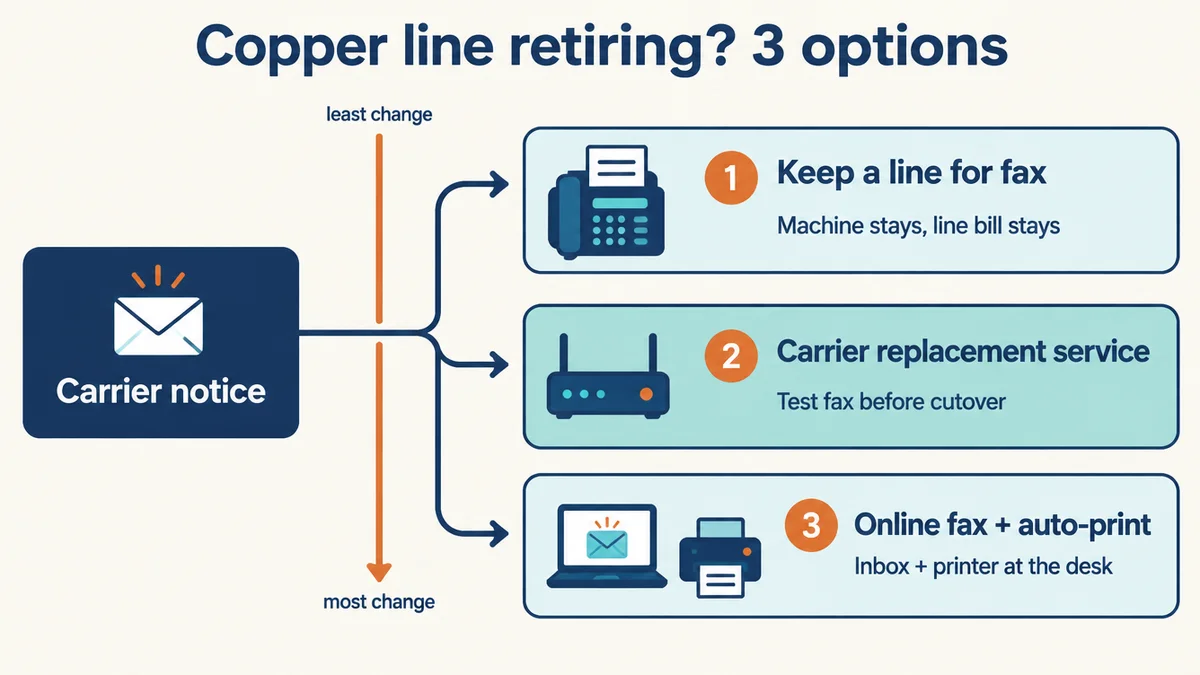
Your three options, least to most change
1. Keep a line for fax
If your carrier offers a replacement service that supports fax, you can keep the machine and the number. You keep paying for a line just for fax, plus paper, toner and machine upkeep. Confirm the details with your carrier.
2. Use the carrier's replacement service or an adapter
Some carriers move customers to a new voice service, sometimes with equipment at the office. We don't evaluate carrier hardware or adapters. Follow your carrier's guidance, and test fax before the old line goes away.
3. Move fax online and keep the paper
Get an online fax number, receive faxes in an inbox, and print them automatically for staff who want paper.
With FaxDash, received faxes land in the app and the web dashboard, and you get a push notification and an email notice for each one. The email has a link to the fax, not the PDF itself. You can send from the app or the web dashboard with no subscription. Sending by email needs an active FaxDash receive number.
For paper, FaxDash Connect is a free Mac and Windows app that prints each fax you receive, once, on the printer you choose. Run it on one computer only, because every copy prints every fax. On a team, it prints the shared inbox. Connect only prints: it can't send faxes.
How FaxDash compares with eFax, Fax.Plus and Documo when you leave the fax machine
If you're moving off the fax machine, three questions decide the switch: can you keep the number people already use, can you still get faxes on paper, and what does a month cost at your volume. The table sums up what each provider says on its own pages. Plans and prices change, so check each provider's pricing page before you decide.
| FaxDash | eFax | Fax.Plus | Documo | |
|---|---|---|---|---|
| Keeping your current fax number | Number transfers are available on the Business plan. Contact support@faxdash.io before you cancel the old line. | Their pricing page says you can transfer your existing fax number to a new eFax account. | Porting a US or Canadian number needs the Premium plan or higher. You get a temporary number while the port goes through. | Their pricing page says Documo handles porting your existing fax number. |
| Faxes on paper | FaxDash Connect, a free Mac and Windows app, prints each fax you receive on the printer you choose. It only prints received faxes and can't send. | Their pricing page doesn't describe automatic printing. It says eFax can be used with your existing equipment. See their site for details. | Not described on their pricing page. See their site. | A fax machine connector is listed on every plan. Documo says it connects an analog fax machine to the internet with no dedicated phone line. |
| Sending without a subscription | Yes. Sending from the app or web dashboard is pay-as-you-go: 1 credit per page to US (+1) numbers, including Canada, and more credits per page for international. | Sending is part of a monthly or annual plan, with a page allowance and a per-page rate for pages over it. | Paid plans are monthly or annual, with a monthly page allowance. | Paid monthly or annual plans with a monthly page allowance. |
| Receiving and starting plan | Receiving needs a receive plan. Starter is $3.99 a month with 50 received pages and 10 send credits. | Personal includes 200 pages a month to US and Canada and 1 fax number. Business includes 500 pages a month. See their pricing page for current prices. | Receiving needs an active paid plan. Basic includes 200 pages a month and one fax number. See their pricing page for current prices. | Solo includes 300 pages a month, 1 fax number and 1 user. See their pricing page for current prices. |
| People on the account | Team seats come with Standard and above. Standard starts with none and each seat is $2.99 a month. Business is $12.99 a month for you + 2 team seats. | 1 user license on Personal, 5 on Business, and $10 a month for each extra user. | One member on Basic and Premium, five on Business, unlimited on Enterprise. Team setup starts on Business. | 1 user on Solo, 10 on Business, 50 on Enterprise, and $3.00 a month for each extra user. |
All four can replace a fax line, so the better fit depends on what you're keeping. If the machine itself has to stay, Documo is the one here that lists a connector for it, and its pages describe a service built mainly for healthcare. If the number matters most, eFax, Fax.Plus and Documo describe number transfers on their pages, and Fax.Plus ties US and Canadian ports to Premium or higher. With FaxDash, number transfers are available on the Business plan. Contact support@faxdash.io about your number before the old line goes, get paper from an ordinary printer through Connect, and send without a subscription. FaxDash offers 2 free pages when you sign up, so you can try a send before you pick a plan.
Keeping your existing fax number
If you want to keep the number clients already use, ask your current carrier what happens to it before the line is discontinued. Number transfers are available on the Business plan. Contact support@faxdash.io before you cancel the old line.
A cutover checklist
Copy this into your office notes:
[ ] 1. Find the carrier notice: the date, and what it says about fax
[ ] 2. List who faxes you: clients, agencies, banks, lenders, insurers
[ ] 3. Decide on the number: keep it (ask your carrier; number transfers on the Business plan via support@faxdash.io) or get a new one
[ ] 4. Set up the receive number and, if you want paper, Connect on one
       computer next to the printer
[ ] 5. Run a test week: have a few senders fax the new number; send a few out
[ ] 6. Update the number on letterhead, your website, forms and agency records
[ ] 7. Only then cancel or let the old line go
How FaxDash handles this
Compare that with what your current fax line costs on your phone bill.
Comparing online fax services? See what a receiving fax number really costs.
FAQ
Will people who fax me notice? Not if you keep the same number. If you move to a new number, they need the new one, which is why step 6 of the checklist matters.
Do I need a computer next to the printer? Only if you want automatic printing. Connect runs on a Mac (macOS 12 or later) or 64-bit Windows 10 or 11 computer and prints to the printer you choose. Without it, faxes still arrive in the app and the dashboard.
Can Connect send faxes? No. It only reads and prints the faxes you receive. Send from the app or the web dashboard, or by email if you have a FaxDash receive number.
What if the computer is off? Faxes still arrive in your FaxDash inbox. Faxes that arrive while the computer is off or Connect is closed print the next time it starts. If the printer is off or missing, faxes wait and print once it's back.
Does the AT&T order mean my line stops on November 15? No. It means AT&T may discontinue those legacy services, in the covered parts of those wire centers, on or after that date. Your carrier's notice tells you what applies to you.
Sources checked October 30, 2026: FCC Public Notice DA 25-1043 (docs.fcc.gov); AT&T's Section 214 application in WC Docket 25-335 (Florida PSC filing 15393-2025); FCC news release and Report and Order FCC 26-19 (adopted March 26, 2026, docs.fcc.gov); AT&T 2025 Annual Report; FaxDash Help pages for Connect, receiving, sending, pricing and teams.
This guide is general information, not legal or tax advice. Fax numbers, forms and agency rules change, so check the agency's official page before you send. FaxDash isn't responsible for decisions made or actions taken based on this guide. For advice about your situation, talk to a qualified tax professional or attorney.